Filesaver.js: FileSaver opens blank tab on Chrome for iOS
Hi there,
I'm running into an issue while using this on Chrome for iOS: when the FileSaver.js code is called to save the blob from a canvas, a new tab is opened, but it's blank. The code is fairly similar to the project's demo code, except it runs on a 'click' event instead of a 'submit' event.
You can replicate this issue by doing the following:
- Put the demo code from the project (here: https://github.com/eligrey/FileSaver.js/tree/master/demo) onto a web server (local or other).
- On an iPhone in Chrome, go to that demo page
- Tap on the canvas a few times to make some dots
- Click the "Save" button.
The thing that's strange, though, is that the demo at http://eligrey.com/demos/FileSaver.js/ works for chrome on iOS. So there appears to be something breaking the saving on Chrome for iOS in the version that the demo loads in.
This code is pretty above my head, otherwise I'd help look into this, so I'm hoping you guys can help me figure this out.
Thanks,
Faison
 Faison
All 11 comments
I have the similar issue.
I've uploaded an example on gh-pages: http://alferov.github.io/filesaver-ios-issue/
It uses the latest code from both Filesaver and Blob projects.
 alferov
on 5 Nov 2015
alferov
on 5 Nov 2015
I don't have any Apple devices, so you can submit pullreqs.
 eligrey
on 18 Nov 2015
eligrey
on 18 Nov 2015
Hi @eligrey ,
Understandable. I could take a crack at it, but I'll need some direction. Do you have any initial thoughts of where in the code this issue could stem from? Any starting points would help me greatly.
Thanks,
Faison
Faison
on 20 Nov 2015
Any updates to this problem?
Safari is still opening files in a new tab with blob:// in the address bar.
Plain text files are displayed in the tab but for example .xls files show just a blank tab.
 Hypocrite
on 26 Feb 2016
Hypocrite
on 26 Feb 2016
Experiencing the same problem here in both my own code and the supplied demo.
Update: used Weinre to remote debug Chrome, but nothing useful there. Console didn't output anything.
 RedShift1
on 8 Mar 2016
RedShift1
on 8 Mar 2016
same issue here, this is what I have done, but not the better way.
if(!navigator.userAgent.match('CriOS')) {
canvas.toBlob(function (blob) {
saveAs(blob, "screen.png");
} );
} else {
//for chrome in apple devices
var a = document.createElement('a');
a.href = canvas.toDataURL();
a.download = 'screen.png';
a.target='blank';
a.click();
}
 arunxavy
on 24 May 2016
arunxavy
on 24 May 2016
Notes from my debugging:
- Chrome iOS (CriOS v51.0.2704.64) does not support opening ObjectUrls. It gives empty page. While it uses Safari engine, recent versions of Safari support ObjectUrls.
- This was already discussed on Google Forums without success, just workaround
- Workaround was published on Stack Overlow. Here is slightly modified version that worked for me. It uses datalinks.
var reader = new FileReader();
var blob = new Blob(['Hello world'], {type: 'text/plain'});
reader.onload = function(e){
  window.location.href = reader.result
}
reader.readAsDataURL(blob);
- It is still a workaround, Chrome iOS does not download the file. It opens it in the tab.
data:attachment/filedid not work for me. CriOS shown file for download, but with download error. After pressing download again button, error again.- I decided to use Blob's type
blob.typein datalink. It worked fine in CriOS. - If datalink type is
data:application/octet-streamit worked even if real Blob type wasimage/png, image was still shown. - This workaround may have problems with big files. Even files slightly over 1MB take some time to load in the tab.
- I've submitted a pull request #240
UPDATE 01:
"data:attachment/file"in CriOS usingwindow.open(dataLink, '_blank');shows empty page, nothing"data:attachment/file"in CriOS usingwindow.location.href = dataLink;behaves as described above - shows download error.
UPDATE 02:
- Both datalink types
"data:application/octet-stream"and"data:"+blob.typework in the same way for file types:pdf, png, csv, zip. PDF/PNGs are displayed on the page, same as CSV (text file). - While I have no handler for ZIP
application/zipinstalled on iOS, using both datalink formats, just an empty tab is opened.
UPDATE 03:
- If Blob has empty type i.e.,
new Blob(["hello world"]), datalink still works, displays"hello world"
UPDATE 04:
- thanks to @jimmywarting for help with improving the PR
UPDATE 05:
- I've tested object links in different setups, still ending up with no action / blank page in CriOS.
- Same results for
window.open(object_url, '_blank');andwindow.location.href = object_url; - Tried blobs of types:
attachment/file,application/octet-stream,image/png, none of them worked. (During testing I modified the code so it does not fallback to datalink forapplication/octet-stream)
 ph4r05
on 15 Jun 2016
ph4r05
on 15 Jun 2016
@ph4r05 nice research
 jimmywarting
on 15 Jun 2016
jimmywarting
on 15 Jun 2016
I still face the problem on IOS for pdf file, has it actually been solved?
 koop4
on 1 Mar 2019
koop4
on 1 Mar 2019
@koop4 If you read the README.md then you will know the answear to your question:
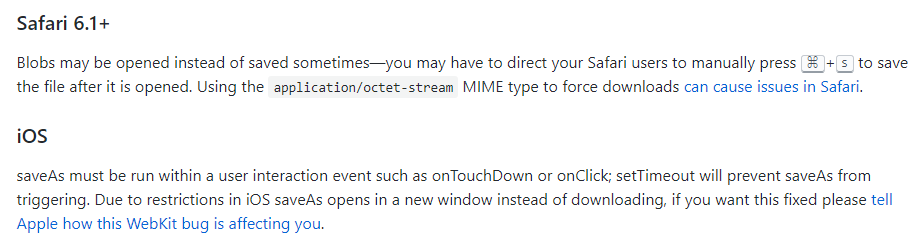
 Ruffio
on 1 Mar 2019
Ruffio
on 1 Mar 2019
Looks like there is still no good workaround for this, isn't it?
 Timoostrich
on 27 Nov 2020
Timoostrich
on 27 Nov 2020
Related issues
 carlosEdua
·
3Comments
carlosEdua
·
3Comments
 HeroSony
·
5Comments
HeroSony
·
5Comments
 ezequiel88
·
4Comments
ezequiel88
·
4Comments
 MFEKN
·
5Comments
MFEKN
·
5Comments
 CSchulz
·
4Comments
CSchulz
·
4Comments
Most helpful comment
Notes from my debugging:
data:attachment/filedid not work for me. CriOS shown file for download, but with download error. After pressing download again button, error again.blob.typein datalink. It worked fine in CriOS.data:application/octet-streamit worked even if real Blob type wasimage/png, image was still shown.UPDATE 01:
"data:attachment/file"in CriOS usingwindow.open(dataLink, '_blank');shows empty page, nothing"data:attachment/file"in CriOS usingwindow.location.href = dataLink;behaves as described above - shows download error.UPDATE 02:
"data:application/octet-stream"and"data:"+blob.typework in the same way for file types:pdf, png, csv, zip. PDF/PNGs are displayed on the page, same as CSV (text file).application/zipinstalled on iOS, using both datalink formats, just an empty tab is opened.UPDATE 03:
new Blob(["hello world"]), datalink still works, displays"hello world"UPDATE 04:
UPDATE 05:
window.open(object_url, '_blank');andwindow.location.href = object_url;attachment/file,application/octet-stream,image/png, none of them worked. (During testing I modified the code so it does not fallback to datalink forapplication/octet-stream)