Files: Display more details when hovering the mouse over a file
- type
- size
- dimensions (if it is an image)

 XPoppyX
All 11 comments
@xPoppyx Would something like this suffice?
It just a standard tooltip that displays for about 5 seconds.
Folder:

File:

 Dylan-Osborne
on 19 May 2020
Dylan-Osborne
on 19 May 2020
@yaichenbaum I'm personally not too keen on adding the hash to the tooltip as most standard users will never use a hash.
The real problem comes that the tooltip only shows for around 5 seconds, so for larger files the tooltip may already have disappeared before the hash is calculated.
However as you suggested, it might work to add a flag that determines whether or not to include the hash. It may also be required to exclude the hash for files larger than a preset size e.g. 100mb in order for the hash to calculate before the tooltip disappears?
Dylan-Osborne
on 19 May 2020
@yaichenbaum I don't think it will be useful if it takes time to show
XPoppyX
on 19 May 2020
@Dylan-Osborne I agree with your points, I think we should leave the hash alone for now. If we do decide to add it later, we can do it behind a flag.
 yaichenbaum
on 19 May 2020
yaichenbaum
on 19 May 2020
Why does the tooltip need to disappear after a set time? Would it not be better to have it replicate the explorer functionality?
 generalguy41
on 19 May 2020
generalguy41
on 19 May 2020
The tooltip is just to get a quick glance at the information.
yaichenbaum
on 19 May 2020
That's fair, but the way it works in explorer still serves that purpose
generalguy41
on 19 May 2020
@generalguy41 I agree with you that the tooltip should display for longer (explorer shows for 32 seconds), unfortunately the tooltip duration property is not available for UWP at the moment. I've tried using other components, but as far as i can see it then breaks the capability to select files.
An issue regarding the missing properties has already been created here so hopefully this functionality will be added soon.
@duke7553 The current name tooltip also only shows for 5 seconds, so is it worth adding the additional properties to the tooltip and hoping that Microsoft adds the duration property soon or should we just leave the tooltip as is for now?
Dylan-Osborne
on 20 May 2020
@Dylan-Osborne The tooltip should be limited to basic information such as the file size and file name. If the user wants more information, they are likely to open the properties window.
yaichenbaum
on 26 Jun 2020
@yaichenbaum Sorry, I don't think I worded that quite right. I 100% agree with you on only the basic info/file properties being shown. When saying "adding the additional properties to the tooltip" I meant just the basics such as those listed so far in this issue.
Dylan-Osborne
on 27 Jun 2020
I don't know if this is still being worked on, but I think it would be useful to also show cloud drive sync status and shortcut destinations in the tooltip.
Cloud drive:
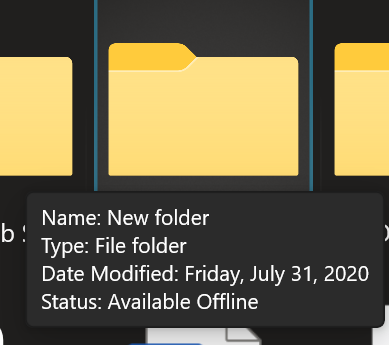
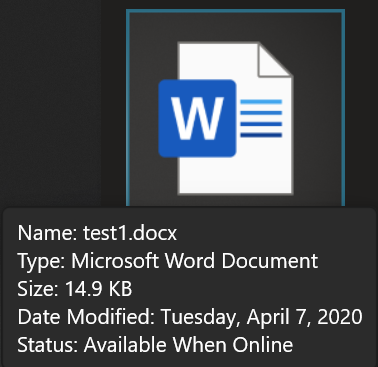
Shortcuts:
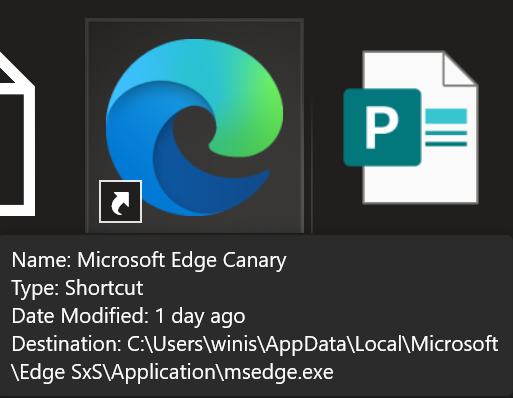
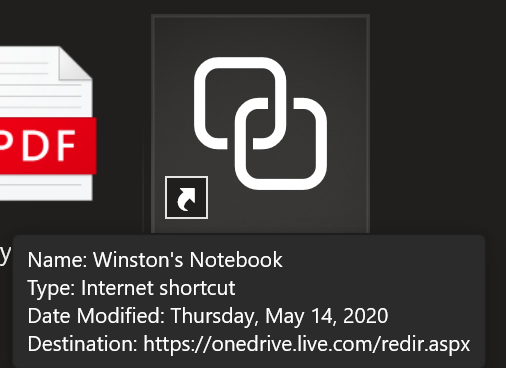
 winston-de
on 16 Aug 2020
winston-de
on 16 Aug 2020
Related issues
 Francisco820
·
3Comments
generalguy41
·
3Comments
Francisco820
·
3Comments
generalguy41
·
3Comments
 szaimen
·
3Comments
szaimen
·
3Comments
 xpirad
·
3Comments
yaichenbaum
·
3Comments
xpirad
·
3Comments
yaichenbaum
·
3Comments