Files: Mismatched drive names in sidebar and navigation toolbar
Describe the bug
The Windows drive is named "Windows (C:)" in the sidebar, but navigating to a directory in the C: drive names the drive as "Local Disk (C:)"
To Reproduce
Steps to reproduce the behavior:
- Open the Files UWP App
- Click on the Windows (C:) in the sidebar
- Observe the path textbox name for the drive
Expected behavior
Whenever the current directory path starts with "C:\", the path textbox should name the drive "Windows (C:)"
Screenshots
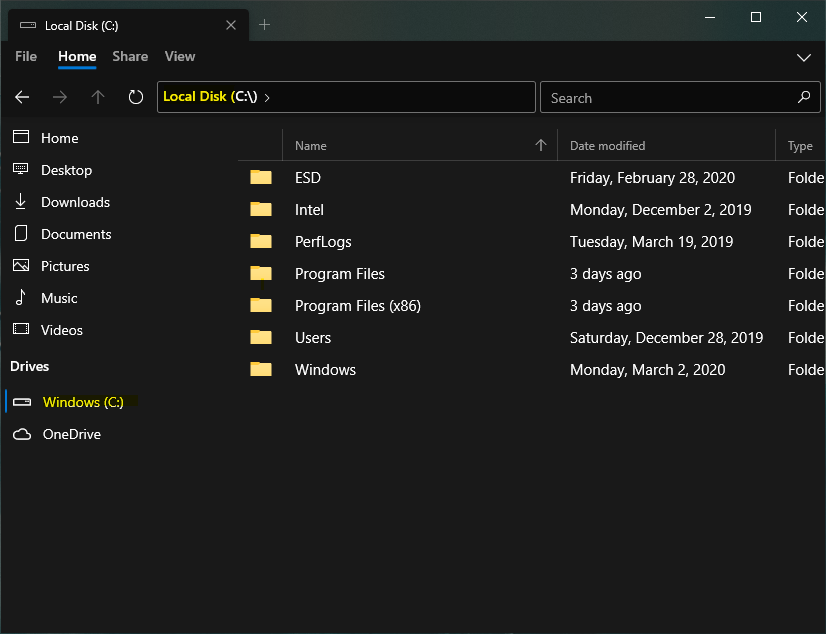
The highlighted names should be the same
Desktop (please complete the following information):
- OS Version: [e.g. Windows 10 1909 18363.720]
- App version: [v0.7.1.0]
Additional context
Does this problem occur again after restarting the app? Yes
I haven't found any issue that addresses this so I opened a new one.
 nahomebssa
All 6 comments
It goes by the drive name, if you rename the c: drive you should see that reflected in the sidebar.
 yaichenbaum
on 18 Mar 2020
yaichenbaum
on 18 Mar 2020
After a fresh install, the default behavior the user would expect is consistent naming, without manually renaming the drive.
nahomebssa
on 19 Mar 2020
@nahomebssa We hear you, and this is on the roadmap to be fixed.
 duke7553
on 19 Mar 2020
duke7553
on 19 Mar 2020
@nahomebssa I am sorry that I wasn't clear, I meant that the sidebar would reflect whatever you have set in the system. On a fresh install, the c: drive is named Local Disk. It could be there are different factors that affect this and that you see something else.
In any case, as @duke7553 said, it is on our roadmap to fix and we will make the sidebar and pathbar be consistent in this area.
yaichenbaum
on 19 Mar 2020
This will be fixed in v0.7.3 with https://github.com/duke7553/files-uwp/commit/840d50636ad83db34f080c4b770faca992b6a5db
duke7553
on 27 Mar 2020
This should be fixed when the v0.7.3 release rolls out.
yaichenbaum
on 2 Apr 2020
Related issues
 generalguy41
·
3Comments
generalguy41
·
3Comments
 ChenShihuan
·
3Comments
ChenShihuan
·
3Comments
 eraychumak
·
3Comments
yaichenbaum
·
3Comments
eraychumak
·
3Comments
yaichenbaum
·
3Comments
 szaimen
·
3Comments
szaimen
·
3Comments