Describe the solution you'd like
I would like to have the old design from version 0.4.9 back or maybe an option to do so.
Describe alternatives you've considered
I would downgrade to version 0.4.9 but it's not a long term solution due to the lack of features in this version.
Additional context
Add any other context or screenshots about the feature request here. Ex: What device type/UI layout and app version?
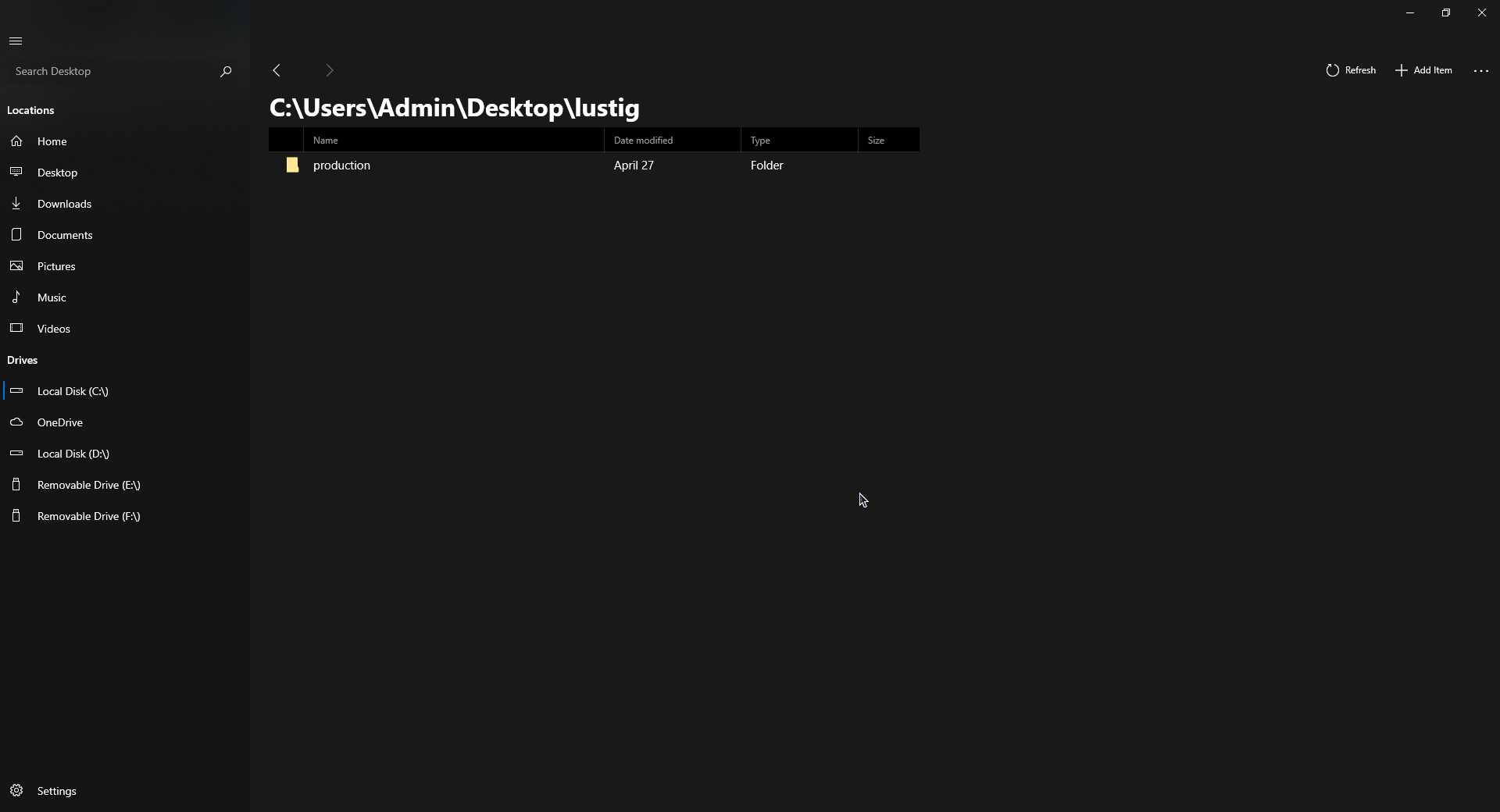
I want a design like this:
 Javahase
All 12 comments
Please do this.
 flimosch
on 12 Jul 2019
flimosch
on 12 Jul 2019
What was in the old design that you liked? Perhaps it would be better to adjust the new design based on what you and other users want.
 yaichenbaum
on 12 Jul 2019
yaichenbaum
on 12 Jul 2019
What was in the old design that you liked? Perhaps it would be better to adjust the new design based on what you and other users want.
First of all, I would like the Acrylic (the transparent) sidebar back. Also, I would appreciate if you could add an option to change the layout of the filemanager. (not of the files)
Javahase
on 12 Jul 2019
An option for acrylic on the sidebar can definitely be added as an optional customization, would be great if you opened a separate issue for that.
What do you mean by changing the layout of the file manager?
yaichenbaum
on 12 Jul 2019
An option for acrylic on the sidebar can definitely be added as an optional customization, would be great if you opened a separate issue for that.
What do you mean by changing the layout of the file manager?
I really dislike all the options being on the top. I would prefer the settings button on the bottom left. I would like to just have the sidebar back like in the screenshot I provided.
Javahase
on 12 Jul 2019
I agree about the acrylic sidebar, but removing the ribbon on the top imho would be inconsistent with the current Windows design language, don't forget this File manager is supposed to replace the Win32 app and having all the options hidden inside a Settings button would make it more clunky. That said, I remember Duke planned to add the option to hide/collapse the ribbon at a certain point, so that may be the best solution for all of us
 SOI7
on 13 Jul 2019
SOI7
on 13 Jul 2019
An option to hide the ribbon is definitely the plan, in the mean time you can use ctrl + clicking on a header to hide collapse the ribbon.
yaichenbaum
on 14 Jul 2019
@Javahase Hey, there are plans for a tablet-optimized layout mode.
 duke7553
on 16 Jul 2019
duke7553
on 16 Jul 2019
@duke7553 Will you add back the Acrylic sidebar?
 ByteZ1337
on 16 Jul 2019
ByteZ1337
on 16 Jul 2019
An option to collapse the ribbon as well as turn back on acrylic will be available in the future.
yaichenbaum
on 16 Jul 2019
Maybe an acrylic ribbon would look very pleasing, but of course have the option to disable it.
 ArtexJay
on 20 Jul 2019
ArtexJay
on 20 Jul 2019
There is an open pull request that adds an option to turn on and off acrylic on the side bar #321. Version 0.7 will also include acrylic on the title bar and and option to collapse the ribbon.
yaichenbaum
on 18 Dec 2019
Related issues
 Cyberdroid1
·
3Comments
Cyberdroid1
·
3Comments
 Francisco820
·
3Comments
Francisco820
·
3Comments
 ChenShihuan
·
3Comments
yaichenbaum
·
3Comments
ChenShihuan
·
3Comments
yaichenbaum
·
3Comments
 jbvc97
·
3Comments
jbvc97
·
3Comments
Most helpful comment
An option to collapse the ribbon as well as turn back on acrylic will be available in the future.