Files: Make it able to "Hook" existing explorer already opened windows.
As my regular file explorer application, I'm using Clover (Which is mainly, the classical explorer, but with Chrome styled tabs added, and some Chinese text in bonus).
And well, As it doesn't directly modify the explorer process (Thankfully), but it got the possibility to directly hook any already opened explorer windows, close it, and open it in his own window.
Even if the application isn't as finished being perfectly usable daily, This would surely be a good idea after the release.
 PoorPocketsMcNewHold
All 7 comments
Interop between uwp and classical desktop is always challenging. Can you describe that the exact UX? i.e. how do you hook the existing explorer window? Using a list or drag and drop?
 ashikns
on 20 Feb 2019
ashikns
on 20 Feb 2019

This is what I was trying to describe. When launched, Clover will automatically, open the already opened windows from the vanilla file explorer processes, close them, and open it in his processes.
So, for Files, It would be to automatically, shows the folders already opened. As an example, when opening the folder of your downloaded files in your web browser, the web browser will obviously open it with the explorer vanilla processes. And so, Not using Files.
But with this way, Files will automatically open itself at the right folder.
Clover isn't a FOSS software, and I don't have any programming knowledge to know exactly how it does achieve this, so, this issue is mostly in order to suggest a proof of concept feature once the application will be released on the Windows Store.
PoorPocketsMcNewHold
on 20 Feb 2019
Thank you for the detailed UX description. How clover does it is kinda deducible since there aren't many ways to do this. It's also not applicable to Files directly since the classical desktop apis aren't available in uwp. I have no idea whether it's possible to do this within uwp, but it's a very interesting path to explore.
ashikns
on 20 Feb 2019
I gave some thought into this. In theory it's possible to have something like on pressing a button Files checks for all current open explorer windows and open them in Files. Of course it would mean Files has to have tab support first if there are multiple explorer windows. We can also set to run this on startup, as well as close the other explorer windows.
What we cannot do however - and I'm pretty sure no software can - is be the default file explorer. That is when you click "Show in folder" in Chrome it will always open the classic explorer. The only way to change this is to replace explorer.exe or monitor for it using some background service. Both are very dangerous things to do and you probably shouldn't trust a program that does this.
ashikns
on 21 Feb 2019
I gave some thought into this. In theory it's possible to have something like on pressing a button Files checks for all current open explorer windows and open them in Files. Of course it would mean Files has to have tab support first if there are multiple explorer windows. We can also set to run this on startup, as well as close the other explorer windows.
What we cannot do however - and I'm pretty sure no software can - is be the default file explorer. That is when you click "Show in folder" in Chrome it will always open the classic explorer. The only way to change this is to replace explorer.exe or monitor for it using some background service. Both are very dangerous things to do and you probably shouldn't trust a program that does this.
Thankfully, It doesn't modify the explorer processes or its file in itself, It runs in his own processes.

However, to be able to display the file explorer in its own process, it uses its own background service indeed.
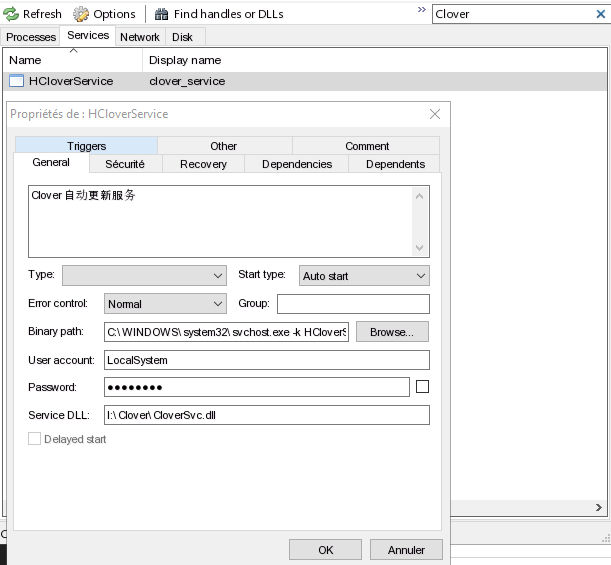
_(Same thing goes for Process Hacker 2 that I'm using here on those screenshots, as it does kind of the same thing with the Task Manager)_
PoorPocketsMcNewHold
on 21 Feb 2019
I would not be open to this feature as it is now because the implementation is too much of a "hack." Now that Files has Full Trust privileges what we would have to do is (correct me if wrong):
- Check if the setting is enabled and launch a FullTrustProcess legacy app on start of Files
- The legacy app will somehow gather information from the explorer.exe process and use this information to open the folder in Files
- It then closes the other File Explorer
This would make it very hard to get Files into the Microsoft Store. I think a better solution would be integration with the system (Open With...) menu from File Explorer if at all possible.
 duke7553
on 22 Feb 2019
duke7553
on 22 Feb 2019
It would be cool to have the feature minus the background service part. Imagine something like you drag and drop your opened explorer window onto Files and Files will open that location.
ashikns
on 22 Feb 2019
Related issues
 xmha97
·
3Comments
xmha97
·
3Comments
 ChenShihuan
·
3Comments
ChenShihuan
·
3Comments
 szaimen
·
4Comments
szaimen
·
4Comments
 xpirad
·
3Comments
xpirad
·
3Comments
 SOI7
·
3Comments
SOI7
·
3Comments
Most helpful comment
I would not be open to this feature as it is now because the implementation is too much of a "hack." Now that Files has Full Trust privileges what we would have to do is (correct me if wrong):
This would make it very hard to get Files into the Microsoft Store. I think a better solution would be integration with the system (Open With...) menu from File Explorer if at all possible.