Files: Random freezes on files drag 'n drop
Sometimes when I try dragging and dropping files, the cursor shows a pointer with a "plus" sign. When it happens, the system stops responding to clicks, although I am able to use a few (but not all) keyboard shortcuts. I am unable to use Super + S or Alt + Tab, but I can use Ctrl + Alt + F1/F3/F7 and even Super + L when it happens.
I am able to move the mouse, only the clicks won't get recognized.
It happens often (at least once a day), but not every time I try dragging and dropping files (most of the times it works well and this issue does not happen). I am only able to get out from the stuck state by resetting my machine.
Environment information: Elementary OS Loki, 8 GB RAM, using standard (2 button + wheel) mouse (not a trackpad).
Steps to reproduce:
- Open Files
- Click and hold the click on any file
- Move the mouse
Expected result: the file gets moved to where the mouse click is unheld
Got result: most of the times it works well, but sometimes, the mouse cursor becomes as in the following picture and the machine stops responding to clicks.

Want to back this issue? Post a bounty on it! We accept bounties via Bountysource.
 jesobreira
All 38 comments
I continue having this issue at least once a day. It's so repeating that I've placed a sticky note on my monitor to make me remember the Super + Shift + RSEIUB kernel reset command. Also, something interesting I noted was that when this issue happens and I try using any of the shell interfaces (Ctrl + Alt + F1/F2/F3), it requires me to login. I put my username with no problem, but when it asks for my password, it auto-detects some return key (that I obviously didn't press) instantly, making it impossible for me to insert my password.
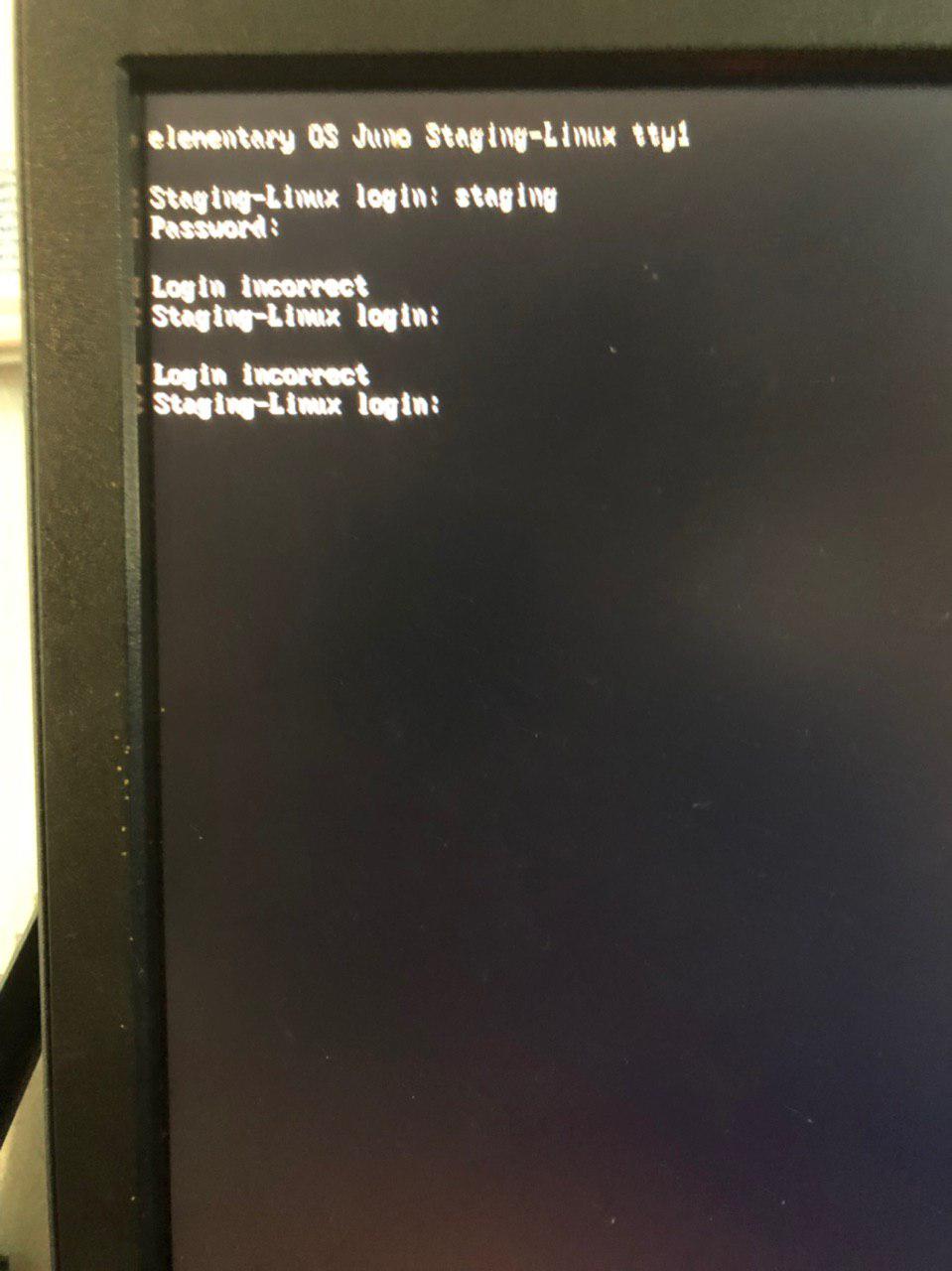
The keyboard is new and is not deffective.
I'll be returning to Ubuntu since it's impossible to work under that risk certainty of having to restart during important tasks, but I will try to keep this harddisk with elementary OS installed for a few days, so if some testing is needed, I will still be able to perform it.
Am an Elementary OS user since 0.2 Luna and never had such problems with other versions.
jesobreira
on 26 Feb 2019
I got the same issue here, any solution?
 yuliantosb
on 28 Feb 2019
yuliantosb
on 28 Feb 2019
I can confirm this is happening to Juno as well
 bleakgrey
on 3 Mar 2019
bleakgrey
on 3 Mar 2019
I got the same issue here, and I think they haven't a solution yet.
But, I've discovered, when I trying ALT+F4 (a old shortcut to CLOSE in Windows), the Pantheon Files is closed and I gain control of eOS again. Then, the plus signal disapear. I'm using elementary OS 5 Juno.
 brcmesquita
on 8 Mar 2019
brcmesquita
on 8 Mar 2019
I have another issue when I'm using drag and drop. Sometimes the drag-and-drop functionality stops working by itself and does not come back. You need to close the Files and open again for the drag and drop function to work again.
brcmesquita
on 8 Mar 2019
I have the same issue, It happens every time I grab something and try to drop it on VS Code, I call it "the grab hell"
 rochabianca
on 25 Mar 2019
rochabianca
on 25 Mar 2019
This happens to me if I try to drag 2 files into telegram web app, if I just drag one it might happen but not as often.
 Julioevm
on 25 Mar 2019
Julioevm
on 25 Mar 2019
There is an outstanding PR related to DnD issues (#814). It is not clear whether this will fix this particular issue as this seems random and therefore not easily reproduced. If anyone experiencing this issue could try out that PR it would be helpful. DnD copies could also trigger the bug that the unmerged PR #714 fixes.
 jeremypw
on 15 Apr 2019
jeremypw
on 15 Apr 2019
I am not sure if this is related, but I have an almost identical issue when extracting files from an archive.
How to reproduce:
- Open Files
- Open an archive (zip, tar, etc)
- Drag and drop any file or file(s) from Archive Manager into the Files window
- Click and drag any file from the Files window
Upon completing the last step, the file or folder you have dragged will be duplicated. The cursor will be stuck on a "grabbing" animation with a small green plus in the corner, as shown here.
The only way to "fix" this is by forcibly closing Files, usually with Alt+F4. Very annoying bug that's been persisting for a few months now.
 citrusui
on 30 May 2019
citrusui
on 30 May 2019
@citrusui I can confirm your version of this bug and also that it is fixed by PR #814. Unfortunately no-one has yet come forward to review/approve this PR and unless and until someone does, it cannot be merged and released.
jeremypw
on 31 May 2019
@jesobreira @citrusui @brcmesquita @rochabianca Could you confirm whether you are still experiencing this with version 4.1.8 (or 4.1.9 if you have it). Thanks.
jeremypw
on 31 Jul 2019
@jeremypw Unfortunately, yes, I do still experience this problem. I'm running pantheon-files version 4.1.9+r3433+pkg82~ubuntu5.0.1 if that helps
citrusui
on 1 Aug 2019
@jesobreira @citrusui @brcmesquita @rochabianca Could you confirm whether you are still experiencing this with version 4.1.8 (or 4.1.9 if you have it). Thanks.
@jeremypw, yes!
I remembered now that this happened this week.
Here are some tips:
- Keep elementary up to date (sudo apt update -y && sudo apt upgrade -y);
- When this happens, do nothing else. Just hit CTRL + Q and see if it's solved;
- Drag files/folders with the right mouse button instead of the left. The difference is that you will have a menu with copy or move options when you finish dragging.
brcmesquita
on 1 Aug 2019
@citrusui @brcmesquita Thanks for the feedback! I'll try to fix this soon.
jeremypw
on 1 Aug 2019
I still have this problem, especially when dragging from zip file and then dragging from the main window
 Hedronmx
on 30 Sep 2019
Hedronmx
on 30 Sep 2019
Can confirm, it happens half the time while moving files between tabs.
 Suzamax
on 17 Oct 2019
Suzamax
on 17 Oct 2019
I had forgotten that #814 (which was supposed to fix this) was never reviewed or merged and is now awaiting splitting into smaller PRs. I'll try and get on with it in the near future unless another dev would like to ...
jeremypw
on 17 Oct 2019
@jeremypw Please do!! I appreciate you work :smile:
Hedronmx
on 17 Oct 2019
@Hedronmx , @Suzamax Please could you confirm whether this occurs during dragging or after dropping? Does it make difference if the drag involves the "auto-open" function - i.e. hovering over a folder until it opens?
jeremypw
on 18 Oct 2019
@jeremypw during dragging. If you stop holding the mouse click button, it keeps the dragging and you can't click to drop the file. Didn't try the auto-open folder thing. It's only between tabs in my case.
Suzamax
on 18 Oct 2019
@jeremypw during dragging as well, but on my end it happens after drag and dropping a file from a zip or any other archive manager file into the elementary file windows.
After doing that, every drag I do inside the elementary file window glitches out and it keeps dragging unless I search a file inside the elementary file window by typing a name.
Hedronmx
on 19 Oct 2019
@Hedronmx , @Suzamax Thanks for the further information.
jeremypw
on 19 Oct 2019
I do not experience any problem drag/dropping files between Files and a file-roller window, using the current master source (with default 'single-click' mode). A couple of small DnD related changes were merged.
jeremypw
on 20 Oct 2019
I have found a reliable method of breaking DnD:
- Using the secondary (right) button drag on the empty background. This starts a drag (in itself a bug).
- Drop the non-existent file onto the background. Nothing appears to happen
- Drag a real file using the secondary button. The DnD will break. There will be no drag icon and releasing the button does not end the drag.
Hopefully with a reproducible issue, I can find a solution.
jeremypw
on 20 Oct 2019
I think I will create a separate issue for the secondary drag problem mentioned above at is not clear it is exactly the same as that originally reported.
jeremypw
on 20 Oct 2019
Please test with archive manager. I get it every time I drag and drop from Archive to Files
Hedronmx
on 20 Oct 2019
File-roller is the default archive manager - which one are you using? I tried with .7z and .zip archives. Are you dragging with the primary or secondary button?
jeremypw
on 21 Oct 2019
I am using Fileroller, and using left click. I suppose that's primary button.
Want me to record a video?
Hedronmx
on 21 Oct 2019
@Hedronmx Are you using Juno stable or do have the daily repos? Let me try again with a unmodified stable installation. I normally use the unstable version.
jeremypw
on 21 Oct 2019
I am running stable version. Thank you for your time
Hedronmx
on 21 Oct 2019
@Hedronmx I did not have any problems dragging files out of an Archive Manager window into Files on Juno stable with an English (UK) locale. Perhaps a video would help, I may be able to spot something. Let me know if you have made any changes to any default settings and which locale you are using.
jeremypw
on 21 Oct 2019
Here it is.
https://gfycat.com/jovialgreenblackrussianterrier
I am using english us as locale and I have not made any significant changes to the default settings. Just adding another keyboard layout (spanish) and setting up night light
Hedronmx
on 23 Oct 2019
Ah! I can reproduce now. I thought the problem affecting dragging any file from an archive into Files. I was testing using a pre-existing archive. If I follow the video and drag a file back out of an archive just created in the same view then I do get the freeze.
jeremypw
on 23 Oct 2019
I'll create a separate issue as the archive problem is reproducible, not random.
jeremypw
on 23 Oct 2019
It happens with downloaded archives too! Not just with the newly created archives.
Hedronmx
on 23 Oct 2019
I have traced the archive problem to the Files handling of "XdndDirectSave0" targets, which some external apps use. Internal Dnd in Files uses "text/uri" targets. I have a solution but I am working on making it as simple as possible so that it gets reviewed/merged in a reasonable time. Really the DnD code needs a complete refactor, which I did do, but could not get it reviewed/merged as a single PR.
jeremypw
on 24 Oct 2019
Awesome!! If you need me to test this out i am willing to help!
Hedronmx
on 24 Oct 2019
@Hedronmx Here is the PR https://github.com/elementary/files/pull/1087. It needs testing to make sure there are no regressions with other DnD operations. There are some manual tests here: https://github.com/elementary/files/wiki/dnd but this is not necessarily exhaustive. If you are able to build and test this PR and comment on your findings in the PR, that would help to get it merged. Make sure you close any existing Files windows before running. Thanks.
jeremypw
on 25 Oct 2019
Related issues
 micahilbery
·
5Comments
micahilbery
·
5Comments
 a-tokarev
·
4Comments
a-tokarev
·
4Comments
 mdalch
·
5Comments
mdalch
·
5Comments
 tintou
·
5Comments
tintou
·
5Comments
 apcamargo
·
5Comments
apcamargo
·
5Comments
Most helpful comment
I had forgotten that #814 (which was supposed to fix this) was never reviewed or merged and is now awaiting splitting into smaller PRs. I'll try and get on with it in the near future unless another dev would like to ...