Filepond: Loading multiple files that already exist on server
files : [
                    {
                        source : "source1 goes here",
                        options : {
                            type : "local"
                        }
                    },
                    {
                        source : "source2 goes here",
                        options : {
                            type : "local"
                        }
                    }
]

                                         <FilePond
                                                            ref={ref => (this.pond = ref)}
                                                            files={this.props.oshaState.files}
                                                            allowMultiple={true}
                                                            server = {
                                                                {
                                                                    load : (source, load, error, progress, abort, headers) => {
                                                                        console.log('uniqueFileId', source)
                                                                        fetch(source)
                                                                        .then(res => {
                                                                            console.log('responseblob', res)
                                                                            return res.blob()
                                                                        })
                                                                        .then(load)
                                                                        .catch(error);
                                                                    }
                                                                }
                                                            }
                                                            allowFileTypeValidation={true}
                                                            allowImageExifOrientation={true}
                                                            allowImagePreview={true}
                                                            allowImageCrop={true}
                                                            allowFileEncode={true}
                                                            acceptedFileTypes={this.state.acceptedFileTypes}
                                                            oninit={() => this.handleInit()}
                                                            onupdatefiles={fileItems => {
                                                                this.props.updateFilesParent(fileItems);
                                                            }}
                                                        />
Summary
I am using this library in one of my react projects and it is super awesome.
The problem i am facing is related to LOAD and FETCH. I have uploaded files on my server and now i need to fetch/load already existing files on server.
Infact, i have already done that but it works fine when i have only one file source in files array. If i try to load multiple files, it goes to infinite loading and the files never loads. I searched alot, went through all related closed issues but didn't find any similar reported issue.
I am badly stuck so please help if you can.
How to reproduce
I have posted my code above. The code will work fine if i have only one file object in files array. After adding multiple objects the issue is produced.
Expected behaviour
It should load all the files on server.
 waseemgn42
All 11 comments
What happens if you comment out this line in the onupdatefiles callback:
this.props.updateFilesParent(fileItems);
 rikschennink
on 4 Feb 2020
rikschennink
on 4 Feb 2020
It worked for me man! I don't know how i missed it.
That line was updating my state variable FILES which was holding the source for existing files. I didn't know that onUpdateFiles calls when it loads existing files.
Thank you so much for your help. I am closing the issue.
waseemgn42
on 4 Feb 2020
Hi Rik,
I am re-opening it because i am still stuck in this.
You were right about that line. After removing it, the files loaded but i needed that line so i explored why actually that line is causing the problem and i ended up finding that => When the existing files loads from server, the FILES array property in state gets generic OBJECT in FILE whereas if we upload new file by browsing or drag and drop, it adds a FILE type object in FILES array. Also, the size of file saves as zero and file type as application/octet-stream...
I am attaching images to make more sense...
Existing file in files array looks like below
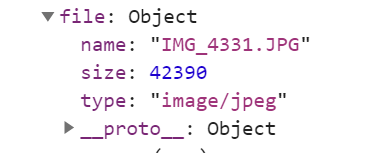
Ignore the size and type in above image as i added them static so that it doesn't load from server. When i do it with load from server then the size will be zero and type octet-stream as i said.
New file in files array looks like
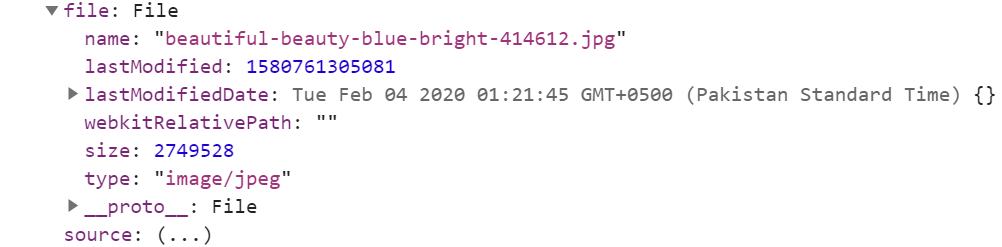
Please suggest what i am doing wrong.
waseemgn42
on 5 Feb 2020
Not sure what happens in this function this.props.updateFilesParent(fileItems); but fileItems is an array of FilePond FileItem objects. You might have to map that to the actual file objects.
this.props.updateFilesParent(fileItems.map(fileItem => fileItem.file))
Yes the function is just mapping it. Here is the definition:
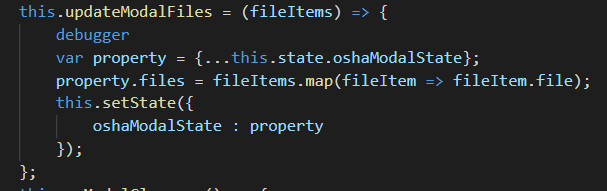
But the problem is that fileItem.file doesn't return the File type object.
waseemgn42
on 6 Feb 2020
octet-stream I think the server also needs to return the correct mime type. Not sure if related but octet-stream is not the correct type.
rikschennink
on 7 Feb 2020
Exactly! The type should be image/jpeg or something. But how can i set the server to return the correct type? I mean there is no API call involved, i am just giving the file source to fetch and the filePond is getting the file from the location, so how can i tell the filepond to fetch the correct type?
waseemgn42
on 7 Feb 2020
Some servers return images as octet-stream depends on the server how you can configure this. On PHP it's simply adding the right content-type header.
https://github.com/pqina/filepond-server-php/blob/master/index.php
rikschennink
on 10 Feb 2020
I am using .net core 2.1 for back-end, do you have any .net related example?
waseemgn42
on 10 Feb 2020
unfortunately not
rikschennink
on 10 Feb 2020
closed because inactive for 16 days
rikschennink
on 26 Feb 2020
Related issues
 samjmckenzie
·
3Comments
samjmckenzie
·
3Comments
 dreamon11
·
5Comments
dreamon11
·
5Comments
 enisdenjo
·
6Comments
enisdenjo
·
6Comments
 paul-siteway
·
4Comments
paul-siteway
·
4Comments
 WifiDubt
·
6Comments
WifiDubt
·
6Comments
Most helpful comment
What happens if you comment out this line in the
onupdatefilescallback: