Filepond: No update On the UI when moved to different browser tab
First of all.. great plugin. Thanks to the authors.
Here is what noted.
- Uploaded 10 photos (options --- parallel uploads:10, max uploads: 50)
- I see some uploading percentage on all the files ( say 20%).
- Now, I go to another tab on the browser ( do some browsing)
- Until I come back to my upload screen, the progress percentage is not changing.. though files received & processed by server.
 picxydev
All 33 comments
Thanks @picxydev!
In this situation, there's currently no event to update the view. Of course it should wake up when focus is returned to the tab. Marked as improvement.
 rikschennink
on 12 Feb 2019
rikschennink
on 12 Feb 2019
Can you post your process method? Anything custom in there? Or are you simply posting to a URL?
rikschennink
on 14 Feb 2019
This is what we are using.
<FilePond allowMultiple={true}
    maxFiles={maxuploads}
    acceptedFileTypes={['image/*']}
    maxParallelUploads={parallel_uploads}
    allowRevert={false}
    fileMetadataObject = {{something:something}}
    labelFileProcessing = "Processing.."
    labelFileProcessingComplete = "Done"
    labelIdle = 'Drag & Drop your files or <span class=" btn btn-primary btn-sm"> Browse </span>'
    onupdatefiles = {this.updateFiles}
    server={
      {url: '/upload_files',
                process: {
            url:'/process/',
            onload: this.onServerSuccess,
            onerror: this.onServerError,
            method:'POST',
            headers: {
              'X-CSRFToken': CSRF_TOKEN
            }
          }
        }
    } />
Thanks, I'm looking into it.
rikschennink
on 14 Feb 2019
Have not been able to reproduce the issue, but have a gut feeling where the problem might be, so I just published version 4.1.3 which addresses this issue. Can you let me know if it resolves the problem?
rikschennink
on 15 Feb 2019
Thanks @rikschennink
Will test it in a while and let you know..
picxydev
on 15 Feb 2019
Looks like progress percentage is changing.. but the next upload is not happening.
I uploaded 5 photos (with parallel_uploads: 1)
picxydev
on 15 Feb 2019
okay, will re-test on monday
rikschennink
on 17 Feb 2019
Not been able to reproduce. What browser is this? Any errors in dev console? Latest version of FilePond? Does it happen without plugins? An online test case would be useful as well.
rikschennink
on 18 Feb 2019
Browser: Chrome Version 71.0.3578.98 (Official Build) (64-bit)
Dev Console: No errors.
Version "filepond": "^4.1.4"
plugins registered: registerPlugin(FilePondPluginFileMetadata, FilePondPluginFileValidateType, FilePondPluginImageExifOrientation);
Recorded video. https://drive.google.com/file/d/1PGZYv1OwEP5HFiUQeT3plzJbq6R-daVW/view?usp=sharing
picxydev
on 18 Feb 2019
Thanks for the video. It looks like the files are uploaded correctly, and the UI is updated correctly as well. If I understand correctly, the problem is that it waits with picking up the next item until the tab is focussed? If so, that is a known issue and should be improved in the near future. As this is related to FilePond core the issue has been moved here.
rikschennink
on 18 Feb 2019
Experiencing this same issue. Also in Chrome.
Do you know when there might be a fix available for this?
 pbaggiol
on 12 Mar 2019
pbaggiol
on 12 Mar 2019
@pbaggiol "near future"
rikschennink
on 12 Mar 2019
Just published version 4.4.5 which switches the internal event loop to be based on setTimeout instead of requestAnimationFrame when a tab is inactive. Please confirm this fixes the issue @pbaggiol @picxydev
rikschennink
on 10 May 2019
Works for me now, thank you!
On 10 May 2019, at 14:53, Rik notifications@github.com wrote:
Just published version 4.4.5 which switches the internal event loop to be based on setTimeout instead of requestAnimationFrame when a tab is inactive. Please confirm this fixes the issue @pbaggiol @picxydev
—
You are receiving this because you are subscribed to this thread.
Reply to this email directly, view it on GitHub, or mute the thread.
 fosterer
on 10 May 2019
fosterer
on 10 May 2019
Hello again,
I am using the last version 4.11.0 of plugin and I am having same issue as the beggining of this incident. Maybe the problem is repeating again with another later change? Is it working ok again?
I am using Google Chrome as default.
 JaimeBtab
on 15 Mar 2020
JaimeBtab
on 15 Mar 2020
Hello, I updated the plugin to 4.13.0 and tested in Chrome and Firefox and the issue is still happening.
I've checked the code changed in that version and I would like to know if it is possible to change the duration or time of setTimeout value to reduce it.
var setTimerType = function setTimerType() {
    if (document.hidden) {
        requestTick = function requestTick() {
            return window.setTimeout(function() {
                return tick(performance.now());
            }, interval);
        };
        cancelTick = function cancelTick() {
            return window.clearTimeout(id);
        };

    } else {
        requestTick = function requestTick() {
            return window.requestAnimationFrame(tick);
        };
        cancelTick = function cancelTick() {
            return window.cancelAnimationFrame(id);
        };
    }
};
@JaimeBtab Looking into this now
rikschennink
on 13 Apr 2020
We can't lower the setTimeout interval, it's 16ms right now, on inactive tabs it's automatically set to a higher value by the browser (Chrome prevents values lower than one second).
After running some tests, I find this functionality is still working. What is happening is that FilePond will wait with uploading files till all animations have finished (this is to prevent hick-ups in the animations). BUT animations keep running when the tab is inactive, which means they're updated one times a second (instead of 60 times) this causes major delays in between files and one major delay before the first file upload starts.
I've updated the animation logic to only run when the document is active. If the document is inactive/hidden the animations will automatically jump to their end states (this makes sure the interface looks correctly when re-activating a document). This seems to solve the issue and greatly increases the speed at which background uploads are handled.
Version 4.13.2 that fixes the issue is now available.
rikschennink
on 13 Apr 2020
Hi @rikschennink!
I'm just doing tests and it's working nice when tab is not active , thanks!
In long list of files, the animation remains Uploading 100% (in blue state) and do not change to Upload Complete (in green state). It is not a major issue because the real state is correctly Uploaded for those files and when the entire list is uploaded the process ends. It's just a issue to keep in mind.
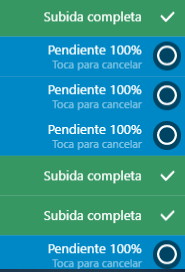
Thanks again for quick answer
JaimeBtab
on 13 Apr 2020
@JaimeBtab Glad to hear that 👍
In long list of files, the animation remains Uploading 100% (in blue state) and do not change to Upload Complete (in green state). It is not a major issue because the real state is correctly Uploaded for those files and when the entire list is uploaded the process ends. It's just a issue to keep in mind.
I can't reproduce this. Tested this on both Chrome and Firefox, using a lot parallel uploads or just a couple, 15+ files, the UI looks correct when returning to the tab.
rikschennink
on 13 Apr 2020
@JaimeBtab I forgot to push 4.13.2 to npm so please make sure you've got the latest version to test with.
rikschennink
on 13 Apr 2020
Yes @rikschennink, I had the last version 4.13.2 when I tested.
Thanks for consideration !
JaimeBtab
on 13 Apr 2020
Hi @rikschennink
Thanks for the fix!
My testing it, we have seen that when uploading the files while the tab is inactive, there is a significant difference in terms of upload. As you mention, there is an increase on delay.
Here is an example on comparison between uploading with active tab (top) and inactive (down):
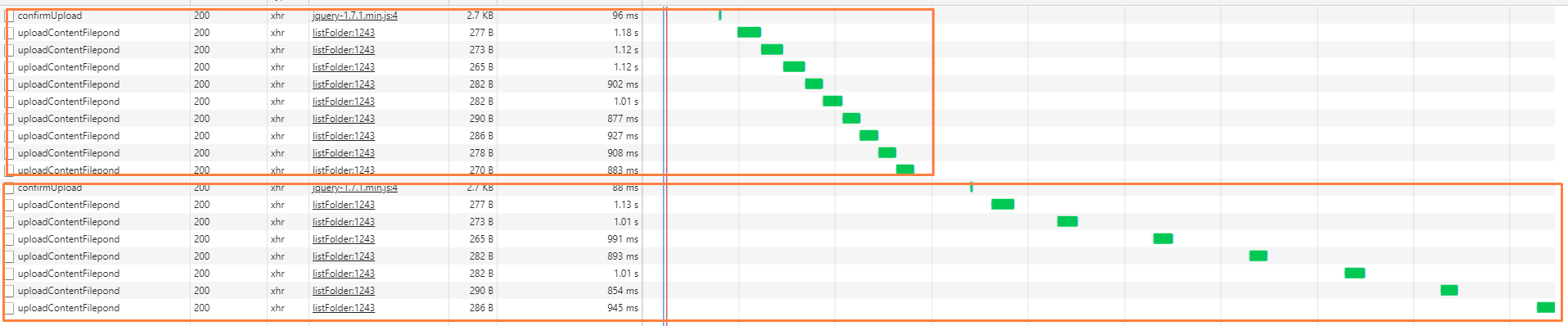
You say it is because it is taking a timer set by the browser. Is this something that we can bypass? I can see other similar plugin does not have such dependency on the browser timer and it would be great if we can achieve that!
I believe you set that timer in here, right?. Can it be modified?:
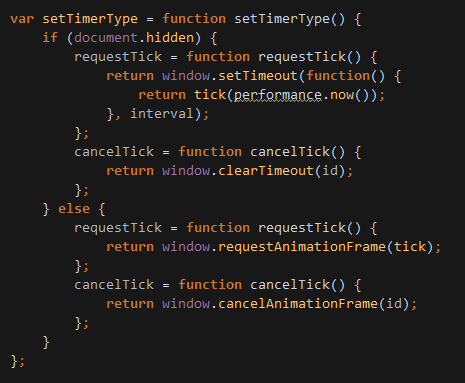
 EthosData
on 14 Apr 2020
EthosData
on 14 Apr 2020
From the screenshot it's difficult to tell the actual delay between files. I've got an idea what might be causing it, I'll take a look.
rikschennink
on 14 Apr 2020
@EthosData Should be improved in 4.13.3
rikschennink
on 14 Apr 2020
Thank @rikschennink
We applied the change but still we see big delays. Can you let me know the improvement you have done for the last version?
To show better what I am referring to, I have done a short video showing the gaps of the delays while being inactive the tab: Video.zip
EthosData
on 14 Apr 2020
@EthosData Can you make sure you're on 4.13.3 and you're cache is cleared.
rikschennink
on 14 Apr 2020
Yes, we have checked it twice and we are in 4.13.3 plus doing the tests after clear cache from browsers (Chrome, Firefox and Edge).
EthosData
on 14 Apr 2020
@EthosData okay, double checking.
rikschennink
on 14 Apr 2020
@EthosData fixing. We're getting there. Try 4.13.4
rikschennink
on 14 Apr 2020
@rikschennink
This version has now fixed. Now seems there is no delays with the tab is inactive.
Thanks a lot!
EthosData
on 14 Apr 2020
I can confirm. This has resolved the issue for me too.
pbaggiol
on 14 Apr 2020
Related issues
 madrussa
·
6Comments
madrussa
·
6Comments
 dreamon11
·
5Comments
dreamon11
·
5Comments
 enisdenjo
·
6Comments
enisdenjo
·
7Comments
enisdenjo
·
6Comments
enisdenjo
·
6Comments
enisdenjo
·
7Comments
enisdenjo
·
6Comments
Most helpful comment
@EthosData fixing. We're getting there. Try
4.13.4