Filepond: The error method is not supported in revert?
I'm using vue-filepond.
I have defined the revert() method according to the documentation. It works nicely.

But i decided to write error handling, such a scenario:
- the user edits the content of the post, I display the list of files in the "limbo" mode
- the user deletes one file
- a server-side error occurred, I return it to the revert() method
What can I do?
I have two load() and error() methods available.
When I use load() - it removes item from list (file on the server remains)
When I use an error() - it will work as above (why?). I think that's why
When I am not calling any of the above methods, the file remains on the list, but in this form:

We gain access to strange actions:
- remove - which causes the file to disappear from the list (file on the server remains)
- upload- of course it will not work for "limbo" type
I would prefer the error() method to change the status of this file in the list, eg in red.
And the error() method, similar to the process() method, triggered the onError event.
Unless I'm doing something wrong?
 alorenc
All 17 comments
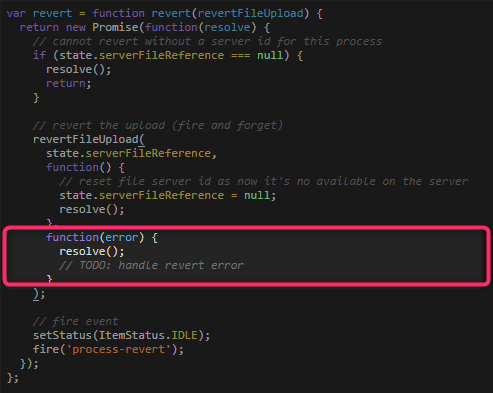
I'm not sure I follow exactly what you want to do but I can confirm that the revert method error callback is currently not handled, it's fire-and-forget if the server fails to remove the file then so be it.
This is mostly because this method is set up to remove temporary uploaded files. If the user closes the browser window the files also won't be removed from the server.
It's on the list for a future release. (hence the TODO comment)
 rikschennink
on 15 Nov 2018
rikschennink
on 15 Nov 2018
That's exactly what I meant. My English is not very good.
It would be good if in the case of an error the container with the file did not change (it remained green with the option to delete). Because in the case of error handling, I will return an appropriate message. Or change it so that it can not be removed from the list.
alorenc
on 15 Nov 2018
Alright, will fix near future.
rikschennink
on 15 Nov 2018
Hello @rikschennink for your great library!
Was this fixed? Is there any way now to 'cancel' the removal of the item from filepond in case of an error detected while trying to delete the file?
Or at least is there a workaround, such as adding back the file if an error is detected in the 'revert' or in 'onremovefile' handlers? I tried to push back the deleted item to the 'files' array but the item doesn't show up again!
I used something like (in Angular):
this.pondFiles.push(
      {
        source: '2.png',
        options: {
            type: 'local',
            file: {
                name: '2.png',
                size: 3001025,
                type: 'image/png'
            }
        }
      }
    );
Thanks.
 haggag
on 29 Jan 2019
haggag
on 29 Jan 2019
Hi, this is not fixed yet.
It seems like a small change but it has a serious impact on the code. Also, this will seriously impact UX so it will be optional.
- When replacing a file the original file is reverted (if it was uploaded), replacing should be blocked if revert doesn't work;
- When editing an item FilePond will revert an earlier upload, editing actions will be undone if the revert call fails;
- When processing an item, if the item was processed before, it is reverted, processing is blocked if the revert action fails;
rikschennink
on 29 Jan 2019
@rikschennink Thanks for your prompt reply! So is there a chance to work around this by adding the 'local' file back to the 'files' list programmatically? As I mentioned, doing so don't make the upload appear back in filepond.
haggag
on 29 Jan 2019
If you pass the above object to the files array I think that should work, I'm not sure pushing will trigger an update.
Please note I'm working on this right now, hope to have it available later today.
rikschennink
on 29 Jan 2019
Now available in version 3.8.0, set forceRevert to true, please let me know if this fixes the issue.
rikschennink
on 29 Jan 2019
Thanks a lot, @rikschennink . Now after an error is triggered the item remains and the file item shows the upload button again as in:

Is it possible to keep it in the original 'processed' state? which was:

Because if an error occurred while trying to delete the file, then I think it makes sense to keep everything intact as it was before trying to delete.
haggag
on 30 Jan 2019
Hm thats weird, it should show an error state. Can you post your config?
rikschennink
on 30 Jan 2019
@rikschennink Here you are. I'm using ngx-filepond and I've verified that filepond is now 3.8:
pondOptions = {
    class: 'my-filepond',
    multiple: true,
    forceRevert: true,
    labelIdle: 'Drop files here',
    server: {
      process: (fieldName, file, metadata, load, error, progress, abort) => {

        console.log("meta ", metadata, " file ", file);
        // Progress indicator supported, set progress to 25% of 1
        // progress(true, .25, 1);

        progress(false); // for infinite upload mode

        let url = UPLOAD_URL + '/' + file.name;
        const req = new HttpRequest('POST', url, file, {
          reportProgress: true,
        });

        let sub = this.http.request(req).subscribe(event => {
          // Via this API, you get access to the raw event stream.
          // Look for upload progress events.
          if (event.type === HttpEventType.UploadProgress) {
            // This is an upload progress event. Compute and show the % done:
            const percentDone = Math.round(100 * event.loaded / event.total);
            console.log(`File is ${percentDone}% uploaded.`);
          } else if (event instanceof HttpResponse) {
            console.log('File is completely uploaded! ', event.body['attachmentId'], event);

            load(event.body['attachmentId']);
          }
        });

        // Should expose an abort method so the request can be cancelled by the user
        return {
          abort: () => {

            // abort your request here
            sub.unsubscribe();
            // updates FilePond interface
            abort();
          }
        };
      },
      revert: (uniqueFileId, load, error) => {

        // remove file from server here
        console.log("deleted  ", uniqueFileId);
        error("errr");

        // we are done
        load();

      },
      fetch: null,
      load: null,
    }
    // acceptedFileTypes: 'image/jpeg, image/png'
  }
@haggag Can you try calling the error method in the revert function within a timeout.
Also, you’re currently calling both load and error.
revert: (uniqueFileId, load, error) => {

        // remove file from server here
        console.log("deleted  ", uniqueFileId);

        // add timeout around this call
        error("errr");

        // we are done
        load();

      },
@rikschennink Thanks a lot. Calling error() in setTimeout's callback did the trick. This handles the issue when trying to delete a file that was just uploaded. But for the files that were uploaded already and the user is visiting the Edit form later. To achieve that, I'm bootstrapping the files array with some local files that I know they belong to this form (i.e. were uploaded previously). Something like:
private pondFiles = [
    {
      source: '1.png',
      options: {
        type: 'local',
        file: {
          name: '1.png',
          size: 3001025,
          type: 'image/png'
        }
      }
    }
  ];
But when a user is in the Edit mode, they cannot revert such local file (correct me if I'm wrong). So the only way is to use 'onfileremove' and try to delete the file manually from the server then add the file back if an error is detected during this operation. The problem now is filepond isn't updating its view. I tried ApplicationRef.tick(), NgZone.run(callback), ChangeDetectorRef.detectChanges() in the onfileremove handler but filepond isn't re-rendering . Any idea how to force filepond rendering?
haggag
on 31 Jan 2019
@haggag You can handle removal of local files in the server.remove callback, I think that should cover this use case?
https://pqina.nl/filepond/docs/patterns/api/server/#remove-1
rikschennink
on 31 Jan 2019
@rikschennink Thanks a lot. server.remove works very well and error handling is supported correctly. The only issue i noticed with the new fix you made in 3.8, that the error message seems to be hardcoded as:

It should get the error message from error() function as the server.remove does.
Thanks.
haggag
on 31 Jan 2019
@haggag It's the other way around :-)
I forgot to add the default label for remove error. Just published version 3.8.2 which now has a labelFileRemoveError property.
Set this to a string to show a default error string.
You can also set it to a function to use your server response as a label or a way to determine what error message to show.
{
    labelFileRemoveError: (serverError) => serverError;
}
@rikschennink Thanks, I've used also labelFileProcessingRevertError to customize the revert error message.
haggag
on 31 Jan 2019
Related issues
 enisdenjo
·
6Comments
enisdenjo
·
6Comments
 paul-siteway
·
4Comments
paul-siteway
·
4Comments
 mirlol
·
4Comments
mirlol
·
4Comments
 vvtkachenko
·
7Comments
vvtkachenko
·
7Comments
 jamesblasco
·
4Comments
jamesblasco
·
4Comments
Most helpful comment
Now available in version
3.8.0, setforceReverttotrue, please let me know if this fixes the issue.