Filepond: Access to the raw response object
I'm uploading a file to a temp bucket in my app. I'm trying to integrate filepond but am having a hard time getting access to the raw response object on upload success. As part of that payload there is a temp file ID I need to get to submit with a later request. Is there a way to do that? It's kind of a deal breaker for using filepond.
 gabaum10
All 14 comments
I'm trying to step through the source, but I just straight up don't see a way of getting the raw response. I see the event fire for the process-complete event, but that never makes it to my client listener. I'm using the Vue component, but that shouldn't matter really.
this.$refs.pond._pond.on('process-complete', () => {
debugger
})
Is there really no way to access this thing?
gabaum10
on 10 May 2018
Hi @gabaum10!
There's no public process-complete event, the one you found is only used internally. See this list for a complete overview of all available events:
https://pqina.nl/filepond/docs/patterns/api/filepond-instance/#events
You can access the returned id through the file object API.
pond.onprocessfile = (error, file) => { console.log('done', file.serverId) };
From the top of my head, that would convert to Vue in the following manner:
<template>
<div id="app">
<file-pond
name="test"
ref="pond"
server="/api"
v-on:processfile="handleProcessFile"/>
</div>
</template>
<script>
// Import Vue FilePond
import vueFilePond from 'vue-filepond';
// Import FilePond styles
import 'filepond/dist/filepond.min.css';
export default {
name: 'app',
methods: {
handleProcessFile: function(error, file) {
console.log('done', file.serverId);
}
},
components: {
FilePond: vueFilePond()
}
};
</script>
 rikschennink
on 11 May 2018
rikschennink
on 11 May 2018
Thanks but that's not what I was asking. I saw the docs and tried all the events and callbacks. We return a special attribute called "key" in the response. I need that somehow in my component. It seems the raw response object is not returned anywhere which seems like kinda an oversight. Can we do something like at least add the response to the file metadata or something?
gabaum10
on 11 May 2018
@gabaum10 The server response should automatically be stored in the file.serverId value. Also, it should be stored in a hidden input inside the FilePond container. For instance, this is the filepond.js file from the product page after upload.
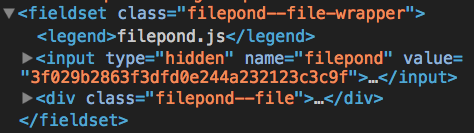
Is it empty? What does the server response look like?
rikschennink
on 11 May 2018
@rikschennink This is what the response looks like:

As you can see there is some extra data that's returned that doesn't exist on the file object that's passed back to the done event; specifically the key. If there is nothing that's exposed, is there a way I can bind something directly to the input to get that raw response?
gabaum10
on 11 May 2018
Oh! Indeed. I see that now. Weird I missed that. Carry on. For the record, you may want to rename that property. That's pretty confusing :)
gabaum10
on 11 May 2018
@gabaum10 The server response should be a unique identifier so when the form is submitted it can be linked to the file on the server. But that's probably not always the case. I take it the property contains the entire response in your situation? But if it was just the key it would match right? Maybe some sort of filter method to select the right property from the response would make it match better?
rikschennink
on 11 May 2018
Yeah, that's true it would. Are you talking about adding a filter in the filePond itself or on the server end?
gabaum10
on 11 May 2018
A filter in FilePond, where it would pass the server response through the filter so you can select the property to use as file server identifier ( in your case key). You could write a custom processing method but that's a bit overkill if you only need to select a property, sometimes altering the server response is out of our control so this would make it a bit easier to use.
rikschennink
on 11 May 2018
That sounds exactly like what we need here. :+1:
gabaum10
on 11 May 2018
@gabaum10 Just published version 1.5.0, you can now add an onload method to the process server configuration to filter the server response.
FilePond.create(document.querySelector('input'), {
    allowMultiple: true,
    instantUpload: true,
    server: {
        url: 'http://192.168.33.11',
        process: {
            onload: (res) => {
                // select the right value in the response here and return
                return res;
            }
        }
    }
});
Great! Thanks for being so responsive.
gabaum10
on 15 May 2018
No problem @gabaum10! Let me know if you have any further questions.
rikschennink
on 15 May 2018
Please note that the typescript types are not up to date: https://github.com/DefinitelyTyped/DefinitelyTyped/blob/master/types/react-filepond/index.d.ts
 prevostc
on 12 Dec 2019
prevostc
on 12 Dec 2019
Related issues
 vvtkachenko
·
7Comments
vvtkachenko
·
7Comments
 WifiDubt
·
6Comments
WifiDubt
·
6Comments
 samjmckenzie
·
3Comments
samjmckenzie
·
3Comments
 mvrhov
·
4Comments
mvrhov
·
4Comments
 jamesblasco
·
4Comments
jamesblasco
·
4Comments
Most helpful comment
@gabaum10 Just published version
1.5.0, you can now add anonloadmethod to theprocessserver configuration to filter the server response.