Filepond: Loading files without transferring file contents
Hi there,
I'm using FilePond to upload a file within in an interface for a data object. The user can then go back to edit that data object, where I would like to show them the currently uploaded file and give them the option to delete that one and upload another.
FilePond does this very well, as I can add the previously uploaded file data to the files array and use the load part of the server API to show the file's name and size.
This is great, except it seems to require that I return the file contents in the server load request, so it appears that each time the user visits the page of a data object FilePond will download the file, which isn't necessary.
I might be missing something obvious, but is there a way to simply add the file details (e.g. name and size) to the files array instead of performing a request for the file?
Thanks!
 mattkibbler
All 26 comments
Hi! Glad to hear FilePond is a good fit. You’re not missing something obvious, FilePond currently downloads the file. I wanted to push towards version 1.0.0 and moved this improvement to a next version.
There are some caveats with not downloading the data, it would for instance make showing an image preview impossible.
The solution you suggested is probably where I’m going with this. Without data the preview functionality would then simply not function.
I plan to add this as soon as possible.
 rikschennink
on 18 Apr 2018
rikschennink
on 18 Apr 2018
I see!
I'm actually using FilePond to manage videos so I didn't think about the image preview, also as they are videos the file size can be a little large so downloading the file is more of a problem for me.
I should add that what you've created so far is really great and enjoyable to use. I'll look forward to future updates!
mattkibbler
on 18 Apr 2018
Any updates on this, or anything I can do to help?
Our app deals with a lot of video (online courses), and it's simply not feasible to download the existing files for FilePond 😢
There are some caveats with not downloading the data, it would for instance make showing an image preview impossible.
I think it would be cool to have something like the poster attribute that allows the user to specify an image URL to load into FilePond for _any_ file type.
Some example scenarios:
- Show a smaller thumbnail as the poster for a large image file
- Show an extracted video frame as the poster for a video
- Show an extracted image as a preview of a PDF or Powerpoint/Keynote
(Extracting these image files is obviously outside the scope of FilePond!)
This could work really well if combined with the name and size attributes as suggested by @mattkibbler:
files: [
  {
    source: '12345',
    options: {
      type: 'local',
      name: 'welcome.mov',
      size: 3001025, // 3 MB
      poster: 'https://cdn.example.com/12345/poster.jpg'
    }
  }
]
 kylefox
on 19 Jun 2018
kylefox
on 19 Jun 2018
@kylefox I'm looking into it now, the poster/preview thing I'll leave out ( for now ), but it should be relatively "easy" to at least add a stub file with filename and size.
rikschennink
on 19 Jun 2018
Just published version 1.8.0. Now updating docs and plugins.
{
    source: '1.png',
    options: {
        type: 'local',
        file: {
            name: '1.png',
            size: 3001025,
            type: 'image/png'
        }
    }
}
Release info:
https://twitter.com/rikschennink/status/1009036630307540993
rikschennink
on 19 Jun 2018
Awesome, works great 👍
However, it would be nice if images could still be loaded into the preview.
I think maybe "displaying file metadata" and "loading file data" are separate concerns that got bundled together here.
The new file: parameter works perfectly for displaying the file info (without downloading the file). But maybe that _shouldn't_ be used to determine if the file data should be loaded.
What about adding a load option?
{
    source: 'image.png',
    options: {
        type: 'local',
        load: true,  // ← File data will be loaded
        file: {
            name: 'image.png',
            size: 3001025,
            type: 'image/png'
        }
    }
},
{
    source: 'huge-video.mov',
    options: {
        type: 'local',
        load: false,  // ← File data will NOT be loaded
        file: {
            name: 'huge-video.mov',
            size: 1000000000,
            type: 'video/mov'
        }
    }
},
100% agreed.
The file info is also useful for updating the view early on (before the same info is retrieved from the server). While it's possible to leave out the file property I agree that it would be easier to have a property to turn it on or off.
I'm still figuring out how this combines with a poster / preview property. I'm currently leaning towards a separate 'poster' plugin as the poster image will reflect the previous output image, while the image preview plugin shows how the output image will look based on the input image ( so that will not render correctly using anything else ).
~I see I've accidentally closed the issue. As the poster property is still on the table I'll re-open it.~
_Note to self, make appointment with eye doctor_
rikschennink
on 19 Jun 2018
I'm currently leaning towards a separate 'poster' plugin as the poster image will reflect the previous output image, while the image preview plugin shows how the output image will look based on the input image
Makes sense! I see now why it's more complicated how loading & previewing are tied together.
Would the image preview and poster plugins be compatible with one another? 🤔
kylefox
on 19 Jun 2018
The new version of the image preview plugin I published yesterday checks if the item contains an actual file. So if that’s the case only the poster plugin can pick it up. Should be okay, but might be some surprises along the way ;-)
rikschennink
on 20 Jun 2018
@kylefox I've just published filepond-plugin-file-poster
https://pqina.nl/filepond/docs/patterns/plugins/file-poster/
Set file metadata property and add a poster property with an image URL to have it load a poster.
The load option is not in there yet, it's on the list.
rikschennink
on 26 Jun 2018
Works nicely 👍
It might be good to document the difference between options.file and options.metadata — I'm still not quite sure I understand how they are different, and the implications of providing (or omitting) those objects.
Again, great work!
kylefox
on 28 Jun 2018
I've added a bit more information to the docs.
In short:
fileis the info used by FilePond to render the file item info. If thefileobject is set, FilePond will note load the remote file.metadatais generic data that can be added to a file using thesetMetadatamethod (crop information, custom data, etc.). Themetadataproperty outlines the initialmetadataobject for that file (which can then be read withgetMetadata). By havingposterin there we can set thepostervalue with the metadata plugin adding some additional configuration flexibility.
rikschennink
on 28 Jun 2018
Will close the issue as the core feature has been added.
I've added the load boolean to the roadmap.
rikschennink
on 28 Jun 2018
i use the poster plugin to initialise the filepond instance with a single file that is the avatar of the user. after successful upload of the initially selected avatar image the file is actually transfered to s3. The thing is that when visiting the avatar page, i successfully initialise and display the file from the s3 url using the poster plugin but the X button doesn't seem to fire the revert event so i dont seem to have a a way to remove the selected avatar.
i might be missing something here... Your thoughts will be greatly appreciated.
Thanks!
 asartz
on 22 Oct 2018
asartz
on 22 Oct 2018
Hi @asartz, there's no default server endpoint to remove local files from the server (the s3 file). In short, temporary files can be reverted (as they are temporary and often uploaded to a temp folder, hence the name "revert upload") but local files cannot.
In your situation. If filepond is contained in a form, and the user has removed the file. When that form is submitted, the file id of the origin file image will not be sent as it's been removed from the field. The server now knows the file has been removed and can delete the file from S3.
You can also set a function to the onremovefile callback and remove the file from there.
It's set up this way because:
- More secure, deleting files from the server is not something that a user should be doing (temp files are files that the user has just uploaded so therefore those are allowed to be removed).
- If a user accidentally presses the remove button the image is gone, it's possible the user no longer has the original so can't re-upload and the server cant revert. (in the example above, submitting a form after clicking the remove button gives an extra bit of confidence the file can actually be removed)
rikschennink
on 23 Oct 2018
Went with oremovefile and implemented the functionality i need in the event handler.
Thank you for your time.
asartz
on 23 Oct 2018
Hey @rikschennink , thanks for the library, really great stuff.
I'm in a bit of a sticky situation where I'm also calling a S3 public url and I'm getting a CORS permission issue ([...]has been blocked by CORS policy: No 'Access-Control-Allow-Origin' header is present on the requested resource.), because it's doing an ajax call.
100% sure the CORS config is correct on S3 side.
This is using the vue library btw , but I think it should be the same issue anyway.
 kezek
on 30 Oct 2018
kezek
on 30 Oct 2018
@kezek thanks!
Is this when loading initial files? Does the problem occur if all plugins are disabled?
rikschennink
on 30 Oct 2018
@asartz can you please share your onremovefile function? I'm in the same situation :)
 kodeine
on 10 Dec 2018
kodeine
on 10 Dec 2018
@kodeine Version 3.4.0 and up support a remove function on the server object. See docs.
rikschennink
on 10 Dec 2018
@kodeine Version
3.4.0and up support aremovefunction on the server object. See docs.
@asartz can you please share your
onremovefilefunction? I'm in the same situation :)
Well nothing fancy actually. Just a plain ajax call to the backend to remove the file from s3, and setting the avatar image to a default on success, something like:
pond.on('removefile', function () {
$.ajax({
url: 'path-to-backend-remove-image-route',
success: function (result) {
$('#user_avatar').attr('src', 'path-to-default-avatar-image');
}
});
})
asartz
on 10 Dec 2018
guys, I've loaded first files on filepond componente without download them, but now I have to make or put a button to download them, but I dont know how do it, can you help me?
 Oscarz90
on 18 Jul 2019
Oscarz90
on 18 Jul 2019
@Oscarz90 Please don't double post
https://github.com/pqina/filepond/issues/197
rikschennink
on 18 Jul 2019
Is the load boolean implemented? I don't find it and would like to not download all the pdfs I receive from the server :)
 santicros
on 30 Apr 2020
santicros
on 30 Apr 2020
@santicros It isn't. You'll have to use mock files and the poster plugin.
rikschennink
on 30 Apr 2020
Hello!
The revert is not executed when I use the filesproperty to load the previously uploaded file from the server!
files =
[
    {
        source:21240,
        options:{
            type:"local",
            file:{
                name:"Hello - Copy.pdf",
                size:"30742",
                type:"application/pdf"
            }
        }
    },
    {
        source:21242,
        options:{
            type:"local",
            file:{
                name:"Hello.pdf",
                size:"30742",
                type:"application/pdf"
            }
        }

    }
]
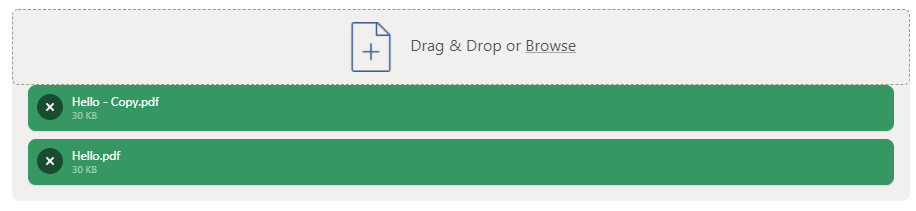
When I click on X button it is removed from FilePond Instance but it doesn't send the request to the server to be removed also from there.
Thank you!
 ehsanmohebbi
on 19 Feb 2021
ehsanmohebbi
on 19 Feb 2021
Related issues
 vvtkachenko
·
7Comments
vvtkachenko
·
7Comments
 paul-siteway
·
4Comments
paul-siteway
·
4Comments
 dreamon11
·
5Comments
dreamon11
·
5Comments
 jamesblasco
·
4Comments
jamesblasco
·
4Comments
 enisdenjo
·
6Comments
enisdenjo
·
6Comments
Most helpful comment
Will close the issue as the core feature has been added.
I've added the
loadboolean to the roadmap.