Filebrowser: Regex not working.
I wanted to create separate user with limited number of folder access.
So I added regex ^(?:(?!Foo|Bar).)*$\r?\n? to allow folder named "Foo" and "Bar" but it does not work.
I get message "Something really went wrong."
I do not want to disallow all the folder individually.

 SJ50
SJ50
All 5 comments
Your regexp is not valid https://play.golang.org/p/-QM2-bgDO3u
 o1egl
on 16 Jul 2020
o1egl
on 16 Jul 2020
Hi! Same kind of issue for me. Trying to "disallow all paths expect 2 folders" for a user. For this we could use regex "negation" pattern (see this: https://stackoverflow.com/questions/1687620/regex-match-everything-but-specific-pattern)
But standard Golang regex seems not support it... Okay. (https://stackoverflow.com/questions/26771592/negative-look-ahead-go-regular-expressions)
Actually i tried the "negative way" because the "positive way" didn't worked as i could expect:
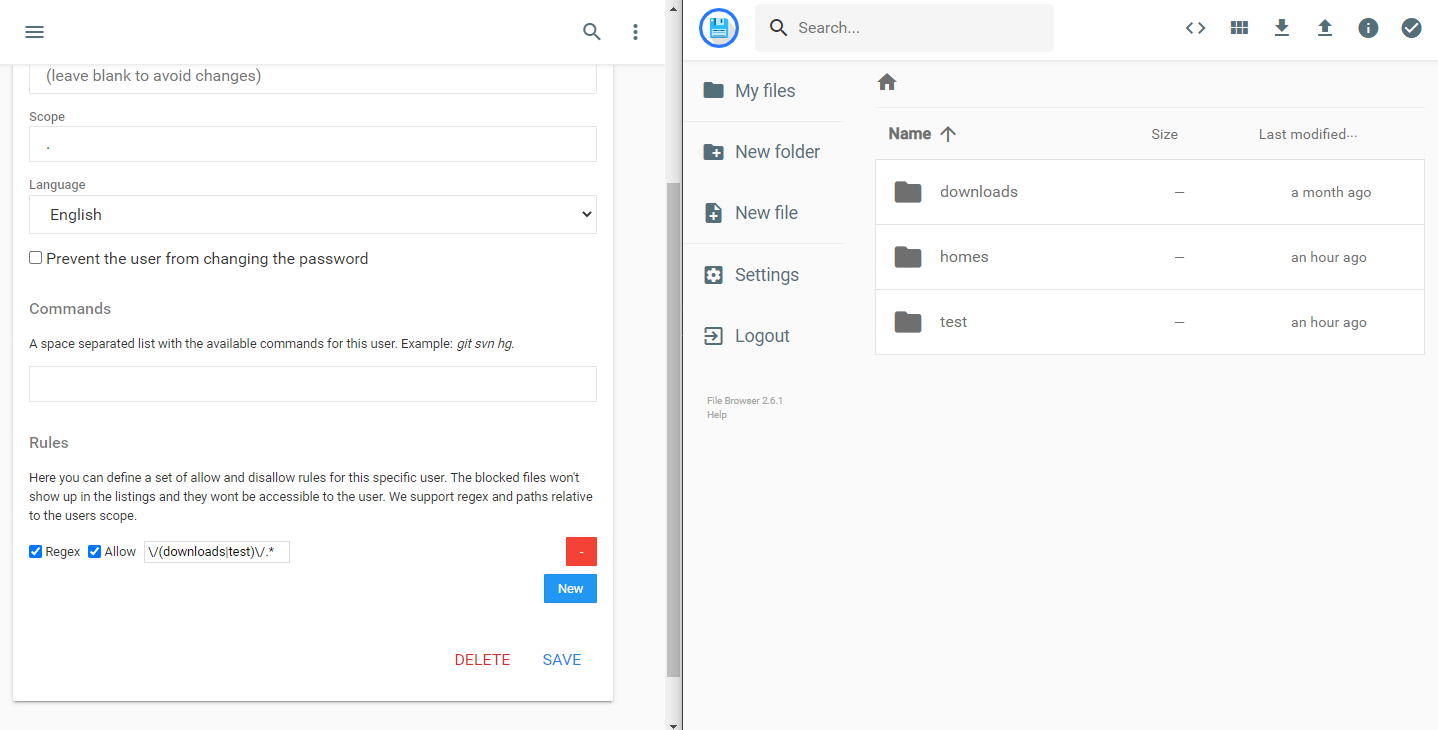
I expected to not see the homes folder :(
I think @SJ50 and me are trying to do the same thing: How to give access only to a list of folders?
Thanks,
Thomas
 thomaschampagne
on 2 Aug 2020
thomaschampagne
on 2 Aug 2020
@thomaschampagne use the following rules

first one is disallowing everything and following after that rules allows "Foo" and "Bar".
@o1egl Please add this to wiki, I found this solution in closed issue answer. This solution is very handy when you have 100s of folder but want to allow few folder to users.
SJ50
on 3 Aug 2020
@SJ50 Thanks for the tip.
I needed to apply the similiar behavior with a inner folder.
The use case: I want alice to a have access to "downloads" folder and only his home folder /homes/alice. Access to folder /homes/bob must be denied for alice
Here's is the working config for this usual case:

These usuals use cases should be added to wiki too.
thomaschampagne
on 3 Aug 2020
@thomaschampagne @SJ50 you are welcome to make a PR https://github.com/filebrowser/docs :wink:
o1egl
on 5 Aug 2020
Related issues
 ghost
·
6Comments
ghost
·
6Comments
 zxysilent
·
5Comments
zxysilent
·
5Comments
 bcardiff
·
3Comments
bcardiff
·
3Comments
 karim2001
·
5Comments
karim2001
·
5Comments
 chanyk-joseph
·
4Comments
chanyk-joseph
·
4Comments
Most helpful comment
@thomaschampagne use the following rules

first one is disallowing everything and following after that rules allows "Foo" and "Bar".
@o1egl Please add this to wiki, I found this solution in closed issue answer. This solution is very handy when you have 100s of folder but want to allow few folder to users.