Fiber: 🤔 Having problem with static files with build to docker
Question description
Hi, I am having a weird problem with docker build.
I am server the static file with wildcard like this
app.Static("/*", "./client")
this works with local go run main.go
however it does not work when I build in docker, any idea why? the reason that I am doing this is because I need to server the client side( react app) with react-router when I refresh the page it return 404 without wildcard.
 maxlibin
All 11 comments
Thanks for opening your first issue here! 🎉 Be sure to follow the issue template! If you need help or want to chat with us, join us on Discord https://gofiber.io/discord
![welcome[bot] picture](https://avatars0.githubusercontent.com/in/4141?v=4&s=40) welcome[bot]
on 4 Jul 2020
welcome[bot]
on 4 Jul 2020
Hi @maxlibin, what Fiber version are you using?
 Fenny
on 4 Jul 2020
Fenny
on 4 Jul 2020
Hi @Fenny I am using github.com/gofiber/fiber v1.12.4.
Well at first I have a lower version but even when I upgraded to v1.12.4 and still having same problem.
maxlibin
on 4 Jul 2020
Oke great, let's try to resolve this issue.
Could you provide a little bit more information so I could reproduce the issue on my end?
- What kind of files/folders fall under
./client - What OS are you using
- What is your docker command/config
If you could answer these questions that would be great!
Fenny
on 4 Jul 2020
Thanks for the quick response, here's my dockerfile command.
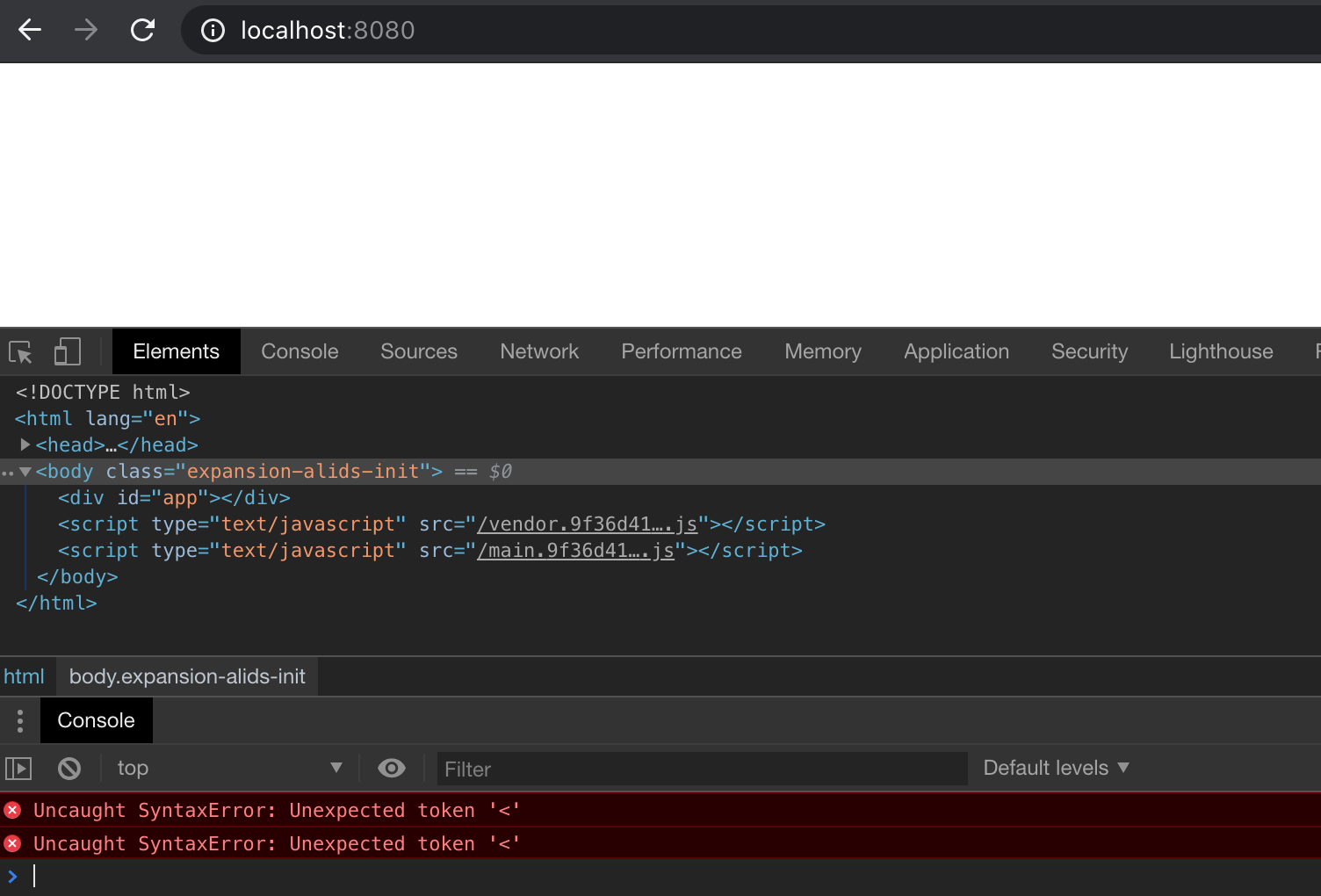
I am using Mac, and the file inside ./client is a simple react built source. with index.html and a javascript file. Between just to be clear what do I mean by not working, if I use "/*" I get a blank page with uncaught syntaxError: unexpected token '<'
FROM golang:1.14 AS builder
ADD . /app
WORKDIR /app/server
# Copy go mod and sum files
# COPY go.mod go.sum ./
# Download all dependencies. Dependencies will be cached if the go.mod and go.sum files are not changed
RUN go mod download
# Build the Go app
RUN CGO_ENABLED=0 GOOS=linux GOARCH=amd64 go build -ldflags "-w" -a -o /main ..
# Build the React application
FROM node:alpine AS node_builder
COPY --from=builder /app/frontend ./
# RUN npm install -g yarn
RUN yarn && yarn build
# Final stage build, this will be the container
# that we will deploy to production
FROM alpine:latest
RUN apk --no-cache add ca-certificates
COPY --from=builder /main ./
COPY --from=node_builder /build ./client
RUN chmod +x ./main
EXPOSE 8080
CMD ./main
I tested the same setup using only a index.html file on Windows with success :confused: I'm currently running out of time, I will take a deeper look tomorrow to see if I can reproduce the same behavior.
PS: Did you also test if a single file works instead of a directory (wildcard would only serve index.html or first file if a directory is given)
app.Static("/", "./client") // css, js, img
app.Static("*", "./client/index.html")
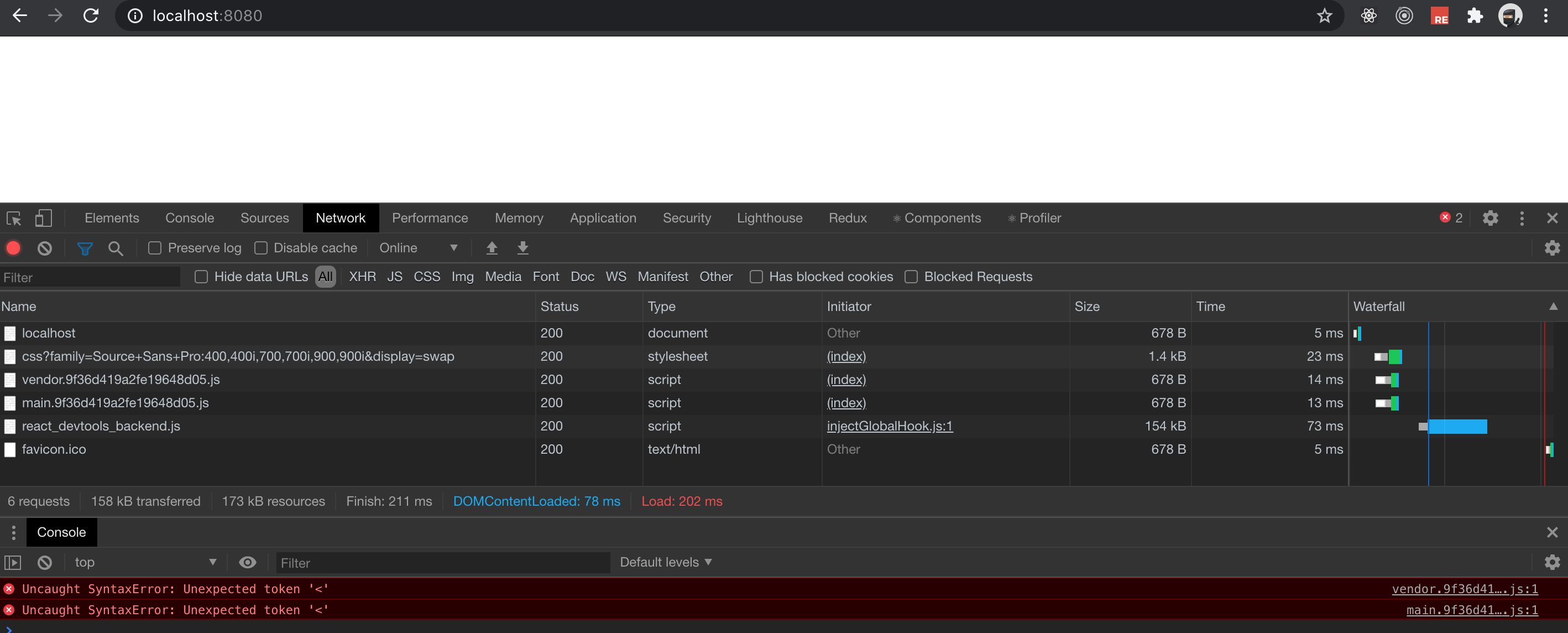
As far as I can see index.html works, but not with loading Js files,
app.Static("/", "./client") works, however if I refresh the react-router localhost:8000/xxxx, it returns 404.
maxlibin
on 5 Jul 2020
@maxlibin Could you please capture the network tab while refreshing the index page?
 kiyonlin
on 5 Jul 2020
kiyonlin
on 5 Jul 2020
maxlibin
on 5 Jul 2020
Interesting 🤔️
This is my spa solution:
package main

import (
    "github.com/gofiber/fiber"
    "log"
)

func main() {
    // Create new Fiber instance
    app := fiber.New()

    // serve Single Page application on "/public"
    // assume static file at dist folder
    app.Static("/", "public")

    // intercept api routes
    apiGroup := app.Group("/api")
    {
        apiGroup.Get("/user", func(c *fiber.Ctx) {
            c.JSON(fiber.Map{"id": 1, "name": "kiyon"})
        })
    }
    // other routes just return `public/index.html`, angular will handle them
    app.Get("/*", func(c *fiber.Ctx) {
        if err := c.SendFile("public/index.html"); err != nil {
            c.Next(fiber.ErrInternalServerError)
        }
    })

    // Start server on http://localhost:3000
    log.Fatal(app.Listen(3000))
}
I wonder if it will help you, though it uses angular.
And here's the simple demo
kiyonlin
on 5 Jul 2020
@kiyonlin wow this solutions works great, I am missing
app.Get("/*", func(c *fiber.Ctx) {
        if err := c.SendFile("public/index.html"); err != nil {
            c.Next(fiber.ErrInternalServerError)
        }
    })
what I did previously is I am server public folder with just app.Static("/*", "public")
case closed, thanks for the help guys!
maxlibin
on 5 Jul 2020
Related issues
 Badrouu17
·
4Comments
Badrouu17
·
4Comments
 Ivan-Feofanov
·
3Comments
Ivan-Feofanov
·
3Comments
 lucasmdomingues
·
3Comments
lucasmdomingues
·
3Comments
 mewben
·
3Comments
mewben
·
3Comments
 renanbastos93
·
3Comments
renanbastos93
·
3Comments
Most helpful comment
Interesting 🤔️
This is my spa solution:
I wonder if it will help you, though it uses
angular.And here's the simple demo