Fga: Stuck in a start quest loop
MAKE SURE YOU TESTED THE LATEST RELEASE.
See 'SAMSUNG.md' first, if you're a Samsung user.
Describe the bug
Script keeps pressing the screen at the start quest location no matter what screen is visible. Just catches the first support on the list, then changes party around rather than starting quest. If you start script after selecting support, it keeps clicking that same spot.
Tried clearing app cache, restarting device, switching to manual support selection. Started second time using ver 10, still occurring with ver 10.1
Screenshots


Device Info (please fill atleast 'Device model'):
- Device model: samsung galaxy tab a 2017, SM-T380
- Screen size: [e.g. 1280x720] (not sure where to find this)
- Android Version: 9
- RAM: 2GB
 Mysty-chan
All 24 comments
Have you tried uninstalling the app and then installing it again? You will lose your settings (no backup function yet) but it may help.
 reconman
on 22 Apr 2020
reconman
on 22 Apr 2020
Oh you can find out your resolution by searching for "\
reconman
on 22 Apr 2020
I was afraid uninstalling would loose settings. Let me try saving that manually and un/reinstall
Mysty-chan
on 22 Apr 2020
Just finished the reinstall of 10.1 and still having the same problem of the start quest loop
Mysty-chan
on 23 Apr 2020
I just tried rolling back to ver 9, which had been working minus the funny Samsung timeout bug after ~1.8 quests. Alas, that now has the bug. So formerly working code is now nonfunctional...which suggests that something changed with my tablet? I was outside doing yard work between the last working session and the first loopy session not changing device settings... Know of any background android/Samsung functions that could screw with non play protect approved apps?
Mysty-chan
on 23 Apr 2020
First of all, I'm unable to reproduce the issue on a Samsung T813.
Second, @MathewSachin and me were wondering if maybe your screen recording program messes up the app. You produced all 3 screenshots with the app running.
Just to make sure, please force kill the screenshot app and try again.
reconman
on 23 Apr 2020
There's always a lag between pressing power/home for native screeshots...so I can't get proper debugging ones without it.
But closing every app besides fgo and fga doesn't restore functionality :-(
Mysty-chan
on 23 Apr 2020
I have just a single idea of which part of the code may be the cause of it. Give me 5 minutes.
reconman
on 23 Apr 2020
Please try out this apk https://github.com/MathewSachin/Fate-Grand-Automata/suites/620516795/artifacts/4889207
I have changed the code so the app always creates new screenshots instead of relying on the system to inform the app about screen changes.
reconman
on 23 Apr 2020
Going to sleep now, it's 2:17 AM.
reconman
on 23 Apr 2020
Hey, that worked great! Loop is gone.
It's still selecting a support half seen from bottom on about the 3rd scroll through friends like it did the first time I tried ver 10 this morning, but the rest of the script worked fine. I'll try to get you a screen shot or two after my ap refills a bit for you to look at after you get your beauty sleep ;-)
Mysty-chan
on 23 Apr 2020
Okay, so I turned the screen recorder back on to capture the scrolling issue...and the loop came back. I did my usual app close method on the screen recorder and still looping. So I went into apps and did a force stop on the app recorder, and for good measure fga too. Then reopened fga, and the loop was gone again. So we can confirm that my screen recorder is very incompatible with fga. Know of any that are?
Back to the scrolling issue. It looks like it is inconsistent as to when it taps too close to the supports. Sometimes it gets all the way to the bottom and refreshes the list, then hits a random one next time. Other times it's the second scroll down motion on the first round that selects the random support. (I'm looking for the Olga Marie MC exp up CE that only 4 friends total have equipped right now so often takes several refreshes to find)
But on a brighter note, I went through all my ap without the play button disappearing at all. Since I moved to a 4ap fuyuki quest it was probably 5-6 quests. Not sure if it was a ver 10/10.1 fix or the one you just sent me, but that's the longest it's functioned for me yet. I'll see if it gets through a full bar in Russia in the morning.
Mysty-chan
on 23 Apr 2020
I can say that scrolling in Android 8+ is still not as expected. It doesn't let go of the servant used for dragging before doing screenshots.
reconman
on 23 Apr 2020
@Mysty-chan The Android 7 scrolling method is working fine on my phone even though it is a bit slow.
So, I've made a build that uses the same method on Android 8 and above.
Will you test: https://github.com/MathewSachin/Fate-Grand-Automata/actions/runs/85513859
There would be an apk link on that page and it should download as a zipped folder.
There are some problems with the Android 8 method which @reconman is currently investigating.
If this build works fine for you and a few others, I'd try to release this before Raid quests begin tomorrow.
 MathewSachin
on 23 Apr 2020
MathewSachin
on 23 Apr 2020
So far the biggest problem I've had with the new version is that it turned auto targeting back on, redirecting my firepower to the wimpy t1enemy rather than the default danger t3 enemy. Good thing that is an easy fix, though I'll probably start adding t codes regularly rather than relying on game default when it's important so that setting can't bother me.
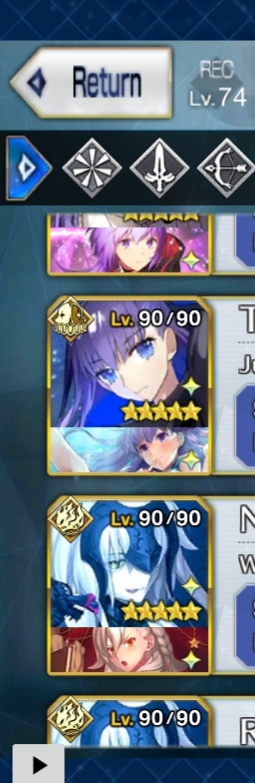
So far it has scrolled properly through 3 friend selection and then failed twice. But then I think I realized why. The final scroll wasn't actually a scroll but a selection click on a definitely different portion of the screen. I'm looking for Personal Lessons CE, and these failures are selecting Melt instead. Olga and Melt have extremely similar poses in the thumbnail. Would be even more so in grayscale which I think you mentioned the code uses.
Mysty-chan
on 23 Apr 2020
Sorry, I don't really see how Olga and Melt are similar. They should be different enough for the app to detect it.
Can you explain your problem with auto targeting again? I usually turn it off and then if needed I put targeting into my SkillCommand.
reconman
on 23 Apr 2020
The app update turned on the auto targeting setting I believe (unless I just missed turning off after the uninstall and didn't notice while in fuyuki), and the auto targeting doesn't go for the danger enemy.
The tilt of the head, the hair, it's quite similar to my eyes. And today the only time the support selection failed to pick the Olga ce is if melt in that ascension shows up before the Olga CE does and clicks directly on Melt's face, just like it clicks on Olga's face when it finds her first.


Mysty-chan
on 23 Apr 2020
I tested auto targeting and it selects the danger servant for me, but there's an issue if the enemy is already targeted, which will be fixed soon.
We believe to have found the source of your issue and a few others: We tell the system to swipe, then we wait for 0.8 seconds, and then we wait for the system to report that the swipe was completed.
That was not the intention behind our code. We wanted to wait AFTER the swipe is done so the graphics caused by clicks and drags are already gone after the wait time.
We'll test our assumptions soon and then tell you after we've tested the bugfix version on our devices.
reconman
on 23 Apr 2020
https://www.dropbox.com/s/pgu9dulp19v437t/20200423_075922.mp4?dl=0
Video of fga selecting melt, me changing the sort method so the jalter with Olga appears on top, restarting the script and fga selecting Olga instead
Mysty-chan
on 23 Apr 2020
Hmm... It's weird, but, I can see that what you're saying is indeed happening.
I'll have to check how much similarity score those images are getting with each other and maybe increasing the threshold Similarity would fix this.
MathewSachin
on 23 Apr 2020
Okay keep in mind that when searching in the FL, you can see the rest of Melt's head which I think is more similar than the snippet needed for servant identification
Mysty-chan
on 23 Apr 2020
Even those images (which you provided) have a similarity of 63% and our threshold currently is 70%! 😮
MathewSachin
on 23 Apr 2020
I tried matching using this image you provided:
Similarity of olga CE with:
- Olga CE: 97%
- Melt: 73%
They indeed are very similar.
The current match threshold is 70%, I think we should increase it to around 80-85%.
MathewSachin
on 23 Apr 2020
Thinking back, I think the similarity was the initial bug I hit with ver 10 that I mentioned on GP before coming to github. It was melt that was selected, but I assumed that it was a scrolling issue since only part of Melt's listing was visible (face only, no CE).
Mysty-chan
on 23 Apr 2020
Related issues
 ScathachSkadi
·
3Comments
ScathachSkadi
·
3Comments
 rafflesiazero
·
8Comments
Mysty-chan
·
8Comments
rafflesiazero
·
8Comments
Mysty-chan
·
8Comments
 IazIow
·
8Comments
IazIow
·
8Comments
 Rajvir8
·
4Comments
Rajvir8
·
4Comments
Most helpful comment
I tested auto targeting and it selects the danger servant for me, but there's an issue if the enemy is already targeted, which will be fixed soon.
We believe to have found the source of your issue and a few others: We tell the system to swipe, then we wait for 0.8 seconds, and then we wait for the system to report that the swipe was completed.
That was not the intention behind our code. We wanted to wait AFTER the swipe is done so the graphics caused by clicks and drags are already gone after the wait time.
We'll test our assumptions soon and then tell you after we've tested the bugfix version on our devices.