Ffimageloading: SVG images Problems using XF 3.4 and Ffimageloading 2.4.4
Hi @daniel-luberda
Please see the difference between XF3.4 and FFImagloading 2.4.4 vs XF3.3 and FFimageloading 2.4.3 On Android. The same problems also on UWP.
I couldnt test but most probably on IOS as well.
Problem1;
In the attached project, please go to AboutPage
_XF3.4 and FFImagloading 2.4.4_

_XF3.3 and FFImagloading 2.4.3_

Problem2; using icon on masterdeail icons are either not displayed at all or not properly displayed
In the attached project, please open masterdetail see in both versions size difference.
_XF3.4 and FFImagloading 2.4.4_

_XF3.3 and FFImagloading 2.4.3_

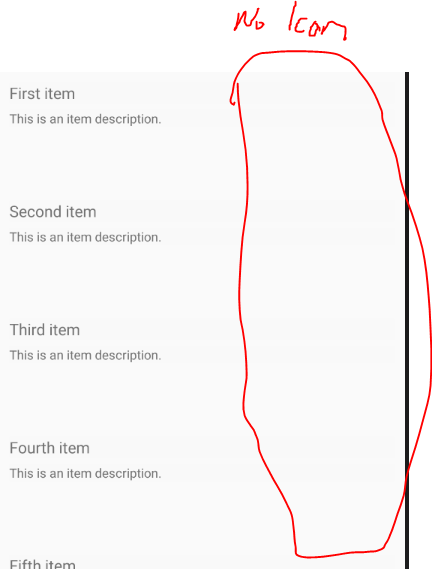
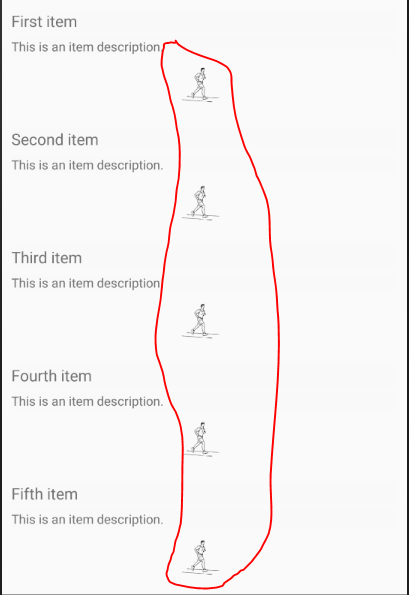
Problem 3 in the listview svg images arent displayed at all
In the attached project, please go to itemsPage
_XF3.4 and FFImagloading 2.4.4_
XF3.3 and FFImagloading 2.4.3
Sample Project:
Related Issues:
https://github.com/luberda-molinet/FFImageLoading/issues/1156
https://github.com/luberda-molinet/FFImageLoading/issues/1154
 EmilAlipiev
All 15 comments
Could you try 2.4.5.860 prerelease?
 daniel-luberda
on 19 Nov 2018
daniel-luberda
on 19 Nov 2018
@daniel-luberda , is it possible that this is the same issue related to the issue I shared with you about FFImageloading not selecting proper image resolution for XF 3.3 and XF 3.4 ? Nothing was changed around this on my end ..
Thanks
 IoTFier
on 19 Nov 2018
IoTFier
on 19 Nov 2018
Could you try 2.4.5.860 prerelease?
Works like before :) thank you
EmilAlipiev
on 19 Nov 2018
@daniel-luberda - I tried it using the latest pre... my image issue is still the same... any thoughts will be appreciated ..as I didn't change anything around images just updated the XF from 3.2 to 3.3, 3.4.....
IoTFier
on 19 Nov 2018
@IoTFier which one is your issue? can you reference?
EmilAlipiev
on 19 Nov 2018
@EmilAlipiev - I mentioned this issue in https://github.com/luberda-molinet/FFImageLoading/issues/1154
IoTFier
on 19 Nov 2018
Plase try to delete all cached / bin files. I was able to render those files correctly on newest prerelease nuget:
abs.svgcardio1.svg
daniel-luberda
on 19 Nov 2018
Hi there,
I have the same issue here. On Xf3.3 and FF 2.4.3 all svg's are fine. After update to XF3.4 and FF 2.4.4 some of my svg's show disorted. After upgrade to prerelease 2.4.5.860 the disorted svg's look fine but now other svg's look disorted. If it help's I can share these svg's, please let me know!
p.s. I removed al bin's etc before rebuilding.
 michelmoorlag
on 21 Nov 2018
michelmoorlag
on 21 Nov 2018
@michelmoorlag can you please share your svgs.
EmilAlipiev
on 21 Nov 2018
@EmilAlipiev : I have added two svg's in the zipfile. The merlinstatus_milking svg is showing disorted with FF 2.4.3 and the other on is showing all black with FF 2.4.5.860
michelmoorlag
on 22 Nov 2018
Could you try 2.4.5.860 prerelease?
Fixed it for me. Thanks!
 AuriR
on 24 Nov 2018
AuriR
on 24 Nov 2018
Here's a copy of a file that WASN'T working until the pre-release fix. Sorry for attaching ZIP - GitHub doesn't support dragging in an SVG :-P
AuriR
on 24 Nov 2018
I'm having similar problems with svgs in v2.4.4 and different ones with the v2.4.5.860-pre prerelease.
v2.4.4 ignores a transform in one of my svg files:
<g id="Layer_2" transform="translate(0,-383.08398)">
v2.4.5.860-pre fixes the transform issue but ignores a style in another svg file so draws paths in the wrong colour. This was working prior to this prerelease version.
I can work around the style issue by changing my svg but it may be more of a problem for others. I've attached the two images that I had these problems with.
 irongut
on 15 Dec 2018
irongut
on 15 Dec 2018
@irongut: I think I have indeed the same issue. After upgrade to 2.4.4. some svg's show disorted. After upgrade to the preview the disorted images showed fine but for some others some color's changed to black. Thank you for pinpointing the exact issue.
@daniel-luberda: I hope this detailed information can help you solve the issue? This would really us :)
michelmoorlag
on 17 Dec 2018
Fixed with: https://github.com/luberda-molinet/FFImageLoading/commit/df7b058bc8e2ebd2e6a60d4ab4b9fef4c0343d43
daniel-luberda
on 6 Apr 2019
Related issues
 astralmaster
·
28Comments
astralmaster
·
28Comments
 renzska
·
15Comments
renzska
·
15Comments
 vlkam
·
21Comments
vlkam
·
21Comments
 Tommigun1980
·
16Comments
Tommigun1980
·
16Comments
 SemyonL
·
20Comments
SemyonL
·
20Comments
Most helpful comment
@irongut: I think I have indeed the same issue. After upgrade to 2.4.4. some svg's show disorted. After upgrade to the preview the disorted images showed fine but for some others some color's changed to black. Thank you for pinpointing the exact issue.
@daniel-luberda: I hope this detailed information can help you solve the issue? This would really us :)