Ffimageloading: Init exception with latest Xamarin.Forms 3.4 / 3.6
Description
I updated the Xamarin.Forms NuGet Package to the latest version and now I get an exception on OnCreate in Android (iOS untested so far).
Actual Behavior
Unhandled Exception:
System.TypeLoadException: VTable setup of type FFImageLoading.Forms.Platform.CachedImageFastRenderer failed
Basic Information
- Version with issue: 2.4.3.840 with XF v3.4.0.1008975
- Last known good version: 2.4.3.840 with XF v3.3.0.967583
- Platform: Android, not sure about iOS
Reproduction Link / Code
In MainActivity, in OnCreate(), it happens on this line:
FFImageLoading.Forms.Platform.CachedImageRenderer.Init(enableFastRenderer: true);
 stesvis
All 144 comments
Same issue here.
 softsan
on 15 Nov 2018
softsan
on 15 Nov 2018
+1
 caseyniemann
on 15 Nov 2018
caseyniemann
on 15 Nov 2018
same issue
 jitendrajadav
on 16 Nov 2018
jitendrajadav
on 16 Nov 2018
Same here
 japero
on 16 Nov 2018
japero
on 16 Nov 2018
Did you try to delete all bin/obj folders, clean solution & then rebuild? I just tested and it's working fine (I even updated repo packages too)
 daniel-luberda
on 16 Nov 2018
daniel-luberda
on 16 Nov 2018
Deleted from those projects that uses these packages. No affect to me. I even restarted Vs17 but error remained.
japero
on 16 Nov 2018
Could you write more info of your dev environment? Xamarin.Android version, VS version, etc?
daniel-luberda
on 16 Nov 2018
I was getting FATAL error using XF 3.4 on Xamarin.Forms App running on Android platform
Downgrading to XF 3.3 removed that error but images from resources folders are showing with lowest resolution (Android 8.0). My usage of FFImageloading is in the context of using it while building UI with Gorilla player and Gorilla SDK. (I have masked my app package details …)
VS Community 15.9.1

 IoTFier
on 16 Nov 2018
IoTFier
on 16 Nov 2018
Now back to XF v3.2 but not happy about that choice when I want to use FFImageloading while making use of XF 3.4 and next ones ...
IoTFier
on 16 Nov 2018
VS17 Enterprise 15.8.9, Works on Xamarin.Forms 3.3.0.967583
If I update to latest Xamarin.Forms 3.4...... error is happening.
I reverted Xamarin update because no need for new features yet
japero
on 16 Nov 2018
@daniel-luberda - with the new rhythm for Xamarin.Forms release since 3.2 .. It might be worthwhile to have regression plugged in to validate compatibility and report any issues into Xamarin.Forms team directly .. ? thoughts ?
In the mean time, please help in updating FFImageLoading compatible with XF 3.3, 3.4 that will also help in picking up the images with resolution corresponding to the underlying device resolution.
Thanks
IoTFier
on 16 Nov 2018
Could you try 2.4.4.858-pre.nupkg?
daniel-luberda
on 16 Nov 2018
did it pass your regression under XF 3.3 and 3.4; including image issue I mentioned above ?
just asking because it takes a lot of time to upgrade , compile , deploy and test .. and revert in case...
Sorry but thanks a lot.
IoTFier
on 16 Nov 2018
I only updated packages & recompiled as I can't reproduce that issue on my projects (even sample project from FFImageLoading is working fine). I'm on beta channel (Mac)
help in picking up the images with resolution corresponding to the underlying device resolution.
Could you explain it in details and create a separate issue for it?
daniel-luberda
on 16 Nov 2018
@daniel-luberda .. the FATAL error is gone but images problem I mentioned as in XF 3.3 still exist.
On Android 8.0, while previewing my UI using Gorilla player - FFImageloading package is picking up images from the lowest resolution … that problem doesn't exist in FFImageloading stable version + XF 3.2. Please help.
IoTFier
on 16 Nov 2018
Did you compile it against XF 3.4 or XF 3.3 ?
IoTFier
on 16 Nov 2018
3.4
.. the FATAL error is gone but images problem I mentioned as in XF 3.3 still exist.
On Android 8.0, while previewing my UI using Gorilla player - FFImageloading package is picking up images from the lowest resolution … that problem doesn't exist in FFImageloading stable version + XF 3.2. Please help.
I don't use Gorilla Player but I don't think it's FFImageLoading related issue. You can review code responsible for retrieving assets here: https://github.com/luberda-molinet/FFImageLoading/tree/master/source/FFImageLoading.Droid/DataResolvers
and you'll see that it supports device size specific assets.
daniel-luberda
on 16 Nov 2018
Well.. I am just wondering how come that's working with XF 3.2 and stable version of FFImageloading ?
IoTFier
on 16 Nov 2018
@daniel-luberda 2.4.4.858-pre fixes the issue.
 alexshikov
on 16 Nov 2018
alexshikov
on 16 Nov 2018
@daniel-luberda - will you be releasing a stable version today ?
IoTFier
on 16 Nov 2018
@daniel-luberda
Still seeing this issue in the release that just went out
11-16 14:06:02.954 D/Mono    (18252): DllImport attempting to load: '/system/lib/liblog.so'.
11-16 14:06:02.954 D/Mono    (18252): DllImport loaded library '/system/lib/liblog.so'.
11-16 14:06:02.964 D/Mono    (18252): DllImport searching in: '/system/lib/liblog.so' ('/system/lib/liblog.so').
11-16 14:06:02.964 D/Mono    (18252): Searching for '__android_log_print'.
11-16 14:06:02.964 D/Mono    (18252): Probing '__android_log_print'.
11-16 14:06:02.964 D/Mono    (18252): Found as '__android_log_print'.
11-16 14:06:02.994 I/MonoDroid(18252): UNHANDLED EXCEPTION:
11-16 14:06:03.104 I/MonoDroid(18252): System.TypeLoadException: Could not load list of method overrides due to Method not found: void Xamarin.Forms.Platform.Android.IVisualElementRenderer.add_LayoutChange(System.EventHandler`1<Android.Views.View/LayoutChangeEventArgs>)
11-16 14:06:03.104 I/MonoDroid(18252):   at HamburgerMenu.Droid.MainActivity.OnCreate (Android.OS.Bundle savedInstanceState) [0x00037] in D:\Dev\Hamburger\New UX Components Test\Droid\MainActivity.cs:24
11-16 14:06:03.104 I/MonoDroid(18252):   at Android.App.Activity.n_OnCreate_Landroid_os_Bundle_ (System.IntPtr jnienv, System.IntPtr native__this, System.IntPtr native_savedInstanceState) [0x00011] in <ad2f15102b3a4d36b40e9b0cbc11c376>:0
11-16 14:06:03.104 I/MonoDroid(18252):   at (wrapper dynamic-method) System.Object.7(intptr,intptr,intptr)
11-16 14:06:03.134 W/art     (18252): JNI RegisterNativeMethods: attempt to register 0 native methods for android.runtime.JavaProxyThrowable
11-16 14:06:03.144 D/Mono    (18252): DllImport searching in: '__Internal' ('(null)').
11-16 14:06:03.144 D/Mono    (18252): Searching for 'java_interop_jnienv_throw'.
11-16 14:06:03.144 D/Mono    (18252): Probing 'java_interop_jnienv_throw'.
11-16 14:06:03.144 D/Mono    (18252): Found as 'java_interop_jnienv_throw'.
Unhandled Exception:

System.TypeLoadException: Could not load list of method overrides due to Method not found: void Xamarin.Forms.Platform.Android.IVisualElementRenderer.add_LayoutChange(System.EventHandler`1<Android.Views.View/LayoutChangeEventArgs>)
FFImageLoading 2.4.4.859
Visual Studio: 17.9
Android Support: 27.0.2.1
Forms: 3.3.0/3.4.0
Deleted all obj&bin and cleared nuget cache.
 mackayn
on 16 Nov 2018
mackayn
on 16 Nov 2018
@daniel-luberda
Worth noting I'm seeing this in Forms 3.3.0 as well, it only occurs though after updating to VS 17.9, in 15.8 everything was okay. Have you tested with 17.9?
mackayn
on 16 Nov 2018
@mackayn Hi, I tested it on Mac VS 7.7 but I don't see anything related to FFImageLoading in the given stack trace. Are you sure it's FFImageLoading? Maybe it's other lib?
I didn't make any fix for XF 3.4 - I only rebuild it with XF packages updates. Maybe VS is caching those files somewhere?
@IoTFier Stable is released already
daniel-luberda
on 16 Nov 2018
@daniel-luberda
It's definitely FFImageLoading that fails

mackayn
on 16 Nov 2018
I had the same TypeLoadException on Mac as well, until I upgraded the XF package from 3.4.0-pre1 to stable. As @daniel-luberda says it's probably the IDE holding onto something. In any case, 2.4.4 definitely works with XF 3.4.0 stable.
 NiknakSi
on 16 Nov 2018
NiknakSi
on 16 Nov 2018
@daniel-luberda, a BIG THANK for removing FATAL Error.
All good with VS 17.9.1, XF 3.4 except my image resolution issue that I talked about ..
Appreciate your help in making us look good. Many paid vendors struggle to reach this bar and level of understanding to serve their customers.
A big Applaud for your professionalism. Thank you !

IoTFier
on 16 Nov 2018
@daniel-luberda
Yah, finally got there, delete all obj & bin, close VS, clear %temp%, re-open VS, clear nuget cache, open solution, restore & rebuild, all good.
Thanks for sorting this so quickly.
mackayn
on 16 Nov 2018
@daniel-luberda i have cleaned obj, bin, tmp, nuget cache all folders and restart VS2017 but Svg images are either not displayed or displayed badly. it looks there is something terribly breaking with Svg images. i think the problem with this issue https://github.com/luberda-molinet/FFImageLoading/issues/1156
 EmilAlipiev
on 17 Nov 2018
EmilAlipiev
on 17 Nov 2018
It seems to be working for me now after updating XF again, and also FFImageLoading!
stesvis
on 19 Nov 2018
I had the same issue when I updated XF to 3.4. I solved it when I also updated FFImageLoading and FFImageLoading.Forms to the newest stable version. In addition, I had to delete bin und obj folders. Now it works.
 JFMG
on 20 Nov 2018
JFMG
on 20 Nov 2018
I think it's not a problem of FFImageLoading, but of how Android 8 works, maybe something works differently than other versions...
Update: I test in Android 7, and also have the error.
 ghost
on 20 Nov 2018
ghost
on 20 Nov 2018
I had this issue using latest FFImageLoading and Xamarin.Forms 3.3. I've fixed it by updating X.F to 3.4.
 lassana
on 28 Nov 2018
lassana
on 28 Nov 2018
I just had this issue using:
XF 3.4.0.1008975
VS 15.9.3
Android Support 27.0.2
Minimum API level 6.0
Target level Android 9.0
FFImageLoading 2.4.4.859
Samsung Galaxy Tab 8.0 A running Android 7.1.1
It's random though. This is the second time I've seen it but it doesn't happen all the time.
I think some of the people above think they are fixing it but in reality, it just hasn't popped up again yet.
 PostImpatica
on 6 Dec 2018
PostImpatica
on 6 Dec 2018
I have the same issue too using
XF 3.4.0.1008975
VS 17 15.9.3
Minimum API level 5.0
Target level Android 8.0
FFImageLoading 2.4.4.859
Oneplus 3 running android 7.1
I update to
XF 4.0.0.8055-pre
FFImageLoading 2.4.5.860-pre
its working now
Update : Test with android 8.0 its working too
 RaashVision
on 13 Dec 2018
RaashVision
on 13 Dec 2018
+1... same issues but with:
Xamarin Forms 3.2.0.871581
FFImageLoading 2.4.4.859
VS 15.8.7
Target level Android 8.0
 dblookup
on 20 Dec 2018
dblookup
on 20 Dec 2018
I can confirm the issue the same as @dblookup. I have attempted to follow the steps outlined by @mackayn in the earlier comment:
delete all obj & bin, close VS, clear %temp%, re-open VS, clear nuget cache, open solution, restore & rebuild
This does not remedy the problem for the call to FFImageLoading.Forms.Platform.CachedImageRenderer.Init within the MainActivity.cs file of the Android project.
I have attempted the following FFImageLoading NuGet versions:
- 2.4.4.859
- 2.4.5.860-pre
Xamarin.Forms: 3.2.0.871581
Visual Studio 2017: 15.9.4
Android SDK Levels:
Target: 27
Min: 15
I have also attempted this within two different xamarin forms apps, both resulting in the same exception of:
System.TypeLoadException: Could not load list of method overrides due to Method not found: void Xamarin.Forms.Platform.Android.IVisualElementRenderer.add_LayoutChange(System.EventHandler1<Android.Views.View/LayoutChangeEventArgs>)
I am attempting to take a look and see if there is a missing event hookup (per the exception received) that was added with the Xamarin 3.2 (and up) image modifications that were implemented for the ImageButton feature. I just wonder this because there have been large changes added that caused other images issues as well, like the issue with Images unable to be set to null for Android found here.
 ckrempp91
on 3 Jan 2019
ckrempp91
on 3 Jan 2019
Upgrading from Xamarin forms 3.2.0.839982 to 3.4.0.1009999 fixed it for me.
 pellet
on 16 Jan 2019
pellet
on 16 Jan 2019
I also get the same problem here, i'm unable to init ffimageloading on main activity. I use xamarin form 3.4.0 and ffimageloading 2.4.4.
 marthinch
on 17 Jan 2019
marthinch
on 17 Jan 2019
I clean All projects and Rebuild the solution and fixed for me
I had I use xamarin forms 3.4.0.1029999 and ffimageloading 2.4.4.859
 alextorres50
on 28 Jan 2019
alextorres50
on 28 Jan 2019
2.4.5.860-pre resolved my issue. However, when is the planned release for that version?
 ArvindSJoshi
on 29 Jan 2019
ArvindSJoshi
on 29 Jan 2019
Same error here, FF 2.4.4.859 and XF 3.3.0
"System.TypeLoadException: Could not load list of method overrides due to Method not found: void Xamarin.Forms.Platform.Android.IVisualElementRenderer.add_LayoutChange(System.EventHandler`1
 martijn-nap
on 6 Feb 2019
martijn-nap
on 6 Feb 2019
Xamarin.Forms introduced a breaking change here. We added an interface event IVisualElementRenderer.LayoutChange. FFImageLoading implemented the old version of this interface. When XF is upgraded, then the interface contained a new event. When mono loads the updated XF, it expects all IVisualElementRenderer implementations to implement the new event. When mono goes to load the FFImageLoading type that implemented the old interface and discovers it doesn't implement the new LayoutChange event, then mono throws the exception you are seeing.
We plan to roll back this change with this PR.
We do not believe this will "re-break" FFImageLoading because we see that the implementation here of IVisualElementRenderer was not upgraded to include the LayoutChange event.
 kingces95
on 27 Feb 2019
kingces95
on 27 Feb 2019
Looking at the current releases of FFIMageLoading.Forms it looks like the fix for the added interface is inside the 2.4.5-pre package but not 2.4.4
It's our plan to get this PR out https://github.com/xamarin/Xamarin.Forms/pull/5398 as soon as possible which will fix FFImageLoading when used with XF 3.6+
If the timing isn't right for 3.6 RC then we will definitely have the fix inside the next 3.6 SR1 release
I just wanted to get this note out before @daniel-luberda makes the 2.4.5 release official.
 PureWeen
on 28 Feb 2019
PureWeen
on 28 Feb 2019
@kingces95 @PureWeen Thanks for info. I replied in XF issue.
daniel-luberda
on 28 Feb 2019
Hi, with the current Xamarin.Forms 3.6.xx I get the init exception too. Downgrade to XF 3.5.xx
 tualatin
on 6 Mar 2019
tualatin
on 6 Mar 2019
Hi, I can confirm I get the same init exception with Xamarin.Forms 3.6 and 2.4.5 pre.
 ChrisJAult
on 6 Mar 2019
ChrisJAult
on 6 Mar 2019
Same error here for Xamarin.Forms 3.6 and 2.4.5 pre
 xalikoutis
on 6 Mar 2019
xalikoutis
on 6 Mar 2019
using...
- Xamarin.Forms 3.6.0.220655
- FFImageLoading 2.4.5.867-pre
-- or -- - FFImageLoading 2.4.4.859
I get this error:
Unhandled Exception:

System.TypeLoadException: Could not load list of method overrides due to Method not found:
void Xamarin.Forms.Platform.Android.IVisualElementRenderer.add_LayoutChange(System.EventHandler`1<Android.Views.View/LayoutChangeEventArgs>) occurred
I also get the above error with this:
- Xamarin Forms 3.5.0.169047
- FFImageLoading 2.4.4.859
This seems to work
- Xamarin Forms 3.5.0.169047
- FF 2.4.5.867-pre
PostImpatica
on 6 Mar 2019
Now that Forms has rolled back the interface a new 2.4.5 pre version of FFImageLoading will need to be released.
Once that's released then it'll fix the exception
PureWeen
on 6 Mar 2019
Same same error here for Xamarin.Forms 3.6 and 2.4.5 pre
 mjspk
on 6 Mar 2019
mjspk
on 6 Mar 2019
@mjspk
Now that Forms has rolled back the interface a new 2.4.5 pre version of FFImageLoading will need to be released.
Once that's released then it'll fix the exception
PureWeen
on 6 Mar 2019
Same here XF 3.6.0.220655 FFIL 2.4.5.867-pre
 dgonzalezp
on 7 Mar 2019
dgonzalezp
on 7 Mar 2019
@dgonzalezp
Once a new build of FFIMageLoading 2.4.5 is created against XF 3.6 then it won't crash
PureWeen
on 7 Mar 2019
Thanks! Meanwhile v2.4.3.840 seems to be working.
XF v3.6.0.220655
FFIL v2.4.3.840
dgonzalezp
on 7 Mar 2019
@daniel-luberda FYI, 3.6.0 is stable now and contains the fixed API, so it's ready for a rebuild. Thanks!!!
 samhouts
on 8 Mar 2019
samhouts
on 8 Mar 2019
use CachedImageRenderer.Init(true); at OnCreate(Bundle savedInstanceState)
Unhandled Exception:
System.TypeLoadException: Could not load list of method overrides due to Method not found: void Xamarin.Forms.Platform.Android.IVisualElementRenderer.add_LayoutChange(System.EventHandler`1
xamarin.forms version:3.6.0.220665
oh my god... help me..
I can't live without FFImageLoading.
当使用xf版本:3.6.0.220665时,报错,请大家帮助我。谢谢各位。
 mazhiyuan1981
on 11 Mar 2019
mazhiyuan1981
on 11 Mar 2019
I can only use it by rolling back to the previous version(xf:3.5.0.169047). But this is not a good idea.
我现在只能通过回滚到上一个版本(xf:3.5.0.169047),才能使用。但这不是好办法。
mazhiyuan1981
on 11 Mar 2019
@mazhiyuan1981 Either downgrade XF to latest 3.5.x or downgrade ff image to 2.4.3.840 for awhile, as this worked on my end. They might push a new version for ffimage to fix the issue.
 jbtamaresgit
on 11 Mar 2019
jbtamaresgit
on 11 Mar 2019
@jbtamaresgit
i see ...thank you very much...
mazhiyuan1981
on 11 Mar 2019
@jbtamaresgit downgrade ff to 2.4.3.840 worked for me
 vipinkrishna131
on 11 Mar 2019
vipinkrishna131
on 11 Mar 2019
I got this error too with XF: 3.6.0.220655 and FF: 2.4.4.859.
Downgrading FF to 2.4.3.840 resolved the issue.
 haldocalypse
on 11 Mar 2019
haldocalypse
on 11 Mar 2019
I think that downgrading is not a good solution. we had several fixes between those versions.
EmilAlipiev
on 11 Mar 2019
this is using XF 3.6.0.220655 and FF 2.4.4.859 and PRE version

 scharada
on 12 Mar 2019
scharada
on 12 Mar 2019
I too get the same error using the combinations @scharada and @haldocalypse mention. I've resolved by downgrading XF for the moment.
 justin-typsy
on 12 Mar 2019
justin-typsy
on 12 Mar 2019
the same issue
 angelru
on 12 Mar 2019
angelru
on 12 Mar 2019
Please check 2.4.5.870-pre. Cheers.
daniel-luberda
on 12 Mar 2019
Please check
2.4.5.870-pre. Cheers.
Works fine with XF: 3.6.0.220655
Thanks for the fixes and continuous support of this package!
 gsgou
on 12 Mar 2019
gsgou
on 12 Mar 2019
I'm having the same issue here.
Downgrading to 2.4.3.840 solved, even being a weird solution.
 ravero
on 12 Mar 2019
ravero
on 12 Mar 2019
Using the 2.4.5.870-pre solves the issue for us. I'll be doing testing with this until it's released as stable. Will raise any issues I find. Thanks team
 clintonrocksmith
on 13 Mar 2019
clintonrocksmith
on 13 Mar 2019
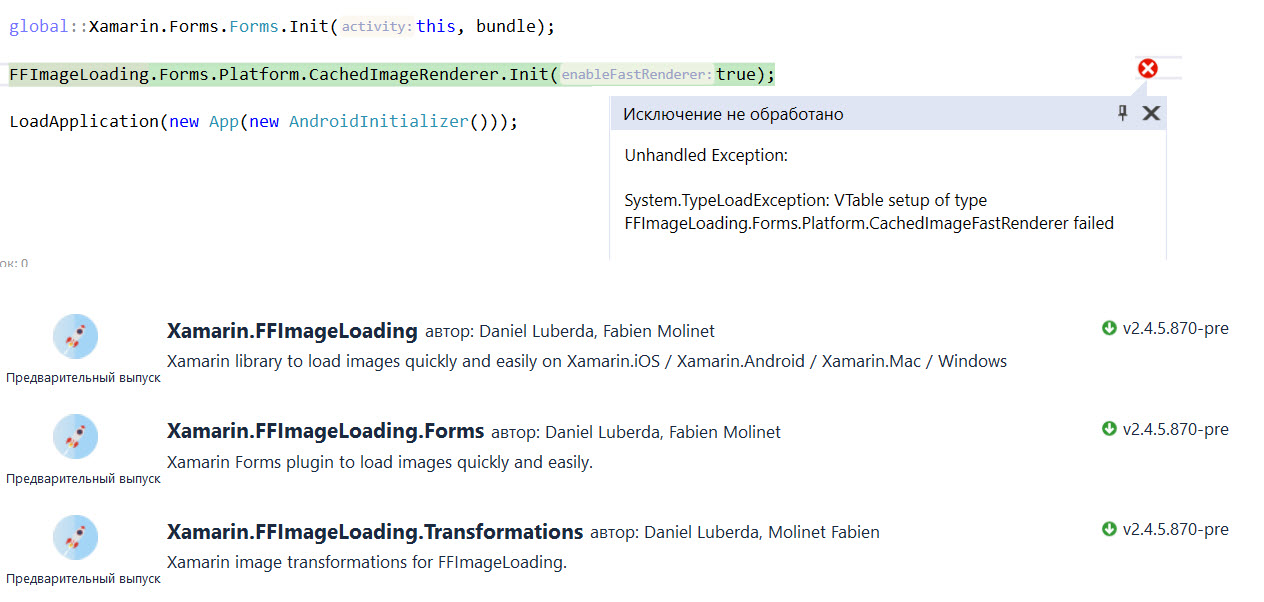
There is System.TypeLoadException in Android by using the 2.4.5.870-pre
 Polyariz
on 13 Mar 2019
Polyariz
on 13 Mar 2019
@Polyariz that sounds like one of your binaries is off. Can you make sure all your nugets are the same version and try deleting your bin/obj folders
PureWeen
on 13 Mar 2019
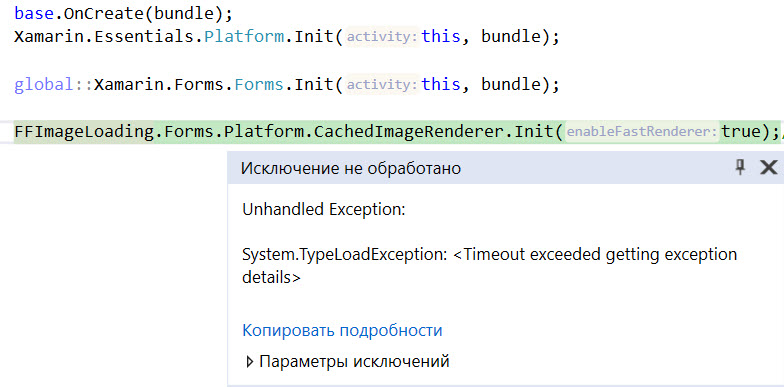
The same, bin and obj were deleted and the nuget's were removed and installed again
Polyariz
on 14 Mar 2019
Anyone tried the latest version with FastRendererers enabled? I'm getting the exception still.
 bcaceiro
on 14 Mar 2019
bcaceiro
on 14 Mar 2019
Updated from XF 3.4 to 3.6 today and got this error. For me FFIL 2.4.5.870-pre solved the problem. Using VS 15.9.7
 EaranMaleasi
on 14 Mar 2019
EaranMaleasi
on 14 Mar 2019
I don't know if anybody has noticed because I haven't read comments about it, but I just wanted to point out that as someone suggested, yes, "v2.4.5.870-pre" builds and deploys without errors, but most of my SVG images look bad now.
So I am gonna keep v2.4.3.840 which displays my images correctly.
stesvis
on 14 Mar 2019
This is a great library but there does still appear to be a compat issue with Xamarin Forms 3.6. Any released or pre-release version of FFIL (e.g., 2.4.4.859, 2.4.5.870-pre, etc.) causes borkage on init. Maintaining plateau of Xamarin Forms 3.5 works however. So we are for the moment sticking with XF 3.5.
 craigajohnson
on 15 Mar 2019
craigajohnson
on 15 Mar 2019
As @stesvis said it works on v2.4.3.840 and the latest version of Xamarin Forms but it does not display my images correct.
Give a try on this one:
https://openclipart.org/download/159037/violin.svg
 danielsilvajobs
on 17 Mar 2019
danielsilvajobs
on 17 Mar 2019
Seeing the same issue, deleting Bin/obj folders and rebuilding does nothing. Rolling back only resolves the issue.
 LeoJHarris
on 18 Mar 2019
LeoJHarris
on 18 Mar 2019
Same issue on XF 3.6.0.264807 and latest stable of FFImageloading
IoTFier
on 20 Mar 2019
Works with the latest XF 4.0 pre-release and version 2.4.5.870-pre of FFImageLoading
 janbaltes
on 21 Mar 2019
janbaltes
on 21 Mar 2019
Well, but we need it working on stable releases.
ravero
on 21 Mar 2019
I got this error too with XF: 3.6.0.220655 and FF: 2.4.4.859.
Downgrading FF to 2.4.3.840 resolved the issue.
Issue was resolved using FFImageLoading version 2.4.5.870-pre and XF 3.6
haldocalypse
on 21 Mar 2019
I can also confirm the above - 2.4.5.870-pre and XF 3.6.0.264807 are working. I'll leave it here pending formal release of the next FFImageLoading version.
craigajohnson
on 21 Mar 2019
@daniel-luberda Any ETA on a stable release for 2.4.5.870-pre?
 Ruddy2007
on 22 Mar 2019
Ruddy2007
on 22 Mar 2019
working in pre
 CarLoOSX
on 25 Mar 2019
CarLoOSX
on 25 Mar 2019
Same as @EaranMaleasi and @craigajohnson: FFImageLoading 2.4.5.870-pre works with Xamarin.Forms 3.6.0.264807.
 jsauve
on 25 Mar 2019
jsauve
on 25 Mar 2019
Same problem for Xamarin.Forms 3.5.0-sr2 (3.5.0.274416), this also needs FFImageLoading 2.4.5.870-pre
 HenrikPihl
on 28 Mar 2019
HenrikPihl
on 28 Mar 2019
It works after installing the 2.4.5.870-pre version,
Thanks for that
 cristhyanc
on 29 Mar 2019
cristhyanc
on 29 Mar 2019
I confirm that the crash is gone with that pre-release version. Thanks.
 xperseguers
on 29 Mar 2019
xperseguers
on 29 Mar 2019
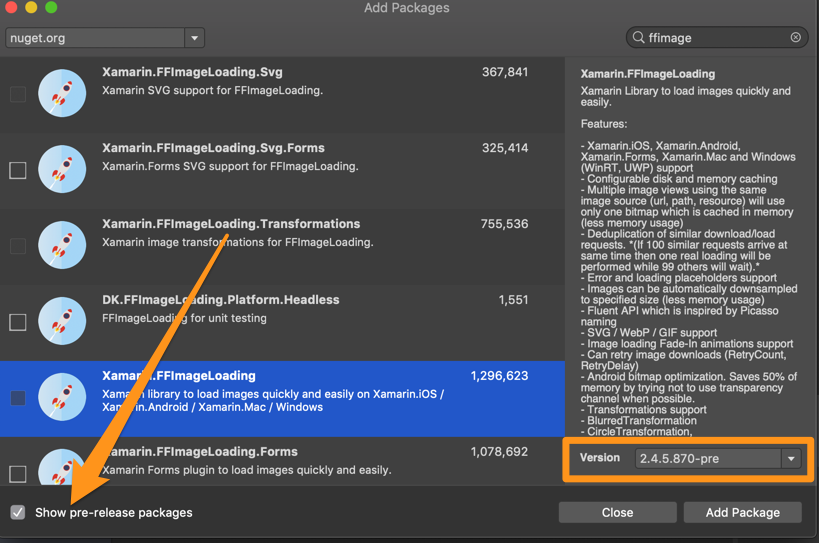
Sorry, how can I download and install the pre-release version: 2.4.5.870-pre?
 fjsosa
on 2 Apr 2019
fjsosa
on 2 Apr 2019
@fjsosa in VS package manager, there is a tick box next to the search that says 'Include prereleases'
 IeuanWalker
on 3 Apr 2019
IeuanWalker
on 3 Apr 2019
System.TypeLoadException: Could not load list of method overrides due to Method not found: void Xamarin.Forms.Platform.Android.IVisualElementRenderer.add_LayoutChange(System.EventHandler`1
still error there for XF.3.6 and also cannot find option in include pre-releases please help
 Monikaprime
on 4 Apr 2019
Monikaprime
on 4 Apr 2019
@Monikaprime You should just follow @IeuanWalker suggestion, this is as easy as that:
xperseguers
on 4 Apr 2019
With 2.4.5.870-pre + Forms 3.6.0.293080 I am running into another issue now on Android:
Constructor on type 'FFImageLoading.Forms.Platform.CachedImageFastRenderer' not found.
  at System.RuntimeType.CreateInstanceImpl (System.Reflection.BindingFlags bindingAttr, System.Reflection.Binder binder, System.Object[] args, System.Globalization.CultureInfo culture, System.Object[] activationAttributes, System.Threading.StackCrawlMark& stackMark) [0x0022b] in <58604b4522f748968296166e317b04b4>:0
  at System.Activator.CreateInstance (System.Type type, System.Reflection.BindingFlags bindingAttr, System.Reflection.Binder binder, System.Object[] args, System.Globalization.CultureInfo culture, System.Object[] activationAttributes) [0x000a1] in <58604b4522f748968296166e317b04b4>:0
  at System.Activator.CreateInstance (System.Type type, System.Object[] args) [0x00000] in <58604b4522f748968296166e317b04b4>:0
  at Xamarin.Forms.Internals.DependencyResolver.ResolveOrCreate (System.Type type, System.Object source, System.Type visualType, System.Object[] args) [0x00075] in D:\a\1\s\Xamarin.Forms.Core\DependencyResolver.cs:51
  at Xamarin.Forms.Internals.Registrar`1[TRegistrable].GetHandler (System.Type type, System.Object source, Xamarin.Forms.IVisual visual, System.Object[] args) [0x00052] in D:\a\1\s\Xamarin.Forms.Core\Registrar.cs:71
  at Xamarin.Forms.Internals.Registrar`1[TRegistrable].GetHandlerForObject[TOut] (System.Object obj, System.Object[] args) [0x0002c] in D:\a\1\s\Xamarin.Forms.Core\Registrar.cs:103
  at Xamarin.Forms.Platform.Android.Platform.CreateRenderer (Xamarin.Forms.VisualElement element, Android.Content.Context context) [0x00000] in D:\a\1\s\Xamarin.Forms.Platform.Android\Platform.cs:339
  at Xamarin.Forms.Platform.Android.VisualElementPackager.AddChild (Xamarin.Forms.VisualElement view, Xamarin.Forms.Platform.Android.IVisualElementRenderer oldRenderer, Xamarin.Forms.Platform.Android.RendererPool pool, System.Boolean sameChildren) [0x000af] in D:\a\1\s\Xamarin.Forms.Platform.Android\VisualElementPackager.cs:120
  at Xamarin.Forms.Platform.Android.VisualElementPackager.SetElement (Xamarin.Forms.VisualElement oldElement, Xamarin.Forms.VisualElement newElement) [0x00139] in D:\a\1\s\Xamarin.Forms.Platform.Android\VisualElementPackager.cs:268
  at Xamarin.Forms.Platform.Android.VisualElementPackager.Load () [0x00000] in D:\a\1\s\Xamarin.Forms.Platform.Android\VisualElementPackager.cs:92
  at Xamarin.Forms.Platform.Android.VisualElementRenderer`1[TElement].SetPackager (Xamarin.Forms.Platform.Android.VisualElementPackager packager) [0x00007] in D:\a\1\s\Xamarin.Forms.Platform.Android\VisualElementRenderer.cs:414
  at Xamarin.Forms.Platform.Android.VisualElementRenderer`1[TElement].SetElement (TElement element) [0x000e0] in D:\a\1\s\Xamarin.Forms.Platform.Android\VisualElementRenderer.cs:231
  at Xamarin.Forms.Platform.Android.VisualElementRenderer`1[TElement].Xamarin.Forms.Platform.Android.IVisualElementRenderer.SetElement (Xamarin.Forms.VisualElement element) [0x00027] in D:\a\1\s\Xamarin.Forms.Platform.Android\VisualElementRenderer.cs:127
  at Xamarin.Forms.Platform.Android.Platform.CreateRenderer (Xamarin.Forms.VisualElement element, Android.Content.Context context) [0x0001f] in D:\a\1\s\Xamarin.Forms.Platform.Android\Platform.cs:341
  at Xamarin.Forms.Platform.Android.VisualElementPackager.AddChild (Xamarin.Forms.VisualElement view, Xamarin.Forms.Platform.Android.IVisualElementRenderer oldRenderer, Xamarin.Forms.Platform.Android.RendererPool pool, System.Boolean sameChildren) [0x000af] in D:\a\1\s\Xamarin.Forms.Platform.Android\VisualElementPackager.cs:120
  at Xamarin.Forms.Platform.Android.VisualElementPackager.SetElement (Xamarin.Forms.VisualElement oldElement, Xamarin.Forms.VisualElement newElement) [0x00139] in D:\a\1\s\Xamarin.Forms.Platform.Android\VisualElementPackager.cs:268
  at Xamarin.Forms.Platform.Android.VisualElementPackager.Load () [0x00000] in D:\a\1\s\Xamarin.Forms.Platform.Android\VisualElementPackager.cs:92
  at Xamarin.Forms.Material.Android.MaterialFrameRenderer.OnElementChanged (Xamarin.Forms.Platform.Android.ElementChangedEventArgs`1[TElement] e) [0x00072] in D:\a\1\s\Xamarin.Forms.Material.Android\MaterialFrameRenderer.cs:130
  at Xamarin.Forms.Material.Android.MaterialFrameRenderer.set_Element (Xamarin.Forms.Frame value) [0x00018] in D:\a\1\s\Xamarin.Forms.Material.Android\MaterialFrameRenderer.cs:67
  at Xamarin.Forms.Material.Android.MaterialFrameRenderer.Xamarin.Forms.Platform.Android.IVisualElementRenderer.SetElement (Xamarin.Forms.VisualElement element) [0x00000] in D:\a\1\s\Xamarin.Forms.Material.Android\MaterialFrameRenderer.cs:259
  at Xamarin.Forms.Platform.Android.Platform.CreateRenderer (Xamarin.Forms.VisualElement element, Android.Content.Context context) [0x0001f] in D:\a\1\s\Xamarin.Forms.Platform.Android\Platform.cs:341
  at Xamarin.Forms.Platform.Android.VisualElementPackager.AddChild (Xamarin.Forms.VisualElement view, Xamarin.Forms.Platform.Android.IVisualElementRenderer oldRenderer, Xamarin.Forms.Platform.Android.RendererPool pool, System.Boolean sameChildren) [0x000af] in D:\a\1\s\Xamarin.Forms.Platform.Android\VisualElementPackager.cs:120
  at Xamarin.Forms.Platform.Android.VisualElementPackager.SetElement (Xamarin.Forms.VisualElement oldElement, Xamarin.Forms.VisualElement newElement) [0x00139] in D:\a\1\s\Xamarin.Forms.Platform.Android\VisualElementPackager.cs:268
  at Xamarin.Forms.Platform.Android.VisualElementPackager.Load () [0x00000] in D:\a\1\s\Xamarin.Forms.Platform.Android\VisualElementPackager.cs:92
  at Xamarin.Forms.Platform.Android.VisualElementRenderer`1[TElement].SetPackager (Xamarin.Forms.Platform.Android.VisualElementPackager packager) [0x00007] in D:\a\1\s\Xamarin.Forms.Platform.Android\VisualElementRenderer.cs:414
  at Xamarin.Forms.Platform.Android.VisualElementRenderer`1[TElement].SetElement (TElement element) [0x000e0] in D:\a\1\s\Xamarin.Forms.Platform.Android\VisualElementRenderer.cs:231
  at Xamarin.Forms.Platform.Android.VisualElementRenderer`1[TElement].Xamarin.Forms.Platform.Android.IVisualElementRenderer.SetElement (Xamarin.Forms.VisualElement element) [0x00027] in D:\a\1\s\Xamarin.Forms.Platform.Android\VisualElementRenderer.cs:127
  at Xamarin.Forms.Platform.Android.Platform.CreateRenderer (Xamarin.Forms.VisualElement element, Android.Content.Context context) [0x0001f] in D:\a\1\s\Xamarin.Forms.Platform.Android\Platform.cs:341
  at Xamarin.Forms.Platform.Android.ScrollViewContainer.set_ChildView (Xamarin.Forms.View value) [0x0002f] in D:\a\1\s\Xamarin.Forms.Platform.Android\Renderers\ScrollViewContainer.cs:36
  at Xamarin.Forms.Platform.Android.ScrollViewRenderer.LoadContent () [0x00000] in D:\a\1\s\Xamarin.Forms.Platform.Android\Renderers\ScrollViewRenderer.cs:356
  at Xamarin.Forms.Platform.Android.ScrollViewRenderer.SetElement (Xamarin.Forms.VisualElement element) [0x000a6] in D:\a\1\s\Xamarin.Forms.Platform.Android\Renderers\ScrollViewRenderer.cs:93
  at Xamarin.Forms.Platform.Android.Platform.CreateRenderer (Xamarin.Forms.VisualElement element, Android.Content.Context context) [0x0001f] in D:\a\1\s\Xamarin.Forms.Platform.Android\Platform.cs:341
  at Xamarin.Forms.Platform.Android.VisualElementPackager.AddChild (Xamarin.Forms.VisualElement view, Xamarin.Forms.Platform.Android.IVisualElementRenderer oldRenderer, Xamarin.Forms.Platform.Android.RendererPool pool, System.Boolean sameChildren) [0x000af] in D:\a\1\s\Xamarin.Forms.Platform.Android\VisualElementPackager.cs:120
  at Xamarin.Forms.Platform.Android.VisualElementPackager.SetElement (Xamarin.Forms.VisualElement oldElement, Xamarin.Forms.VisualElement newElement) [0x00139] in D:\a\1\s\Xamarin.Forms.Platform.Android\VisualElementPackager.cs:268
  at Xamarin.Forms.Platform.Android.VisualElementPackager.Load () [0x00000] in D:\a\1\s\Xamarin.Forms.Platform.Android\VisualElementPackager.cs:92
  at Xamarin.Forms.Platform.Android.VisualElementRenderer`1[TElement].SetPackager (Xamarin.Forms.Platform.Android.VisualElementPackager packager) [0x00007] in D:\a\1\s\Xamarin.Forms.Platform.Android\VisualElementRenderer.cs:414
  at Xamarin.Forms.Platform.Android.VisualElementRenderer`1[TElement].SetElement (TElement element) [0x000e0] in D:\a\1\s\Xamarin.Forms.Platform.Android\VisualElementRenderer.cs:231
  at Xamarin.Forms.Platform.Android.VisualElementRenderer`1[TElement].Xamarin.Forms.Platform.Android.IVisualElementRenderer.SetElement (Xamarin.Forms.VisualElement element) [0x00027] in D:\a\1\s\Xamarin.Forms.Platform.Android\VisualElementRenderer.cs:127
  at Xamarin.Forms.Platform.Android.Platform.CreateRenderer (Xamarin.Forms.VisualElement element, Android.Support.V4.App.FragmentManager fragmentManager, Android.Content.Context context) [0x00031] in D:\a\1\s\Xamarin.Forms.Platform.Android\Platform.cs:388
  at Xamarin.Forms.Platform.Android.AppCompat.FragmentContainer.OnCreateView (Android.Views.LayoutInflater inflater, Android.Views.ViewGroup container, Android.OS.Bundle savedInstanceState) [0x00008] in D:\a\1\s\Xamarin.Forms.Platform.Android\AppCompat\FragmentContainer.cs:56
  at Android.Support.V4.App.Fragment.n_OnCreateView_Landroid_view_LayoutInflater_Landroid_view_ViewGroup_Landroid_os_Bundle_ (System.IntPtr jnienv, System.IntPtr native__this, System.IntPtr native_inflater, System.IntPtr native_container, System.IntPtr native_savedInstanceState) [0x00020] in <96541ba8a6104b52aadf4218488f978c>:0
  at (wrapper dynamic-method) Android.Runtime.DynamicMethodNameCounter.30(intptr,intptr,intptr,intptr,intptr)
 aspnetde
on 5 Apr 2019
aspnetde
on 5 Apr 2019
I'm having the same issue here...
 aspnerd
on 6 Apr 2019
aspnerd
on 6 Apr 2019
Same here
 jelkevdh
on 8 Apr 2019
jelkevdh
on 8 Apr 2019
Yup, same issue here:
Constructor on type 'FFImageLoading.Forms.Platform.CachedImageFastRenderer' not found.
 mjfara
on 8 Apr 2019
mjfara
on 8 Apr 2019
So here's the rundown of version compatibles. Let me know if something here seems incorrect and I can update
As of now we rolled back the interface change that caused this initial headache on every XF 3 version. This change needed to be applied to XF 3.4, 3.5, 3.6 meaning that
https://www.nuget.org/packages/Xamarin.FFImageLoading/2.4.4.859
- is incompatible with the latest versions of 3.4, 3.5, and 3.6, 4.0 pre(*)
https://www.nuget.org/packages/Xamarin.FFImageLoading/2.4.4.859 and all 2.4.5 versions prior to
https://www.nuget.org/packages/Xamarin.FFImageLoading/2.4.5.880-pre
are compatible with:
- https://www.nuget.org/packages/Xamarin.Forms/3.6.0.220655
- https://www.nuget.org/packages/Xamarin.Forms/3.5.0.169047
- https://www.nuget.org/packages/Xamarin.Forms/3.4.0.1029999
https://www.nuget.org/packages/Xamarin.FFImageLoading/2.4.5.880-pre
- is compatible with the latest versions of 3.4, 3.5, and 3.6
https://www.nuget.org/packages/Xamarin.FFImageLoading/2.4.5.870-pre
- XF 3.6.0.264807
PureWeen
on 8 Apr 2019
It works after installing the 2.4.5.870-pre version,
Thanks for that
Same here.
 fzany
on 8 Apr 2019
fzany
on 8 Apr 2019
FYI
https://www.nuget.org/packages/Xamarin.FFImageLoading/2.4.5.880-pre
Is listed as coming out 2 days ago so updating to that might also fix your woes
I tested latest 3.6 against that version and everything worked for me
PureWeen
on 8 Apr 2019
Its appear that "SvgCachedImage.LoadingPlaceholder" is not being replaced by svg file URL, someone can confirm if it's really a issue?
 candidodmv
on 8 Apr 2019
candidodmv
on 8 Apr 2019
I found the cause: The Project was referering to version 2.4.5.880-pre insted of 2.4.5.870-pre
candidodmv
on 8 Apr 2019
Works well with 2.4.5.870-pre and XF 3.6.0.264807. Thank you all.
 KishorTiwari
on 9 Apr 2019
KishorTiwari
on 9 Apr 2019
Yes, 2.4.5.870-pre and XF 3.6.0.264807 is good for me.
mackayn
on 9 Apr 2019
@candidodmv @KishorTiwari @mackayn
Out of curiosity why are you opting to use 2.4.5.870-pre opposed to 2.4.5.880-pre?
2.4.5.880-pre works with the latest version of XF 3.6.0.293080
PureWeen
on 9 Apr 2019
@PureWeen as mentioned above https://github.com/luberda-molinet/FFImageLoading/issues/1154#issuecomment-480989539, with the version 2.4.5.880-pre is not loading svg files for me
candidodmv
on 9 Apr 2019
I'm getting this when I try to upgrade to the pre release
NU1605: Detected package downgrade: Xamarin.FFImageLoading from 2.4.5.880-pre to 2.4.4.859. Reference the package directly from the project to select a different version.
SalesApp.iOS -> Xamarin.FFImageLoading.Forms 2.4.5.880-pre -> Xamarin.FFImageLoading (>= 2.4.5.880-pre)
SalesApp.iOS -> Xamarin.FFImageLoading (>= 2.4.4.859)
NU1605: Detected package downgrade: Xamarin.FFImageLoading from 2.4.5.880-pre to 2.4.4.859. Reference the package directly from the project to select a different version.
SalesApp.Droid -> Xamarin.FFImageLoading.Forms 2.4.5.880-pre -> Xamarin.FFImageLoading (>= 2.4.5.880-pre)
SalesApp.Droid -> Xamarin.FFImageLoading (>= 2.4.4.859)
Installing NuGet package Xamarin.FFImageLoading.Forms 2.4.5.880-pre.
NU1605: Detected package downgrade: Xamarin.FFImageLoading from 2.4.5.880-pre to 2.4.4.859. Reference the package directly from the project to select a different version.
SalesApp.iOS -> Xamarin.FFImageLoading.Forms 2.4.5.880-pre -> Xamarin.FFImageLoading (>= 2.4.5.880-pre)
SalesApp.iOS -> Xamarin.FFImageLoading (>= 2.4.4.859)
 greektreat
on 10 Apr 2019
greektreat
on 10 Apr 2019
I'm getting this when I try to upgrade to the pre release
NU1605: Detected package downgrade: Xamarin.FFImageLoading from 2.4.5.880-pre to 2.4.4.859. Reference the package directly from the project to select a different version.
SalesApp.iOS -> Xamarin.FFImageLoading.Forms 2.4.5.880-pre -> Xamarin.FFImageLoading (>= 2.4.5.880-pre)
SalesApp.iOS -> Xamarin.FFImageLoading (>= 2.4.4.859)
NU1605: Detected package downgrade: Xamarin.FFImageLoading from 2.4.5.880-pre to 2.4.4.859. Reference the package directly from the project to select a different version.
SalesApp.Droid -> Xamarin.FFImageLoading.Forms 2.4.5.880-pre -> Xamarin.FFImageLoading (>= 2.4.5.880-pre)
SalesApp.Droid -> Xamarin.FFImageLoading (>= 2.4.4.859)
Installing NuGet package Xamarin.FFImageLoading.Forms 2.4.5.880-pre.
NU1605: Detected package downgrade: Xamarin.FFImageLoading from 2.4.5.880-pre to 2.4.4.859. Reference the package directly from the project to select a different version.
SalesApp.iOS -> Xamarin.FFImageLoading.Forms 2.4.5.880-pre -> Xamarin.FFImageLoading (>= 2.4.5.880-pre)
SalesApp.iOS -> Xamarin.FFImageLoading (>= 2.4.4.859)
Never Mind after a few tries it worked, also solved the issue
greektreat
on 10 Apr 2019
With 2.4.5.870-pre and XF 3.6.0.264807 combination, some images are showing in black and others good. I try with 2.4.5.880-pre and XF 3.6.0.293080 with no luck. Also, I delete bin/obj folders, clear nuget cache, rebuild and close VS 2019 for mac and continue with same issue.
 mimunoz
on 11 Apr 2019
mimunoz
on 11 Apr 2019
In iOS (XF 3.6.0.293080, XF Visual Material 3.6.0.293080, Xamarin.FFImageLoading.Svg.Forms 2.4.4.859, VS2019) everything works fine.
I believe is Android's problem. I tried everything mentioned to the previous posts without luck!
 kmagalios
on 13 Apr 2019
kmagalios
on 13 Apr 2019
After some research, the problem is related to Xamarin.Forms.Visual.Material!
When the CachedImage or SvgCachedImage are inside a, for example, StackLayout which has the property Visual="Material", then you take an exception.
I set, for CachedImage, the property Visual="Default" and everything works fine!
(XF 3.6.0.293080, XF Visual Material 3.6.0.293080, Xamarin.FFImageLoading.Svg.Forms 2.4.5.880-pre, VS2019)
BR.
kmagalios
on 14 Apr 2019
@kmagalios
When the CachedImage or SvgCachedImage are inside a, for example, StackLayout which has the property Visual="Material", then you take an exception.
is there any special setup for this? Or literally any CachedImage/SvgCachedImage you use when set to material will cause an exception?
Do you have the stack trace of the exception by chance?
PureWeen
on 15 Apr 2019
@kmagalios We could use a fix for this, see: https://github.com/luberda-molinet/FFImageLoading/pull/1246
Reflection is needed as we need to be backward compatible. What do you think? Can you confirm if non-default style is an issue?
daniel-luberda
on 16 Apr 2019
@daniel-luberda Thank you for your reply. Reflection sounds ok to me! I'll check it at afternoon.
@PureWeen
If CachedImage/SvgCachedImage is hosted into a container (Frame/StackLayout etc) which has the property Visual="Material", then the value of the property is propagated to contained components. For this case you have to set Visual="Default" to CachedImage/SvgCachedImage.
If the property Visual is not set or is set to "Default" you don't have any problem.
The default value for Visual property is "Default".
kmagalios
on 17 Apr 2019
SvgCahcedImage doesn't display anything after I updated to the pre-release version. The source of the SvgCahedImage is a resource file in the shared project and I use it like below:
<forms:SvgCachedImage Source="resource://SharedProject.Images.share.svg">
This code worked before the update.
 IbrahimElshafey
on 17 Apr 2019
IbrahimElshafey
on 17 Apr 2019
@IbrahimElshafey Could you attach a repo?
daniel-luberda
on 17 Apr 2019
@daniel-luberda while I create a sample to post it here I found it works fine, I will try to find the reason why it didn't work in the original project I worked on.
IbrahimElshafey
on 17 Apr 2019
@daniel-luberda It seems that some images that were displayed correctly using the old version can't be displayed with the new one.
I created a sample that demonstrates that In this sample I display two images using the old version (2.3.6) and the other use the pre-release version (2.4.5.900), the old sample display both images correctly but the new one display only one image and the other is white.
IbrahimElshafey
on 17 Apr 2019
@kmagalios We could use a fix for this, see: #1246
Reflection is needed as we need to be backward compatible. What do you think? Can you confirm if non-default style is an issue?
@daniel-luberda I've installed the latest preview version (2.4.5.900-pre) and everything works fine.
I remove the property Visual="Default" and everything is ok.
Thank you.
kmagalios
on 17 Apr 2019
I pushed quite a lot of fixes and improvements lately. New prerelease package should be a lot more performant, especially on Android. I tested it while fast scrolling tons of images (also with poor internet connection scenario), not a single crash or exception and memory usage is lower than with previous versions. SVG parsing is also improved, etc.
I plan to release new stable. If you could test prerelease first and submit your feedback I would be grateful as I would like to fix all potential issues before a release.
daniel-luberda
on 18 Apr 2019
@daniel-luberda I upgraded to the latest prerelease package but SVG images that were displayed by the old version (2.3.6) can't be displayed.
IbrahimElshafey
on 18 Apr 2019
Also having this issue that IbrahimElshafey mentioned. Using the latest stable Xamarin Forms release.
Stack Trace
04-22 11:12:33.843 I/mono-stdout(17978): Image loading failed: resource://PROJECT.Resources.cogwheel.svg?assembly=PROJECT,%20Version=1.0.0.0,%20Culture=neutral,%20PublicKeyToken=null;(size=0x64,dip=True,type=SvgDataResolver)
04-22 11:12:33.848 I/mono-stdout(17978): System.MissingMethodException: Method not found: void SkiaSharp.SKPath.AddRoundRect(SkiaSharp.SKRect,single,single,SkiaSharp.SKPathDirection)Image loading failed: resource://PROJECT.Resources.cogwheel.svg?assembly=PROJECT,%20Version=1.0.0.0,%20Culture=neutral,%20PublicKeyToken=null;(size=0x64,dip=True,type=SvgDataResolver)
System.MissingMethodException: Method not found: void SkiaSharp.SKPath.AddRoundRect(SkiaSharp.SKRect,single,single,SkiaSharp.SKPathDirection)
  at FFImageLoading.Svg.Platform.SKSvg.ReadElement (System.Xml.Linq.XElement e, SkiaSharp.SKCanvas canvas, SkiaSharp.SKPaint stroke, SkiaSharp.SKPaint fill) [0x00440] in C:\projects\ffimageloading\source\FFImageLoading.Svg.Shared\SkSvg.cs:281

04-22 11:12:33.848 I/mono-stdout(17978):   at FFImageLoading.Svg.Platform.SKSvg.ReadElement (System.Xml.Linq.XElement e, SkiaSharp.SKCanvas canvas, SkiaSharp.SKPaint stroke, SkiaSharp.SKPaint fill) [0x00440] in C:\projects\ffimageloading\source\FFImageLoading.Svg.Shared\SkSvg.cs:281   at FFImageLoading.Svg.Platform.SKSvg.ReadElement (System.Xml.Linq.XElement e, SkiaSharp.SKCanvas canvas, SkiaSharp.SKPaint stroke, SkiaSharp.SKPaint fill) [0x006c6] in C:\projects\ffimageloading\source\FFImageLoading.Svg.Shared\SkSvg.cs:357
  at FFImageLoading.Svg.Platform.SKSvg.ReadElement (System.Xml.Linq.XElement e, SkiaSharp.SKCanvas canvas, SkiaSharp.SKPaint stroke, SkiaSharp.SKPaint fill) [0x006c6] in C:\projects\ffimageloading\source\FFImageLoading.Svg.Shared\SkSvg.cs:357
  at FFImageLoading.Svg.Platform.SKSvg.LoadElements (System.Collections.Generic.IEnumerable`1[T] elements, SkiaSharp.SKCanvas canvas, SkiaSharp.SKPaint stroke, SkiaSharp.SKPaint fill) [0x00010] in C:\projects\ffimageloading\source\FFImageLoading.Svg.Shared\SkSvg.cs:215

04-22 11:12:33.848 I/mono-stdout(17978):   at FFImageLoading.Svg.Platform.SKSvg.ReadElement (System.Xml.Linq.XElement e, SkiaSharp.SKCanvas canvas, SkiaSharp.SKPaint stroke, SkiaSharp.SKPaint fill) [0x006c6] in C:\projects\ffimageloading\source\FFImageLoading.Svg.Shared\SkSvg.cs:357
04-22 11:12:33.849 I/mono-stdout(17978):   at FFImageLoading.Svg.Platform.SKSvg.ReadElement (System.Xml.Linq.XElement e, SkiaSharp.SKCanvas canvas, SkiaSharp.SKPaint stroke, SkiaSharp.SKPaint fill) [0x006c6] in C:\projects\ffimageloading\source\FFImageLoading.Svg.Shared\SkSvg.cs:357   at FFImageLoading.Svg.Platform.SKSvg.Load (System.Xml.Linq.XDocument xdoc) [0x003f9] in C:\projects\ffimageloading\source\FFImageLoading.Svg.Shared\SkSvg.cs:203

04-22 11:12:33.849 I/mono-stdout(17978):   at FFImageLoading.Svg.Platform.SKSvg.LoadElements (System.Collections.Generic.IEnumerable`1[T] elements, SkiaSharp.SKCanvas canvas, SkiaSharp.SKPaint stroke, SkiaSharp.SKPaint fill) [0x00010] in C:\projects\ffimageloading\source\FFImageLoading.Svg.Shared\SkSvg.cs:215
04-22 11:12:33.849 I/mono-stdout(17978):   at FFImageLoading.Svg.Platform.SKSvg.Load (System.Xml.Linq.XDocument xdoc) [0x003f9] in C:\projects\ffimageloading\source\FFImageLoading.Svg.Shared\SkSvg.cs:203
04-22 11:12:33.850 I/mono-stdout(17978):   at FFImageLoading.Svg.Platform.SKSvg.Load (System.Xml.XmlReader reader) [0x00000] in C:\projects\ffimageloading\source\FFImageLoading.Svg.Shared\SkSvg.cs:97
04-22 11:12:33.852 I/mono-stdout(17978):   at FFImageLoading.Svg.Platform.SKSvg.Load (System.IO.Stream stream) [0x00012] in C:\projects\ffimageloading\source\FFImageLoading.Svg.Shared\SkSvg.cs:91   at FFImageLoading.Svg.Platform.SKSvg.Load (System.Xml.XmlReader reader) [0x00000] in C:\projects\ffimageloading\source\FFImageLoading.Svg.Shared\SkSvg.cs:97
  at FFImageLoading.Svg.Platform.SKSvg.Load (System.IO.Stream stream) [0x00012] in C:\projects\ffimageloading\source\FFImageLoading.Svg.Shared\SkSvg.cs:91
  at FFImageLoading.Svg.Platform.SvgDataResolver.Resolve (System.String identifier, FFImageLoading.Work.TaskParameter parameters, System.Threading.CancellationToken token) [0x00198] in C:\projects\ffimageloading\source\FFImageLoading.Svg.Shared\SvgDataResolver.cs:98
  at FFImageLoading.DataResolvers.WrappedDataResolver.Resolve (System.String identifier, FFImageLoading.Work.TaskParameter parameters, System.Threading.CancellationToken token) [0x00044] in C:\projects\ffimageloading\source\FFImageLoading.Common\DataResolvers\WrappedDataResolver.cs:21
  at FFImageLoading.Work.ImageLoaderTask`3[TDecoderContainer,TImageContainer,TImageView].RunAsync () [0x00300] in C:\projects\ffimageloading\source\FFIma

geLoading.Common\Work\ImageLoaderTask.cs:555
 Kiitoksia
on 22 Apr 2019
Kiitoksia
on 22 Apr 2019
- Which version of SkiaSharp do you use?
- Are you sure you have the same FFIL packages version in all projects?
daniel-luberda
on 22 Apr 2019
SkiaSharp wasn't referenced in my project, so I guess it was whichever version is bundled with Xamarin?
Adding the latest SkiaSharp reference via Nuget fixed this issue.
Kiitoksia
on 22 Apr 2019
@daniel-luberda First of all thank you, I very appreciate your work, FFIL is an essential package to any Xamarin.Forms project.
I use the same SkiaSharp version in all projects, the sample contains two Xamarin forms projects, the code in both is the same but in the old (SvgCachedImageTest_old) I use FFIL version as the image
 the other one uses the latest pre-release version as the following

- the result of both project is different, The old version display both SVG fine but the new pre-release isn't


IbrahimElshafey
on 22 Apr 2019
@IbrahimElshafey Thanks.
- You're not referencing all packages in your projects (
Xamarin.FFImageLoading,Xamarin.FFImageLoading.Svg) - The important thing is you should use the same package version in all your projects. Both images render just fine on latest prerelease package. Also:
- Always delete all
bin/objfolders and then rebuild if you experience any problems.

daniel-luberda
on 22 Apr 2019
@daniel-luberda Thanks for your response.
I added the missing packages and I deleted the bin/obj folders but with the new version the arrow image didn't display. bellow is the SVG for the image:
<svg xmlns="http://www.w3.org/2000/svg" width="8.5" height="14.9">
  <path fill="#f0f" d="M2.5 7.5a2 2 0 0 1 .3.2L8 13a1 1 0 1 1-1.5 1.5l-3.8-3.9L.4 8.2a1 1 0 0 1 0-1.6L6.6.4a1 1 0 0 1 1.8.4 1 1 0 0 1-.3 1L4.7 5.4 2.5 7.5z"/>
</svg>
If I deleted the fill attribute (fill="#f0f") it displayed fine, I tried this on two diffrent emulators and on my phone.
<svg xmlns="http://www.w3.org/2000/svg" width="8.5" height="14.9">
  <path d="M2.5 7.5a2 2 0 0 1 .3.2L8 13a1 1 0 1 1-1.5 1.5l-3.8-3.9L.4 8.2a1 1 0 0 1 0-1.6L6.6.4a1 1 0 0 1 1.8.4 1 1 0 0 1-.3 1L4.7 5.4 2.5 7.5z"/>
</svg>
@daniel-luberda I didn't want to waste your time If it works fine on your machine ignore the latest message because I use the old version in the real project and it works fine.
IbrahimElshafey
on 22 Apr 2019
See screenshot above, it works. I just tested it on FFIL sample project:

daniel-luberda
on 22 Apr 2019
@daniel-luberda It may be some packages cached on my machine I will try again.
IbrahimElshafey
on 22 Apr 2019
@IbrahimElshafey
Clear your Visual Studio nuget cache.
mackayn
on 22 Apr 2019
@mackayn I tried this already, I deleted all FFIL packages in the packages folder C:\Users\UserName\.nuget\packages\ but the problem still exists, I will compile source code locally.
IbrahimElshafey
on 22 Apr 2019
Using 2.4.5.909-pre and Xamarin forms 3.6.0.344457 resolves this issue for me.
LeoJHarris
on 23 Apr 2019
Hi
Using 2.4.5.909-pre (Core, iOS and Android) and Xamarin forms 3.6.0.344457 but the images are not visible.
 HugoTruffe
on 23 Apr 2019
HugoTruffe
on 23 Apr 2019
I confirm
 MaxenceSAUNIER
on 25 Apr 2019
MaxenceSAUNIER
on 25 Apr 2019
Same issue here, SVGs are not rendered
 Giorgi
on 26 Apr 2019
Giorgi
on 26 Apr 2019
Please make sure you:
- have included all necessary packages in all projects, https://github.com/luberda-molinet/FFImageLoading/wiki/Xamarin.Forms-API#step-1 (including
SkiaSharp) - all packages all in the same version
- delete all
bin/objfolders from all projects & rebuild
daniel-luberda
on 26 Apr 2019
Please make sure you:
- have included all necessary packages in all projects, https://github.com/luberda-molinet/FFImageLoading/wiki/Xamarin.Forms-API#step-1 (including
SkiaSharp)- all packages all in the same version
- delete all
bin/objfolders from all projects & rebuild
This worked, however, only the first time i run the app after a clean+delete obj/bin+rebuild.
After that, if i run the app again there is no error, but all my svg icons are invisible.
I would have to clean+delete obj/bin+rebuild the app every time to make it work....
Is there a reason?
stesvis
on 30 Apr 2019
I have install SkiaSharp and it's working. Thanks @daniel-luberda
MaxenceSAUNIER
on 2 May 2019
I updated the Xamarin.Forms NuGet Package to the latest version and now I get an exception on OnCreate in Android (iOS untested so far).
Is there a solution to this problem?
 scriptBoris
on 16 May 2019
scriptBoris
on 16 May 2019
commit your code or take a copy of your project.
After the apply this command on package manager console "update-package".
After this clean build your project, then restart visual studio and rebuild your project.
This procedure work for me.
 MHamzaRajput
on 10 Jun 2019
MHamzaRajput
on 10 Jun 2019
Using version 2.4.4.859 works well with XForms 3.4.0.1009.
The following versions did not work for me (combined with the same XForms version above):
- 2.4.11.982
- 2.4.9.961
 ngoquoc
on 19 Jul 2019
ngoquoc
on 19 Jul 2019
Hello,
it also crashes for me, I use FFImageLoading version 2.4.4.858-pre and Xamarin.forms 4.6.0.800.
It throws this exception:
System.TypeLoadException: Could not load list of method overrides due to Method not found: void Xamarin.Forms.Platform.Android.IVisualElementRenderer.add_LayoutChange(System.EventHandler`1
)
I did everything requested here: https://github.com/luberda-molinet/FFImageLoading/wiki/Xamarin.Forms-API#step-1
I did not do:
Xamarin.FFImageLoading.Transformations (if you’ll use transformations like CircleTransformation)
Xamarin.FFImageLoading.Svg (for SVG support)
Xamarin.FFImageLoading.Svg.Forms (for SVG support)
SkiaSharp (for SVG support)
As it is optional - I don't use SVG, and I don't use transformations
 hbock-42
on 25 May 2020
hbock-42
on 25 May 2020
@daniel-luberda, a BIG THANK for removing FATAL Error.
All good with VS 17.9.1, XF 3.4 except my image resolution issue that I talked about ..Appreciate your help in making us look good. Many paid vendors struggle to reach this bar and level of understanding to serve their customers.
A big Applaud for your professionalism. Thank you !
@IoTFier screenshots helped me a lot.. thanks....
 udaysaikumargarlapati
on 16 Nov 2020
udaysaikumargarlapati
on 16 Nov 2020
Related issues
 paleicikas
·
5Comments
paleicikas
·
5Comments
 CNDOGTA
·
3Comments
CNDOGTA
·
3Comments
 dkornev
·
4Comments
PostImpatica
·
4Comments
dkornev
·
4Comments
PostImpatica
·
4Comments
 Pinox
·
5Comments
Pinox
·
5Comments
Most helpful comment
Please check
2.4.5.870-pre. Cheers.