Ffimageloading: [Android] Broken Image with AspectFill
All 17 comments
Hello, I'm having this issue too with latest stable FFImageLoading (2.4.4.859) and Xamarin Forms 3.4.0.1008975.
See screenshots:
Android:
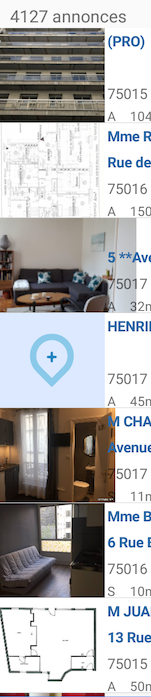
iOS:

 nbsoftware
on 21 Nov 2018
nbsoftware
on 21 Nov 2018
Better use Xamarin Forms Image now until the problem solved
 rredoh
on 22 Nov 2018
rredoh
on 22 Nov 2018
Hmmm... I can't because I need the DownsampleToViewSize functionality from FFImageLoading to release pressure on memory (I don't have thumbnails available).
I'd be better off downgrading Xamarin Forms & FFImageLoading altogether, but that's a pain too...
Daniel, any idea?
nbsoftware
on 22 Nov 2018
Sure, you can downgrade. In my case I can't downgrade because I need TitleView with Command Binding
rredoh
on 23 Nov 2018
Broken Aspect Fill + No Background Color.
Simplest project VS 15.9.2
<StackLayout>
<ffimageloading:CachedImage
Margin="10" HeightRequest="100" WidthRequest="100"
Aspect="AspectFit"
HorizontalOptions="Center" VerticalOptions="Center"
BackgroundColor="Gray"/>
<ffimageloading:CachedImage
Margin="10" HeightRequest="50" WidthRequest="100"
Aspect="AspectFill"
Source="xam_icon.png" HorizontalOptions="Center" VerticalOptions="Center"
BackgroundColor="Gray"/>
<ffimageloading:CachedImage
Margin="10" HeightRequest="100" WidthRequest="100"
Aspect="Fill" HorizontalOptions="Center" VerticalOptions="Center"
BackgroundColor="Gray"/>
</StackLayout>
Xamarin Forms 3.1 + FFImage 2.4.2 = OK
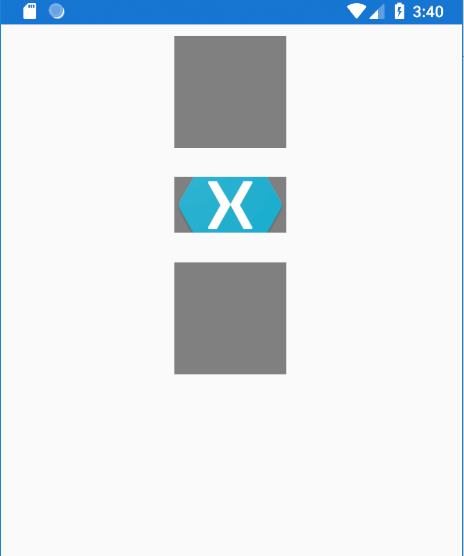
Xamarin Forms 3.4 + FFImage 2.4.4.859 & 860_pre =

Between this versions - initialization errors only .
 pkolosov
on 26 Nov 2018
pkolosov
on 26 Nov 2018
Hi Daniel,
Could you have a look at this one?
This issue is blocking me from releasing my app :/
At least unless I painfully downgrade every component...
Would be very appreciated.
Thanks
nbsoftware
on 5 Dec 2018
Hi @daniel-luberda ,
Could you check this?
rredoh
on 8 Dec 2018
Hi, I have the same issue (last version of XF and FFImageLoading). Did someone find any workaround other than downgrading or using xamarin image control ?
 jeremymarabel
on 12 Dec 2018
jeremymarabel
on 12 Dec 2018
Unfortunately no.
As this is only happening with Android, I'm still waiting for @daniel-luberda to take a look at this one...
nbsoftware
on 12 Dec 2018
@daniel-luberda @nbsoftware I have a PR up for this now which brings over the fix from XF.
 velocitysystems
on 14 Dec 2018
velocitysystems
on 14 Dec 2018
Thanks for your effort @velocitysystems :)
Please do an update @daniel-luberda
rredoh
on 15 Dec 2018
For those who can't waiting for the official update, base on @velocitysystems solution, you can add this renderer
using System;
using Android.Content;
using Android.Graphics;
using Android.Runtime;
using Project.Droid.Renderers;
using FFImageLoading.Forms;
using FFImageLoading.Forms.Platform;
using Xamarin.Forms;

[assembly: ExportRenderer(typeof(CachedImage), typeof(FFImage_CachedImageRenderer))]
namespace Project.Droid.Renderers
{
    class FFImage_CachedImageRenderer : CachedImageFastRenderer
    {

        public FFImage_CachedImageRenderer(Context context) : base(context)
        {
        }

        public FFImage_CachedImageRenderer(IntPtr javaReference, JniHandleOwnership transfer) : base(javaReference, transfer)
        {
        }

        protected override void OnLayout(bool changed, int left, int top, int right, int bottom)
        {
            base.OnLayout(changed, left, top, right, bottom);
            ClipBounds = GetScaleType() == ScaleType.CenterCrop ? new Rect(0, 0, right - left, bottom - top) : null;
        }

    }
}
@rredoh To use your workaround, you'll also need to:
- Add this to your renderer:
public static void OverrideDefaultFastRenderer()
{
    var assembly = typeof(Xamarin.Forms.Image).Assembly;
    Type registrarType = assembly.GetType("Xamarin.Forms.Internals.Registrar") ?? assembly.GetType("Xamarin.Forms.Registrar");
    var registrarProperty = registrarType.GetProperty("Registered", BindingFlags.Static | BindingFlags.NonPublic | BindingFlags.Public);

    var registrar = registrarProperty.GetValue(registrarType, null);
    var registerMethod = registrar.GetType().GetRuntimeMethod("Register", new[] { typeof(Type), typeof(Type) });
    registerMethod.Invoke(registrar, new[] { typeof(CachedImage), typeof(FFImage_CachedImageRenderer) });
}
- Call OverrideDefaultFastRenderer after calling
CachedImageRenderer.Init:
FFImageLoading.Forms.Platform.CachedImageRenderer.Init(enableFastRenderer);
FFImage_CachedImageRenderer.OverrideDefaultFastRenderer();
Thanks @velocitysystems :)
rredoh
on 17 Dec 2018
I can confirm it works as expected with this workaround.
Thanks!!
nbsoftware
on 19 Dec 2018
Fixed with https://github.com/luberda-molinet/FFImageLoading/pull/1170
Thanks @velocitysystems
 daniel-luberda
on 13 Feb 2019
daniel-luberda
on 13 Feb 2019
Is this in preview? The image is still bleeding out of it's view with DownSampleToViewSize prop enabled. I have version 2.4.4.859
 titonton
on 7 Mar 2019
titonton
on 7 Mar 2019
Related issues
 PostImpatica
·
4Comments
PostImpatica
·
4Comments
 paleicikas
·
5Comments
paleicikas
·
5Comments
 K232
·
3Comments
K232
·
3Comments
 BurningAXE
·
5Comments
BurningAXE
·
5Comments
 jjchiw
·
5Comments
jjchiw
·
5Comments
Most helpful comment
For those who can't waiting for the official update, base on @velocitysystems solution, you can add this renderer