Is there a way to catch a 401 error code? I first thought I could add it to the checkStatus function but
it seems that a 401 does reject the promise.
But there is little to no information in the error object.
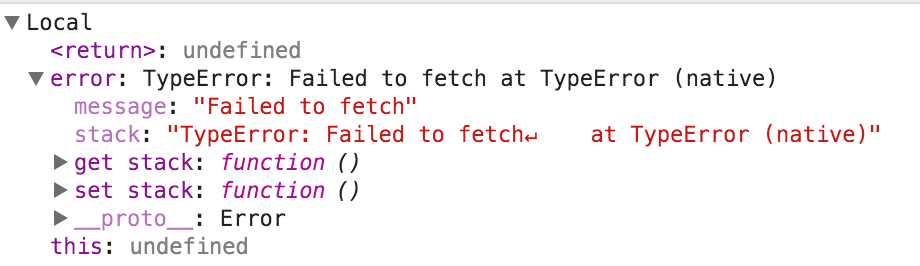
Am I missing something?
 vdclouis
All 24 comments
Curious, Fetch shouldn't reject the promise on HTTP errors, maybe edit your issue and paste the code you're using?
 ziir
on 18 Sep 2015
ziir
on 18 Sep 2015
I should have mentioned that I'm using Chrome 47. So if I understand correctly it actually doesn't use the fallback but just the standard spec. So it seems there's some issue there...
vdclouis
on 18 Sep 2015
The polyfill is not active in browsers that include a native implementation of window.fetch, including Chrome and Firefox.
Here's how you can detect and handle a 401 status code in the response from the server.
fetch('/').then(function(response) {
if (response.status === 401) {
// 401 returned from server
} else {
// another status code
}
})
 dgraham
on 18 Sep 2015
dgraham
on 18 Sep 2015
@dgraham that's not correct. Fetch seems to reject the promise on a 401. So you don't have access to the response object
vdclouis
on 18 Sep 2015
@vdclouis I've just tested in Chrome 45 latest stable, and it does resolve the promise on 401. So the behavior you're seeing in Chrome 47 prerelease with rejecting the promise might be a regression and I bet the Chromium dev team would like to know about that.
 mislav
on 19 Sep 2015
mislav
on 19 Sep 2015
@vdclouis Actually if I try to replicate your experience on Chrome Canary 47, I still can't. It behaves as expected. I added the /authfail endpoint and this test:
test('resolves promise on 401 error', function() {
return fetch('/authfail').then(function(response) {
assert.equal(response.status, 401)
assert.equal(response.ok, false)
return response.text()
}).then(function(body) {
assert.equal(body, 'you need to auth')
})
})
but it passes.
mislav
on 19 Sep 2015
Hmm, maybe because I'm sending credentials and thus does a Options call first?
vdclouis
on 19 Sep 2015
Is it a cross-site request?
mislav
on 19 Sep 2015
Yes, yes it is.
vdclouis
on 20 Sep 2015
The promise is supposed to be rejected if CORS doesn't allow it. I just tested with Chrome 45 and Chrome 47 and the promise is rejected by default when "No 'Access-Control-Allow-Origin' header is present on the requested resource."
However if I add the Access-Control-Allow-Origin: * header to the 401 response from the other server, the 401 response is received just fine (promise is resolved) and its HTTP status is readable and correct.
mislav
on 20 Sep 2015
Hmm, If this is a server setting I'm afraid I'm stuck...
vdclouis
on 20 Sep 2015
@vdclouis Hey Louis, was you able to find a way to detect 401 code for rejected by CORS request?
I'm stuck with same problem, I need to catch 503 status code
 NeXTs
on 8 Nov 2016
NeXTs
on 8 Nov 2016
@NeXTs any news? Could you get it to work?
 luisguilhermemsalmeida
on 23 Dec 2016
luisguilhermemsalmeida
on 23 Dec 2016
@luisguilhermemsalmeida https://github.com/github/fetch/issues/426
NeXTs
on 23 Dec 2016
I am seeing the same.
 gorillatron
on 23 Feb 2017
gorillatron
on 23 Feb 2017
I had to get the latest systemjs src and all was well. SystemJS v0.19.47 did the trick for me.
 kvigor
on 24 Mar 2017
kvigor
on 24 Mar 2017
For anyone who will have this issue in the future
Fetch API fails only if it can't make a request. And if it can, fetch will be executed successfully even if it has a bad status. For example:
fetch('http://google.com')
  .then(response => {
    // response from server
    // here you can check status of response and handle it manually
    switch (response.status) {
      case 500: console.error('Some server error'); break;
      case 401: console.error('Unauthorized'); break;
      // ...
    }
    // or you can check if status in the range 200 to 299
    if (response.ok) {
      return response;
    } else {
      // push error further for the next `catch`, like
      return Promise.reject(response);
      // or another way
      throw Error(response.statusText);
    }
  })
  .catch(error => {
    // here you will get only Fetch API errors and those you threw or rejected above
    // in most cases Fetch API error will look like common Error object
    // {
    //   name: "TypeError",
    //   message: "Failed to fetch",
    //   stack: ...
    // }
  });
And here are some (not all) of the errors from Fetch API:
- misspelled
urllikefetch('https::://hey.com')–TypeError Failed to execute 'fetch' on 'Window': Failed to parse URL from https::://hey.com; - nonexistent
urllikefetch('http://hey')–TypeError: Failed to fetch (GET http://hey/ net::ERR_NAME_NOT_RESOLVED); - you don't have an internet connection
fetch('https://google.com')–TypeError: Failed to fetch (GET https://google.com/ net::ERR_NAME_RESOLUTION_FAILED) - because of the Content Security Policy
fetch('https://google.com')–TypeError: Failed to fetch (Refused to connect to 'https://google.com/' because it violates the following Content Security Policy directive: "connect-src 'self'...) - because of the CORS
fetch('https://google.com')–TypeError: Failed to fetch (Fetch API cannot load https://google.com/ has been blocked by CORS policy: No 'Access-Control-Allow-Origin' header is present on the requested resource....)
The last two cases you can fix by adding (or editing) the appropriate headers on the server, if you have an access.
 racc-oo-n
on 13 Jun 2017
racc-oo-n
on 13 Jun 2017
Is there a way to get those additional error messages to determine which error is occurring? For example (in Chrome 67), I'm running the following code:
fetch('https://fail').then(function(response){
    console.log('Fetch was successful', response);
}).catch(function(event){
    console.log('Fetch failed', event);
});
Which fails, but the only message in the console is TypeError: Failed to fetch. This example is obvious what the problem is, but when I have an actual URL in the fetch that resolves via a standard request, but fails using fetch() I cannot figure out what the specific problem is.
Edit: Thanks for the info below- in my situation error.response is undefined so it must be a network error like you described.
 chrisblakley
on 6 Jul 2018
chrisblakley
on 6 Jul 2018
@chrisblakley You can inspect event.response (your event argument is actually an Error instance) in the catch handler to access response.statusText and other information about a failed HTTP response.
If there is no error.response, then the fetch failed with what is usually a network error, and browsers don't typically give us much information about those. See https://github.com/github/fetch/pull/562#issuecomment-330594122 for more context
mislav
on 6 Jul 2018
@github fix your damn shit pls, i have had many many problems doing this in react, and all i get when it rejects is TypeError: Failed to fetch. either make the errors more detailed or fix your shit 😠
 Illizion
on 30 Oct 2018
Illizion
on 30 Oct 2018
going off that, i know it is not a network error 😂 but i also know my api server is running properly and there are no auth problems, because i checked Okta
Illizion
on 30 Oct 2018
@mislav got the core of the problem here I believe. Fetch response promise is not rejected because of 401 status code but because 401 responses don't have the proper CORS headers.
In my case (Laravel), I had to add them manually on 401 error responses:
    // app/Exceptions/Handler.php
    protected function prepareJsonResponse($request, AuthenticationException $e)
    {
        // ...

        $response = response()->json($data, $statusCode);

        $cors = app(Barryvdh\Cors\Stack\CorsService::class);

        if ($cors->isCorsRequest($request)) {
           $response = $cors->addActualRequestHeaders($response, $request);
        }

        return $response;
    }
 eightyfive
on 5 Nov 2018
eightyfive
on 5 Nov 2018
either way, this spec desperately needs to be fixed
Illizion
on 20 Nov 2018
I'd say it works as expected, there is nothing to be fixed.
eightyfive
on 20 Nov 2018
Related issues
 javan
·
3Comments
javan
·
3Comments
 AllenFang
·
5Comments
AllenFang
·
5Comments
 fczuardi
·
3Comments
fczuardi
·
3Comments
 proofrock
·
3Comments
proofrock
·
3Comments
 codeashian
·
3Comments
codeashian
·
3Comments
Most helpful comment
For anyone who will have this issue in the future
Fetch API fails only if it can't make a request. And if it can,
fetchwill be executed successfully even if it has a bad status. For example:And here are some (not all) of the errors from Fetch API:
urllikefetch('https::://hey.com')–TypeError Failed to execute 'fetch' on 'Window': Failed to parse URL from https::://hey.com;urllikefetch('http://hey')–TypeError: Failed to fetch (GET http://hey/ net::ERR_NAME_NOT_RESOLVED);fetch('https://google.com')–TypeError: Failed to fetch (GET https://google.com/ net::ERR_NAME_RESOLUTION_FAILED)fetch('https://google.com')–TypeError: Failed to fetch (Refused to connect to 'https://google.com/' because it violates the following Content Security Policy directive: "connect-src 'self'...)fetch('https://google.com')–TypeError: Failed to fetch (Fetch API cannot load https://google.com/ has been blocked by CORS policy: No 'Access-Control-Allow-Origin' header is present on the requested resource....)The last two cases you can fix by adding (or editing) the appropriate headers on the server, if you have an access.