Describe the bug
Unable to acces my Google Drive, getting an error message saying: You are not signed in
You are signed out. Sign back in, then click 'Retry'.
When I click on "Retry" nothing happens. The "_Sign back in_ line is a link that opens a browser window in my case safari where it takes me to the google sign in page. I sign in and get the message "You are now signed in, go back and click retry" - Close the window"
I'm clicking on "Retry" but as I mentioned nothing happens.
To Reproduce
Steps to reproduce the behavior:
- Go to '...'
- Click on '....'
- Scroll down to '....'
- See error
Expected behavior
Hoping that one you guys can allocate the error and fix the bug.
Screenshots

Desktop (please complete the following information):
- OS: [e.g. iOS]
- Browser [e.g. chrome, safari]
- Version [e.g. 22]
Smartphone (please complete the following information):
- Device: MacBook Pro retina 15-inch early 2013
- OS: Mojave Version 10.14.6
- Browser: Safari
- Version: Version 12.1.2
Additional context
Add any other context about the problem here.
 KrisBataican
All 30 comments
same issue here for me ! :)
 Gamgie
on 30 Mar 2020
Gamgie
on 30 Mar 2020
Same issue here
Desktop:
- OS: macOS Mojave 10.14.6
- Version: 5.4.3
 danielleos
on 31 Mar 2020
danielleos
on 31 Mar 2020
Same issue here
Desktop:
- OS: Windows 10
- Version: 5.4.3
 dorukkarinca
on 1 Apr 2020
dorukkarinca
on 1 Apr 2020
Same issue here
Desktop:
OS: macOS Catalina 10.15.4
Version: 5.4.4-beta.3
 WichardRiezebos
on 8 Apr 2020
WichardRiezebos
on 8 Apr 2020
Same
OS: macOS Catalina 10.15.3
Version: 5.4.4-beta.3
 lisaq
on 15 Apr 2020
lisaq
on 15 Apr 2020
Same issue here, hope you can fix it!
OS: macOS Catalina 10.15.4
Version: 5.4.4-beta.3
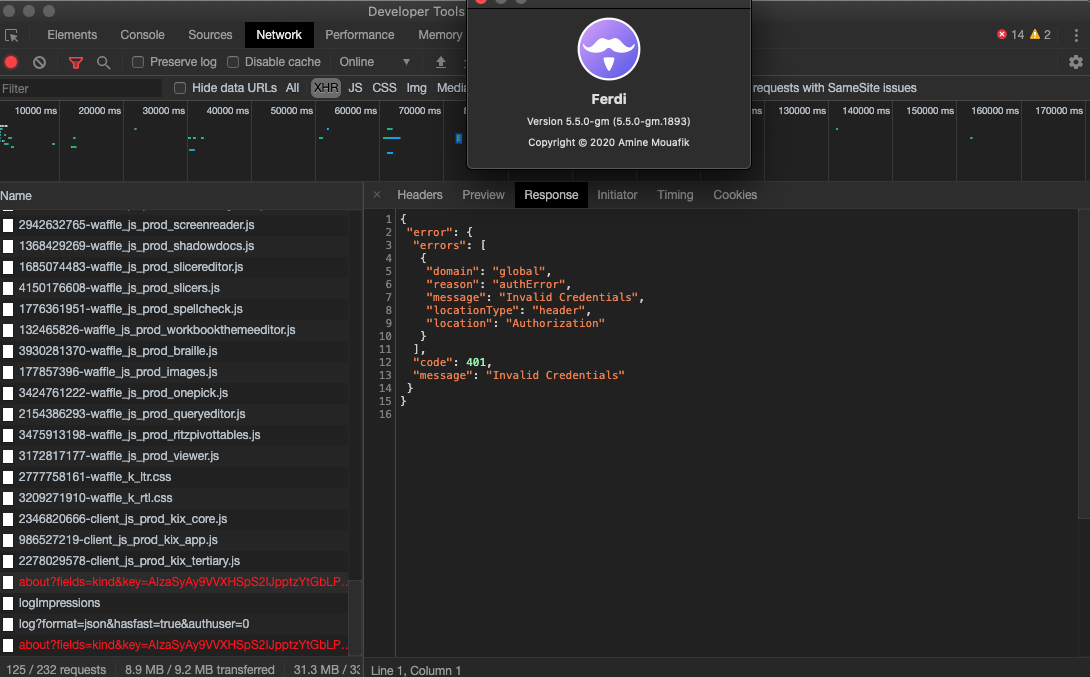
This is the response of this
{
 "error": {
  "errors": [
   {
    "domain": "global",
    "reason": "authError",
    "message": "Invalid Credentials",
    "locationType": "header",
    "location": "Authorization"
   }
  ],
  "code": 401,
  "message": "Invalid Credentials"
 }
}
 harrytran998
on 22 Apr 2020
harrytran998
on 22 Apr 2020
@harrytran998 Can you try with 5.5.0-gm and let me know if that still is an issue in that version?
Thank you! 🙏
 kytwb
on 22 Apr 2020
kytwb
on 22 Apr 2020
@kytwb I can confirm I have the same error under 5.5.0-gm (Windows 10).
dorukkarinca
on 22 Apr 2020
@harrytran998 Can you try with 5.5.0-gm and let me know if that still is an issue in that version?
Thank you! 🙏
Thank you for quickly reply! But yes, It's still happen!
harrytran998
on 23 Apr 2020
@harrytran998 can you please share the request headers from within Ferdi and the ones from within your normal browser where it works?
kytwb
on 25 Apr 2020
@harrytran998 can you please share the request headers from within Ferdi and the ones from within your normal browser where it works?
Of course! This is from Ferdi
:authority: clients6.google.com
:method: GET
:path: /drive/v2internal/about?fields=kind&key=AIzaSyAy9VVXHSpS2IJpptzYtGbLP3-3_l0aBk4
:scheme: https
accept: */*
accept-encoding: gzip, deflate, br
accept-language: en-US
authorization: SAPISIDHASH 1587905655_2a0ba914261d7a0b0e83e8c5a50e9b356a544801_u
cookie: SID=wQd73psSqS_U_O-xEvhW1_UunzDWRonXbwRi8Ld1lwDRhH9OrdsZzOUj4zgAsBpG0R07jg.; __Secure-3PSID=wQd73psSqS_U_O-xEvhW1_UunzDWRonXbwRi8Ld1lwDRhH9OZFiruVeP2TG4aLlE86lgEQ.; HSID=Acth5ctm-0dIJHfxN; SSID=ATLDnD26Mkl_aQCm0; APISID=oPldoNDkf04eZ3E4/AQ1puYEaMh7n7JdPN; SAPISID=x0Az-MfYhIt_ALLx/AQzGSBCKnfEm-Sxb3; __Secure-HSID=Acth5ctm-0dIJHfxN; __Secure-SSID=ATLDnD26Mkl_aQCm0; __Secure-APISID=oPldoNDkf04eZ3E4/AQ1puYEaMh7n7JdPN; __Secure-3PAPISID=x0Az-MfYhIt_ALLx/AQzGSBCKnfEm-Sxb3; 1P_JAR=2020-4-26-12; NID=203=hLZE3R3lu47TRWnQen-H5brB_L5QF8YbAin76UKN79Hae6fncGQ4oKHCCvzJ5QczKhpOJtNPKOpcHDB32D8hFdBDuaqcbQupdlxqXBsvDSptASm2gxBaRVY48kUd-cOiMFwjXf5Hp4n8-7VpY8EqbBneKCEykht0aiMn_ffiXzbe3BNEcD9uOLib4DdTUMCb; SIDCC=AJi4QfH2OcXclRXGcqkpmpzynXpIRhhQdviSvA24EDEXOdzpGxgQFheIXSsVRs7nNeALcy6edQ
referer: https://drive.google.com/drive/my-drive
sec-fetch-dest: empty
sec-fetch-mode: cors
sec-fetch-site: same-site
user-agent: Mozilla/5.0 (Macintosh; Intel Mac OS X 10.15; rv:72.0) Gecko/20100101 Firefox/72.0
x-goog-authuser: 0
And this one from google chrome
:authority: clients6.google.com
:method: GET
:path: /drive/v2internal/about?openDrive=true&reason=301&syncType=0&errorRecovery=false&fields=kind%2Cuser%2CquotaBytesTotal%2CquotaBytesUsed%2CquotaBytesUsedAggregate%2CquotaBytesUsedInTrash%2CquotaBytesByService%2CquotaType%2CrootFolderId%2CdomainSharingPolicy%2ClargestChangeId%2CimportFormats&key=AIzaSyAy9VVXHSpS2IJpptzYtGbLP3-3_l0aBk4
:scheme: https
accept: */*
accept-encoding: gzip, deflate, br
accept-language: en-US,en;q=0.9,vi;q=0.8
authorization: SAPISIDHASH 1587906079_64f086319e20b3484e3cb33a075cf5851c81484d_u
cookie: COMPASS=drivev2=ELO_4vQFGrIBAAlriVckSykNqR7Qa-VLOD6OoC8WXXwT7iVnnA-mhRjTCEw6IGiYnqbK_N4gV5DK5onCTETFNZ3EinVsZeZSK6yT5vawMBfy-DkfgUoi4VJXCsbQAFXXBEpaypI7yrFkLaqQ2Q2vnrv0DoKcRAQdCxafOYfIIVrNJJSQcBNWPKloIdEmkODMOGRwVEeyFta4mCfquwpL6BRTTtLVAcwdl4YLO795Mfp-b2Z39wgP352jWA; CONSENT=YES+VN.en+201906; SEARCH_SAMESITE=CgQIvo8B; ANID=AHWqTUlaFo4c2EZx4b2F7C8d1_5vlXorrJY-jA51yZGAaD4AnBe6e1v0INGUFeJf; HSID=Al5J4e5OdaBHXh0UK; SSID=AsAjgV1s6mqZaUFjG; APISID=ceKbYzgb0rwjpWBk/AQRZ-YBBkKWG13gd4; SAPISID=m35xIzy1tp9bdIVQ/AIB-Z5WV_a2_h_5-B; __Secure-HSID=Al5J4e5OdaBHXh0UK; __Secure-SSID=AsAjgV1s6mqZaUFjG; __Secure-APISID=ceKbYzgb0rwjpWBk/AQRZ-YBBkKWG13gd4; __Secure-3PAPISID=m35xIzy1tp9bdIVQ/AIB-Z5WV_a2_h_5-B; SID=wQe6QOw0NRcNGu_KEPIVxSgAETxZ41OuHm0geUfIZmVAXtZd01c3DOYmXVhyuiO5jdkYFg.; __Secure-3PSID=wQe6QOw0NRcNGu_KEPIVxSgAETxZ41OuHm0geUfIZmVAXtZdzhvalrJ1n4rDSVNTmAem2Q.; NID=203=AwJw25S4GqqUOPr4hLiQcEnpTQWSqG0vA8uShoLrlwLn6MHpQZs5q10hOlAKhRhcqg11qCM8Sc53Muhsdgxi1bYpWjToDuTPvv82YZJEIlz-o3kug7h3HiAo6CQwF3cGcwlxeMyeA_-KaO-XUvBGWHXtXjCFO-nh7KlB4M1_T8neq6AokA1GxnYPlyn8uwBtjCPqn48rc2oCWtO492twMydr7bViMp6FQ6tR4wVaAr_dI1XNUu_EMBKs4hXZ7ZD7mrbymYSq72I80gOSzITcZ2XE6iq2WdG1ArEKFesV1ErU_ViJGl3iO5a3z9Ihk5HPSHA1qRW3HiR63WQk2oTrSNdw4aDdMSKKaejHh5Qhgcm8MrBb2tXvsNVZT7w8ZKOEQhdLrzZWhSoabGLU-xCkSXoHs_BNQeUTwIwBqkTkxBe1UiTHnBPh6fMiUhJ7367J5PGGDCt_WaQ-Mb-ANkspi1s4cxDjHYVEuGMrAma7p-CoUna-3hyVNZ_921BRCFMjFs2uDVniRA; 1P_JAR=2020-4-26-12; SIDCC=AJi4QfEdGi_V62ZDi9mntw7EyU-aqa2eBlZq6TflUYxL7q0YHFHaU2majaCvXGV5PDub1kflSVhK
if-none-match: "zHq4IbGVdtMqBIgiigavVtyCFDA"
origin: https://drive.google.com
referer: https://drive.google.com/drive/u/0/
sec-fetch-dest: empty
sec-fetch-mode: cors
sec-fetch-site: same-site
user-agent: Mozilla/5.0 (Macintosh; Intel Mac OS X 10_15_4) AppleWebKit/537.36 (KHTML, like Gecko) Chrome/81.0.4044.122 Safari/537.36
x-client-data: CIm2yQEIpLbJAQjBtskBCKmdygEI0K/KAQi8sMoBCJq1ygEI7bXKAQiOusoBGL66ygE=
x-goog-authuser: 0
This can help you? @kytwb
harrytran998
on 26 Apr 2020
Via https://www.diffchecker.com/
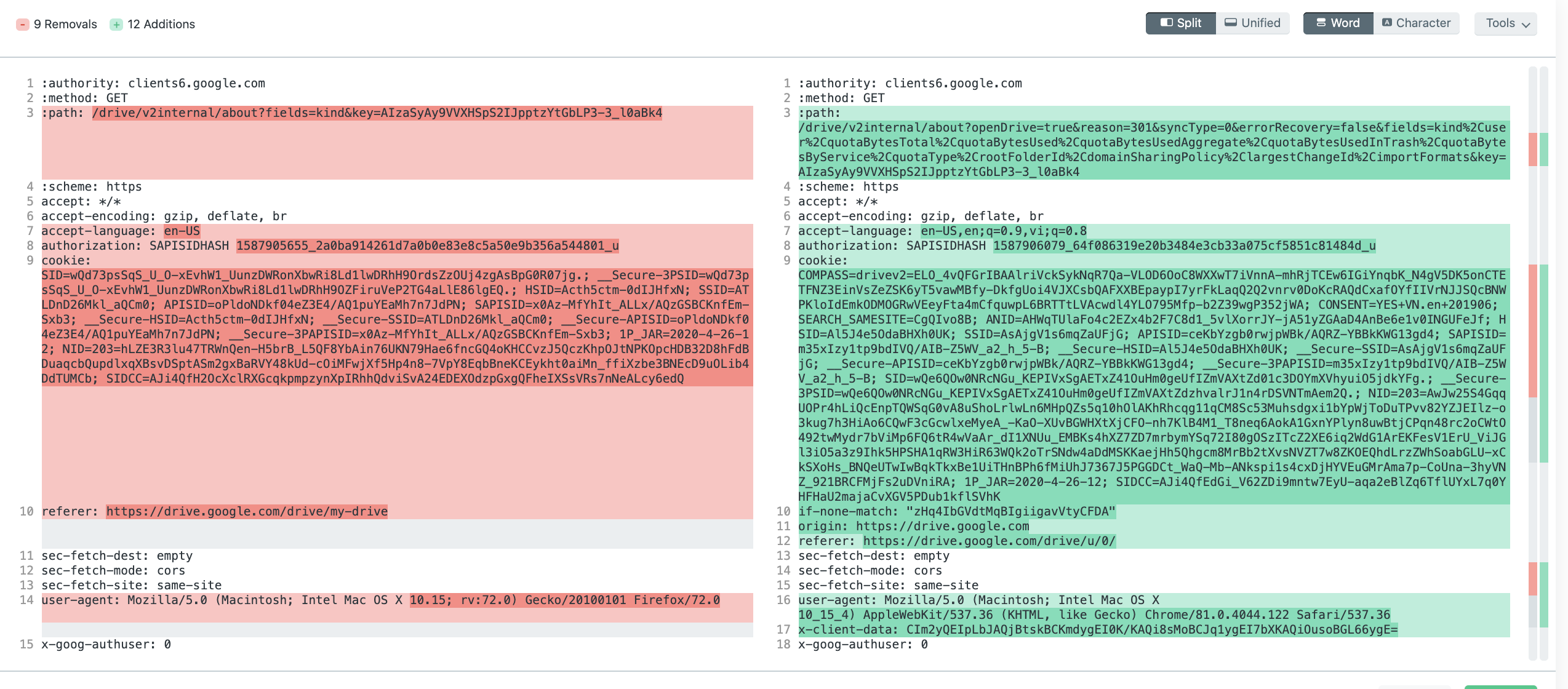
I think we need to properly set origin, maybe x-client-data (?) and referrer using modifyRequestHeaders as it was done via https://github.com/getferdi/recipes/pull/137 for Google Hangouts.
kytwb
on 26 Apr 2020
I'm still having this issue!
Desktop:
OS: Windows 10
Version: 5.5.0
 eflames
on 5 May 2020
eflames
on 5 May 2020
Unfortunately last version Ferdi 5.5.0 is still not compatible with Google Drive on MacOS.
That's a shame since it's a no-go to use Ferdi yet.
Changing the User-Agent did not help. Best I had was a mobile version by setting user-agent to Mozilla/5.0 (Macintosh) AppleWebKit/537.36 (KHTML, like Gecko) Chrome/80.0.3987.122 Safari/537.36 Edge/12.10136.
Setting origin did not help neither.
x-client-data is not used by Station, and Station works. It's more of a tracking id.
 renard
on 29 May 2020
renard
on 29 May 2020
@renard @eflames in your google meet recipe index.html - modify the file with the following piece of code -
var os = require('os')
module.exports = Franz =>
class googledrive extends Franz {
modifyRequestHeaders() {
return [
{
headers: {
'user-agent': window.navigator.userAgent.replace(/(Ferdi|Electron)/S+ ([^)]+)/g, '').trim(),
'origin': 'https://drive.google.com'
},
requestFilters: {
urls: [':///*'],
},
},
];
}
};
This will be fixed via the PR - https://github.com/getferdi/recipes/pull/188. But until then use this fix above
 mahadevans87
on 29 May 2020
mahadevans87
on 29 May 2020
You're snippet is not correct but this one https://github.com/getferdi/recipes/blob/da05bb8f15eb8a50c2bda4ef417b3c38c162d189/uncompressed/googledrive/index.js works now.
@mahadevans87 Thanks a lot!
Still documents are opened in an other browser like said in #756.
Maybe because document are using doc.google.com instead of drive.google.com.
Station uses
extended_scopes":["https://docs.google.com","https://drive.google.com"]
See:
{
  "name": "Google Drive",
  "start_url": "https://accounts.google.com/AddSession?passive=true&Email={{userIdentity.profileData.email}}&continue=https://drive.google.com/drive/{{#if moreThanOneIdentity}}u/{{userIdentity.profileData.email}}{{/if}}",
  "icons": [
    {
      "src": "https://cdn.filestackcontent.com/J4MAUo7LRZm2fhyp6X0f",
      "platform": "browserx"
    }
  ],
  "theme_color": "#FCCD48",
  "scope": "https://drive.google.com",
  "bx_override_user_agent": "Mozilla/5.0 (Macintosh; Intel Mac OS X 10_13_6) AppleWebKit/537.36 (KHTML, like Gecko) Chrome/79.0.3945.79 Safari/537.36 Edge/80.0.361.62",
  "bx_use_native_window_open_on_host": true,
  "bx_legacy_service_id": "gdrive-mu",
  "extended_scopes": [
    "https://docs.google.com",
    "https://drive.google.com"
  ],
  "bx_multi_instance_config": {
    "preset": "google-account",
    "presets": [
      "google-account"
    ],
    "instance_wording": "account",
    "instance_label_tpl": "{{email}}",
    "start_url_tpl": "https://accounts.google.com/AddSession?passive=true&Email={{userIdentity.profileData.email}}&continue=https://drive.google.com/drive/{{#if moreThanOneIdentity}}u/{{userIdentity.profileData.email}}{{/if}}",
    "new_page_url_tpl": "https://drive.google.com/drive/{{#if moreThanOneIdentity}}u/{{userIdentity.profileData.email}}{{/if}}"
  }
}
Now wi a fresh new account I got this message:
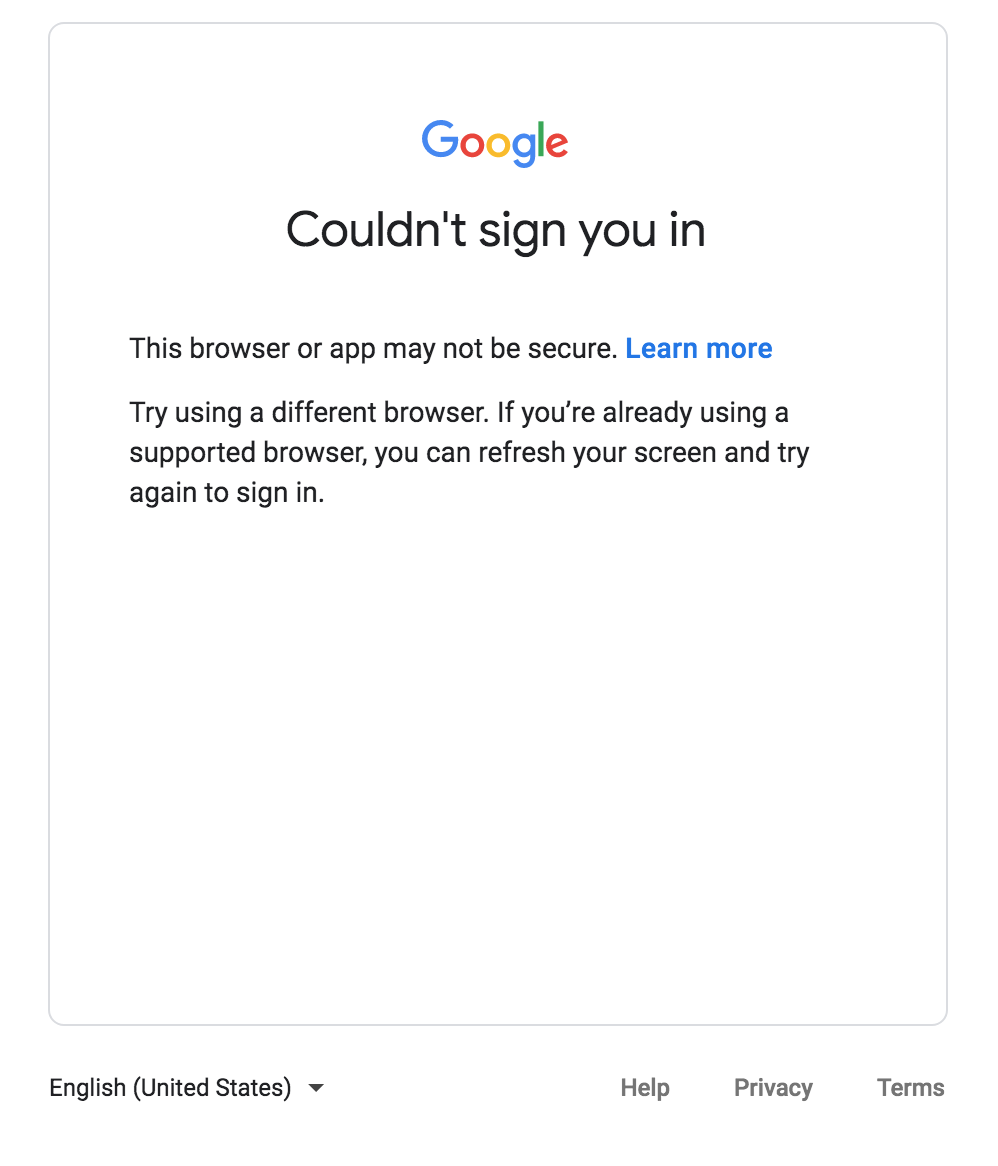
This was fixed by using this user-agent:
'user-agent': "Mozilla/5.0 (Macintosh; Intel Mac OS X 10_13_6) AppleWebKit/537.36 (KHTML, like Gecko) Chrome/79.0.3945.79 Safari/537.36 Edge/80.0.361.62",
@renard Ah yes. I have not yet started working on that issue since I initially bumped into this login error. I don't think its because of the extended scopes. Basically drive opens a document in a new window. However, in ferdi it opens the tab in the default browser. I will explore on how to open this inside Ferdi.
mahadevans87
on 29 May 2020
@mahadevans87 Ok this would be nice to have multiple tabs (or something similar) like station does.
This is helpful when working on several documents.
Since the domain is different (doc.google.com vs drive.google.com) Ferdi has to know it should handle this query instead of forwarding it to the default browser.
renard
on 29 May 2020
@renard - I have made a fix for the google drive document opener here - https://github.com/getferdi/ferdi/pull/787
mahadevans87
on 31 May 2020
@mahadevans87 Nice.
Is there an easy way to monkey patch an installed version without having to go through the whole rebuild process?
renard
on 1 Jun 2020
@mahadevans87 is there any chance to support tabs in Ferdi instead of opening new windows?
renard
on 1 Jun 2020
This issue has been automatically marked as stale because it has not had recent activity. Please check if this issue is still relevant and please close it if it's not. This will make sure that our open issues are actually of use and reduce the list of obsolete issues. Thank you for your contributions.
![stale[bot] picture](https://avatars3.githubusercontent.com/in/1724?v=4&s=40) stale[bot]
on 31 Jul 2020
stale[bot]
on 31 Jul 2020
Hi everyone. I confirm this issue still exists.
FERDI
Version: 5.5.0 (x64)
Electron: 8.2.3
Node.js: v12.13.0
Platform: win32
Note: I'm using the portable version of Ferdi by CrazyMax here: https://portapps.io/app/ferdi-portable/

 MikeBlueberry
on 5 Aug 2020
MikeBlueberry
on 5 Aug 2020
Same here, MacOS 10.14.6, Ferdi 5.5.0
- Adding Drive takes me to https://www.google.com/drive/ in an unlogged in state.
- Clicking "Go to Drive" opens my browser.
- Right-clicking "Go to Drive" and choosing "Open in Ferdi" allows me to login, but then I get "You are not signed in" as above.
 dzg
on 13 Aug 2020
dzg
on 13 Aug 2020
Bumping this. Applies to other Google services like Classroom (when added as a Custom Website)
 arielaco
on 3 Sep 2020
arielaco
on 3 Sep 2020
Having this error on Mac Catalina. Version 5.5.0
 amykluber
on 8 Sep 2020
amykluber
on 8 Sep 2020
You're snippet is not correct but this one https://github.com/getferdi/recipes/blob/da05bb8f15eb8a50c2bda4ef417b3c38c162d189/uncompressed/googledrive/index.js works now.
@mahadevans87 Thanks a lot!
Still documents are opened in an other browser like said in #756.
Maybe because document are using doc.google.com instead of drive.google.com.
Station uses
extended_scopes":["https://docs.google.com","https://drive.google.com"]See:
{
  "name": "Google Drive",
  "start_url": "https://accounts.google.com/AddSession?passive=true&Email={{userIdentity.profileData.email}}&continue=https://drive.google.com/drive/{{#if moreThanOneIdentity}}u/{{userIdentity.profileData.email}}{{/if}}",
  "icons": [
    {
      "src": "https://cdn.filestackcontent.com/J4MAUo7LRZm2fhyp6X0f",
      "platform": "browserx"
    }
  ],
  "theme_color": "#FCCD48",
  "scope": "https://drive.google.com",
  "bx_override_user_agent": "Mozilla/5.0 (Macintosh; Intel Mac OS X 10_13_6) AppleWebKit/537.36 (KHTML, like Gecko) Chrome/79.0.3945.79 Safari/537.36 Edge/80.0.361.62",
  "bx_use_native_window_open_on_host": true,
  "bx_legacy_service_id": "gdrive-mu",
  "extended_scopes": [
    "https://docs.google.com",
    "https://drive.google.com"
  ],
  "bx_multi_instance_config": {
    "preset": "google-account",
    "presets": [
      "google-account"
    ],
    "instance_wording": "account",
    "instance_label_tpl": "{{email}}",
    "start_url_tpl": "https://accounts.google.com/AddSession?passive=true&Email={{userIdentity.profileData.email}}&continue=https://drive.google.com/drive/{{#if moreThanOneIdentity}}u/{{userIdentity.profileData.email}}{{/if}}",
    "new_page_url_tpl": "https://drive.google.com/drive/{{#if moreThanOneIdentity}}u/{{userIdentity.profileData.email}}{{/if}}"
  }
}
This worked!
amykluber
on 9 Sep 2020
Same issue here.
OS: Ubuntu 20.04
Browser: FireFox
Version: 5.5.0(x64)
 allanjonis
on 23 Sep 2020
allanjonis
on 23 Sep 2020
Same issue.
OS: Pop!_OS 20.04 LTS
Version: 5.5.0(x64)
 Andreqlp
on 5 Oct 2020
Andreqlp
on 5 Oct 2020
Related issues
 avielc
·
3Comments
avielc
·
3Comments
 webworker01
·
3Comments
webworker01
·
3Comments
 PeSader
·
3Comments
PeSader
·
3Comments
 AP-Hunt
·
3Comments
AP-Hunt
·
3Comments
 Jendker
·
3Comments
Jendker
·
3Comments