Ferdi: Gmail requires cookies to be enabled
Recently, Gmail in Ferdi has started showing the following error on a daily basis:
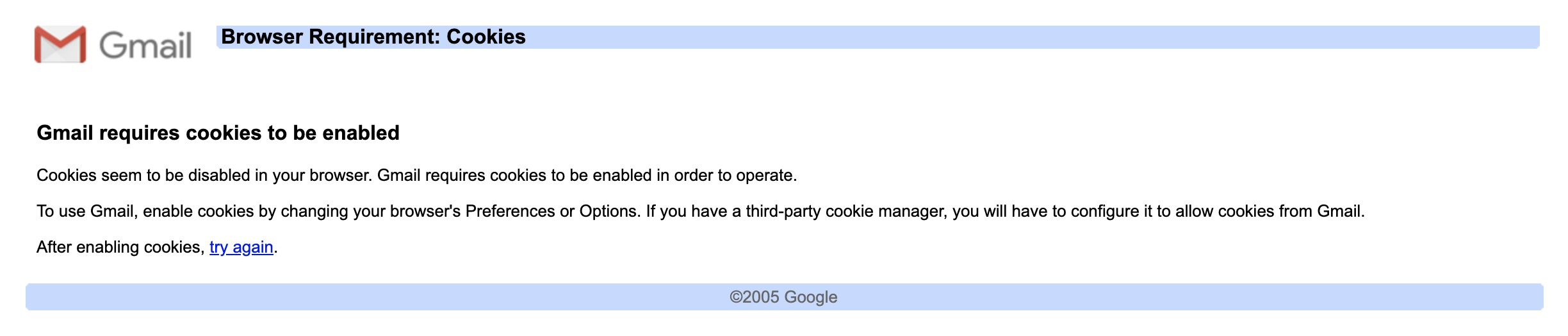
Reloading the tab does not make the error go away, but clicking the "try again" button does.
I have 6 Gmail services, and it's not a specific service that this happens to.
Versions
- macOS 10.14.6
- Ferdi 5.4.3
 probablykasper
All 10 comments
Probably related to #359.
 vantezzen
on 11 Feb 2020
vantezzen
on 11 Feb 2020
I had this happen as well and clicking "try again" does the trick.
 kytwb
on 21 Feb 2020
kytwb
on 21 Feb 2020
@kytwb Well yes, until it appears once again for all my six services the next day
probablykasper
on 21 Feb 2020
@probablykasper Google is giving us a hard time, but hopefully we will manage to make things work better 🙏 Thanks for bearing with us.
kytwb
on 22 Feb 2020
GMail doesn't work at all for me ever since.
Nontheless Ferdi works better than Rambox, so I'll still stay with Ferdi.
All fingers crossed you can solve that problem.
If I can help, just let me know. Plenty of time here atm, for some reason ;)
 DasJott
on 21 Mar 2020
DasJott
on 21 Mar 2020
@DasJott Can you tell me what problem you are experiencing exactly? The cookie issue can be fixed by clicking "try again" in the original screenshot. If you're experiencing another issue, we should be able to assist with a temporary fix.
Otherwise thank you for proposing to dive in! 💪🙏 We appreciate it! 😄 To start with, maybe you could take a look at the README and setup the development environment. Then, it would be interesting to inspect the requests (headers) made to Google within the service (using the service developer tools) and compare with your normal browser to find the differences; then try to bring changes to the code to make the webview used in Ferdi behave more like your normal browser.
Feel free to share your findings/thought process even if you don't manage to fix the issue, that could be picked up where you left things off later by someone else 🙏 Thank you again!
kytwb
on 21 Mar 2020
Earlier I had some issue with Gmail (maybe about opening links, or something else about cookies), and found an issue that suggested changing the user agent. I'm not 100% sure, but I think this problem may have gone away after I changed the user agent to this:
Mozilla/5.0 (Macintosh; Intel Mac OS X 10_15_2) AppleWebKit/537.36 (KHTML, like Gecko) Chrome/79.0.3945.130 Safari/537.36
Note: Until it's added as a setting, check #264 for how to change user agent
probablykasper
on 21 Mar 2020
In response to @vantezzen, I am not sure whether this issue is related to #359 because I have the issue in #359 but not this issue (I changed user agents).
- OS: Windows 10
- Version: 5.4.3
 dorukkarinca
on 7 Apr 2020
dorukkarinca
on 7 Apr 2020
I experienced this once in v5.5.0-gm (macOS), clicking retry properly reloaded Gmail.
kytwb
on 22 Apr 2020
This issue has been automatically marked as stale because it has not had recent activity. Please check if this issue is still relevant and please close it if it's not. This will make sure that our open issues are actually of use and reduce the list of obsolete issues. Thank you for your contributions.
![stale[bot] picture](https://avatars3.githubusercontent.com/in/1724?v=4&s=40) stale[bot]
on 21 Jun 2020
stale[bot]
on 21 Jun 2020
Related issues
 sbienkow
·
3Comments
sbienkow
·
3Comments
 dzg
·
3Comments
dzg
·
3Comments
 ammarmalhas
·
3Comments
ammarmalhas
·
3Comments
 PeSader
·
3Comments
PeSader
·
3Comments
 avielc
·
3Comments
avielc
·
3Comments
Most helpful comment
@probablykasper Google is giving us a hard time, but hopefully we will manage to make things work better 🙏 Thanks for bearing with us.