Ferdi: Universal Dark Mode is inconsistent
Describe the bug
Upon loading darkmode.css into Messenger, nothing happens. Service remains white and no attributes from the CSS file are shown. Viewing devtools for service, no styles are loaded from darkmode.css.
To Reproduce
- Go to Messenger service
- Click on 'Enable Dark Mode'
- Click on 'Open darkmode.css'
- Add styles and save
Expected behavior
Expected to have darkmode.css rendered
Desktop
- OS: MacOS High Sierra 10.13.6
- Version 5.4.0-beta.2
Additional context
I've tried the same darkmode.css on the Messenger service within Franz and it works as expected. Is there a reason that it is not loading darkmode.css for Ferdi?
 incace
All 34 comments
Ferdi does have some problems with dark mode probably because of the Dark Reader implementation.
For me Ferdi just randomly doesn't load in or only partially loads in my dark modes at launch, but that is fixed by reloading a given service.
I use a custom dark mode for Messenger and Telegram, but it only happens to TG every 1 or 2 weeks, while for Messenger it's several times a week.
If you reload just your Messenger by right clicking the icon on the left does it still not load?
Maybe there's an error message in the console the team could direct us to?
 Gaboris
on 25 Oct 2019
Gaboris
on 25 Oct 2019
Here (Windows 10, Ferdi 5.4.0-beta.2) dark mode stopped working since last update, when Universal Dark mode was introduced.
Before this Dark Mode was working, still soon I needed to reload single services.
 nessunluogo
on 25 Oct 2019
nessunluogo
on 25 Oct 2019
I currently can't reproduce this with Ferdi 5.4.0-beta.5 (current develop branch). I now added some debug statements to help fix this issue. If you open the service developer tools on the latest develop commit (should be published as v5.4.0-beta.5), it will show exactly what its doing.
I also added a possible fix for this issue - but as I can't reproduce it I don't know if it fixed it.
Using MacOS Catalina 10.15.
 vantezzen
on 25 Oct 2019
vantezzen
on 25 Oct 2019
If you reload just your Messenger by right clicking the icon on the left does it still not load?
Maybe there's an error message in the console the team could direct us to?
Reloading both services and Ferdi did not fix it on my end. I tried disabling universal dark mode, but still doesn't fix it. Multiple reloads and nothing, but today it randomly loaded for reload.
Here's the interesting part. If I right-click and reload on the icon, it loads white. BUT, if I then open service devtools and then right-click reload while devtools is open, the darkmode loads sometimes. Like 1 out of 4 times. Weird?
I updated today to beta.4 and darkmode.css loaded right away first time. Crossing fingers and will post back if there's any issue.
UPDATE
Running into the same issue above with WhatsApp. If I reload with devtools open, it loads sometimes. Not seeing the issue in console though just a bunch of sourcemap failures for WhatsApp.
With both services, it's working about 1/10 reloads. Seems to be random whether or not the darkmode.css actually loads. So, not working here. beta.4
incace
on 26 Oct 2019
It looks like the recipe script sometimes can't get loaded and instead throws this error:
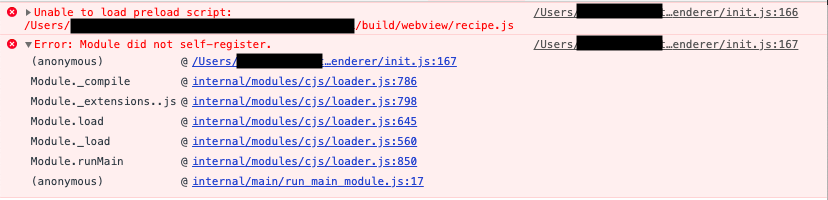
It can't load the module because the module "did not self-register". Looking online, most people suggested trying to reinstall node_modules and rebuilding the modules but both did nothing.
At least on my computer it looks like the service always succeeds at loading the darkmode when initially creating the webview but fails to do so whenever I reload it. I tried always disabling the webview's websecurity (in case that blocked the module from being loaded) but that didn't fix it.
I now also tried to change the reload script from updating the webview url to directly reloading the webview (c8e7dabd) and that _looks_ like it fixed the issues for me. No matter how often I refresh and reload the services, the darkmode gets loaded correctly everytime. I also don't have any conflicts between universal dark mode and darkmode.css anymore.
The fixed will be published as 5.4.0-beta.5 in the next couple of days so you can test if that was also the problem on your end.
vantezzen
on 27 Oct 2019
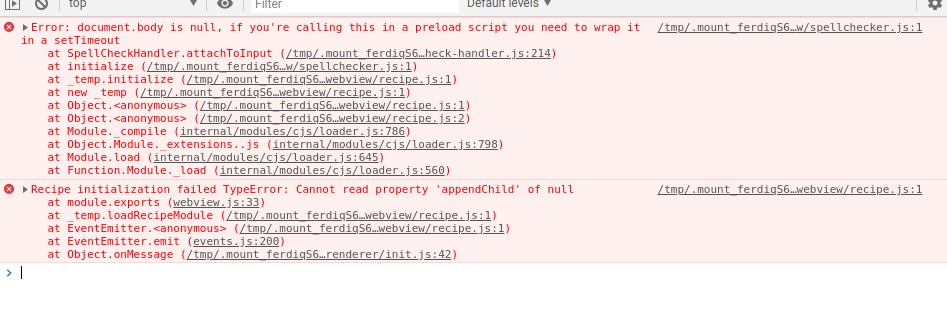
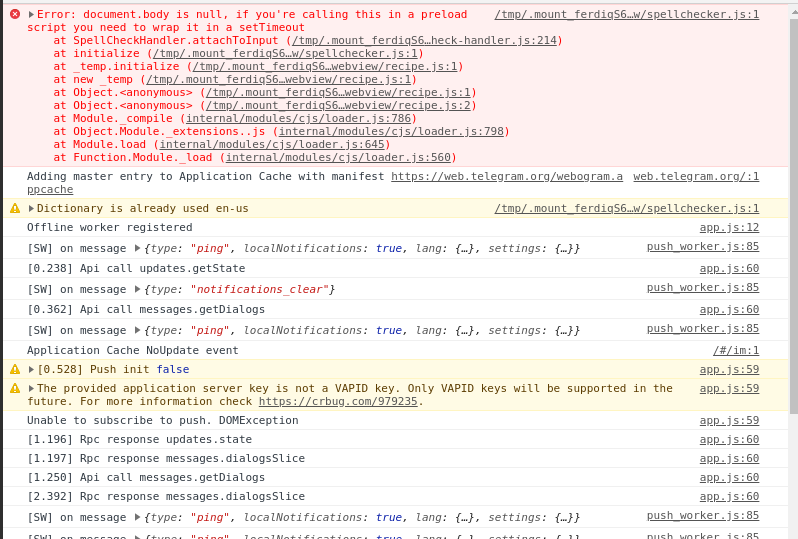
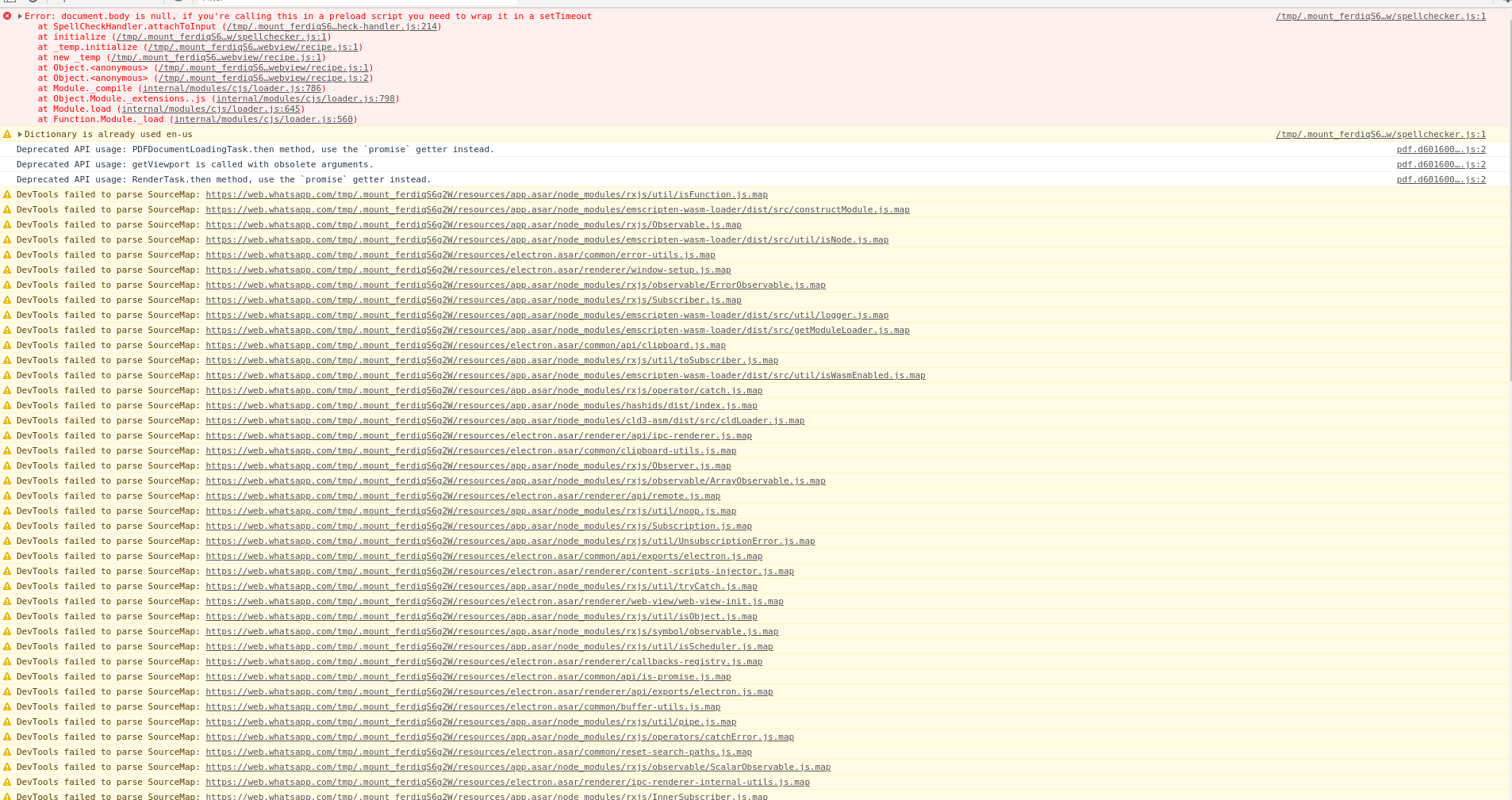
I still have some problems with dark mode. I couldn't apply a dark theme to google calendar via darkmode.css, the Enable Dark Mode setting in the service was always enabled but didn't help. Telegram was working with dark reader and I could set a darkmode.css for whatsapp (not sure if it worked because of the css or dark reader). So I deleted the $HOME/.config/Ferdi and re-added the services (telegram, whatsapp and google calendar). Now Whatsapp Web works with Dark reader, but neither telegram nor google calendar appear dark (also not with a darkmode.css).
Screenshot of my google calendar dev console:
Screenshot of my telegram dev console:
Screenshot of my whatsapp dev console:
Env
- Fedora 29
- using
Ferdi-5.4.0-beta.4.AppImage - using Ferdi without a server
 mwelsch
on 24 Nov 2019
mwelsch
on 24 Nov 2019
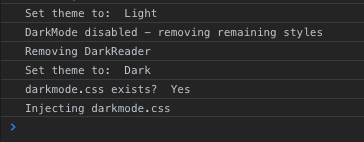
I've noticed with the latest update (5.4.0) that when the Messenger service dark mode toggle is enabled and there is an existing darkmode.css file, it does not load. BUT, if you open the service devtools and load the console tab, THEN right-click on the service icon and choose "Reload", darkmode.css will then load. If you close the devtools window and do another reload, once again darkmode.css will not load and you get the default. The CSS will only load if the devtools window is active. Odd no? I've tested this with both Messenger and Whatsapp with identical results.
Attached is a screenshot from 2 reloads of the console. The first 3 lines are on reload without devtools and the last 3 lines are on reload with service devtools active.
incace
on 27 Nov 2019
Some improvements have been shipped with v5.4.1-beta.2.
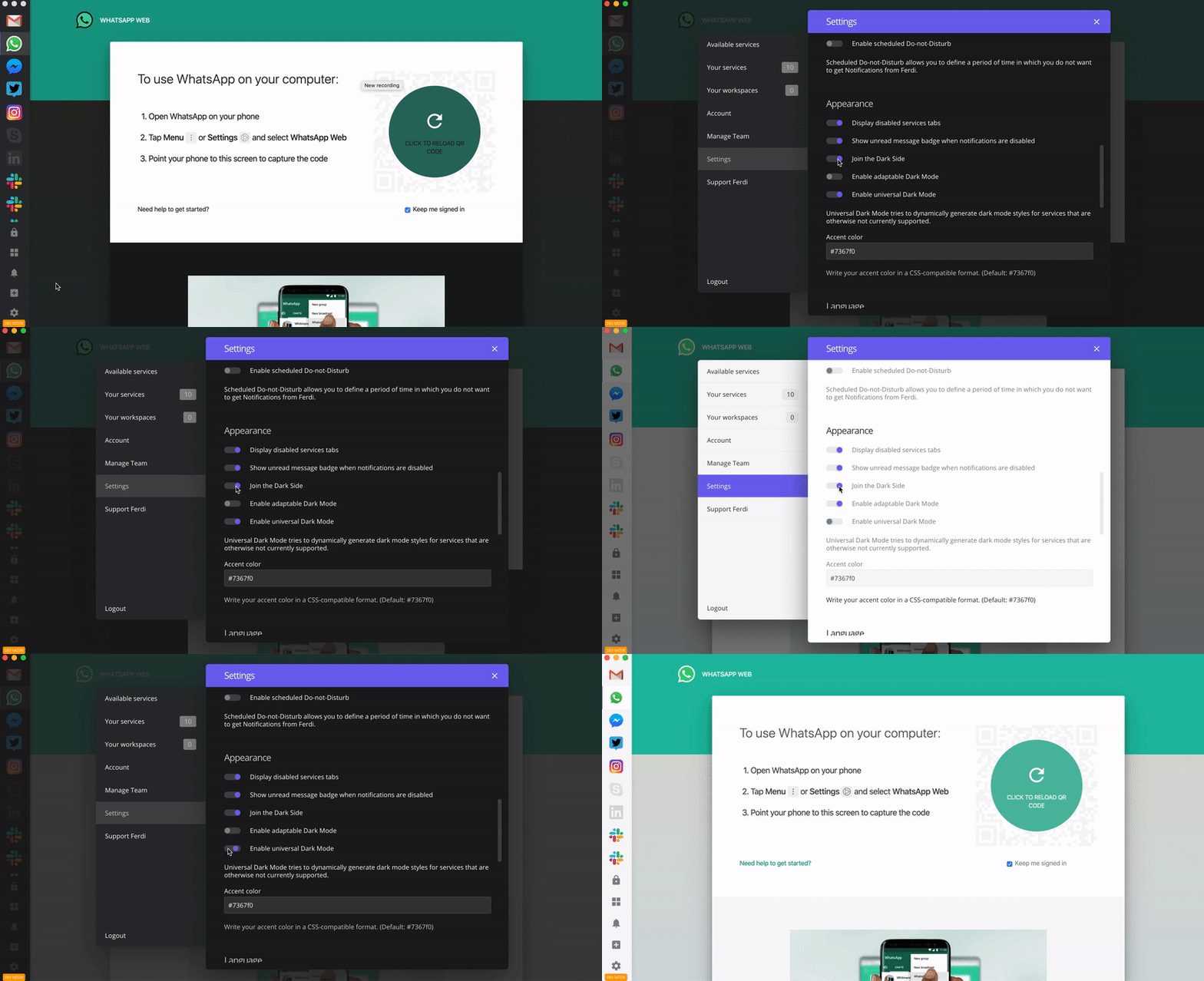
I will continue to improve and take a look at the inconsistencies in UDM.
 kytwb
on 29 Nov 2019
kytwb
on 29 Nov 2019
Confirmed: Dark Mode is working in Google Voice now.
 ylluminate
on 18 Dec 2019
ylluminate
on 18 Dec 2019
To whomever is coming here from a referenced issue, I recommend updating directly to v5.4.1-beta.3 to avoid issues possibly introduced in v5.4.1-beta.1 or v5.4.1-beta.2. There is still some inconsistencies to be addressed with Universal Dark Mode (UDM) as, if I remember correctly, it doesn't work nicely with Adaptive Dark Mode on macOS yet.
kytwb
on 18 Dec 2019
I use 5.4.1-beta.4 at the moment and dark mode remains very inconsistent. It used to help to reload the service for some services (Google Cal e.g.) but others like Slack worked consistently with UDM. Today one of two Slack service instances remains dark, the other one has changed the background of messages to white and no reload fixes this.
 VOOM108
on 15 Jan 2020
VOOM108
on 15 Jan 2020
I have added to darkmode.css for Slack:
.c-message_kit__background {
    background: rgba(var(--sk_primary_background,255,255,255),0);
}
.c-message_kit__background:hover {
    background: rgba(var(--sk_primary_background,255,255,255),0.1);
}
That fixed it for now...
I discovered that I did have CSS in the file; so I might have forgotten that I used some Userstyle-CSS instead of relying on UDM. In that case it actually may be some change Slack made. Strange though that only one of the instances changed.
VOOM108
on 15 Jan 2020
Dark Mode works really well for me on Ferdi Version 5.4.3 (5.4.3.994), however when switching between dark and light mode on macOS, the services all stay in dark mode (adaptable and universal dark mode enabled).
Is it possible to have the services as well as the window chrome switch automatically with the macOS dark / light mode?
Thanks!
 emanuelst
on 30 Jan 2020
emanuelst
on 30 Jan 2020
@emanuelst Normally, Ferdi should switch modes automatically when you change your system dark mode. What version of macOS are you on?
vantezzen
on 31 Jan 2020
Hmm, I'm on macOS 10.15.3 (19D76) and Ferdi Version 5.4.3 (5.4.3.994).
I have Dark Side, adaptable Dark Mode and universal Dark mode turned on.
The Ferdi application switches automatically, but the services stay dark for me in system light and dark mode.
emanuelst
on 31 Jan 2020
Ok, I just published better synchronisation between service dark mode and macOS dark mode with 5714e2fb - it will be released with the next update.
vantezzen
on 31 Jan 2020
Followup on Google Voice, having an odd issue now where there's a flickering of the service as you move your mouse around the page. It's an odd issue in that something (not yet sure what) is triggering it to go "blank":

ylluminate
on 5 Feb 2020
Ok, I just published better synchronisation between service dark mode and macOS dark mode with 5714e2f - it will be released with the next update.
This now works flawlessly for me with Version 5.4.4-beta.1 (5.4.4-beta.1.1023) on macOS 10.15.3 (19D76). Thank you! :)
emanuelst
on 5 Feb 2020
@emanuelst have you checked it with Google Voice per chance? I'd like to know if this is isolated to me or others are also seeing it.
ylluminate
on 5 Feb 2020
@emanuelst have you checked it with Google Voice per chance? I'd like to know if this is isolated to me or others are also seeing it.
Unfortunately I can't tell you, as I'm not able to log into Google Voice (#264)
emanuelst
on 6 Feb 2020
@vantezzen I think https://github.com/getferdi/ferdi/issues/347 was introduced via the recent changes. Also, I think we should start use nativeTheme.shouldUseDarkColors more for the Adaptable Dark Mode instead of checking if the app is running on macOS, as nativeTheme.shouldUseDarkColors works for other platforms. I'm keen to contribute to the refactor and fix the regression at the same time.
kytwb
on 11 Feb 2020
I just pushed a fix for #347 just so we've already fixed that.
Using nativeTheme.shouldUseDarkColors sounds like a good idea so you're welcome to start refactoring.
vantezzen
on 11 Feb 2020
Just commenting to say #258 is still occurring for me with Ferdi 5.4.3.
 deadmeu
on 20 Feb 2020
deadmeu
on 20 Feb 2020
Whatsapp not loading dark mode after a service reload.
Have both universal and adaptable dark modes enabled, as well as dark mode enabled on the service itself. I've tried clearing the cache (not sure if that would have done anything anyway, but worth a shot), reloaded service, restarted Ferdi, disabled and re-enabled service as well as removing and re-adding the service. None of the above seemed to fix.
When I opened darkmode.css it was empty - is this expected (maybe a silly question, sorry!)?
Dark mode worked on first installation (same version as using now).
Version 5.4.3; OS: macOS Mojave 10.14.6
 danielleos
on 1 Apr 2020
danielleos
on 1 Apr 2020
Whatsapp not loading dark mode after a service reload.
Have both universal and adaptable dark modes enabled, as well as dark mode enabled on the service itself. I've tried clearing the cache (not sure if that would have done anything anyway, but worth a shot), reloaded service, restarted Ferdi, disabled and re-enabled service as well as removing and re-adding the service. None of the above seemed to fix.
When I opened darkmode.css it was empty - is this expected (maybe a silly question, sorry!)?
Dark mode worked on first installation (same version as using now).
Version 5.4.3; OS: macOS Mojave 10.14.6
So I believe this is a separate issue from what is described in the original issue, but I ran into this and found the workaround. When you opened darkmode.css it created a darkmode.css file. Ferdi handles dark mode in a separate way/file, so this file overrides Ferdi's dark mode.
The workaround/fix is to delete the darkmode.css file you created and is empty. After doing so restart Ferdi and you should be back to Ferdi's. Ferdi's Dark Mode may still be inconsistent as described in this issue depending on the service.
 Julian88Tex
on 1 Apr 2020
Julian88Tex
on 1 Apr 2020
So I believe this is a separate issue from what is described in the original issue, but I ran into this and found the workaround. When you opened darkmode.css it created a darkmode.css file. Ferdi handles dark mode in a separate way/file, so this file overrides Ferdi's dark mode.
The workaround/fix is to delete the darkmode.css file you created and is empty. After doing so restart Ferdi and you should be back to Ferdi's. Ferdi's Dark Mode may still be inconsistent as described in this issue depending on the service.
This worked, thank you!
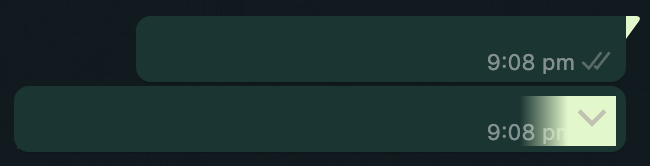
The issue I ran into on my first comment actually happened when trying to remediate a different issue i came across - which is where the speech bubble tails in Whatsapp aren't the same colour as the body of the message in dark mode (it might be related to #511?) and similarly the colour of the dropdown arrow which appears on hovering over messages isn't consistent with the rest of the dark mode styling - see screenshots.

danielleos
on 1 Apr 2020
Same behaviour here, I deleted darkmode.css from edit service -> bottom left button in dialog edit darkmode.css, and it's now working, but at least once the file got re-generated.
Also, how do I change Dark reader settings [contrast, etc..]?
Thanks
 nordurljosahvida
on 5 Apr 2020
nordurljosahvida
on 5 Apr 2020
Also, how do I change Dark reader settings [contrast, etc..]?
We can't at the moment, but someone else suggested we expose them to the user via https://github.com/getferdi/ferdi/issues/531.
kytwb
on 5 Apr 2020
Same behaviour here, I deleted darkmode.css from edit service -> bottom left button in dialog
edit darkmode.css, and it's now working, but at least once the file got re-generated.Also, how do I change Dark reader settings [contrast, etc..]?
Thanks
@nordurljosahvida just to clarify, did it regenerate without clicking "Open darkmode.css" file?
As far as I know, it will always generate after clicking this button. Not aware of any other ways it may be generated.
Julian88Tex
on 5 Apr 2020
Also, how do I change Dark reader settings [contrast, etc..]?
We can't at the moment, but someone else suggested we expose them to the user via #531.
great thanks!
@Julian88Tex i supposed it had, since i only clicked open darkmode.css to delete it, and as soon as i did that everything started working.
nordurljosahvida
on 12 Apr 2020
I have a similar problem in 5.5.0.
In all services I tested when you put something in darkmode.css the UI of the service changes to a light theme again. When I empty the darkmode.css it stays light, also after reloading. Only when removing the darkmode.css file and reloading the service it is dark again.
Only with WhatsApp when I change the 'Dark Reader settings', even a little bit, WhatsApp shows the default light theme again. This can only be fixed by deleting the WhatsApp service and add it again.
 jeroenpraat
on 28 Apr 2020
jeroenpraat
on 28 Apr 2020
This issue has been automatically marked as stale because it has not had recent activity. Please check if this issue is still relevant and please close it if it's not. This will make sure that our open issues are actually of use and reduce the list of obsolete issues. Thank you for your contributions.
![stale[bot] picture](https://avatars3.githubusercontent.com/in/1724?v=4&s=40) stale[bot]
on 28 Jun 2020
stale[bot]
on 28 Jun 2020
A lot of solutions are proposed here but let me throw in my custom darkmode.css based on this stackoverflow answer.
It persists as you move inside the web app and even managed to inject itself through iframes.
html {
    -webkit-filter: invert(100%);
    -moz-filter: invert(100%);
    -o-filter: invert(100%);
    -ms-filter: invert(100%);
}
 dorukkarinca
on 23 Jul 2020
dorukkarinca
on 23 Jul 2020
This issue has been automatically marked as stale because it has not had recent activity. Please check if this issue is still relevant and please close it if it's not. This will make sure that our open issues are actually of use and reduce the list of obsolete issues. Thank you for your contributions.
stale[bot]
on 21 Sep 2020
Related issues
 idonthaveanametoday
·
3Comments
idonthaveanametoday
·
3Comments
 PeSader
·
3Comments
PeSader
·
3Comments
 sbienkow
·
3Comments
sbienkow
·
3Comments
 ammarmalhas
·
3Comments
ammarmalhas
·
3Comments
 YourWishes
·
3Comments
YourWishes
·
3Comments
Most helpful comment
To whomever is coming here from a referenced issue, I recommend updating directly to v5.4.1-beta.3 to avoid issues possibly introduced in v5.4.1-beta.1 or v5.4.1-beta.2. There is still some inconsistencies to be addressed with Universal Dark Mode (UDM) as, if I remember correctly, it doesn't work nicely with Adaptive Dark Mode on macOS yet.