Fenix: Bookmarked sites are not autocompleted in the address bar when 'Search browsing history' is switched off
Steps to reproduce
- On a fresh Firefox install, ensure that 'Autocomplete URLs' is turned on (Settings > Search > Autocomplete URLs)
- Switch off 'Search browsing history' (Settings > Search > Search browsing history)
- Bookmark a site that is not listed in Alexa top sites (e.g., https://www.depop.com/)
- Begin typing "depop.com" in the address bar
Expected behavior
After typing the first few letters, depop.com should be autocompleted in the address bar. This should happen regardless of the 'Search browsing history' option.
Actual behavior
depop.com is not autocompleted in the address bar if 'Search browsing history' is switched off. Other non-bookmarked sites (e.g., amazon.com) are.
Device information
- Android device: Xiaomi Mi A2, running Android 10 (Android One)
- Fenix version: 84.1.1
 neekt
neekt
All 17 comments
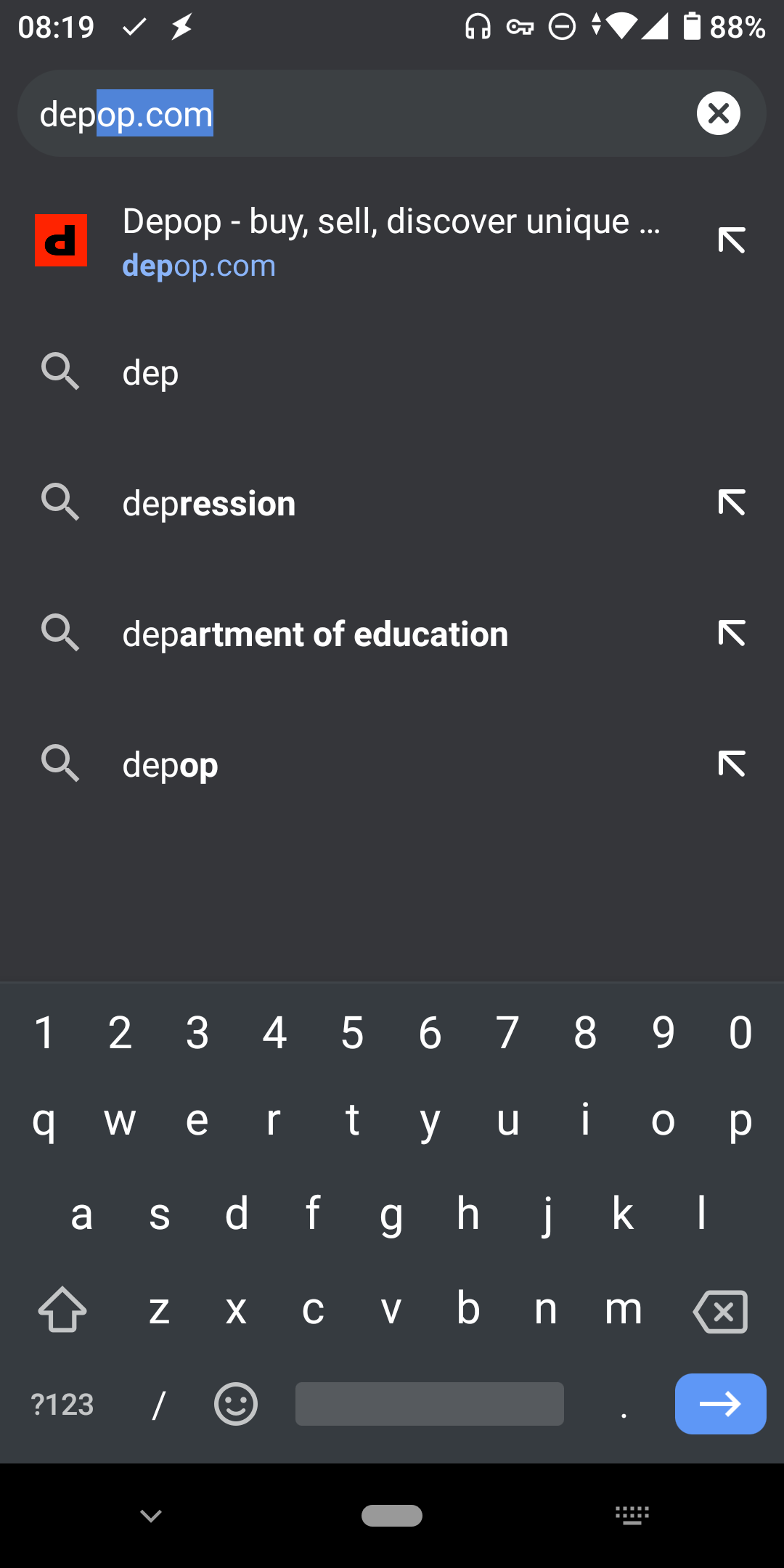
An additional comment; the current autocomplete behaviour is not just inconsistent with both Firefox for desktop and the old Firefox for Android, it's also inconsistent with Chrome for Android - which autocompletes bookmarked URLs, and not sites that are non-bookmarked and unvisited.
neekt
on 22 Dec 2020
But it is showing here..
 sheikh-azharuddin
on 22 Dec 2020
sheikh-azharuddin
on 22 Dec 2020
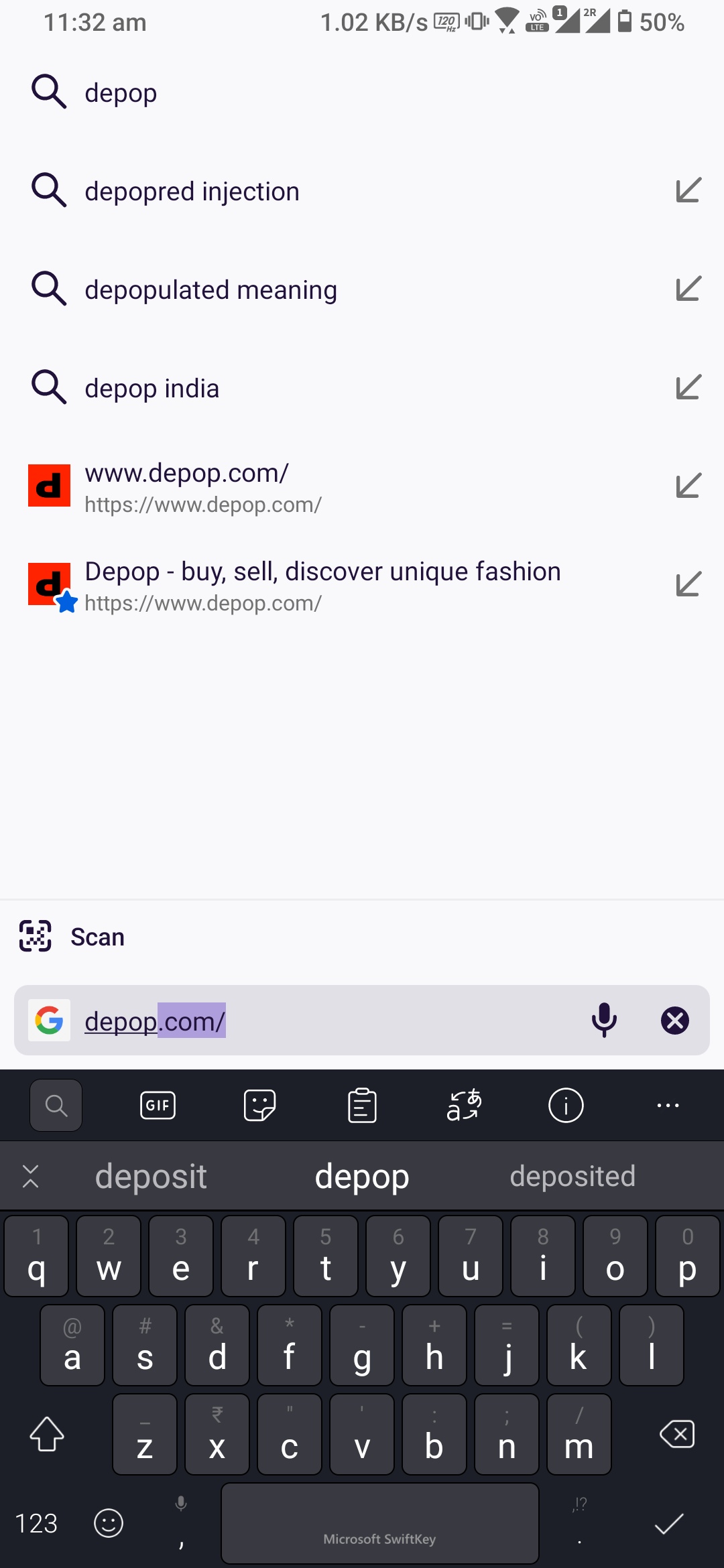
Interesting. Not for me:

neekt
on 22 Dec 2020
Interesting. Not for me:
@neekt It does show for you also, the suggestion marked with a ⭐ is the suggestion from bookmarks.
 mcarare
on 22 Dec 2020
mcarare
on 22 Dec 2020
@mcarare I'm not talking about suggestions, I'm talking about autocompleting URLs in the address bar. Like this in Chrome for Android:
neekt
on 22 Dec 2020
@sheikh-azharuddin does this still work if you clear your browsing history? Autocomplete does seem to work if Search Browsing History is switched on and the bookmarked site is in your browsing history. Otherwise, not.
neekt
on 22 Dec 2020
@sheikh-azharuddin does this still work if you clear your browsing history? Autocomplete does seem to work if Search Browsing History is switched on and the bookmarked site is in your browsing history. Otherwise, not.
yes this still works after clearing browing history

 width = 40%>
sheikh-azharuddin
on 23 Dec 2020
On a side note another critical bug found due to this auto complete feature... While deleting the character from address bar URL it deletes one character and then it auto completes so literally you have to press delete button twice to delete a single character.. . I will file new issue
sheikh-azharuddin
on 23 Dec 2020
@neekt , @sheikh-azharuddin what keyboards are you using?
mcarare
on 23 Dec 2020
@sheikh-azharuddin Thanks for confirming that.
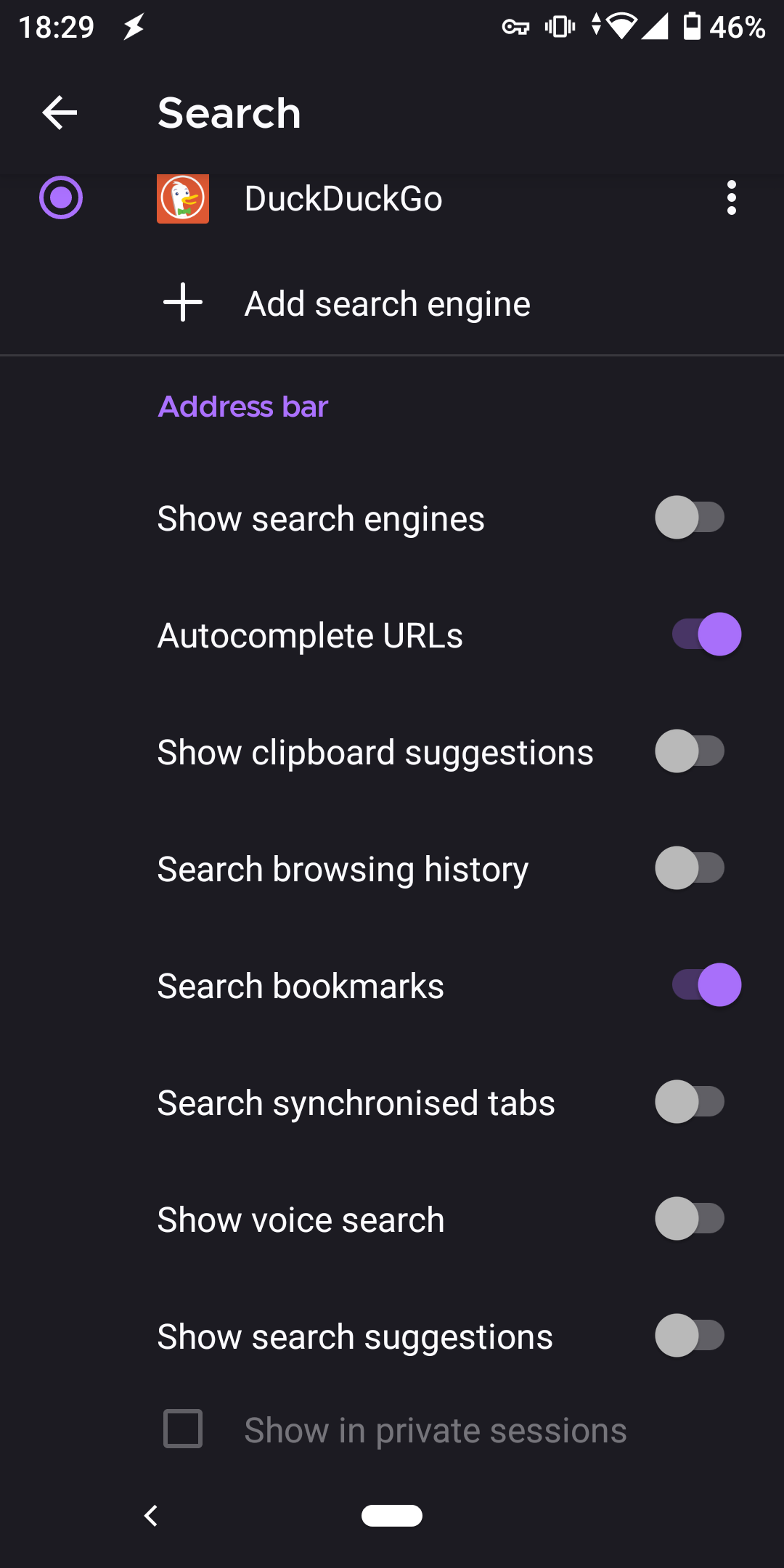
After a little bit more testing, it seems that if 'search browsing history' is switched off (Settings > Search > Search browsing history), then bookmarked URLs aren't autocompleted, regardless of whether the site is in the history or not.
So with the following settings, bookmark URLs are not autocompleted:
neekt
on 23 Dec 2020
Hi @mcarare, I've been using AnySoftKeyboard and Gboard. The results are the same with both.
neekt
on 23 Dec 2020
And after a little more testing I've found that if I have search browsing history switched ON and search bookmarks switched OFF, I still get bookmarked URLs being autocompleted. None of the other settings under Search make a difference to this.
My conclusion from this is that 'Search bookmarks' doesn't do anything at all. Autocompleting bookmark URLs is entirely dependent on 'search browsing history' being activated.
neekt
on 23 Dec 2020
@neekt Maybe the setting description is not clear enough, but that setting is for the suggestions shown in the awesomebar, not the autocomplete feature.
mcarare
on 23 Dec 2020
Tagging UX for feedback on expected auto-complete behavior and the Settings description.
mcarare
on 23 Dec 2020
@neekt Maybe the setting description is not clear enough, but that setting is for the suggestions shown in the awesomebar, not the autocomplete feature.
I think there are a couple of issues here:
- As in the original post and subsequent comment, I would still expect autocomplete to work for bookmarks - as it does in Firefox for desktop, the old Firefox for Android (Fennec), and in other browsers (e.g., Chrome) - regardless of the search history setting.
- Even with 'search bookmarks' switched off and the history completely cleared, bookmarks are still suggested (as well as autocompleted) when 'search browsing history' is switched on. [EDIT: This is actually only true for the domain - paths are not suggested]
neekt
on 23 Dec 2020
Actually there is one setting missing...I have filed a ticket for the same
sheikh-azharuddin
on 23 Dec 2020
I have updated the issue to make it properly reproducible, and to be clear this is about autocompleting URLs in the address bar, which is affected by the 'Search browsing history' option. The 'Search bookmarks' option is irrelevant to this particular issue (as @mcarare has kindly pointed out).
neekt
on 23 Dec 2020
Related issues
 csadilek
·
3Comments
csadilek
·
3Comments
 lindongbin
·
3Comments
lindongbin
·
3Comments
 topotropic
·
3Comments
topotropic
·
3Comments
 abodea
·
3Comments
abodea
·
3Comments
 clitetailor
·
3Comments
clitetailor
·
3Comments