Fenix: Increase touch target for the play button in tabs tray - grid layout
Followup ticket for https://github.com/mozilla-mobile/fenix/pull/15970.
The items is still seen by the a11y scanner as having a 24x24 size though playPauseButtonView.increaseTapArea is already being used.
We need to have this button have at least 48dp in size, while staying with the current design.
 Mugurell
All 7 comments
As a note, the Accessibility scanner does not account for the use of TouchDelegate for versions before Android 10. If using the scanner on an Android 10 device it does not show any suggestions, the layout should be fine.
 mcarare
on 20 Oct 2020
mcarare
on 20 Oct 2020
I think the issue here is that according to the current design there is no space for where the button's touch rect to extend.
The button is already to the extreme corner of the layout.
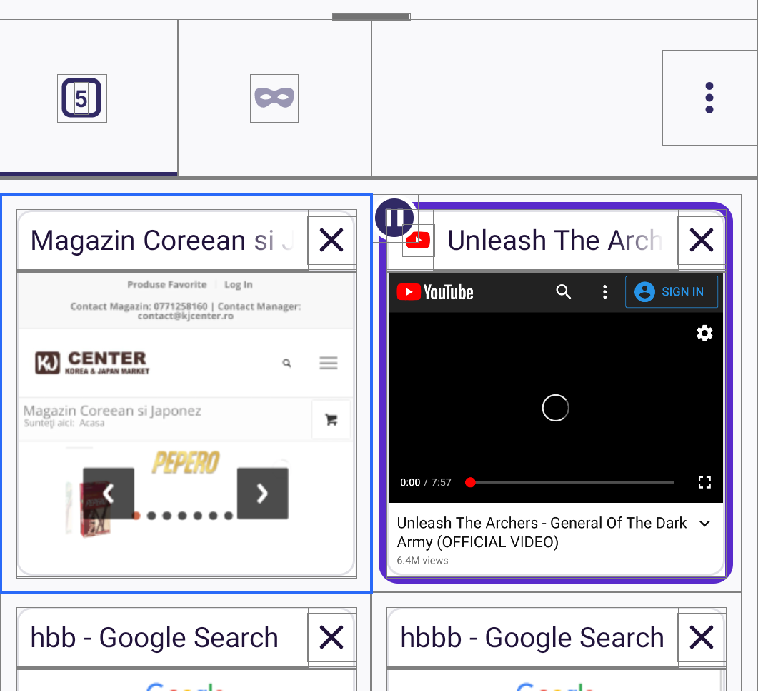
Waiting for UX feedback on how to resolve this:
- increase the spacing between items from 16dp to 28dp to allow the button to extend from 24dp to 48dp
- move the button lower in the layout by 12 dp to allow the same size increase
- other
Mugurell
on 21 Oct 2020
@Mugurell I assume this means the play button needs to be centered in the 48x48dp parent box, correct? Or could we position the play button in the uper left corner and let the parent box extend to the right and bottom?
 topotropic
on 9 Nov 2020
topotropic
on 9 Nov 2020
Maybe a bit strange but I think after the changes from https://github.com/mozilla-mobile/fenix/pull/16481
specifically the removal of this line - https://github.com/mozilla-mobile/fenix/blob/a8db85fc22cbdb5ae36638e24d3892c0a186ee52/app/src/main/res/layout/tab_tray_grid_item.xml#L21
the behavior will be the one you talked about Nicole - the 48x48 touch rect parent box will be translated to fit the parent.
The play button will not be centered but in a corner of that touch rect which will no be big enough to not be an a11y issue.
This should be be rechecked after that PR lands.
Mugurell
on 11 Nov 2020
@Mugurell this is still reproducible on Nightly 11/17 (both list & grid view) on LG G7 Fit (Android 8.0). A suggestion is made to increase the size from 24dp x 24dp to 48dp.
Not reproducible on: Pixel 3 (Android 11), Samsung Note10(Android 10).
 sflorean
on 17 Nov 2020
sflorean
on 17 Nov 2020
As a note, the Accessibility scanner does not account for the use of
TouchDelegatefor versions before Android 10
https://support.google.com/accessibility/android/answer/7101858?hl=en
Note: Accessibility Scanner can detect and account for the use of TouchDelegate only when running on Android 10 and later. On earlier Android versions, touch target size results may appear even when this API is used to enlarge touch targets to an appropriate size.
mcarare
on 18 Nov 2020
Based on the comment above, I will close this issue.
sflorean
on 18 Nov 2020
Related issues
 thelazyoxymoron
·
3Comments
thelazyoxymoron
·
3Comments
 abodea
·
3Comments
abodea
·
3Comments
 csadilek
·
3Comments
csadilek
·
3Comments
 lindongbin
·
3Comments
lindongbin
·
3Comments
 ekager
·
3Comments
ekager
·
3Comments