Fenix: Bookmarks screen inconsistencies
Following https://github.com/mozilla-mobile/fenix/issues/15497 it was seen that the bookmarks folders can extend to the end of the row but the items will always be clipped by the size of the menu button, even when that is not visible.
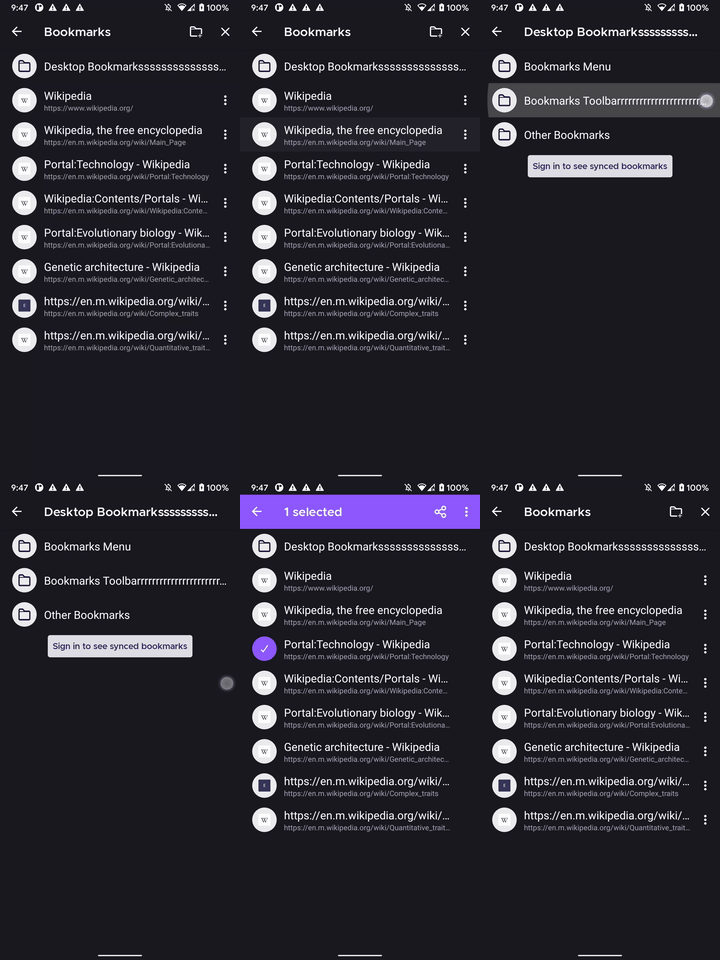
Asking UX what is the correct behavior here:
- folders should extend to the end but individual bookmarks be clipped even with no menu button
- both folders and individual bookmarks should be clipped (look like padded) with the size of the menu button even if that's not showing
- both folders and individual bookmarks should extend to the edge of the row when the menu button is not clipped.
 Mugurell
All 3 comments
There should be a way to re-araign the bookmark list. A way to sort it.
And the New bookmarks should be plased on the top og the list.
 killercarAJ
on 10 Oct 2020
killercarAJ
on 10 Oct 2020
@killercarAJ Your comment has nothing to do with this issue except from the fact that it's about bookmarks. Sorting bookmarks is #4348.
 cadeyrn
on 10 Oct 2020
cadeyrn
on 10 Oct 2020
both folders and individual bookmarks should be clipped (look like padded) with the size of the menu button even if that's not showing
Could we also apply this to multi-select on tab tray?
Thanks, @Mugurell
 topotropic
on 15 Oct 2020
topotropic
on 15 Oct 2020
Related issues
topotropic
·
3Comments
 thelazyoxymoron
·
3Comments
thelazyoxymoron
·
3Comments
 phileastv
·
3Comments
phileastv
·
3Comments
 abodea
·
3Comments
abodea
·
3Comments
abodea
·
3Comments
abodea
·
3Comments
Most helpful comment
There should be a way to re-araign the bookmark list. A way to sort it.
And the New bookmarks should be plased on the top og the list.