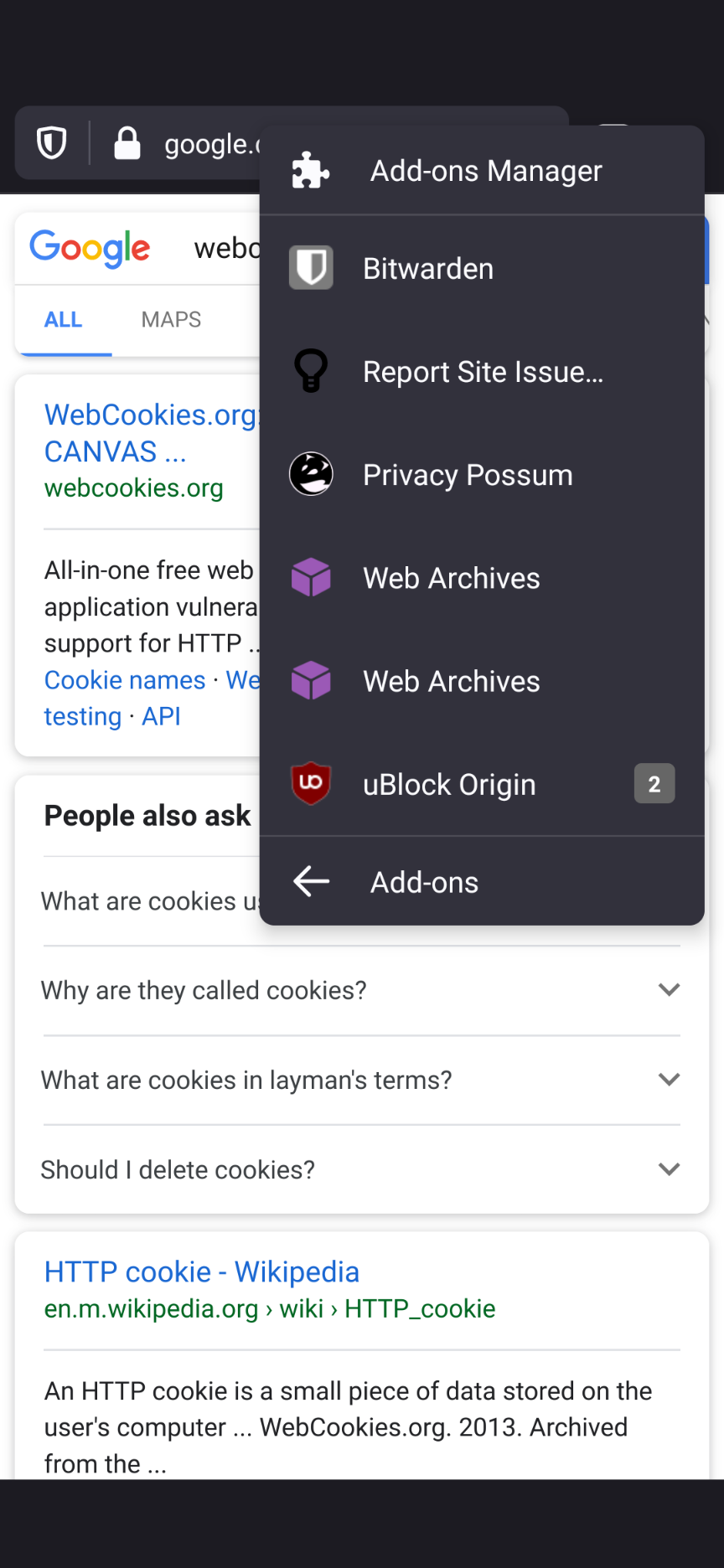
Fenix: [Bug] 2 instances of web archive add-on showing in add-on menu because it uses page-action and browser-action
Steps to reproduce
Installed archives extension in nightly
Expected behavior
One instance in add-on menu
Actual behavior
2 instances in add-on menu
Device information
Nightly 200928 17:07 (Build #2015766603)
AC: 61.0.20200925190057, 01306f87c
GV: 83.0a1-20200922094538
AS: 63.0.0
 jawz101
All 14 comments
I don't know if this is because I installed nightly today and then a bunch of the extensions and then uninstalled the web archive extension. And then later today I installed the web archive extension once more and then I noticed this. I didn't check after the first time though.
jawz101
on 29 Sep 2020
There are actually 2 different entries in the menu because one is for page action and the other for browser action. Although, from the manifest i see they use the same icon so there is no way do distinguish between them.
I am not aware of other extensions with both actions.
@Amejia481 what do you think? Can we try to differentiate between actions in the menu somehow, or should extensions devs provide a way of differentiating?
 mcarare
on 30 Sep 2020
mcarare
on 30 Sep 2020
So is this the equivalent of an extension on the desktop having both an icon in the tray that does one thing and then a right click page option that does another?
I'm trying to visualize if it's something with a desktop equivalent situation where possibly other extensions might do the same thing.
jawz101
on 30 Sep 2020
There are actually 2 different entries in the menu because one is for page action and the other for browser action. Although, from the manifest i see they use the same icon so there is no way do distinguish between them.
I am not aware of other extensions with both actions.
@Amejia481 what do you think? Can we try to differentiate between actions in the menu somehow, or should extensions devs provide a way of differentiating?
Thanks for investigating! Indeed, we are not distinguishing from page/browser actions from each other in the UI
Talking with @csadilek, he mentioned that there is something else apart from showing the two actions:
- In Fennec and Desktop, we only display one action using the same add-on code.
- The second action doesn't work when we click it.
- If we want to support page actions we should improve the UI.
- The page action is disabled, but we seem to show it anyway.
 Amejia481
on 30 Sep 2020
Amejia481
on 30 Sep 2020
From there, the first step could be to find out why Fennec/Desktop only display the one (working) action and why we display two, and from that we can determine if we want to improve the UI.
Amejia481
on 30 Sep 2020
Just to clarify. Desktop does display both, but shows the page action as disabled (not clickable). That's a case we don't seem to handle yet in Fenix/A-C.
 csadilek
on 30 Sep 2020
csadilek
on 30 Sep 2020
fixed
jawz101
on 1 Oct 2020
The page action is only supported by the extension on the desktop version of Firefox, and Fennec is hiding the page action declared in the manifest until pageAction.show() is called, as described in the docs.
A quick fix would be to do the same in Fenix for now, and later on rethink how page actions are visually differentiated from browser actions in the new menu design that is being flashed out by @vesta0. The way page action icons pop up in the URL bar when pageAction.show() is called in the desktop version of Firefox is intuitive and offers immediate access to a relevant action with a single click.
Chrome does not allow page actions and browser actions to coexist, though I think there is value in being able to show both at the same time, to offer quick contextual actions based on tab content, while also keeping a global extension UI accessible from the menu.
 dessant
on 4 Oct 2020
dessant
on 4 Oct 2020
Sorry, I meant to ping @violasong in the previous comment.
dessant
on 20 Oct 2020
The extension has landed in Firefox Beta. Is there a fix being planned, or should I release a workaround in the extension?
dessant
on 29 Oct 2020
@dessant Thank you for looking into this! The bug is in Android Components: https://github.com/mozilla-mobile/android-components/issues/8867.
If you have time to work around in the extension short-term or want to contribute a fix to A-C, your help is very much appreciated.
csadilek
on 2 Nov 2020
This is fixed now in latest Nightly 201105 17:04. QA, please verify :).
csadilek
on 5 Nov 2020
Hi, verified as fixed on the latest Nightly Build 201106 using the following devices:
• Google Pixel 3a (Android 11)
• Huawei Mate 20 Lite (Android 10)
• OnePlus A3 (Android 6.0.1)
 AndiAJ
on 6 Nov 2020
AndiAJ
on 6 Nov 2020
I can also confirm that page actions now work as expected in Firefox Nightly. @csadilek, thanks a bunch for the fix!
dessant
on 6 Nov 2020
Related issues
 topotropic
·
3Comments
topotropic
·
3Comments
 robsmith11
·
3Comments
robsmith11
·
3Comments
 vesta0
·
3Comments
vesta0
·
3Comments
 thelazyoxymoron
·
3Comments
csadilek
·
3Comments
thelazyoxymoron
·
3Comments
csadilek
·
3Comments