Fenix: [Bug] tap and drag to select text is crazy
Steps to reproduce
As explained in https://github.com/mozilla-mobile/fenix/issues/10618#issuecomment-697107024:
- Tap and hold any text.
- Drag to another part of the paragraph to select text.
Expected behavior
Select text range, just like any other app.
Actual behavior
Firefox selects just one word, and then you need to use the handles to select the rest.. and it works weird because the nav bar moves.
Device information
- Android device: SM-T720
- Fenix version: 81.1.1 (Build #2015764547)
 Yajo
Yajo
All 8 comments
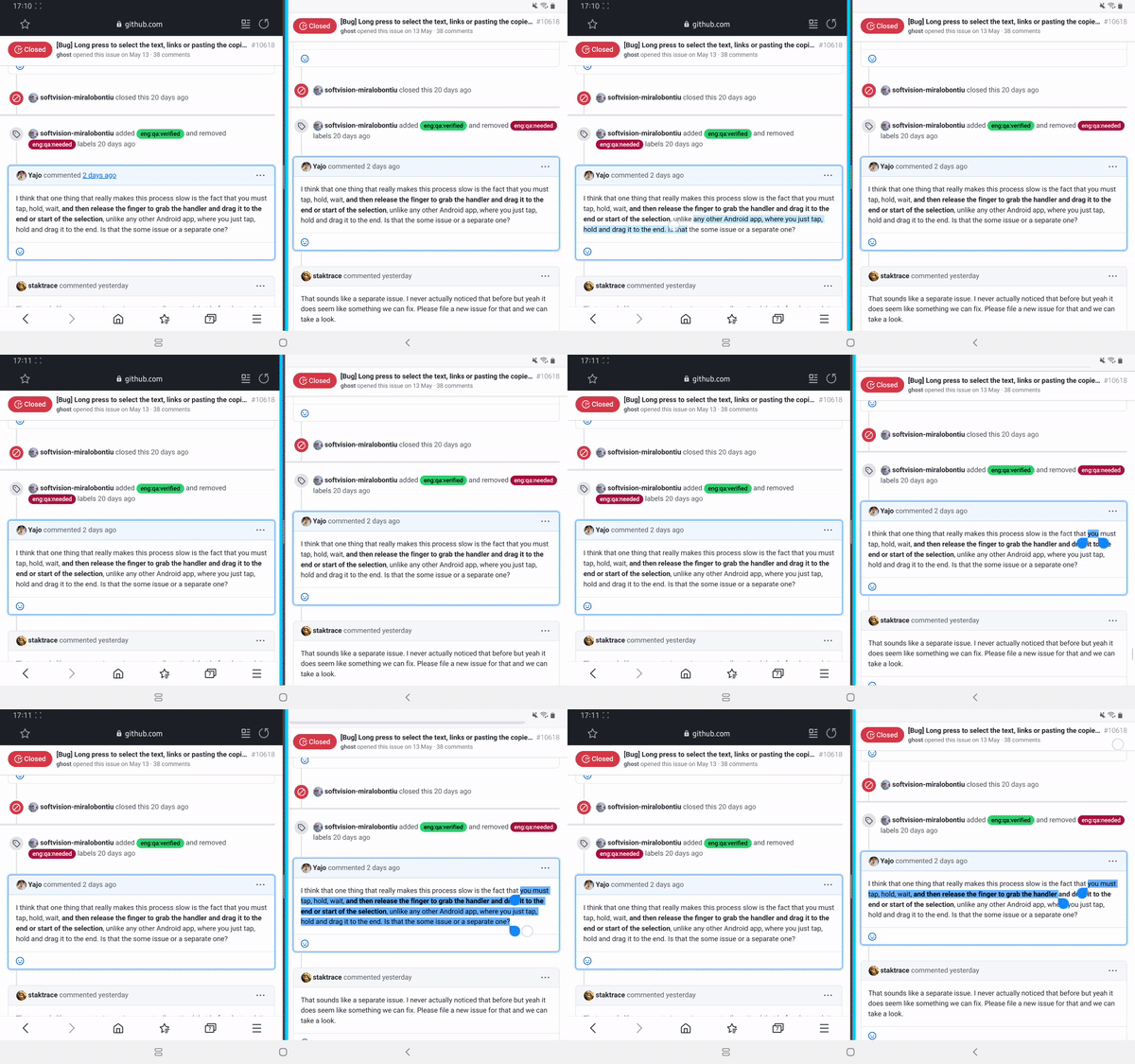
See it in action. Left side is Samsung browser 12.1.2.5. Right side is Firefox 81.1.1 (Build #2015764547).
Yajo
on 24 Sep 2020
Can you check with Nightly? There are some touch scrolling fixes that might improve this situation. I did a quick check on Pixel 2XL running Nightly and did not see the address bar move with the text selection handles for me on https://paste.mozilla.org
 kbrosnan
on 24 Sep 2020
kbrosnan
on 24 Sep 2020
I just tested. It's much better as it doesn't seem so crazy, but it is still away from normal Android experience.
Firefox selects just one word, and then you need to use the handles to select the rest..
This still happens.
and it works weird because the nav bar moves.
This is fixed.
Yajo
on 5 Oct 2020
Selecting one word is standard Android behavior - it's also what chrome, gmail, and other android apps do. Will close since the navbar dragging is fixed, and the others are Android behavior.
 liuche
on 15 Oct 2020
liuche
on 15 Oct 2020
Nope. On any other Android app, this is what you do with your finger to select a text range:
- Tap on the word
- Hold
- Drag
- Release
Firefox needs:
- Tap
- Hold
- Release
- Tap on the handle
- Hold
- Drag
- Release
It's obviously not standard. Just check the Samsung browser part of https://github.com/mozilla-mobile/fenix/issues/15391#issuecomment-698421694.
Yajo
on 15 Oct 2020
Chrome on Android 8:

Apps usually allow you to select more than 1 word.
 PlayXman
on 15 Oct 2020
PlayXman
on 15 Oct 2020
Sorry about that! Let me move this to our GeckoView team to see what we can do there.
liuche
on 16 Oct 2020
Moved to bugzilla: https://bugzilla.mozilla.org/show_bug.cgi?id=1671530
Change performed by the Move to Bugzilla add-on.
liuche
on 16 Oct 2020
Related issues
 andreicristianpetcu
·
3Comments
andreicristianpetcu
·
3Comments
 abodea
·
3Comments
abodea
·
3Comments
 lindongbin
·
3Comments
andreicristianpetcu
·
3Comments
lindongbin
·
3Comments
andreicristianpetcu
·
3Comments
 clitetailor
·
3Comments
clitetailor
·
3Comments
Most helpful comment
See it in action. Left side is Samsung browser 12.1.2.5. Right side is Firefox 81.1.1 (Build #2015764547).