Fenix: [Bug] Shopping cart page not rendering properly.
Steps to reproduce
- Go to bananarepublic.gapcanada.ca
- Tap on the shopping cart icon to go to the shopping cart page
Expected behavior
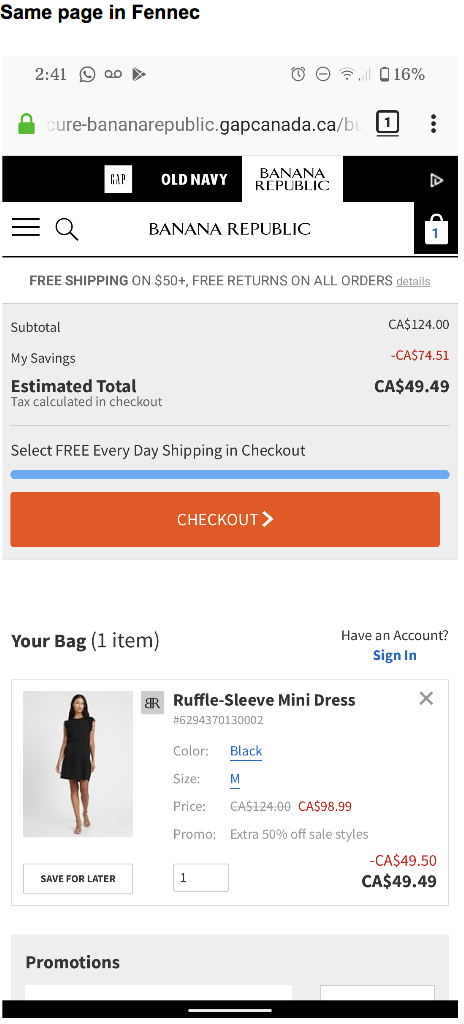
- Shopping cart loads
Actual behavior
- An error page shows up
Device information
- Android device: Pixel 4
- Fenix version: Sep 11 nightly
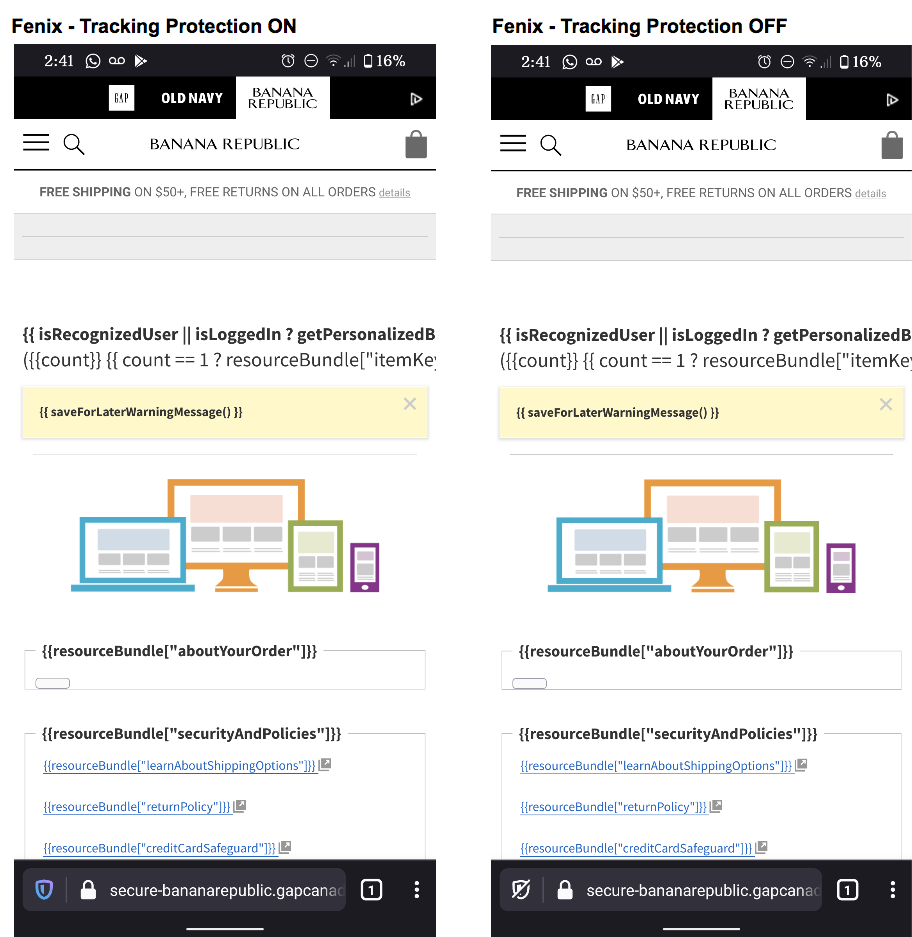
 vesta0
All 11 comments
I can still repro on Nightly - we probably need to pull in the webcompat and/or Gecko teams to take a look.
 ekager
on 29 Sep 2020
ekager
on 29 Sep 2020
I can still reproduce it.
vesta0
on 30 Sep 2020
@karlcow @ksy36 would the Webcompat team be able to look at this.
 kbrosnan
on 6 Oct 2020
kbrosnan
on 6 Oct 2020
So the site is testing different media queries with window.matchMedia to detect the right one:
S = " and (min-aspect-ratio: 1/1)", E = " and (max-aspect-ratio: 1/1)", O = [{
      size: "small",
      orientation: "portrait",
      media: "(max-width: 300px)"
  }, {
      size: "small",
      orientation: "landscape",
      media: "(max-width: 567px)" + S
  }, {
      size: "small",
      orientation: "portrait",
      media: "(max-width: 567px)" + E
  },
The media query string that supposed to match fenix is (max-width: 567px) and (max-aspect-ratio: 1/1) , and it does
return matches: true, however max-aspect-ratio is returned as (max-aspect-ratio: 1):
console.log(window.matchMedia('(max-width: 567px) and (max-aspect-ratio: 1/1)'))
MediaQueryList { media: "(max-width: 567px) and (max-aspect-ratio: 1)", matches: true, onchange: null }
The site seems to be expecting the result max-aspect-ratio of window.matchMedia to match the original query. Chrome returns it as 1/1. I didn't find any core issues related to that, so I'll file one
 ksy36
on 7 Oct 2020
ksy36
on 7 Oct 2020
ok so
- it doesn't reproduce in Chrome Canary,
- it doesn't reproduce in Fennec,
- but reproduce in Firefox Preview
- and it can be also reproduced with rdm on Firefox Nightly desktop with both chrome and firefox UA.
- AND it can be reproduced on Firefox Nightly desktop which will make things easier and we can run mozregression (just in case)
mozregression doesn't give me good results.
(update) Ah! @ksy36 beat me to it. Very cool.
 karlcow
on 7 Oct 2020
karlcow
on 7 Oct 2020
So indeed, as @ksy36 said: window.matchMedia('(max-width: 567px) and (max-aspect-ratio: 1/1)').media
Safari returns
"(max-aspect-ratio: 1/1) and (max-width: 567px)" = $1
Chrome returns
"(max-aspect-ratio: 1/1) and (max-width: 567px)"
Firefox returns
"(max-width: 567px) and (max-aspect-ratio: 1)"
And just for the sake of testing, if I do
window.matchMedia('(max-width: 567px) and (max-aspect-ratio: 1/2)').media
Firefox returns
"(max-width: 567px) and (max-aspect-ratio: 1 / 2)"
while Safari/Chrome return
window.matchMedia('(max-width: 567px) and (max-aspect-ratio: 1/2)').media
So it's half an issue with the way Gecko returns the result, and half an issue with the site itself, where they are expecting a precise string to match.
@emilio for the string returned by MediaQueryList.media what do you think?
But we should probably contact gap/banana republic about it.
karlcow
on 7 Oct 2020
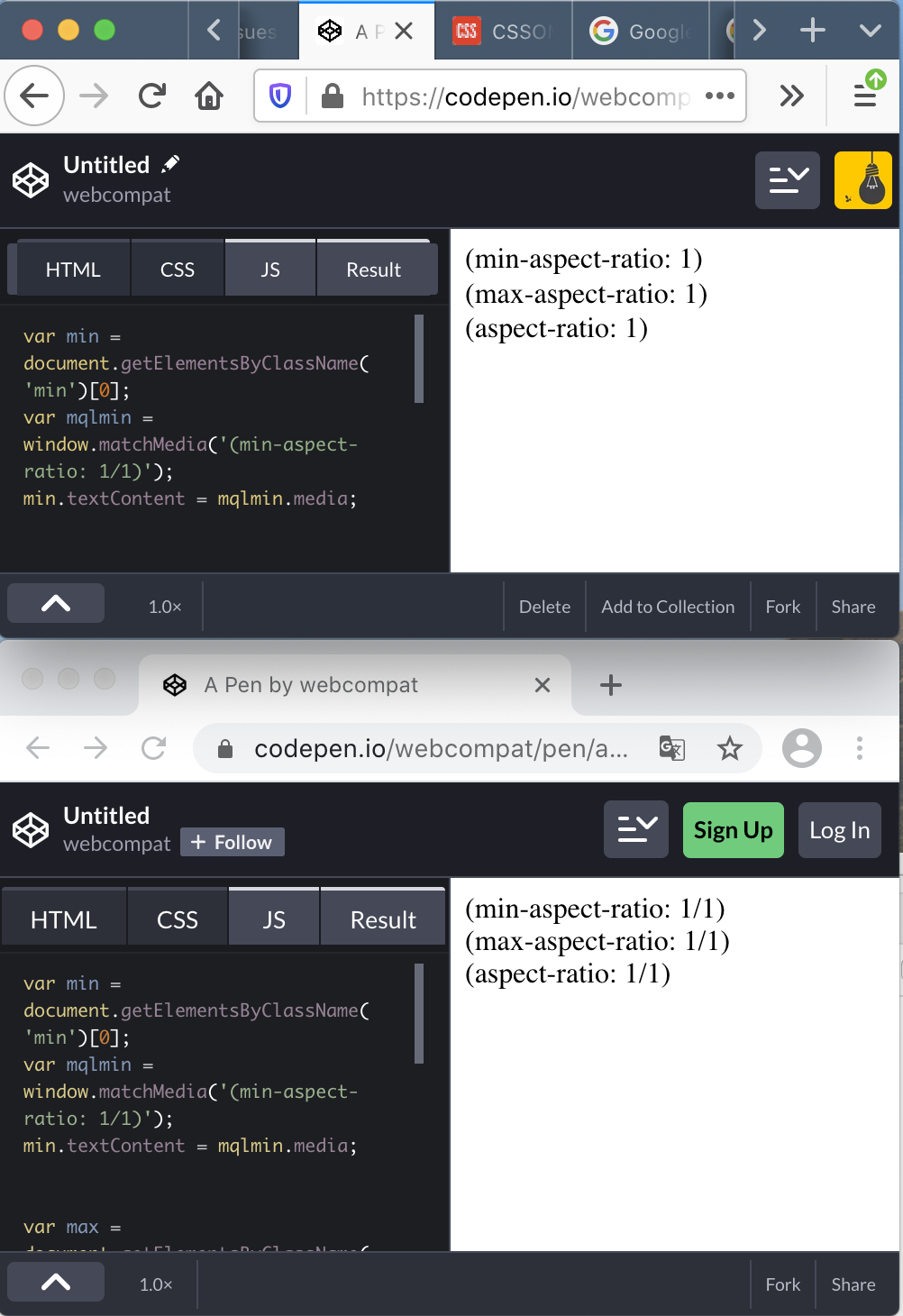
https://codepen.io/webcompat/pen/abZbvMV
illustrating the differences in between chrome and Firefox.
https://drafts.csswg.org/cssom-view/#dom-window-matchmedia
Return a new MediaQueryList object, with the context object’s associated Document as the document, with parsed media query list as its associated media query list.
Then https://drafts.csswg.org/cssom-view/#media-query-list
A MediaQueryList object has an associated media which is the serialized form of the associated media query list.
Then https://drafts.csswg.org/cssom/#serialize-a-media-query-list
To serialize a media query list run these steps:
- If the media query list is empty, then return the empty string.
- Serialize each media query in the list of media queries, in the same order as they appear in the media query list, and then serialize the list.
window.matchMedia('(max-width: 100px) and (max-aspect-ratio: 1/1)').media
- So Safari and Chrome have a bug on the order?
- And Firefox a bug on the serialization of aspect-ratio value?
karlcow
on 7 Oct 2020
karlcow
on 7 Oct 2020
There's no bug in the aspect-ratio serialization fwiw. 1 is a valid aspect ratio and is a shorter serialization than 1/1, so it's the correct serialization. But if we need to change it for compat so it is I guess.
 emilio
on 7 Oct 2020
emilio
on 7 Oct 2020
@emilio The part which is "weird" is that in Firefox "1/2" is becoming "1 / 2"
https://drafts.csswg.org/css-values-4/#ratio-value seems to have dropped the space.
Mediaqueries-4
<ratio> = <number [0,∞]> [ / <number [0,∞]> ]?
vs mediaqueries-3
The
<ratio>value is a positive (not zero or negative)<integer>followed by optional whitespace, followed by a solidus (‘/’), followed by optional whitespace, followed by a positive<integer>.
for the 1/1 yeah… sniff at comparing string… just let's hope that nobody uses that to identify Firefox. sigh
karlcow
on 7 Oct 2020
I've contacted their customer service and filed a bug https://bugzilla.mozilla.org/show_bug.cgi?id=1669742. This seems to be happening only on canadian website, the cart is working on com and eu domains
ksy36
on 7 Oct 2020
Related issues
ekager
·
3Comments
 robsmith11
·
3Comments
robsmith11
·
3Comments
 abodea
·
3Comments
abodea
·
3Comments
 csadilek
·
3Comments
csadilek
·
3Comments
 thelazyoxymoron
·
3Comments
thelazyoxymoron
·
3Comments
Most helpful comment
So the site is testing different media queries with
window.matchMediato detect the right one:The media query string that supposed to match fenix is
(max-width: 567px) and (max-aspect-ratio: 1/1), and it doesreturn
matches: true, however max-aspect-ratio is returned as(max-aspect-ratio: 1):The site seems to be expecting the result
max-aspect-ratioofwindow.matchMediato match the original query. Chrome returns it as1/1. I didn't find any core issues related to that, so I'll file one