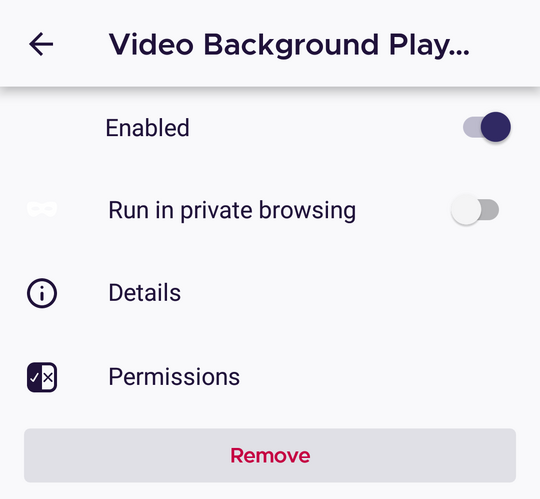
Fenix: [Bug]White "Run in private browsing" icon
Prerequisites
Set Fenix's theme to Light
Steps to reproduce
- Install any of the featured Add-ons
- Tap on the installed add-on from the Add-ons page.
- Check the elements
Expected behavior
Properly displayed "Run in private browsing" icon
Actual behavior
White Run in private browsing" icon
Device information
- Android device: OnePlus A3 (Android 6.0.1)
- Fenix version: Nightly 200910
Notes
❗ Properly displayed on Google Pixel 3a (Android 10)
► Screenshot
 AndiAJ
All 3 comments
Related to/Duplicate of #14933
 hwinnemoe
on 10 Sep 2020
hwinnemoe
on 10 Sep 2020
👍1
This issue should be reopened. It's related to #14933 because it's probably a regression from the same change but it's not a duplicate. While all devices were affected by #14933 this issue only exists on some devices (I can't reproduce) and my PR for #14933 didn't do anything with the icon in the add-ons manager.
 cadeyrn
on 18 Sep 2020
cadeyrn
on 18 Sep 2020
👍2
Indeed, while the icon from Settings is displayed properly, the "Run in private browsing" icon is white for each extension on the latest Nightly Build 200918 using a OnePlus A3 (Android 6.0.1)
AndiAJ
on 18 Sep 2020
Was this page helpful?
0 / 5 - 0 ratings
Related issues
 andreicristianpetcu
·
3Comments
andreicristianpetcu
·
3Comments
 topotropic
·
3Comments
topotropic
·
3Comments
 vesta0
·
3Comments
vesta0
·
3Comments
 softvision-miralobontiu
·
3Comments
softvision-miralobontiu
·
3Comments
 Chris01277
·
3Comments
Chris01277
·
3Comments
Most helpful comment
This issue should be reopened. It's related to #14933 because it's probably a regression from the same change but it's not a duplicate. While all devices were affected by #14933 this issue only exists on some devices (I can't reproduce) and my PR for #14933 didn't do anything with the icon in the add-ons manager.