Fenix: [Bug] When tapping the cursor in a comment box to the right of the last piece of text, it defaults to putting the cursor UP, to the nearest text above where you tap, rather than to the left at the end of the comment
Steps to reproduce
- Set Firefox Day to default settings.
- Go to Reddit.com and log in to your account. Twitter.com or any site with comments works, but for the sake of simplicity, we'll use Reddit.com for this demonstration.
- Go to one of your lengthier comments that you have written in the past (needs to have at least two rows of text for the demonstration to work).
- Select "edit" on the comment.
- At the very end of the comment, select your cursor to the right of the last piece of text.
Expected behavior
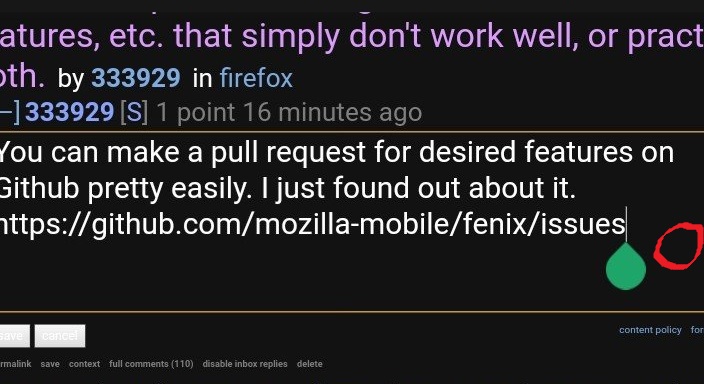
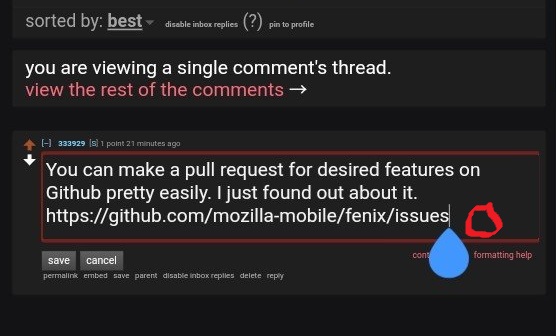
In Chrome-based browsers, the cursor defaults to going to the left of where you tapped, to the end of the text, as you would expect. Here are two screenshots of what happens when you tap to the right of the last piece of text. Note: The red circle is where I tapped:
Chrome-based browser 1 screenshot:
Chrome-based browser 2 screenshot:
Actual behavior
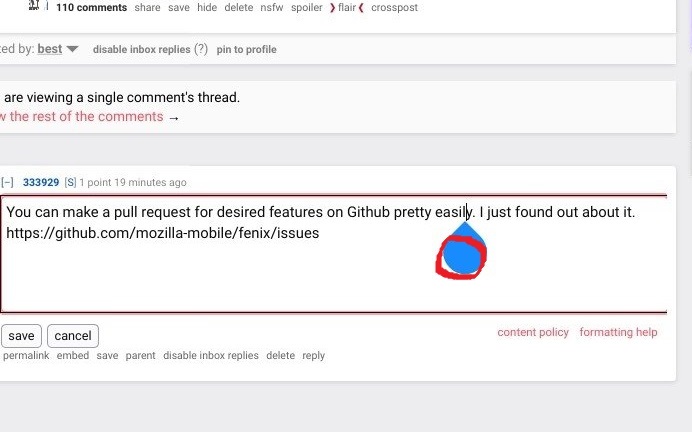
In Firefox Day, when you tap to the right of the last piece of text, the cursor defaults to going UP, above wherever you tapped, instead of left. This is extremely disorienting, and not logical at all. You are constantly having to drag and drop the cursor to the end of the text from where you tapped, if you want to add something to the end of the comment. Here is a screenshot of what happens in Firefox 80. Note: the red circle is where I tapped:
Firefox Day screenshot:
Device information
- Android device: Samsung S8 (SM-G950FD Smartphone, latest version of Android operating system as of 2020/Dec/18)
- Fenix version: Firefox Day 84.1.1 (Build number 2015781795)
This issue has existed ever since the first version of Fenix Firefox.
 MadridSpain
All 3 comments
Note: this is not only expected behavior based on Chrome/ium, this is a nearly universal expectation of text box position selection, including in Fennec, desktop versions of Firefox, and iOS Firefox. Tapping empty space to the right (or left in right-to-left scripts) of a line of text should position the cursor at the end of the line, not at the left-right position of the tap in the line above.
There's a related issue that also affects desktop Firefox (for Windows, at minimum): clicking in empty space in a text box below the last line of text positions the cursor at the left-right position of the click in the line above (the last line), as it does when clicking empty space at the end of a line of text in Fenix/Daylight, rather than at the end of the last line in the text box. I suggest this should also be changed (I can/will file a separate report/request for desktop FF, not sure if this should be noted as a separate issue for Fenix), ESPECIALLY for mobile platforms where tapping space is generally smaller and less precise than mouse selection with a cursor, meaning the easiest way to select the end of a block typed text is to tap empty space in the text box below. Depending on how the position determination is coded, this may be addressed by whatever fix is pushed for the line-end bug, which is why I'm noting it here, though it might also be a separate issue, as it is for desktop FF on Windows.
Firefox for iOS follows both normative conventions: tapping in blank space past the end of a line puts the cursor at the end of that line, and tapping in blank space below the last line puts the cursor at the end of the last line. Fennec also followed this convention.
 JohannVII
on 29 Sep 2020
JohannVII
on 29 Sep 2020
This issue is still not fixed (2020 December 18), even on Firefox Daylight 84.1.1 (build #2015781795) on an up-to-date Samsung Galaxy S8 with 4GB of ram. I have tried on an up-to-date version of Nightly (build #2015781579) and the same problem exists.
This is seriously a major problem when writing comments, and Firefox is the ONLY mobile browser that does it. When I say problem, I mean this issue alone is so problematic that if for no other reason at all, I would choose a different mobile browser based on this issue alone. It never did it before Fenix. It is a BUG as far as I am concerned.
I don't know why it has not been fixed. It seems like it would be easy to solve. It would also seem like anyone who writes lots of comments on mobile browsers, like on Twitter or Reddit, would notice this quickly.
MadridSpain
on 18 Dec 2020
Moved to bugzilla: https://bugzilla.mozilla.org/show_bug.cgi?id=1683747
Change performed by the Move to Bugzilla add-on.
 ekager
on 21 Dec 2020
ekager
on 21 Dec 2020
Related issues
 csadilek
·
3Comments
csadilek
·
3Comments
 clitetailor
·
3Comments
clitetailor
·
3Comments
 softvision-miralobontiu
·
3Comments
softvision-miralobontiu
·
3Comments
 andreicristianpetcu
·
3Comments
andreicristianpetcu
·
3Comments
 lindongbin
·
3Comments
lindongbin
·
3Comments
Most helpful comment
Note: this is not only expected behavior based on Chrome/ium, this is a nearly universal expectation of text box position selection, including in Fennec, desktop versions of Firefox, and iOS Firefox. Tapping empty space to the right (or left in right-to-left scripts) of a line of text should position the cursor at the end of the line, not at the left-right position of the tap in the line above.
There's a related issue that also affects desktop Firefox (for Windows, at minimum): clicking in empty space in a text box below the last line of text positions the cursor at the left-right position of the click in the line above (the last line), as it does when clicking empty space at the end of a line of text in Fenix/Daylight, rather than at the end of the last line in the text box. I suggest this should also be changed (I can/will file a separate report/request for desktop FF, not sure if this should be noted as a separate issue for Fenix), ESPECIALLY for mobile platforms where tapping space is generally smaller and less precise than mouse selection with a cursor, meaning the easiest way to select the end of a block typed text is to tap empty space in the text box below. Depending on how the position determination is coded, this may be addressed by whatever fix is pushed for the line-end bug, which is why I'm noting it here, though it might also be a separate issue, as it is for desktop FF on Windows.
Firefox for iOS follows both normative conventions: tapping in blank space past the end of a line puts the cursor at the end of that line, and tapping in blank space below the last line puts the cursor at the end of the last line. Fennec also followed this convention.