Fenix: [UX] Users don't know that they can adjust their browser font size
User Story
- As a user, I want to adjust my browser font size based on my needs so I can use the browser.
User problem:
Based on user feedback, many users don't know that they are able to adjust the browser font. This may be due to the fact that the Font Size scale feature is not visible when "Automatic font sizing" is toggled on. Perhaps we can still show a grayed out version of the font size option when "Automatic font sizing" is toggled on.
Acceptance Criteria
- I know how to adjust my font size.
 vesta0
All 13 comments
Simple Solution
A very easy solution exists.
- Remove option
Automatic font size - Replace
Font SizewithFont Size Control: WhenControlis disabled, it is the same as the system setting it up automatically. - When the option is off, disable the slider bar. (darkly)

New menu
Creating a page setup menu.
Similar to Safari's approach.
Pressing the current Tracking Protection menu position makes Text Size, Tracking Protection, Site Setting, ..ETC appear.
- Left Menu: Specify site settings
- Right Menu: Browser-wide Features
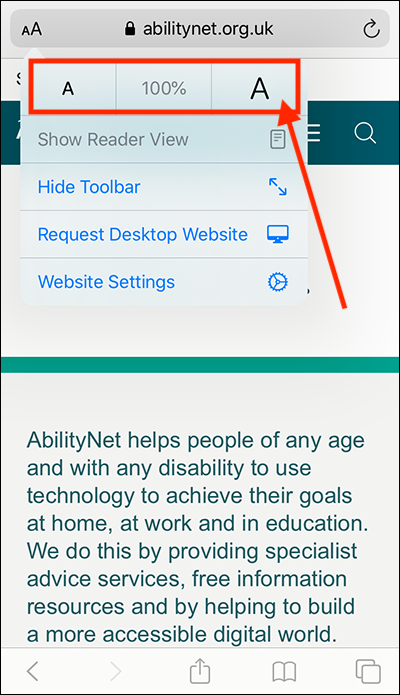
Refer Image
You can both apply it. :smile:
ADD
Come to think of it now, it's not bad to put it on the right side menu like PC Firefox.
Because it guarantees continuous usability.
How about the location above Find in page?
 black7375
on 26 Sep 2020
black7375
on 26 Sep 2020
@ekager To @black7375's point above, I'm wondering do we really need the Automatic font sizing toggle? Could we just have the slider and it would be implied that 100% on the slider is the equivalent of automatic font sizing? Chromium browsers just have the scale, no toggle.
 apbitner
on 6 Oct 2020
apbitner
on 6 Oct 2020
Yep @apbitner that would work - so do you want me to move forward with those changes?
 ekager
on 6 Oct 2020
ekager
on 6 Oct 2020
@ekager Let's confirm first.
@vesta0 it doesn't seem the Automatic font sizing toggle is completely necessary so we propose removing it and just having the slider, which would make this option more discoverable. Sound good?
apbitner
on 6 Oct 2020
Let's do it!
vesta0
on 7 Oct 2020
@ekager I think we're good to move forward. Let me know if you have any design questions but it should just be removing the toggle and moving up the content beneath.
apbitner
on 7 Oct 2020
Hi, verified as fixed on the latest Nightly Build 201012 using the following devices:
• Google Pixel 3a (Android 10)
• Huawei Mate 20 Lite (Android 9)
• OnePlus A3 (Android 6.0.1)
 AndiAJ
on 12 Oct 2020
AndiAJ
on 12 Oct 2020
removing automatic font sizing toggle and setting slider to 100 % gives me a very big text, so how can I get same size as before setting to 95 % or 105 % is giving me slightly smaller /bigger text
am I'm missing something?
 ale82to
on 16 Oct 2020
ale82to
on 16 Oct 2020
it is a bug
 lindongbin
on 17 Oct 2020
lindongbin
on 17 Oct 2020
@ale82to have you changed your system font size setting?
As mentioned above, 100% means "automatic font sizing" now
ekager
on 17 Oct 2020
yes exactly(my android general setting for font is 130 %).as I commented in another bug report new semplified setting is not working as expected because is no longer possible for the user to get both 100 % real font size for web pages and automatic font sizing disabled at the same time.
having saying that hopefully after many force close of fenix (I ve got root) i was able to get *old, real 100 % * for webpages (setting slider to 100 %)
ale82to
on 17 Oct 2020
or in other words
100 % in slider (new semplified setting) MUST means real 100 % font size for webpages regardless of android setting for font size.
if the user want bigger font can just use the slider otherwise there 's no way to get real 100 % font size for web content.
ale82to
on 17 Oct 2020
As mentioned above, 100% means "automatic font sizing" now SERIOUSLY?
100 % must disable automatic font sizing
or please tell me how to oldbehavoiur :100 % real font size for webpages and automatic font sizing disabled at same time.
ale82to
on 17 Oct 2020
Related issues
AndiAJ
·
3Comments
 topotropic
·
3Comments
ekager
·
3Comments
vesta0
·
3Comments
lindongbin
·
3Comments
topotropic
·
3Comments
ekager
·
3Comments
vesta0
·
3Comments
lindongbin
·
3Comments
Most helpful comment
@ekager To @black7375's point above, I'm wondering do we really need the
Automatic font sizingtoggle? Could we just have the slider and it would be implied that 100% on the slider is the equivalent of automatic font sizing? Chromium browsers just have the scale, no toggle.