Fenix: [Bug] App preview shows 2 search toolbars
Steps to reproduce
- Launch Fenix and tap on the URL bar.
- Tap on the app preview button in order to minimize Fenix.
Expected behavior
A single search toolbar is displayed in-app preview mode.
Actual behavior
App preview shows 2 search toolbars
Device information
- Android device: Google Pixel 4 XL (11).
- Fenix version: Nightly 9/7.
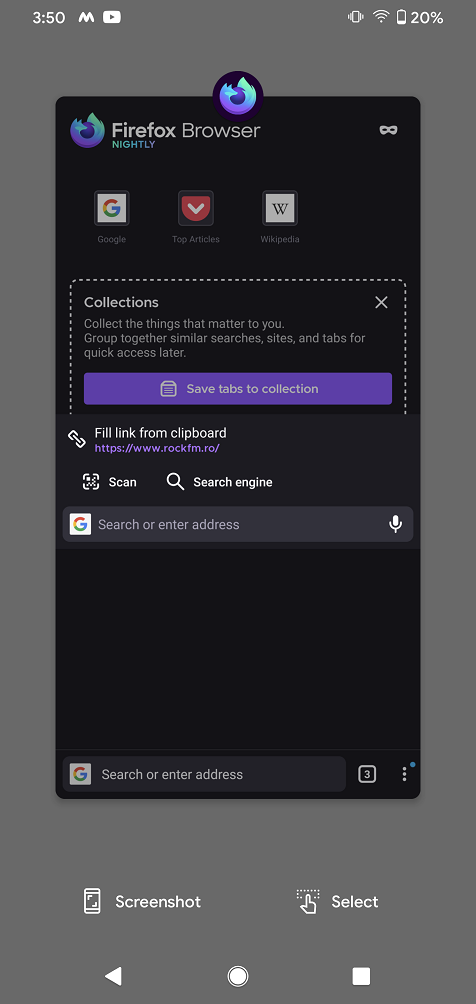
 abodea
All 6 comments
@abodea Does this occur often or was it a one time thing?
FWIK in recent apps Android shows a screenshot of what each app looked like when the user left.
Here I think I'm seeing that Android captured the exact moment when you were switching to edit mode to type a url and we're seeing just a frame of the animation occurring right before you left the app - probably to go to recents screen.
If opening the app from recents you would probably only see one toolbar because the animation ended.
If this is the case it's certainly an interesting issue, but "it works as expected".
 Mugurell
on 8 Sep 2020
Mugurell
on 8 Sep 2020
@Mugurell it occurs all the time.
If opening the app from recent you would probably only see one toolbar because the animation ended.
This bug is not about that, it's just when following the steps from the description.
abodea
on 8 Sep 2020
The top toolbar is the one from the search fragment, the bottom is from the home fragment. They are different, but visible because the search fragment is transparent above home.
Normally the bottom one is hidden by the keyboard, but the android preview hides the keyboard and so it is shown (and I guess that if you can make your keyboard transparent, it will be shown too).
The simplest solution will be to force the search activity to have an opaque view below, where the keyboard is. Or if that's not possible place it in the home fragment directly.
 TrianguloY
on 8 Sep 2020
TrianguloY
on 8 Sep 2020
The "edit mode" toolbar should automatically be dismissed when the user is leaving the app.
When testing with "window animation scale 10x" I see the following:

video
Mugurell
on 9 Sep 2020
The "edit mode" toolbar should automatically be dismissed when the user is leaving the app.
I cannot confirm this behaviour, but I can confirm the reported bug.
- I start Firefox and tap on the URL bar
- I switch to the Android home screen
- => Now I am on the homescreen and the keyboard is still enabled (that's #14396, but maybe related?)
- I open the Android app preview
- => I see the reported behaviour with two toolbars
- I start Firefox again
- => The edit mode toolbar is still enabled. I only see a completely white screen with the button bar for scan and search engines and the address bar with microphone and x icons (that's obviously the edit mode) at the bottom of the screen.
Device info: OnePlus 7T Pro McLaren, Oxygen OS 10.0.10 (Android 10)
 cadeyrn
on 9 Sep 2020
cadeyrn
on 9 Sep 2020
Thank you all!
If this happens often I think we can synchronize the events / toolbars.
Mugurell
on 9 Sep 2020
Related issues
 vesta0
·
3Comments
abodea
·
3Comments
vesta0
·
3Comments
abodea
·
3Comments
 clitetailor
·
3Comments
clitetailor
·
3Comments
 andreicristianpetcu
·
3Comments
andreicristianpetcu
·
3Comments
 ekager
·
3Comments
ekager
·
3Comments