Fenix: Investigate why favicon for frecent sites are slow to fetch
Steps to reproduce
open a new tab
watch the 8 Top Sites slots
Expected behavior
Top Sites favicons are instantly present
Actual behavior
Top Sites favicons appear from top left to bottom right over perhaps 0.5 seconds. It looks unpolished.
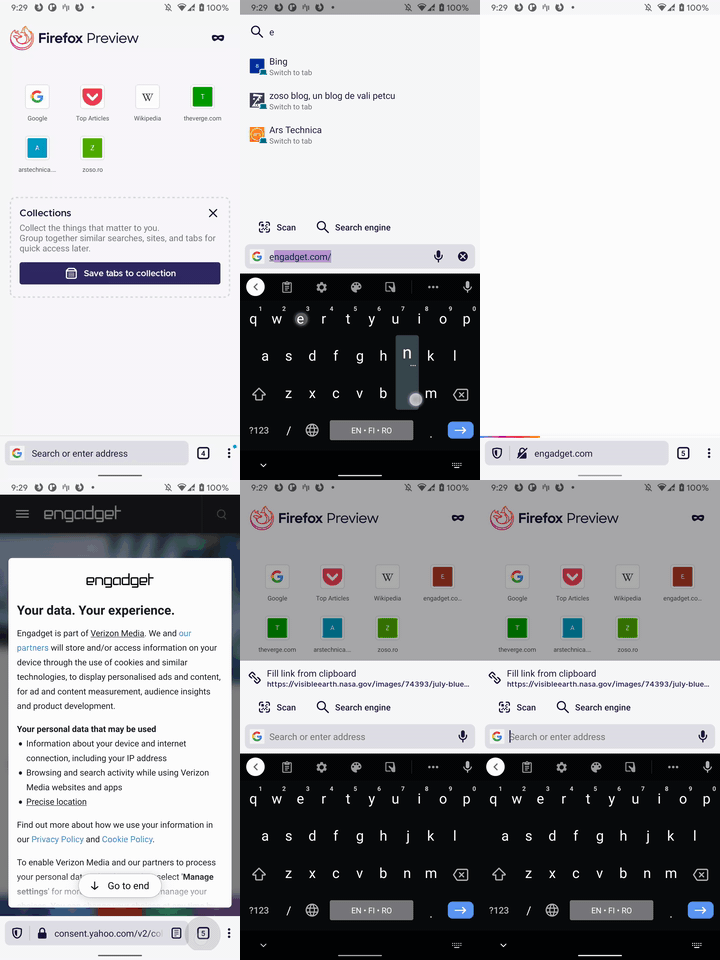
video
Device information
- Android device: Galaxy A40
- Fenix version: Today's
 gabrielluong
All 20 comments
I was talking to Jaws about this, and he referenced this issue.
 violasong
on 30 Sep 2020
violasong
on 30 Sep 2020
I was talking to Jaws about this, and he referenced this issue.
Thanks! This is super helpful to know that this is a common problem.
gabrielluong
on 1 Oct 2020
from @mcomella:
Triage: we think we might be able to do this with better caching (we shouldn't block to make this happen). Moving to inter team list to investigate the possibility.
 liuche
on 7 Oct 2020
liuche
on 7 Oct 2020
Triage: suggested action would be to take a profile to determine what's taking so long for the data to arrive. For getting started with profilers, see our docs: https://wiki.mozilla.org/Performance/How_to_get_started_on_Fenix
 mcomella
on 15 Oct 2020
mcomella
on 15 Oct 2020
I have tested this recently on several devices, and I do not see any delay in icon loading anymore.
Can QA also test this (maybe on slow devices?) or @gabrielluong confirm if this is still an issue? Thank you!
 mcarare
on 21 Oct 2020
mcarare
on 21 Oct 2020
I still have this issue on today's Fenix (201020 17:01), The first favicon - Pocket Top Articles - appears instantly, the other 7 icons might have got a little bit faster but it still takes perhaps 0.25 second for them to appear.
(it's possible that my 7 Top Sites are slow because they are pinned. Are yours?)
Galaxy A40 (midrange device), Android 10
 Cheap-Skate
on 21 Oct 2020
Cheap-Skate
on 21 Oct 2020
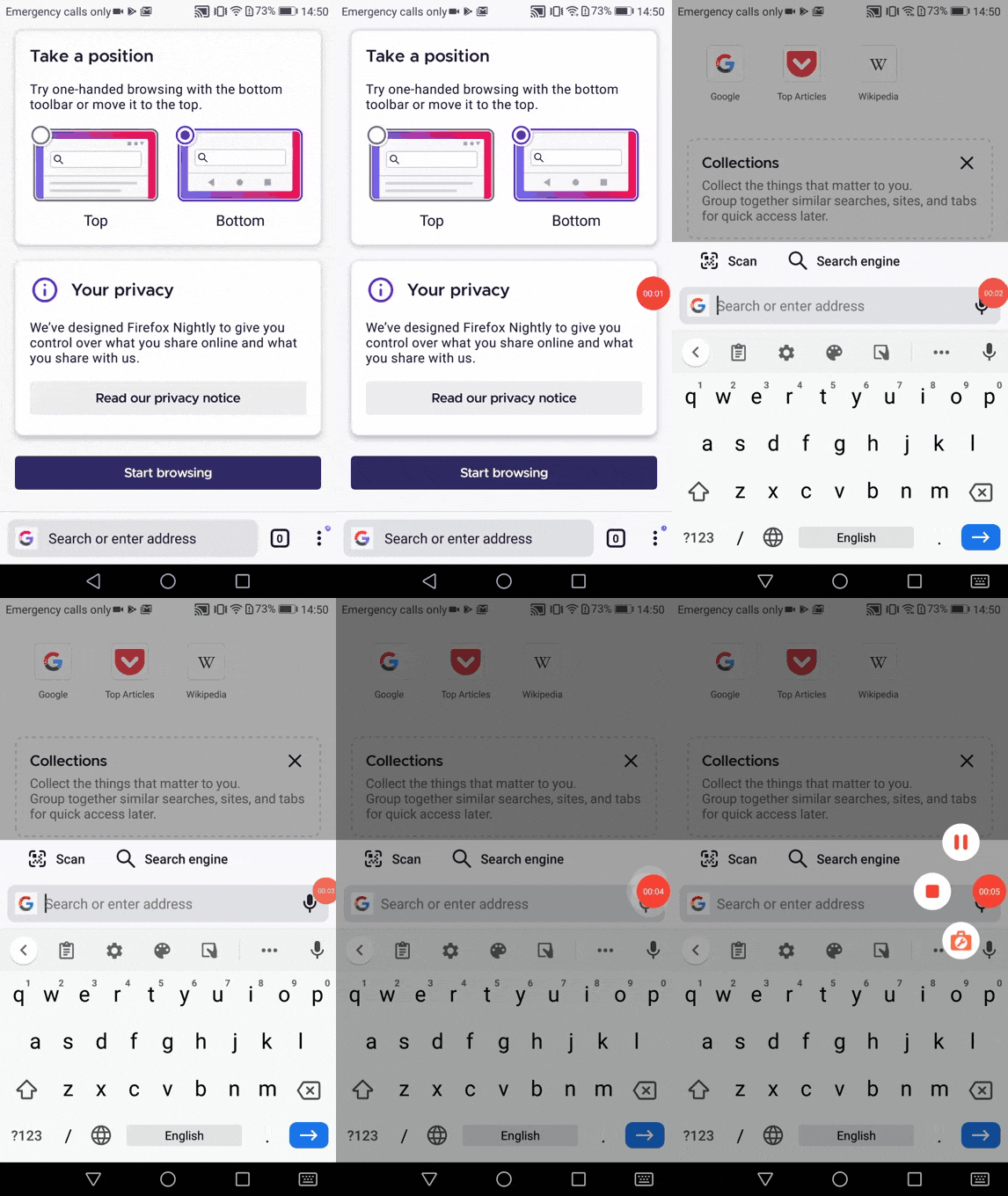
This issue is reproducible on Nightly 201026 with Huawei P9 Lite (Android 7) after clearing data. Not reproducible on Pixel2 (Android 9). I will remove the qa:needed label for now.
 ebalazs-sv
on 26 Oct 2020
ebalazs-sv
on 26 Oct 2020
After some investigation I have found that after a fresh install the top sites icon download takes about 180ms - 200ms. (Pixel 3XL Android 10; over wifi).
While the icon loaders do run sequentially they are arranged from the least to the most time consuming:
MemoryIconLoader(sharedMemoryCache),
        DiskIconLoader(sharedDiskCache),
        HttpIconLoader(httpClient),
        DataUriIconLoader()
In the log below you can see how Fenix is loading the two top sites icons on a fresh install start (top articles icon is local):
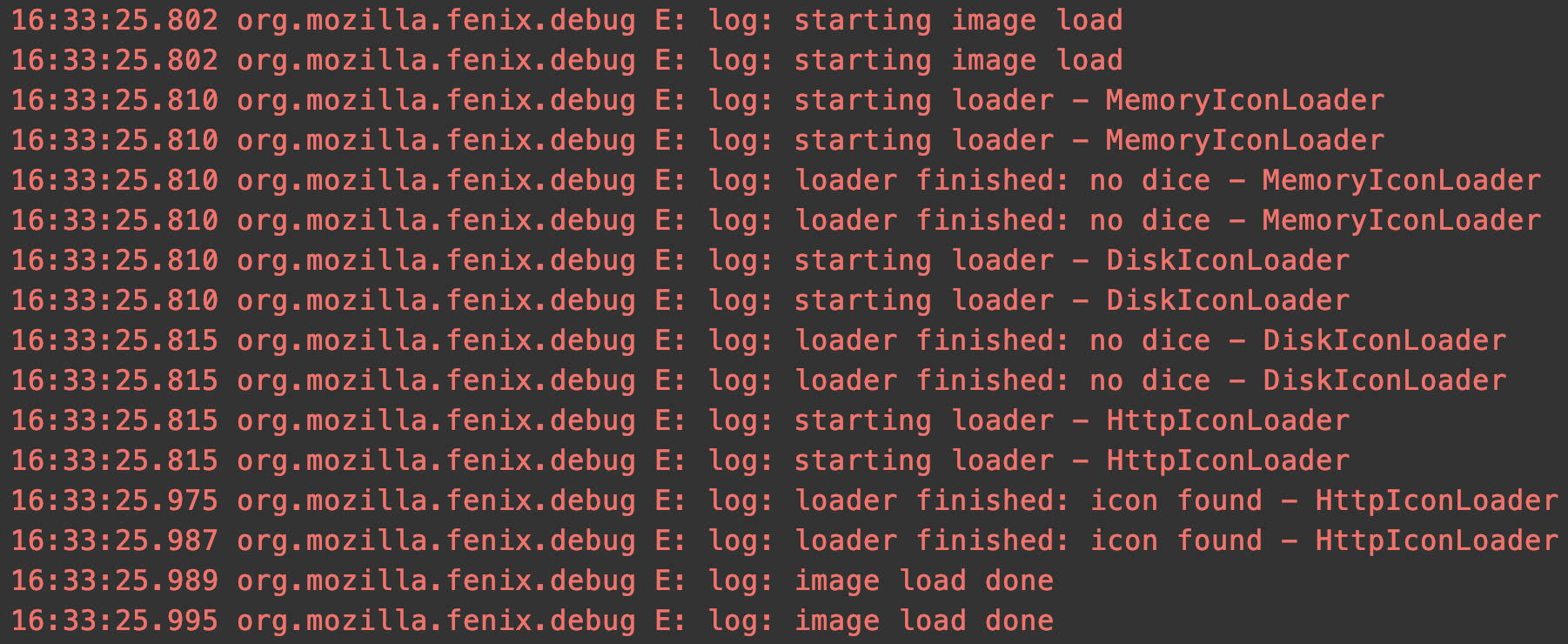
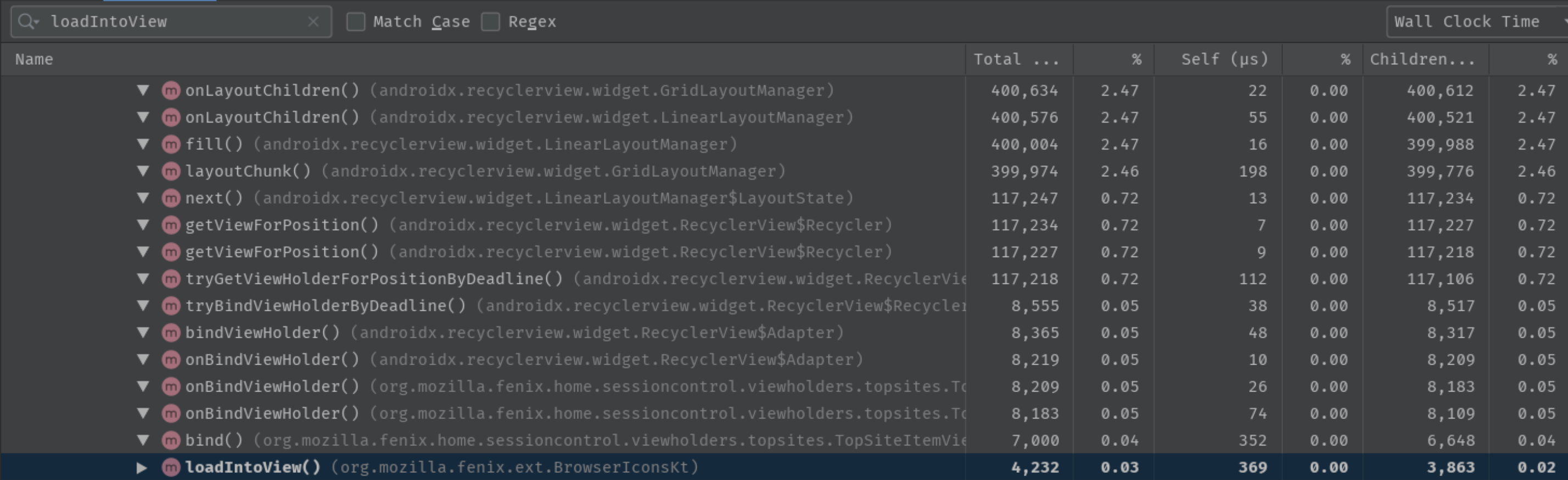
Image showing recycle view layout draw:
I'm not sure how we can improve on this. Maybe we can add a fade-in animation to the icons to make it less jarring when they pop in? But I don't know what the performance impact of that would be.
 codrut-topliceanu
on 30 Oct 2020
codrut-topliceanu
on 30 Oct 2020
So this seems like the normal behavior.
- In profiler we see that the entire layout of the RecyclerView happens in ~400 µs - less than 1ms so there's nothing we could reasonably improve here.
- Then in the first screenshot, based on the logs posted it seems that there is a little bit of time needed to actually download the favicons, almost 200ms with no extraneous method calls which can be avoided.
This could certainly be observed by the user if she knows where to look but it's something that is inherent to downloading an Internet resource.
@topotropic We could maybe show a placeholder but the switch from a placeholder to the website favicon would again be visible.
@gabrielluong Based on this would you agree to close this as a "works as intended" type of issue?
 Mugurell
on 4 Nov 2020
Mugurell
on 4 Nov 2020
How does Desktop do it? I wonder if the Desktop favicons are cached somehow?
On Firefox Desktop
- when I open a new tab at about:home they appear "instantly" (much faster than Fenix) but
- if I cmd-R to reload about:home they take a fraction of a second to populate (similar to Fenix)
On Chrome Android they seem to appear "instantly". IIRC, Fennec was "instant" too (?). IMHO "instant" looks much nicer
Cheap-Skate
on 4 Nov 2020
I think here there are two issues:
- the issue shown by Eliza - https://github.com/mozilla-mobile/fenix/issues/14443#issuecomment-716527445 the favicons don't appear instantly immediately after onboarding
Chrome has the same issue:
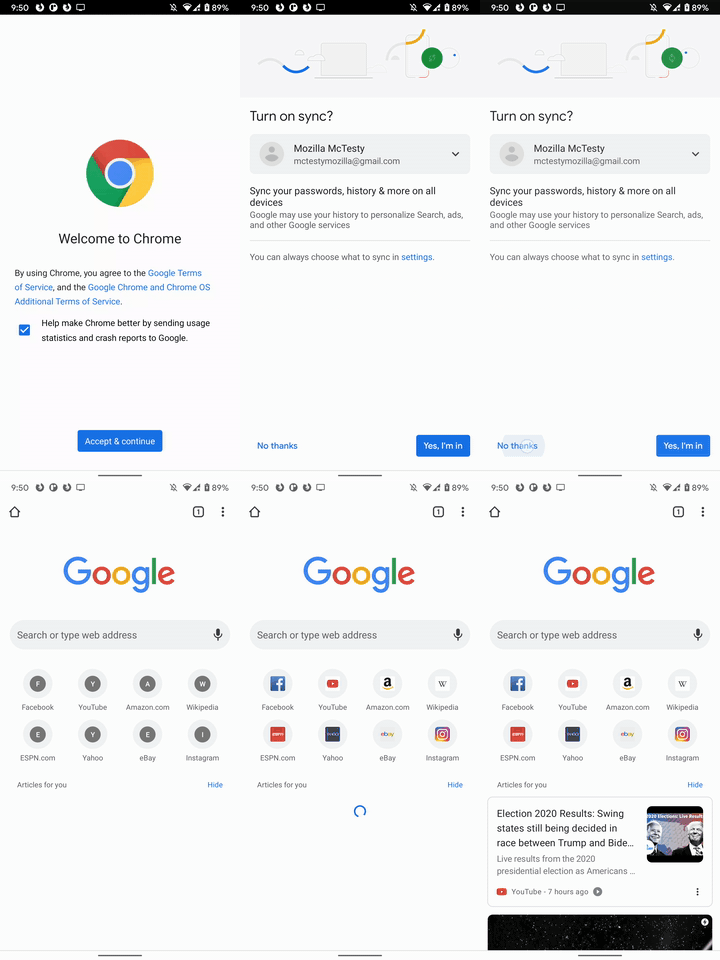
video
The old Firefox for Android got around this by having more icons cached (we only have the Pocket one) and also having the onboarding screens which allow for time to load the needed favicons behind them.
As a workaround for this specific scenario: first app startup, no already downloaded favicons we could look into starting to download the favicons while the user in is Fenix onboarding.
The issue reported by Gabriel: a small hiccup in loading topSites when returning to Fenix's homescreen
I see this as the normal behavior based on the following:- we are delegating the top sites refresh to a TopSitesFeatureInstance.
- this feature only refreshes the topSites in
Lifecycle.Event.ON_STARTmeaning after Fenix's homescreen is visible to the user.
Users would first see the previous list of topSites and only after this the refresh of topSites is started and after a short brief of time the list of topSites is refreshed with no unexpected delays loading the favicons seen.
I've added to the original comment a short video showing this.
Based on the above I see the current behavior as expected with the only possible improvement being related to the issue Eliza shown, we could be preemptive about downloading favicons for the initial run though giving that this issue exists in other browsers also and only for the first run I'm not sure it warrants a rather complex solution.
Mugurell
on 5 Nov 2020
Looking more into what's happening when returning to homescreen from a webpage I'm seeing some interesting logs:
10:35:30.688 HomeFragment: onCreate: HomeFragment{a05bc1d} (8715fa47-bbf1-47f0-957b-07d20df7d136) id=0x7f0a0172}
10:35:30.689 HomeFragment: onCreateView: HomeFragment{a05bc1d} (8715fa47-bbf1-47f0-957b-07d20df7d136) id=0x7f0a0172}
10:35:30.717 updateSessionControlView: updating view with 3 topSites
10:35:30.726 HomeFragment onStart HomeFragment{a05bc1d} (8715fa47-bbf1-47f0-957b-07d20df7d136) id=0x7f0a0172}
10:35:30.730 newHomeFragmentAction: Change(topSites=[TopSite(id=1, title=Google, url=https://www.google.com/, createdAt=1604568902423, type=DEFAULT), TopSite(id=2, title=Top Articles, url=https://getpocket.com/fenix-top-articles, createdAt=1604568902423, type=DEFAULT), TopSite(id=3, title=Wikipedia, url=https://www.wikipedia.org/, createdAt=1604568902423, type=DEFAULT)], mode=org.mozilla.fenix.home.Mode$Normal@a77a965, collections=[], tip=null, showCollectionPlaceholder=true)
10:35:30.730 HomeFragment: onCreateView: HomeFragment{2b6d54} (dbd36591-d892-465c-9ce7-21e936b626f8) id=0x7f0a0172}
10:35:30.744 updateSessionControlView: updating view with 3 topSites
10:35:30.752 HomeFragment onStart HomeFragment{2b6d54} (dbd36591-d892-465c-9ce7-21e936b626f8) id=0x7f0a0172}
10:35:30.754 newHomeFragmentAction: Change(topSites=[TopSite(id=1, title=Google, url=https://www.google.com/, createdAt=1604568902423, type=DEFAULT), TopSite(id=2, title=Top Articles, url=https://getpocket.com/fenix-top-articles, createdAt=1604568902423, type=DEFAULT), TopSite(id=3, title=Wikipedia, url=https://www.wikipedia.org/, createdAt=1604568902423, type=DEFAULT), TopSite(id=null, title=theguardian.com, url=http://theguardian.com/, createdAt=null, type=FRECENT)], mode=org.mozilla.fenix.home.Mode$Normal@a77a965, collections=[], tip=null, showCollectionPlaceholder=true)
10:35:30.866 Will bind https://www.google.com/ at position 0
10:35:30.869 Will bind https://getpocket.com/fenix-top-articles at position 1
10:35:30.872 Will bind https://www.wikipedia.org/ at position 2
10:35:30.894 Will bind https://www.google.com/ at position 0
10:35:30.896 Will bind https://getpocket.com/fenix-top-articles at position 1
10:35:30.898 Will bind https://www.wikipedia.org/ at position 2
10:35:30.942 updateSessionControlView: view.consumeFrom loaded 3 topSites
10:35:30.945 newHomeFragmentAction: CollectionsChange(collections=[])
10:35:30.946 DefaultTopSitesView: displayTopSites will dispatch an update for [TopSite(id=1, title=Google, url=https://www.google.com/, createdAt=1604568902423, type=DEFAULT), TopSite(id=2, title=Top Articles, url=https://getpocket.com/fenix-top-articles, createdAt=1604568902423, type=DEFAULT), TopSite(id=3, title=Wikipedia, url=https://www.wikipedia.org/, createdAt=1604568902423, type=DEFAULT), TopSite(id=null, title=theguardian.com, url=http://theguardian.com/, createdAt=null, type=FRECENT)] topsites
10:35:30.946 updateSessionControlView: view.consumeFrom loaded 4 topSites
10:35:30.946 newHomeFragmentAction: TopSitesChange(topSites=[TopSite(id=1, title=Google, url=https://www.google.com/, createdAt=1604568902423, type=DEFAULT), TopSite(id=2, title=Top Articles, url=https://getpocket.com/fenix-top-articles, createdAt=1604568902423, type=DEFAULT), TopSite(id=3, title=Wikipedia, url=https://www.wikipedia.org/, createdAt=1604568902423, type=DEFAULT), TopSite(id=null, title=theguardian.com, url=http://theguardian.com/, createdAt=null, type=FRECENT)])
10:35:30.947 newHomeFragmentAction: CollectionsChange(collections=[])
10:35:30.949 DefaultTopSitesView: displayTopSites will dispatch an update for [TopSite(id=1, title=Google, url=https://www.google.com/, createdAt=1604568902423, type=DEFAULT), TopSite(id=2, title=Top Articles, url=https://getpocket.com/fenix-top-articles, createdAt=1604568902423, type=DEFAULT), TopSite(id=3, title=Wikipedia, url=https://www.wikipedia.org/, createdAt=1604568902423, type=DEFAULT), TopSite(id=null, title=theguardian.com, url=http://theguardian.com/, createdAt=null, type=FRECENT)] topsites
10:35:30.949 newHomeFragmentAction: TopSitesChange(topSites=[TopSite(id=1, title=Google, url=https://www.google.com/, createdAt=1604568902423, type=DEFAULT), TopSite(id=2, title=Top Articles, url=https://getpocket.com/fenix-top-articles, createdAt=1604568902423, type=DEFAULT), TopSite(id=3, title=Wikipedia, url=https://www.wikipedia.org/, createdAt=1604568902423, type=DEFAULT), TopSite(id=null, title=theguardian.com, url=http://theguardian.com/, createdAt=null, type=FRECENT)])
10:35:30.987 updateSessionControlView: view.consumeFrom loaded 4 topSites
10:35:31.007 Will bind https://www.google.com/ at position 0
10:35:31.010 Will bind https://getpocket.com/fenix-top-articles at position 1
10:35:31.012 Will bind https://www.wikipedia.org/ at position 2
10:35:31.013 Will bind http://theguardian.com/ at position 3
10:35:31.035 Will bind https://www.google.com/ at position 0
10:35:31.036 Will bind https://getpocket.com/fenix-top-articles at position 1
10:35:31.038 Will bind https://www.wikipedia.org/ at position 2
10:35:31.040 Will bind http://theguardian.com/ at position 3
So there might be some improvements to be made here, not related to fetching but to HomeFragment and it's lifecycle methods.
Mugurell
on 5 Nov 2020
@topotropic We could maybe show a placeholder but the switch from a placeholder to the website favicon would again be visible.
@Mugurell We could consider showing the background (fill + border) and then the favicons
 topotropic
on 5 Nov 2020
topotropic
on 5 Nov 2020
This is how it looks at the moment:
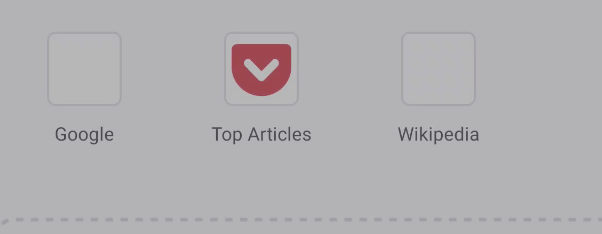

(To take these screenshots I recorded the screen and then went through the video frame by frame)
We could consider showing the background (fill + border) and then the favicons
The first screenshot shows the background(fill + border) and then the favicons image loads in. How should we change this?
codrut-topliceanu
on 11 Nov 2020
Thanks for the screenshots. Based on the comments above it sounds like there isn't much we can do to accomplish this:
Expected behavior
Top Sites favicons are instantly present
Is that correct?
Assuming this is the case, all we can do is to reduce noise, I think having what you posted above is already great. In the comment 0 video was also a brief flicker, is this something you can reproduce and that we could address?
I'm also wondering if it would make sense to display all favicons at ones to reduce noise if that's possible and doesn't take too long. Thanks!
topotropic
on 11 Nov 2020
Thanks for the screenshots. Based on the comments above it sounds like there isn't much we can do to accomplish this:
Expected behavior
Top Sites favicons are instantly presentIs that correct?
Correct. While we may be able to find specific scenarios like the first app start where we could add pre-fetching while the user is on the welcome page, I believe that would add a lot of complexity.
In the comment 0 video was also a brief flicker, is this something you can reproduce and that we could address?
I haven't witnessed this myself and I was unable to reproduce it, but I've heard mention of it before, it may be an issue with the diffUtil when in onCreateView. I'll look into it some more.
I'm also wondering if it would make sense to display all favicons at ones to reduce noise if that's possible and doesn't take too long.
The top articles icon appears instantly because we have it locally, but I can definitely delay its appearance until the other icons are loaded.
codrut-topliceanu
on 11 Nov 2020
I like the idea of delaying top sites appearing until they are all ready, so maybe all 8 appear simultaneously. Maybe you could even fade them in over eg 500 ms? I don't know whether a blank screen before top sites appear, or the current placeholders, would be more elegant.
Cheap-Skate
on 11 Nov 2020
I like the pocket delay idea as well.
@topotropic:
We could consider showing the background (fill + border) and then the favicons
Yes! I think skeleton screen-style boxes would help a lot. It's what Chrome seems to be doing as well. Quick sketch:

violasong
on 11 Nov 2020
@topotropic
diffUtil seems ok so I'm not sure what is up with the brief flicker.
The top articles icon appears instantly because we have it locally, but I can definitely delay its appearance until the other icons are loaded.
Should I proceed with this?
codrut-topliceanu
on 18 Nov 2020
collecting nicole's thoughts - we show the background until all favicons are ready and then show those all at one time to reduce the flickering/noise. something like the sketch in victoria's comment above. we'll circle back on this in a few weeks, once we get back from the design sprint! :)
---- update ----
just to clarify, by circle back i meant please start the implementation using the above guidance ^. you don't need to wait for us to be ready before you start :)
 lime124
on 18 Nov 2020
lime124
on 18 Nov 2020
Related issues
 clitetailor
·
3Comments
clitetailor
·
3Comments
 AndiAJ
·
3Comments
AndiAJ
·
3Comments
 lindongbin
·
3Comments
lindongbin
·
3Comments
 abodea
·
3Comments
abodea
·
3Comments
 andreicristianpetcu
·
3Comments
andreicristianpetcu
·
3Comments
Most helpful comment
I think here there are two issues:
Chrome has the same issue:
video
The old Firefox for Android got around this by having more icons cached (we only have the Pocket one) and also having the onboarding screens which allow for time to load the needed favicons behind them.
As a workaround for this specific scenario: first app startup, no already downloaded favicons we could look into starting to download the favicons while the user in is Fenix onboarding.
The issue reported by Gabriel: a small hiccup in loading topSites when returning to Fenix's homescreen
I see this as the normal behavior based on the following:
Lifecycle.Event.ON_STARTmeaning after Fenix's homescreen is visible to the user.Users would first see the previous list of topSites and only after this the refresh of topSites is started and after a short brief of time the list of topSites is refreshed with no unexpected delays loading the favicons seen.
I've added to the original comment a short video showing this.
Based on the above I see the current behavior as expected with the only possible improvement being related to the issue Eliza shown, we could be preemptive about downloading favicons for the initial run though giving that this issue exists in other browsers also and only for the first run I'm not sure it warrants a rather complex solution.