Fenix: [Bug] Nighlty crashes on startup
Steps to reproduce
Install Nightly and start it
Expected behavior
not crash
Actual behavior
crashes
Device information
- Android device: OnePlus 5t
- Fenix version: Nightly
 andreicristianpetcu
All 15 comments
Could you share the top crash report from about:crashes?
 s-ankur
on 27 Aug 2020
s-ankur
on 27 Aug 2020
logcat? https://github.com/mozilla-mobile/fenix/wiki/Logging-Crash-Information#using-adb-logcat-to-get-crash-information
 yoasif
on 27 Aug 2020
yoasif
on 27 Aug 2020
same issue here after wasting 3 hours of my spare time it turns out that the crash occurs only if nighlty is set as default browser clearing default for browser in android setting solve the issue.
 ale82to
on 28 Aug 2020
ale82to
on 28 Aug 2020
Could someone who is experiencing this please link a crash report from about:crashes 🙏
 ekager
on 28 Aug 2020
ekager
on 28 Aug 2020
@ekager https://crash-stats.mozilla.org/report/index/3fa2294f-64bd-41f9-9846-e1d0b0200827 from https://github.com/mozilla-mobile/fenix/issues/14333
yoasif
on 28 Aug 2020
Hm cc @boek @eliserichards looks related to https://github.com/mozilla-mobile/fenix/pull/14126 possibly?
ekager
on 28 Aug 2020
@ale82to that's correct! I removed it from default browser and it works.
andreicristianpetcu
on 28 Aug 2020
I don't have google play installed, not sure if it is relevant.
andreicristianpetcu
on 28 Aug 2020
secret settings looks odd
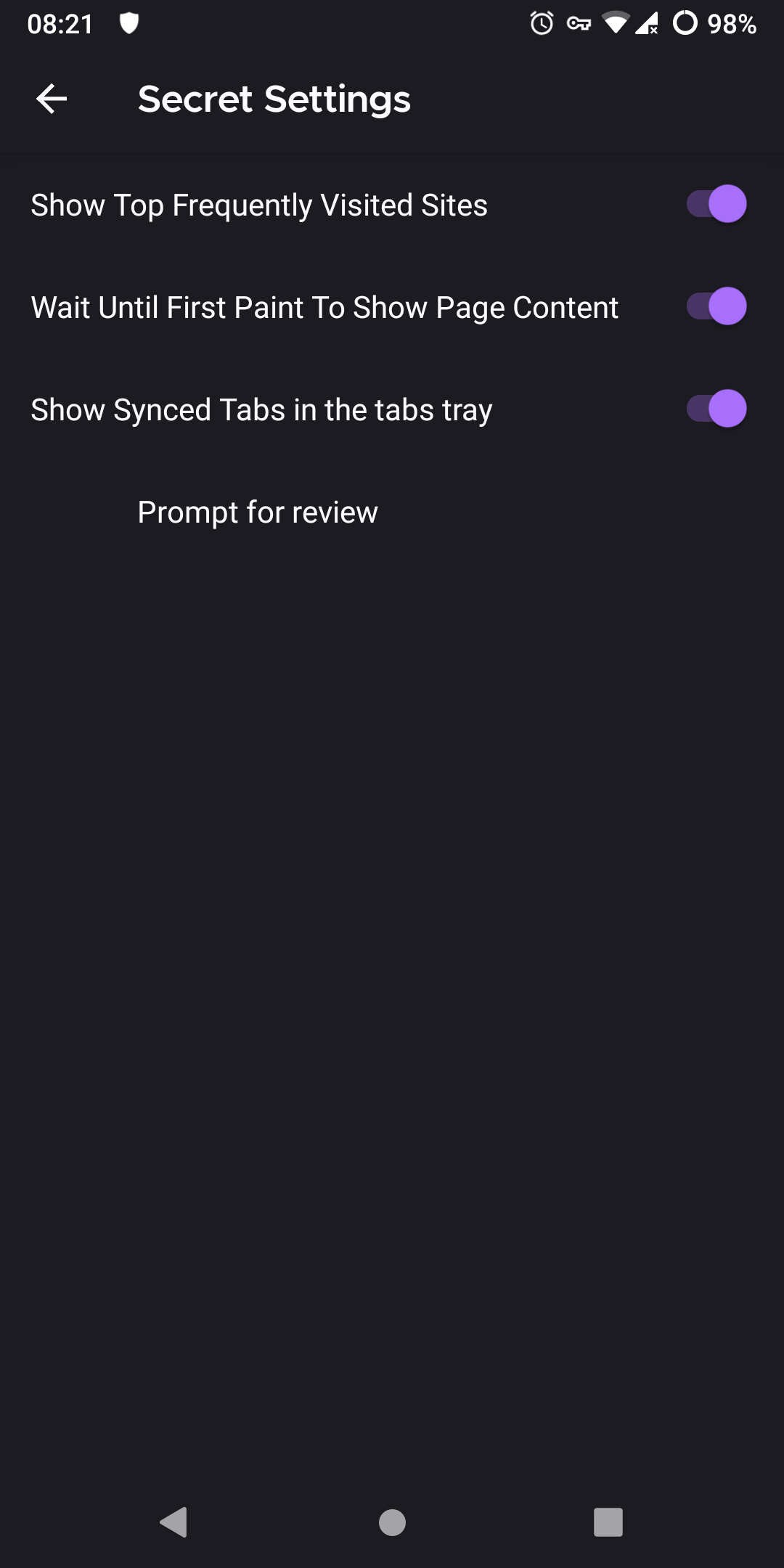
Clicking on prompt for review crashes.
andreicristianpetcu
on 28 Aug 2020
54837620-7a09-43aa-ba65-0e63abb33cb1
com.google.android.play.core.internal.aq:/ailed to bind to the service.
- Sentry: https://sentry.prod.mozaws.net/operations/firefox-nightly/?query=6ab57e8364cb41d1a017faf2605a4cb5
* Socorro: https://crash-stats.mozilla.org/report/index/bp-40b690e6-6e8d-46f9-a0d0-eca300200828
com.google.android.play.core.internal.aq: Failed to bind to the service.
at com.google.android.play.core.internal.ap.a(Unknown Source:78)
at com.google.android.play.core.internal.ai.a(Unknown Source:4)
at com.google.android.play.core.internal.ag.run(Unknown Source:0)
at android.os.Handler.handleCallback(Handler.java:873)
at android.os.Handler.dispatchMessage(Handler.java:99)
at android.os.Looper.loop(Looper.java:193)
at android.os.HandlerThread.run(HandlerThread.java:65)
 B0pol
on 28 Aug 2020
B0pol
on 28 Aug 2020
I pressed on prompt to review earlier today, it crashes but I can restart the browser. Then it worked for few hours, and suddenly, without changing any settings it crashed.
- the crash message is the same as the one after prompt for review, but I did not click on it when I got these crashes on startup
- I could open a new tab from a link, but I could not use tab tray to type about:crashes, because it was making instant crash
- it stopped crashing when I changed default browser, then I was able to access about:crashes
- my phone: Pocophone F1, Android 9, no google play services, only microG
B0pol
on 28 Aug 2020
So it worked for two days but now I get crash on startup with today builds, but not from the beginning (I mean right after the update).
I can't even open it if I change default browser / open via a link (I could with the original bug report) then I don't know if it is related, but I can't open about:crashes anyway
B0pol
on 30 Aug 2020
@B0pol That is very likely #14486 and unrelated to this issue.
 hwinnemoe
on 30 Aug 2020
hwinnemoe
on 30 Aug 2020
I think we can close this crash.
ekager
on 30 Aug 2020
No startup crash in Nightly 9/1 and RC 80.1.2, following the steps mentioned here: default browser and restart the app on a device without GPS.
 sv-ohorvath
on 1 Sep 2020
sv-ohorvath
on 1 Sep 2020
Related issues
 thelazyoxymoron
·
3Comments
thelazyoxymoron
·
3Comments
 vesta0
·
3Comments
andreicristianpetcu
·
3Comments
vesta0
·
3Comments
andreicristianpetcu
·
3Comments
 abodea
·
3Comments
abodea
·
3Comments
 clitetailor
·
3Comments
clitetailor
·
3Comments
Most helpful comment
I think we can close this crash.