Fenix: [Bug] Notification for QR scan/FxA pairing failures if camera permission denied
Steps to reproduce
Trigger QR Scan for loading a url
Deny permission twice to get "Deny & Don't ask again"
Trigger QR scan again
Expected behavior
Message explaining why the permission is needed
Actual behavior
Screen flashes, nothing happens, seems broken
Note: this also happens when you go to pair from sync settings
UX
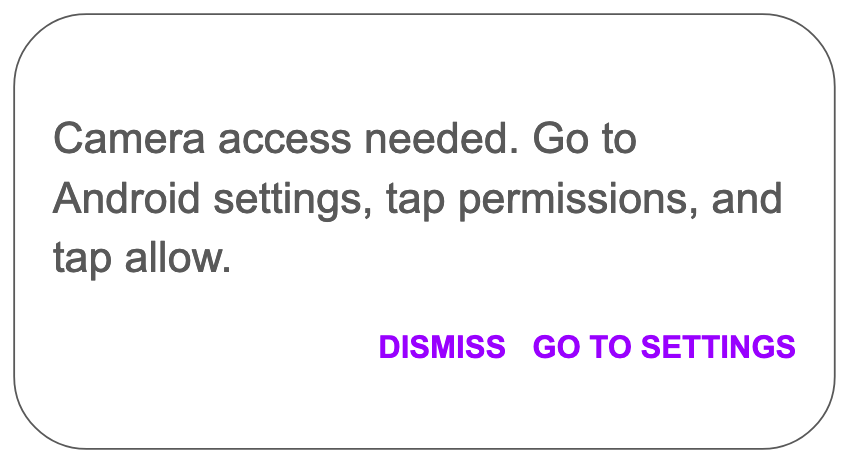
From @betsymi: show a notification:
 liuche
All 15 comments
For Android versions that don't allow linking into the App settings what are we doing here? SUMO article?
 kbrosnan
on 26 Aug 2020
kbrosnan
on 26 Aug 2020
Here are the strings since you can't grab them from the image above.
Camera access needed. Go to Android settings, tap permissions, and tap allow.
DISMISS GO TO SETTINGS
Linking to SUMO is fine for those other Android versions, though I wasn't able to find an existing article that explains how to do this. We may need a new article.
 betsymi
on 26 Aug 2020
betsymi
on 26 Aug 2020
@ekager if you have a recommendation here for what UI elements to use, and how to handle the low-API devices, for whoever picks this up after pre-landing strings.
liuche
on 26 Aug 2020
Yep this looks like a dialog to me based on the two button configuration/longer message.
It does sound like we need a new SUMO article similar to how what we have for our Default Browser setting
 ekager
on 26 Aug 2020
ekager
on 26 Aug 2020
Requested a new Sumo page from Joni. She's getting back to me tomorrow with the draft.
 eliserichards
on 31 Aug 2020
eliserichards
on 31 Aug 2020
Here's the URL you can use in the UI: https://support.mozilla.org/1/mobile/%VERSION%/%OS%/%LOCALE%/qr-camera-access. It will redirect to a SUMO article (currently in progress).
 jonichan
on 31 Aug 2020
jonichan
on 31 Aug 2020
We have a draft here.
Please comment with any feedback. I'm on a Pixel with Android 10 and I'm wondering if the steps are the same as other versions.
jonichan
on 1 Sep 2020
Article is now live (but we can make additional changes if needed): https://support.mozilla.org/kb/camera-permissions
Thanks for the feedback, Elise and Betsy.
jonichan
on 2 Sep 2020
Thank you so much @jonichan! 🎉
eliserichards
on 2 Sep 2020
Takled to Vesta, and this is something that she'd like to have uplifted to 81. Let's see where we're at with it when we regroup next week.
liuche
on 3 Sep 2020
@vesta0 this should be ready to test in Nightly on Saturday at the latest (but probably Friday), or in Firefox Beta early next week.
liuche
on 11 Sep 2020
This has landed in Fenix 81.1.1-beta3.
Found an issue while testing it:
When permission is denied and the prompt appears, go to Settings to change the Camera permission.
Switch Camera permission on.
Return to Fenix and tap the Search Scan again.
Expected: The notification is not displayed, the QR code scan is launched.
Actual result: The notification still appears after allowing Camera permission.
Can't verify it for the QR pairing feature due to this crash: https://github.com/mozilla-mobile/fenix/issues/14973
 sv-ohorvath
on 11 Sep 2020
sv-ohorvath
on 11 Sep 2020
Now 8.1.1.1-beta.4 crashes if you tap the Go to Settings button when trying to pair using the QR code. See https://github.com/mozilla-mobile/fenix/issues/15079
Since the remaining bugs have been logged on separate issues: #https://github.com/mozilla-mobile/fenix/issues/14998 & #15079, I'll close this ticket.
sv-ohorvath
on 14 Sep 2020
Our contacts at Google suggested that we need to reserve sending a user to the app settings until the app has detected that the 'Always deny' option has been selected.
They followed up with these guidelines on the permission request flow they require for featured apps in the Play Store:
Permission Request Flow (non-critical permissions)
(When selecting a feature that requires a non-critical permission)
- Inform the user on what the following permission will be used for
- Tigger the permission request
- (If Denied) Inform user again
- Trigger permission request
- (If set to Don’t Ask Again) Inform the user that they can activate the permission in the app settings
- Remind users to allow permission in the app settings any time a feature requiring the permission is selected
you can also share this link with them
http://stackoverflow.com/questions/30719047/android-m-check-runtime-permission-how-to-determine-if-the-user-checked-nev
 lwa-moz
on 26 Oct 2020
lwa-moz
on 26 Oct 2020
I'll file a new bug with these requirements ^
eliserichards
on 26 Oct 2020
Related issues
 lindongbin
·
3Comments
lindongbin
·
3Comments
 thelazyoxymoron
·
3Comments
thelazyoxymoron
·
3Comments
 softvision-miralobontiu
·
3Comments
softvision-miralobontiu
·
3Comments
 Chris01277
·
3Comments
Chris01277
·
3Comments
 vesta0
·
3Comments
vesta0
·
3Comments
Most helpful comment
Here's the URL you can use in the UI: https://support.mozilla.org/1/mobile/%VERSION%/%OS%/%LOCALE%/qr-camera-access. It will redirect to a SUMO article (currently in progress).