Fenix: [Bug] saved logins lost during upgrade fennec to fenix with Master Password enabled
Steps to reproduce
- saved logins in fennec 68.11
- master password set
- update via play store to fenix 79.0.4
Expected behavior
- logins are migrated
Ideas to solve this:
- upgrade is held back until master password removed, or
- master password is asked during migration
Actual behavior
- all logins are lost
Showing the information to remove the master password _after_ migration and total loss of all saved logins is currently a questionable choice of user experience, to put it mildly.
See also reviews on play store for more user reports of this issue.
Device information
- Android device: Samsung S8, Android 9
- Fenix version: 79.0.4
 fichtennadel
All 11 comments
I'm sorry this happened to you - we're sending out messaging for this, but it seems like you may not have gotten this.
Do you have your passwords synced to another device, and can sync them back to a fresh install of firefox?
Here's the SUMO article with messaging about it, but I assume you did not see it: https://support.mozilla.org/en-US/kb/firefox-android-upgrade-faqs?redirectslug=firefox-preview-upgrade-faqs
cc @mei-loo do you know if we're doing any other messaging around this?
 liuche
on 20 Aug 2020
liuche
on 20 Aug 2020
I'm sorry this happened to you - we're sending out messaging for this, but it seems like you may not have gotten this.
No, it has not reached me. By which means/channels are you actively(!) reaching out to users to warn them about the loss of their data?
Here's the SUMO article with messaging about it, but I assume you did not see it: https://support.mozilla.org/en-US/kb/firefox-android-upgrade-faqs?redirectslug=firefox-preview-upgrade-faqs
I did see it. After the upgrade it had been shown as landing page in fenix.
You can't seriously expect users to find this link without even knowing what is going to happen when their phone/play store automatically updates from fennec to fenix. Even the ones triggering the update manually have seen no hint whatsoever in the release notes.
Just have a look at the reviews in play store to get an idea of the scale of this disaster.
fichtennadel
on 20 Aug 2020
That's the only information I've seen before my passwords and logins got lost:
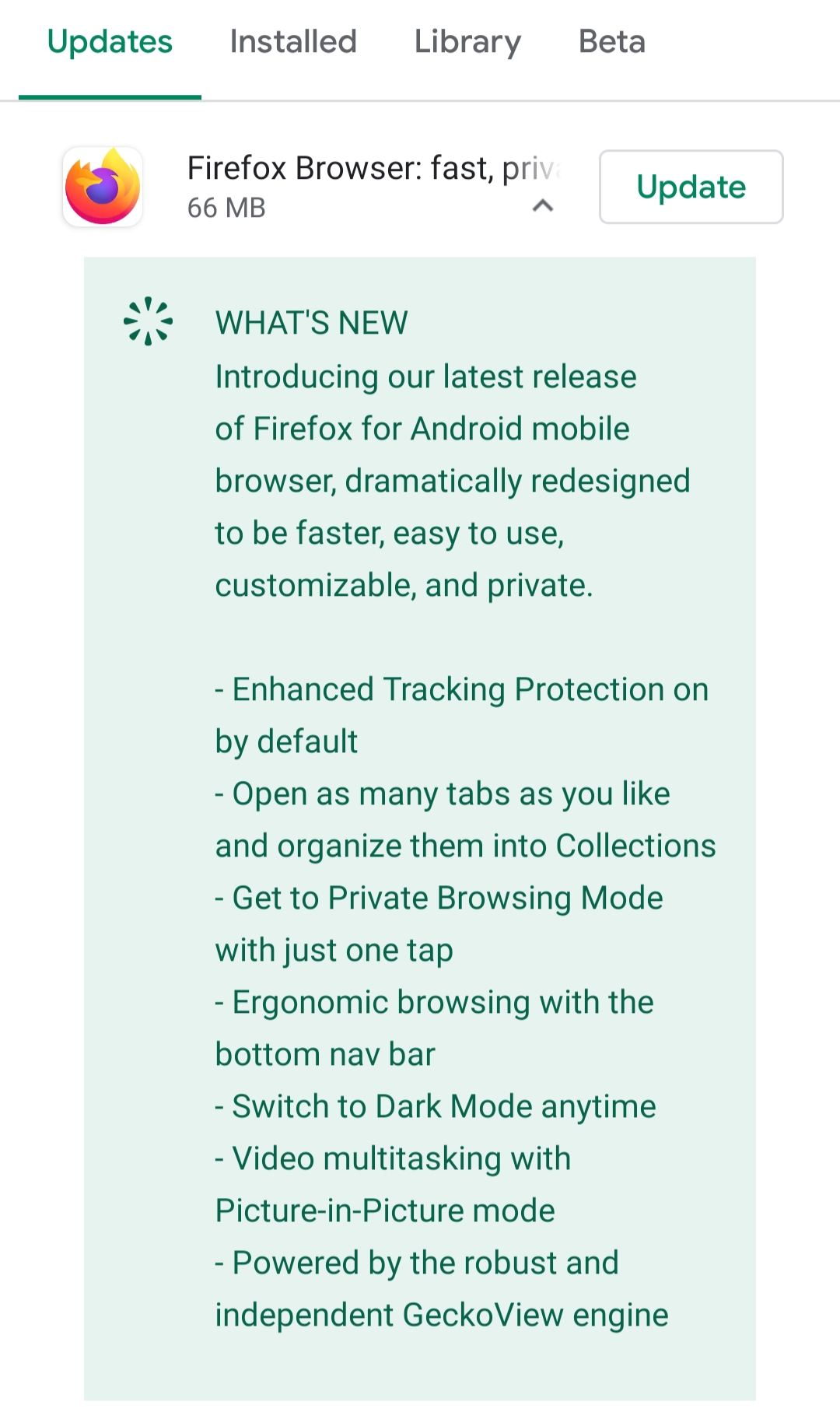
How should anyone guess what is going to happen to their browser and data out of this.
This is seriously disappointing.
fichtennadel
on 20 Aug 2020
"Good" news is that as long as you didn't uninstall 79 version, your old passwords are still there.
/data/data/org.mozilla.firefox/files/mozilla/<profile>.default/signons.sqlite*
I successfully downgraded to 68 and restored them. IMPORTANT: backup all your data before that! Root required.
Edit: if you want manually transfer signons between profiles you will need key4.db as well
 L418467
on 22 Aug 2020
L418467
on 22 Aug 2020
Restore procedure:
- Downgrade to Firefox 68
1.1 Disable automated upgrades of Firefox for Android
1.2 Download correct version 68 APK from www.apkmirror.com onto device
1.3 Allow Android Debugging (ADB) and start shell on device: adb shell
1.4 Move downloaded APK file to /data/local/tmp (necessary for my device, might work without)
1.5 Downgrade (keeping your data) with: pm install -r -d /data/local/tmp/xxx.apk - Export credentials, e.g. by creating a Firefox Sync account
- Enable automated upgrades of Firefox for Android again
- Upgrade to Fenix 79+ using Play Store
- Import credentials, e.g. by logging in to the Firefox Sync account
If using a Firefox Sync account, you can stop device synchronization afterwards and delete it again.
 oskar023
on 26 Aug 2020
oskar023
on 26 Aug 2020
In terms of messaging, please note that Mobile Engagement team published an
in-app message that deployed on 8/24 to align with the tier 1 pre-awareness
push notification since we wanted the users to be aware that there was an
update coming before displaying a message about turning off the setting
before the update.
This is also English-only, but any user in any country who is in-app is
eligible to receive this message now if they are using master password.
On Wed, Aug 19, 2020 at 10:13 PM liuche notifications@github.com wrote:
I'm sorry this happened to you - we're sending out messaging for this, but
it seems like you may not have gotten this.Do you have your passwords synced to another device, and can sync them
back to a fresh install of firefox?Here's the SUMO article with messaging about it, but I assume you did not
see it:
https://support.mozilla.org/en-US/kb/firefox-android-upgrade-faqs?redirectslug=firefox-preview-upgrade-faqscc @mei-loo https://github.com/mei-loo do you know if we're doing any
other messaging around this?—
You are receiving this because you were mentioned.
Reply to this email directly, view it on GitHub
https://github.com/mozilla-mobile/fenix/issues/13926#issuecomment-676854531,
or unsubscribe
https://github.com/notifications/unsubscribe-auth/AQLXVGM666ZRPJG4LRUYSCDSBSBGLANCNFSM4QFBVCKA
.
--
Mei Loo
Product Marketing, Firefox Mobile
Mozilla, Washington, DC
 mei-loo
on 27 Aug 2020
mei-loo
on 27 Aug 2020
In terms of messaging, please note that Mobile Engagement team published an in-app message that deployed on 8/24 to align with the tier 1 pre-awareness push notification since we wanted the users to be aware that there was an update coming before displaying a message about turning off the setting before the update. This is also English-only, but any user in any country who is in-app is eligible to receive this message now if they are using master password.
In terms of end user experience, please note that I received none such message.
fichtennadel
on 27 Aug 2020
@fichtennadel we are sorry that this happened and we are rolling out a fix in a couple of weeks that will allow you to restore all your passwords.
 vesta0
on 1 Sep 2020
vesta0
on 1 Sep 2020
QA: to test, please migrate from Fennec with a primary password set. You should not be able to access any of your migrated passwords in the new Fenix, until you enter the primary password. https://support.mozilla.org/en-US/kb/using-primary-password-sync
Additional things to test: what happens if you migrate Fenix, and before you unlock your primary password on the homescreen, you save some passwords (may be duplicates of, or same site/same username/different password). They should resolve correctly.
liuche
on 3 Sep 2020
Verified as fixed on Beta 81.1.0-beta.2 (Build #2015761657), GV 81.0, from 9/2 with Samsung Galaxy Tab S3 (Android 8), Nexus 5 (Android 5).
New related issues:
https://github.com/mozilla-mobile/fenix/issues/14676 - "Looking for your logins?" message card is displayed after entering primary password and returning to home screen;
https://github.com/mozilla-mobile/fenix/issues/14677 - The "x" button from the Transfer saved logins pop up is missing;
https://github.com/mozilla-mobile/fenix/issues/14678 - The "Invalid password" error message is displayed from the first character typed in the Transfer saved logins field;
https://github.com/mozilla-mobile/fenix/issues/14679 - "Continue and transfer" button is clickable when the password field is empty;
 ebalazs-sv
on 3 Sep 2020
ebalazs-sv
on 3 Sep 2020
Is there a way to get the new dialog for transfering the passwords back, if it has been closed once?
 jmozmoz
on 5 Sep 2020
jmozmoz
on 5 Sep 2020
Related issues
 lindongbin
·
3Comments
lindongbin
·
3Comments
 phileastv
·
3Comments
vesta0
·
3Comments
phileastv
·
3Comments
vesta0
·
3Comments
 csadilek
·
3Comments
csadilek
·
3Comments
 ekager
·
3Comments
ekager
·
3Comments
Most helpful comment
That's the only information I've seen before my passwords and logins got lost:

How should anyone guess what is going to happen to their browser and data out of this.
This is seriously disappointing.