Fenix: [Feature request] Add-ons sub-menu overlay should not disappear after rotation
Steps to reproduce
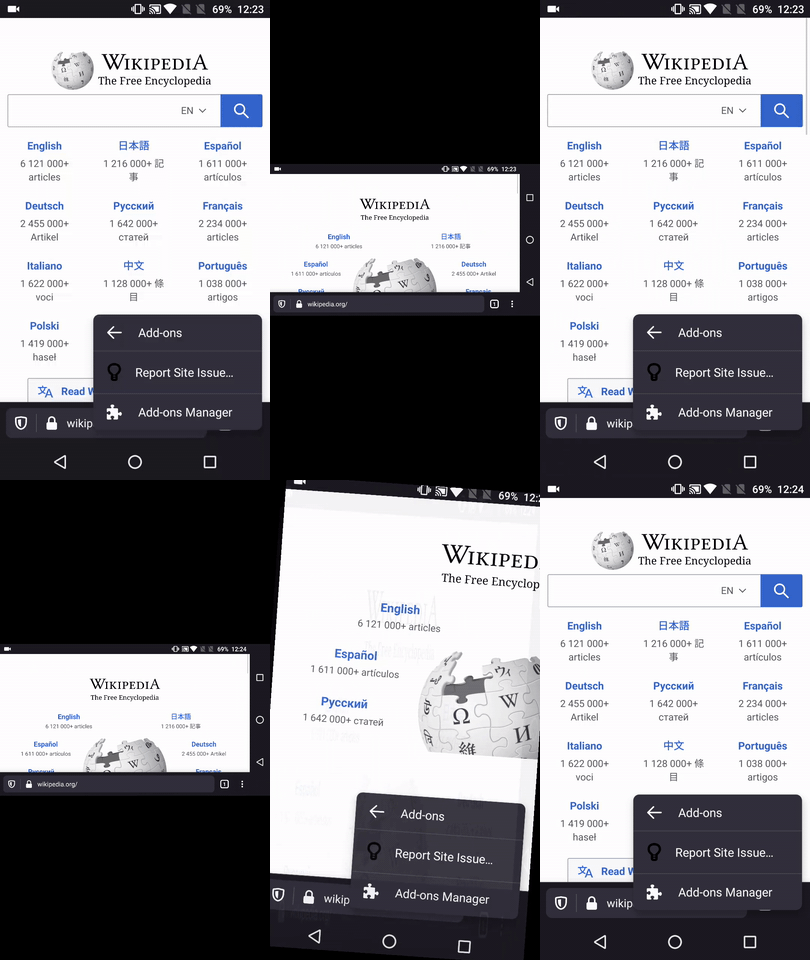
- Open a website and tap the ⋮ Main menu button
- Tap on Add-ons
- Rotate the device to landscape view
Expected behavior
The overlay should remain displayed
Actual behavior
The overlay disappears after rotating the device to landscape view
Device information
- Android device: OnePlus A3 (Android 6.0.1)
- Fenix version:
• Nightly 200717 from 7/17
•79 beta.8 from 7/17
Notes
► Video
 AndiAJ
All 4 comments
Changing this to a feature request since this functionality is intentional in the current version.
 eliserichards
on 17 Jul 2020
eliserichards
on 17 Jul 2020
Hi @eliserichards , As I recall, the main menu wasn't dismissed on rotation.
Made it float with a different STR:
- Open a website and tap the ⋮ Main menu button
- Rotate the device to landscape view
- Tap the Add-ons button
- Rotate the device to portrait mode

Please review and share your thoughts ☺️
AndiAJ
on 20 Jul 2020
@brampitoyo for feedback
 AmyYLee
on 20 Jul 2020
AmyYLee
on 20 Jul 2020
@AndiAJ @eliserichards Hi. I don’t think Android is explicit about whether main menu should be dismissed or preserved during device rotation.
Google’s own apps aren’t consistent. Sometimes menus are dismissed, and sometimes they’re kept open.
I would recommend keeping all our menus open during rotation. This includes the Add-ons submenu.
When we rotate the device, let’s remember to keep the menu positioning, so they’re always consistent against the side of the screen where the menu icon is located. This means that the menu is default-positioned on the bottom-right hand corner on toolbar-bottom, top-right corner on toolbar-top, and will shift to the left corners if the user changes to an RTL language.
 brampitoyo
on 21 Jul 2020
brampitoyo
on 21 Jul 2020
Related issues
 phileastv
·
3Comments
phileastv
·
3Comments
 ekager
·
3Comments
ekager
·
3Comments
 abodea
·
3Comments
abodea
·
3Comments
 bbinto
·
3Comments
AndiAJ
·
3Comments
bbinto
·
3Comments
AndiAJ
·
3Comments
Most helpful comment
@AndiAJ @eliserichards Hi. I don’t think Android is explicit about whether main menu should be dismissed or preserved during device rotation.
Google’s own apps aren’t consistent. Sometimes menus are dismissed, and sometimes they’re kept open.
I would recommend keeping all our menus open during rotation. This includes the Add-ons submenu.
When we rotate the device, let’s remember to keep the menu positioning, so they’re always consistent against the side of the screen where the menu icon is located. This means that the menu is default-positioned on the bottom-right hand corner on toolbar-bottom, top-right corner on toolbar-top, and will shift to the left corners if the user changes to an RTL language.