Fenix: [Bug] Downloading a PDF that redirects doesn't work.
Steps to reproduce
Visit http://citeseerx.ist.psu.edu/viewdoc/download?doi=10.1.1.395.378&rep=rep1&type=pdf
Expected behavior
I can download and see a PDF.
Actual behavior
The file seems to download, but can't be opened. It downloads fine on other browsers.
Device information
- Android device: Motorola Moto G8 plus
- Fenix version: Nightly 200703 08:40 (Build #21850844)
AC: 49.0.20200702131412, 1cba216b2
GV: 80.0a1-20200701093012
AS: 61.0.7
 emilio
All 23 comments
Working fine in latest nightly. File downloaded and opening fine.

 sheikh-azharuddin
on 7 Jul 2020
sheikh-azharuddin
on 7 Jul 2020
I wasn't able to replicate the issue on the latest nightly, using Pixel 3 with Android 10:
Nightly 200708 06:05 (Build #21900620)
AC: 50.0.20200707200739, e24828693
GV: 80.0a1-20200707094747
AS: 61.0.7
 Amejia481
on 8 Jul 2020
Amejia481
on 8 Jul 2020
@emilio does it show any specific error message when opening?
Amejia481
on 8 Jul 2020
I can repro consistently on the latest Nightly. I just get "Cannot open document". The file in the downloads folder is 206 bytes instead of the expected 1.58MB.
I'm happy to provide more logging or what not if you tell me what to look for :-)
emilio
on 8 Jul 2020
When I download with either Fennec or Chrome it works just fine and the file is the correct size.
emilio
on 8 Jul 2020
Why i feel this issue is similar to other issue where download was not working on some devices....
Emilio can you please try with arm64 or other 2 architecture version latest fenix from below link-
Give it a try
https://firefox-ci-tc.services.mozilla.com/tasks/index/project.mobile.fenix.v2.production/latest
sheikh-azharuddin
on 8 Jul 2020
My internet connection is pretty poor here, and I think I just found out how to _not_ reproduce. If I wait to click the download button in the download toast for a few seconds the whole file is downloaded.
I just opened the file that gets downloaded in the "bad" case, and these are the contents:
$ cat 10.1.1.395.378\(1\).pdf
<html>
<head>
<title>Download Limit Exceeded</title>
</head>
<body>
<br><br><br>
<center>
<h1>Download Limit Exceeded</h1>
<h3>You have exceeded your daily download allowance.</h3>
</center>
</body>
</html>
Are we doing two requests really fast instead of one single request?
emilio
on 8 Jul 2020
Yeah, I think that's the issue. If I wait enough (4/5 seconds) to tap the download button I get the correct file consistently. If I click it really fast I get the bogus 206 byte file which is that ^.
emilio
on 8 Jul 2020
I can repro the same behavior from the reference browser in an x86-64 android emulator.
emilio
on 8 Jul 2020
Is your slow connection the reason? Maybe browser is sending multiple connection request in the background because of slow connection and the server is thinking same user is downloading the file multiple times
sheikh-azharuddin
on 8 Jul 2020
I doubt so... But in any case even if it was, it works just fine in other browsers, so I'd argue it's still a Fenix bug.
emilio
on 8 Jul 2020
I can try to repro with a faster connection later today I guess. cc @sblatz who has fixed other of my reported downloads bugs :P
I'm happy to give a shot at fixing this if someone gives pointers. It's a good excuse to learn some Kotlin while I'm on PTO :)
emilio
on 8 Jul 2020
Also, fwiw, slow connection means "slow compared to my usual work environment", as I'm in a rural area. But I still get ~1Mbps download speed, which is fairly decent. So I suspect it's nothing out of the ordinary :)
emilio
on 8 Jul 2020
I think this goes back to GeckoView, but please correct me if I'm wrong.
Downloads in Fenix are somewhat broken and always involve two requests. Take this example (source): When you click on the button you should download a text file. This works in all desktop browsers, including Fennec.
Arguably this doesn't work on Chrome for Android (AFAICS), so there's probably more bugs around, but it seems wrong to me that it doesn't work. The reason it doesn't work in GeckoView is this, I think. We unconditionally cancel the channel, even if it has side effects, and the consumer just decides to start the download somewhere else. I think that's wrong? Ideally we should do what desktop does and keep that channel around. I think downloading via post is a legit use case.
cc @snorp
emilio
on 8 Jul 2020
But bro that example is dowloading properly...
sheikh-azharuddin
on 8 Jul 2020
I think that's wrong? Ideally we should do what desktop does and keep that channel around. I think downloading via post is a legit use case.
Yeah, requiring a second request is definitely wrong, but it was the best we could do at the time. We're tracking this bug in https://bugzilla.mozilla.org/show_bug.cgi?id=1530022
 snorp
on 8 Jul 2020
snorp
on 8 Jul 2020
But bro that example is dowloading properly...
It is not, afaict.
emilio
on 8 Jul 2020
Ah, great @snorp, thanks! I think that would fix this (and my POST example). Let me know if you want to close it or leave it for tracking / verification for when it works :)
emilio
on 8 Jul 2020
Hi, i can replicate this with Google Pixel 3 XL (Android 9) and Samsung Galaxy S9 (Android 8) latest Nightly 7/9.
- It does not happen the first time when downloading the file, but when making another download of the same file, i'll put here the GIF with the issue.
Google Pixel 3 XL (Android 9)
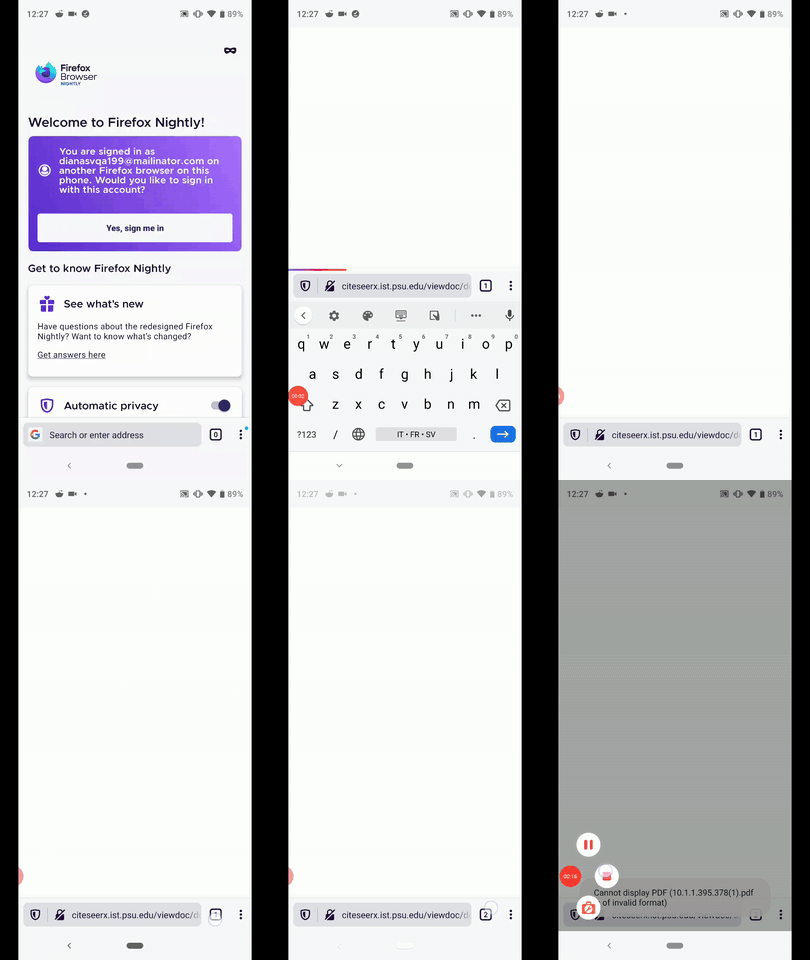
Note:
- After the first download the file will show it has 1.51 MB
- After the second download of the file it will show that the file has 206 B
 Diana-Rus
on 9 Jul 2020
Diana-Rus
on 9 Jul 2020
I was able to download the file in nightly. @emilio would you mind retesting? I would also as the QA team to verify as they have a wider number of devices.
Amejia481
on 12 Nov 2020
Yes, both the original link and the test-case I wrote in https://github.com/mozilla-mobile/fenix/issues/12363#issuecomment-655662461 work now, as expected given https://bugzilla.mozilla.org/show_bug.cgi?id=1530022 is fixed. Thanks!
emilio
on 12 Nov 2020
Verified as fixed on the latest Nightly 201117 05:03 (Build #2015776107) GV 84 from 11/17 with the following devices:
- Huawei P9 Lite (Android 7);
- Motorola Moto G6 (Android 8);
- Google Pixel 2 (Android 9).
I will close this issue and remove the qa:needed label.
 ebalazs-sv
on 17 Nov 2020
ebalazs-sv
on 17 Nov 2020
Thanks @ebalazs-sv :)
Amejia481
on 17 Nov 2020
Related issues
 csadilek
·
3Comments
csadilek
·
3Comments
 ekager
·
3Comments
ekager
·
3Comments
 softvision-miralobontiu
·
3Comments
softvision-miralobontiu
·
3Comments
 lindongbin
·
3Comments
lindongbin
·
3Comments
 phileastv
·
3Comments
phileastv
·
3Comments