Fenix: [Bug] The dialog for delete the last tab in a collection, contains the "collection" word twice when this is called "Collection x"
Steps to reproduce
- Launch Firefox;
- Save one page in a collection with the custom name: "Collection x";
- Delete the page from the previous step, by tapping the "x" button;
- Observe the dialog's question;
- Expected behavior
Delete Collection x? - Actual behavior
Delete collection Collection x? - Screenshot
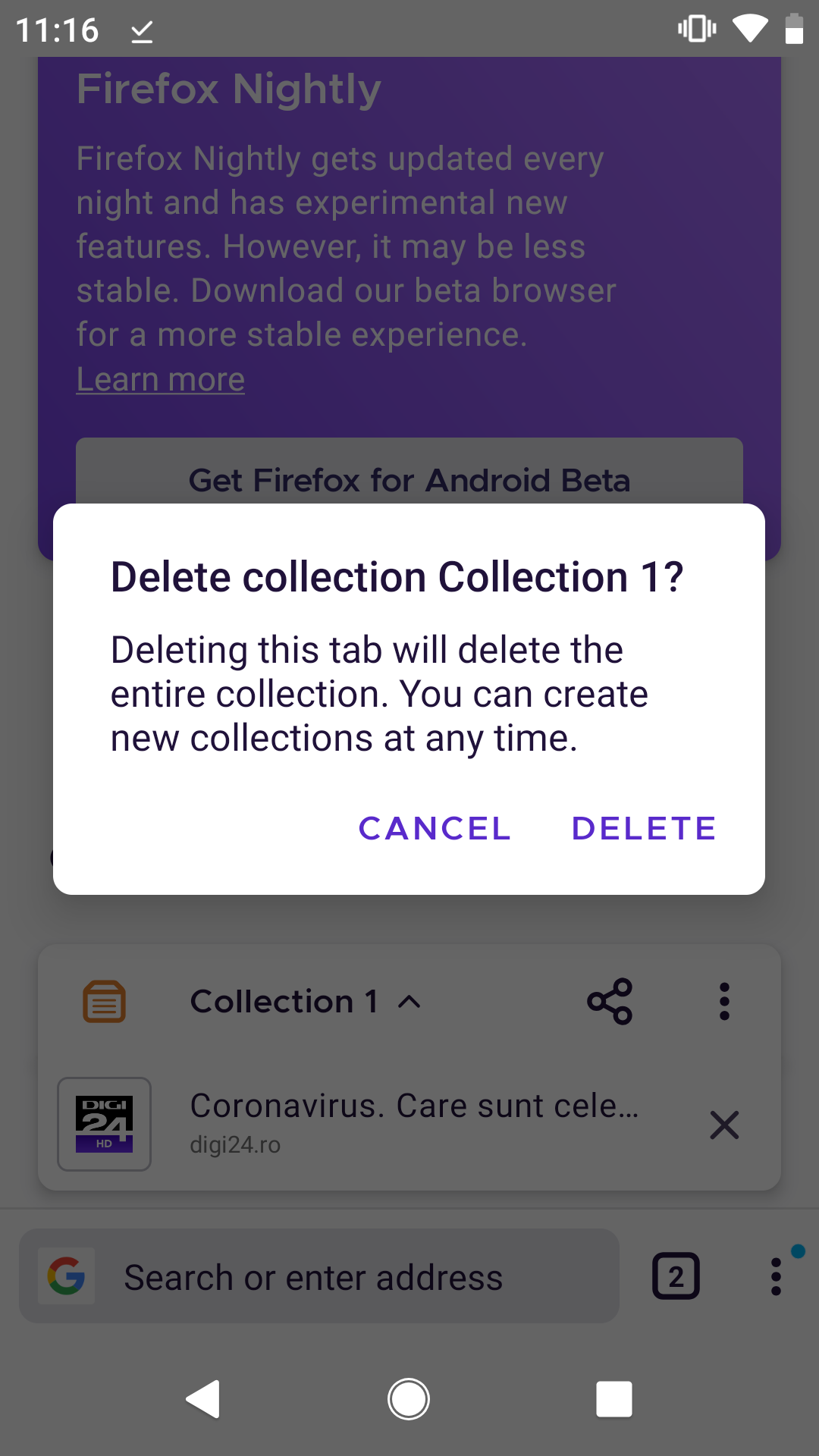 UNITO-UNDERSCORE!20200707-111628!
- Expected behavior
Notes
When deleting the collection from the three-dot menu, the dialog's question is: "Are you sure you want to delete Collection 1?", so there is no duplicated "collection" word.
Device information
- Android device: Pixel 2 (Android 9)
- Fenix version: Nightly 200707 GV 80, from 7/7
 ebalazs-sv
All 4 comments
What if the collection name is not collection X? In that case removing the word collection won't create confusion? ? ?
What Firefox team can do is to set the collection name in bold letter to distinguish from the word collection
 sheikh-azharuddin
on 7 Jul 2020
sheikh-azharuddin
on 7 Jul 2020
What if the collection name is not collection X? In that case removing the word collection won't create confusion? ? ?
As mentioned in the description's notes, this is already the case for when deleting the collection from the three-dot menu.
ebalazs-sv
on 7 Jul 2020
Correct copy should be:
Delete %1$s?
Deleting this tab will delete the entire collection. You can create new collections at any time.
CANCEL | DELETE
 betsymi
on 7 Jul 2020
betsymi
on 7 Jul 2020
Hi! This issue is verified as fixed on Nightly 200805 GV 81.0a1 from 8/5 with Motorola Moto G6 (Android 8).
I filed a new related issue: https://github.com/mozilla-mobile/fenix/issues/13305.
ebalazs-sv
on 5 Aug 2020
Related issues
 csadilek
·
3Comments
csadilek
·
3Comments
 AndiAJ
·
3Comments
AndiAJ
·
3Comments
 vesta0
·
3Comments
vesta0
·
3Comments
 ekager
·
3Comments
ekager
·
3Comments
 thelazyoxymoron
·
3Comments
thelazyoxymoron
·
3Comments