Fenix: [Bug]Missing History and Bookmarks action bar after opening multiple items in new tabs
Prerequisites
Have a couple of Bookmarks and history items
Steps to reproduce
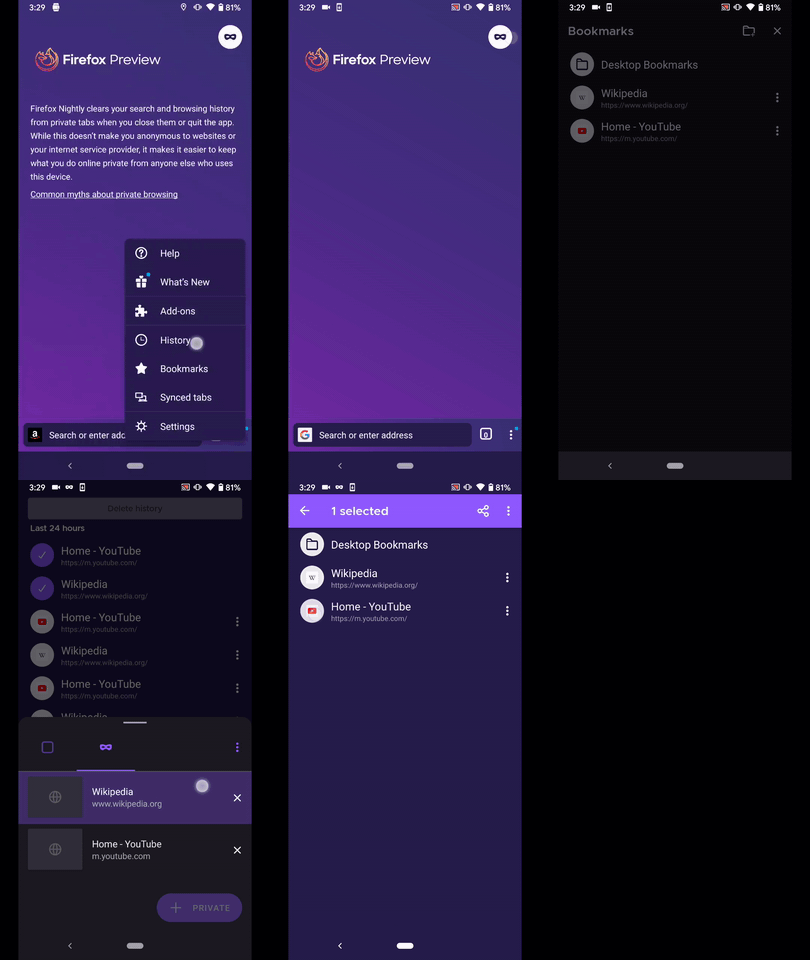
- Open History
- Multi-select a couple of items
- Tap the ⋮ button from the action bar
- Select Open in new tab
- Dismiss the Tabs Tray
Expected behavior
The History action bar should be available
Actual behavior
While in Normal Browsing
| Section | Action | Status| Remarks |
|----|----|----|----|
| History | Open in new tab | :x: | Missing action bar |
| Bookmarks | Open in new tab | :x: | Missing action bar |
| History | Open in Private tab | ❗ | The action bar is available, on the other hand, the number of selected items is lost after minimizing the Tabs Tray |
| Bookmarks | Open in Private tab | ❗ | The action bar is available, the problem is that it's not in selection mode (number of selected items, color change ) |
it should display the number of previously selected bookmarks
While in Private Browsing
| Section | Action | Status| Remarks |
|----|----|----|----|
| History | Open in new tab | ❗ | The action bar is available, on the other hand, the number of selected items is lost after minimizing the Tabs Tray |
| Bookmarks | Open in new tab | ❗ | The action bar is available, the problem is that it's not in selection mode (number of selected items, color change ) |
| History | Open in Private tab | :x: | Missing action bar |
| Bookmarks | Open in Private tab | :x: | Missing action bar |
Device information
- Android device:
• Google Pixel 3a (Android 10)
• OnePlus A3 (Android 6.0.1) - Fenix version:
Fenix 78.0.1-beta.1 from 6/27
Nightly Build 200629 from 6/29
Notes
Could be caused by #11468
► Video Normal Browsing

► Video Private Browsing
 AndiAJ
All 6 comments
Before submitting a fix can UX give some feedback on what the behavior should be? Specifically, do user expect their selection to be kept when returning to the library screen? Should we preserve that, or on return we should show the initial toolbar? TY!
 mcarare
on 30 Jun 2020
mcarare
on 30 Jun 2020
As a user who has lots of bookmarks in a lot of different folders, I would prefer that after I select bookmarks and open them, I stay inside bookmarks in the same folder with everything deselected, so that I can move around opening bookmarks from the next folder.
 nc-x
on 3 Jul 2020
nc-x
on 3 Jul 2020
Assigning to @topotropic for feedback
 AmyYLee
on 5 Jul 2020
AmyYLee
on 5 Jul 2020
@nc-x thanks for the feedback – I'm just wondering if we should open the last selected site right away instead of sending people to the tab tray. I'm curious to learn more about your use case here, why would you want to go back to the bookmark/history section? Thanks!
 topotropic
on 16 Jul 2020
topotropic
on 16 Jul 2020
@topotropic
Well, it's the same reason as having Ctrl+B open a persistent bookmarks side bar in desktop firefox.
You have bookmarks organized into many folders, and you want to open bookmarks from multiple folders. So, opening bookmarks again and again, as well as remembering whether you already went through a particular bookmark folder or not is a chore.
So instead, you have the bookmarks tab open, and you open all the urls you want, then you close the bookmarks tab and browse in peace.
In any case, currently after opening multiple tabs the tab tray is shown. So, if people do not want to open any more bookmarks, they can always just click any tab then. It's just one more click (comparatively, my usecase above requires multiple clicks because I have to reopen bookmarks tab again and again, then go through the folder hierarchy to find where I was previously, open more tabs, repeat...)
nc-x
on 17 Jul 2020
Thanks for the explanation @nc-x
Specifically, do user expect their selection to be kept when returning to the library screen? Should we preserve that, or on return we should show the initial toolbar?
@mcarare We don't need to keep the selection after someone opened the selected tabs, please return to the initial toolbar.
Currently, we keep a back arrow icon in selection mode, would it be possible to update this to a close icon when people are in selection mode as part of this issue? thanks!
topotropic
on 17 Jul 2020
Related issues
 clitetailor
·
3Comments
AndiAJ
·
3Comments
topotropic
·
3Comments
clitetailor
·
3Comments
AndiAJ
·
3Comments
topotropic
·
3Comments
 bbinto
·
3Comments
bbinto
·
3Comments
 ekager
·
3Comments
ekager
·
3Comments