Fenix: FNX2-15063 ⁃ [Bug]Can't launch on first attempt Fenix geckoNightlyDebug on Huawei Mate 20 Lite (Android 9)
Steps to reproduce
- Launch Fenix debug build (build variant geckoNightlyDebug)
Expected behavior
Fenix Debug build should launch properly after install
Actual behavior
Can't launch Fenix on first try
This error is displayed, and only after tapping ok for the 5th time Fenix will launch
The app Firefox Preview(process org.mozilla.fenix.debug) has violated its self-enforced StrictMode policy
Device information
- Android device: Huawei Mate 20 Lite (Android 9)
- Fenix version: Fenix Debug build 45.0.20200608190110, 8ec16f840 GV: 79.0a1-20200608094842 AS: 60.0.
Notes
► Screenshot
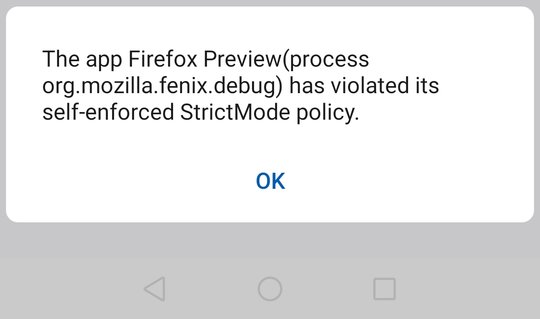 UNITO-UNDERSCORE!screenshot!UNITO-UNDERSCORE!20200609!UNITO-UNDERSCORE!140731!UNITO-UNDERSCORE!orgmozillafenixdebug!
@mcomella & @MarcLeclair - Is this related to #10831 ?
 AndiAJ
All 10 comments
Same issue on Huawei P10, Android 9, from logcat: android.os.strictmode.DiskReadViolation in these cases:
at android.graphics.HwTypefaceUtil.updateFont(HwTypefaceUtil.java:154)
    at android.graphics.Typeface.loadSystemFonts(Typeface.java:1212)
at android.app.ResourcesManager.getResources(ResourcesManager.java:982) at android.app.ContextImpl.createResources(ContextImpl.java:2302) at android.app.ContextImpl.createSystemUiContext(ContextImpl.java:2610) at android.app.ActivityThread.getSystemUiContext(ActivityThread.java:2631) at android.app.ActivityThread.handleConfigurationChanged(ActivityThread.java:5852) at android.app.ActivityThread.handleLaunchActivity(ActivityThread.java:3599)at java.lang.Class.getDeclaredMethodInternal(Native Method) at java.lang.Class.getPublicMethodRecursive(Class.java:2075) at java.lang.Class.getMethod(Class.java:2063) at java.lang.Class.getMethod(Class.java:1690) at androidx.core.os.TraceCompat.<clinit>(TraceCompat.java:56) at androidx.core.os.TraceCompat.beginSection(TraceCompat.java:100) at androidx.recyclerview.widget.RecyclerView.onLayout(RecyclerView.java:4403)
 mcarare
on 9 Jun 2020
mcarare
on 9 Jun 2020
Mhm we just landed stricter strict mode violation. This looks like its a ~huawei~ manufacturer specific thing since I can run this on Px4 and G5 but my P20 is seeing the dialog. Seems like manufacturers have different implementation for their font class ( we did notice this with Samsung and the Px4 initially). An educated guess would be that with different OS "skins" (such as touchwiz for samsung) has a different font classes. Not too sure what to do about this one @mcomella
Edit: There are possible work arounds such as identifying and updating a list of known manufacturers that have their own wrapper around the OS. Not sure how feasible that is or if its even worth it since it would affect our start up performance on debuggable build (but is that really that important since we take our measurements on release builds?)
 MarcLeclair
on 9 Jun 2020
MarcLeclair
on 9 Jun 2020
This looks like its a huawei specific thing
It's not only an issue on Huawei devices. I see six of these dialogs on the OnePlus 7T Pro McLaren.
 cadeyrn
on 9 Jun 2020
cadeyrn
on 9 Jun 2020
@cadeyrn I should've edited it, thanks for pointing that out! I think it's a manufacturer specific issue when there's a wrapper around the base OS (such as touchwiz by samsung) 😄
MarcLeclair
on 9 Jun 2020
@sraturi @MarcLeclair this is still happening and it's on a Pixel 2 virtual device, blocking the automation UI tests, see: https://console.firebase.google.com/project/moz-fenix/testlab/histories/bh.66b7091e15d53d45/matrices/5775755259756697270/executions/bs.3a35aa14d22c065c/videos
 sv-ohorvath
on 2 Jul 2020
sv-ohorvath
on 2 Jul 2020
Still happening on virtual devices and causing automation tests to fail: https://console.firebase.google.com/project/moz-fenix/testlab/histories/bh.66b7091e15d53d45/matrices/8312248502354333158/executions/bs.3cd755354eeaaddc/videos
sv-ohorvath
on 3 Aug 2020
@sv-ohorvath I'm not able to see the logs.. (LDAP problem...) but I'm running the emulated pixel 2 device with API 28 and don't see any pop-ups? I wonder if its an API thing?
 sraturi
on 4 Aug 2020
sraturi
on 4 Aug 2020
@sraturi This is what I have from the Firebase logs, from Pixel 2 API 28:
Test log:
strictModeLog.txt
The pop-up:
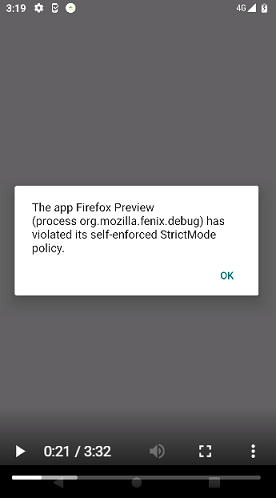
It only appears randomly, and not in the same tests. So I couldn't reproduce it manually either, only maybe if we'd run a whole package of tests...
sv-ohorvath
on 4 Aug 2020
@sraturi Did you file a new bug for this issue? i.e. #13368 ? If so, we should close this again.
 mcomella
on 8 Aug 2020
mcomella
on 8 Aug 2020
Hi @mcomella No #13368 is a seperate issue that I ran into. I was trying to replicate this issue but havent had any luck yet.
sraturi
on 8 Aug 2020
Related issues
 phileastv
·
3Comments
phileastv
·
3Comments
 lindongbin
·
3Comments
lindongbin
·
3Comments
 topotropic
·
3Comments
topotropic
·
3Comments
 clitetailor
·
3Comments
clitetailor
·
3Comments
 vesta0
·
3Comments
vesta0
·
3Comments