Fenix: [Bug] Voice icon on search widget crashes when google app disabled after widget installed
Steps to reproduce
- Install the search widget with Google app enabled on your device
- Disable the Google app.
- Tap the "voice icon" on the search widget.
Expected behavior
- The voice icon should disappear as the functionality is no longer available
Actual behavior
- Fenix crashes when attempting to start the dictation.
 sblatz
All 9 comments
This feels like a pretty small edge case to me, honestly, and I think we can only update the search widget once an hour? If that's the case, when a user taps the voice icon we should just validate and clear out the icon when the intent launches.
sblatz
on 29 May 2020
I would normally say that maybe we should redirect the user to settings when they click the microphone, where they can re-enable the Google app. But that requires also some UI like a pop-up informing them of why this is happening, and then handling the result from settings. While this is certainly feasible, since the use-case is so limited, I think simply closing the activity OR redirecting to home and displaying a short Toast like "Please enable your Google App" should do. If that's the way to go, can we also get the string for the toast message?
EDIT: just realised I forgot to mention the behaviour: as @sblatz said, currently our widget is refreshing every hour, so what I said above applies to that the period between when the user disables the app and the widget refreshing (so max 1 hour period). After that hour, the microphone will disappear.
 BranescuMihai
on 8 Jul 2020
BranescuMihai
on 8 Jul 2020
@brampitoyo @betsymi for follow-up
 AmyYLee
on 10 Jul 2020
AmyYLee
on 10 Jul 2020
@brampitoyo and @betsymi - Just following up on this. If this requires more attention, please update flag to needs UX-investigation and remove UX-feedback flag. Thanks!
AmyYLee
on 4 Aug 2020
@sblatz @BranescuMihai
As the process to reactivate voice is too long and hard to teach with a snackbar that disappears after a few seconds, we should not show a toast.
Instead, let’s “scale down elegantly” and just hide the microphone icon from the widget, as we already do in the Fenix address bar.
 brampitoyo
on 5 Aug 2020
brampitoyo
on 5 Aug 2020
@brampitoyo so the issue is that we're currently allowed by the system to update the widget only every hour. Which means that if the user disabled the Google app right after a scheduled widget update, they will see the microphone icon for another 59 minutes, even though it will do nothing on click. And only after those 59 minutes we'll be able to hide it.
Is that ok?
BranescuMihai
on 7 Aug 2020
@BranescuMihai I think showing the microphone icon for the next 59 minutes will be mildly annoying and could imply that something is broken (“I’ve disabled it – why does it still show up?), but it’s also the best compromise we can make given system limitation.
Let’s do that.
brampitoyo
on 11 Aug 2020
This should be fixed in the next Nightly.
 Mugurell
on 21 Aug 2020
Mugurell
on 21 Aug 2020
Hi issue is fixed, verification based on comment on latest Nightly 8/26 with:
- Google Pixel 3 XL (Android 9)
- Samsung Galaxy S9 (Android 8)
- Sony Xperia Z5 (Android 7)
Gif
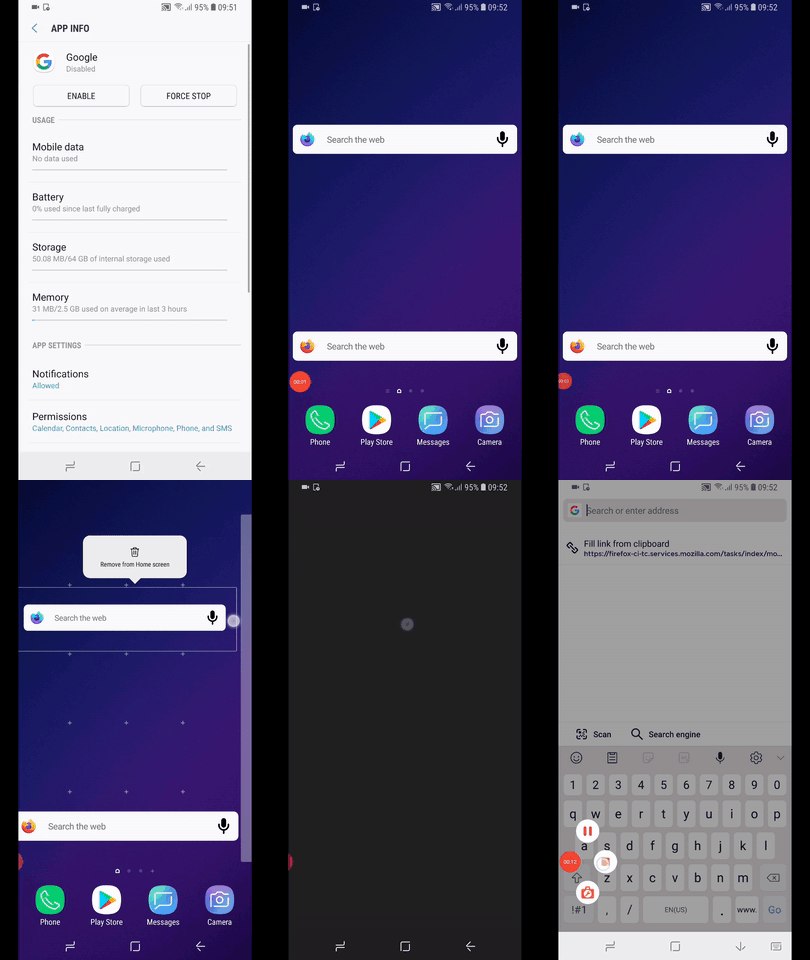
@Mugurell - Based on the previous affirmation that the widget updates hourly. i can see that the mic icon is not removed from the widget, the update of it can't be seen on android device.
Created a new issue for this: https://github.com/mozilla-mobile/fenix/issues/14206
Note:
- In case of having disabled the google app and restarting the device will have the mic icon removed from the widget, even if the one hour timeline didn't passed
 Diana-Rus
on 26 Aug 2020
Diana-Rus
on 26 Aug 2020
Related issues
 csadilek
·
3Comments
csadilek
·
3Comments
 lindongbin
·
3Comments
lindongbin
·
3Comments
 abodea
·
3Comments
abodea
·
3Comments
 softvision-miralobontiu
·
3Comments
softvision-miralobontiu
·
3Comments
 ekager
·
3Comments
ekager
·
3Comments