Fenix: FNX2-16177 ⁃ [Bug] Crash when using voice input for Search with disabled Google App
Steps to reproduce
- Deactivate voice input on Android, e.g. by disabling the Google app
- Open Fenix Nightly
- Tap on search area of bottom bar
- Tap on microphone symbol (see #1216)
Expected behavior
A snackbar is displayed informing the user about missing permissions or deactivated voice input search / microphone symbol is not shown at all
Actual behavior
The app crashes. This does not change if I allow Fenix to access my microphone or not.
about:crashes shows:
_android.content.ActivityNotFoundException:
No Activity found to handle Intent
{ act=android.speech.action.RECOGNIZE_SPEECH (has extras) }_
Sidenote: I could not find my crash reports on crash-stats.mozilla.org. Also, accessing about:crashes via about:support does not show any sent crash reports.
Device information
- Android device: Sony Xperia Z2, Android 6.0.1
- Fenix version:
Nightly 200520 06:01 (Build #2015741361)
42.0.20200518130035, f0cb2cca9
GV: 78.0a1-20200517094345
AS: 0.58.2
 hwinnemoe
All 9 comments
Do you have the google app disabled?
 astarq
on 21 May 2020
astarq
on 21 May 2020
I can reproduce. I don't have any Google apps or services, I just have microG.
 B0pol
on 21 May 2020
B0pol
on 21 May 2020
I have THE google app disabled, which acts as the voice recognition provider, that'll be why it crashes. The mic button shouldn't exist when that's the case, like in other apps
astarq
on 21 May 2020
Do you have the google app disabled?
Yes, the Google App is disabled. Also, Fennec does not show me the microphone button. I have updated the issue's title and description accordingly.
hwinnemoe
on 22 May 2020
Fennec has it right then.
astarq
on 22 May 2020
Hi, thank you for the report I can also reproduce this with Samsung Galaxy S9 (Android 8) on Fenix Nightly 5/22. The crash is present when tapping on the mic from Adress bar but also on the mic from search widget.
10809-Crash-Logcat.txt
 Diana-Rus
on 22 May 2020
Diana-Rus
on 22 May 2020
In case you needed another log:
https://gist.github.com/yoasif/66a63d8d0d217a4b8f97e8731a52814c
I also don't have a Google App on this device (Moto G XT1031).
 yoasif
on 22 May 2020
yoasif
on 22 May 2020
Hi, verified with Samsung Galaxy S9(Android 8) and Google Pixel 3 XL (Android 9):
Scenario 1 - Mic is not displayed in browser when Google app is disabled - PASS
Scenario 2 - Mic is displayed in search widget when Google app is disabled while widget is set before disabling the Google app - FAIL (crash present)
Scenario 3 - Mic is not displayed when Google app is disabled when the widget is added after the Google app is disabled - PASS
GIF
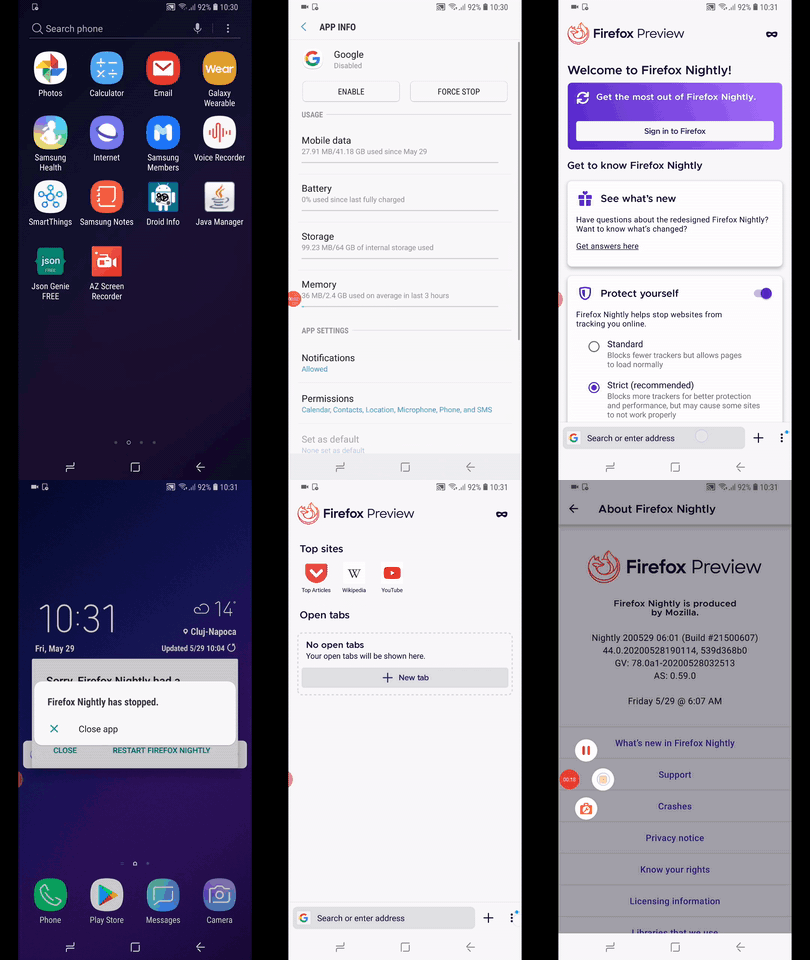
I'll remove the qa needed label until further notice.
Note:
- For scenario 3 when re-enabling the Google app, in order for mic to reaper in widget you need to restart the device.
Diana-Rus
on 29 May 2020
Hi @Diana-Rus that sounds like an existing bug with the search widget and is unrelated to the changes I made. I'll file a separate bug for that. Since the crashes with voice in search screen are fixed, I will close this :)
 sblatz
on 29 May 2020
sblatz
on 29 May 2020
Related issues
 clitetailor
·
3Comments
clitetailor
·
3Comments
 softvision-miralobontiu
·
3Comments
softvision-miralobontiu
·
3Comments
 Chris01277
·
3Comments
Chris01277
·
3Comments
 csadilek
·
3Comments
csadilek
·
3Comments
 robsmith11
·
3Comments
robsmith11
·
3Comments