Fenix: [Bug] Cannot autofill passwords using Enpass
Steps to reproduce
This is related to #9773, Enpass is marked as working but I don't see it working properly on my device.
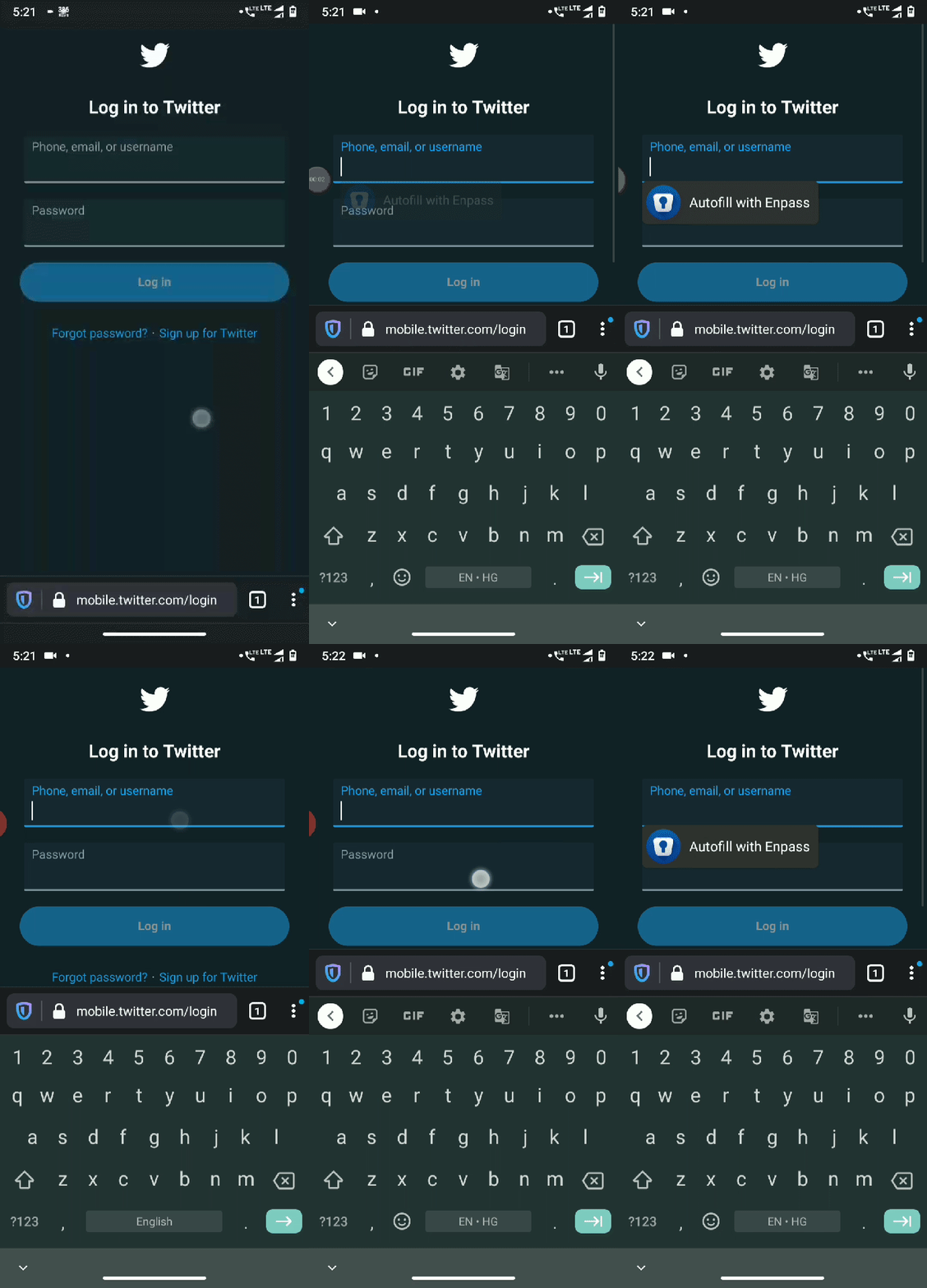
- Enable Enpass autofill service.
- Go to: https://mobile.twitter.com/login
- Autofill pop-up randomly appears and disappears.
4.This can also be reproduced on:
https://myanimelist.net/login.php?from=%2F - This is the same behaviour almost everywhere the login form appears.
Expected behavior
Autofill should work properly
Actual behavior
Autofill doesn't work properly
Device information
- Android device: Motorola One Power, Android 10.
- Fenix version: 76.0.0-beta.1 (Build - #2015737667) and Nightly 200511 06:21 (Build #2015739635)
 UNITO-UNDERSCORE!054802!
 ghost
ghost
All 11 comments
Hi, @SS1113 note that I was able to autofill using Enpass, I had 0 issues regarding this app.
Tested with the latest Nightly from 5/15 using Google Pixel 4 XL (10).

 abodea
on 15 May 2020
abodea
on 15 May 2020
@abodea It is not working on my device properly, the autofill prompt appears and disappears quickly when I click the input fields and if I keep clicking the input fields then after 10 seconds or so it works as expected; autofill prompt doesn't disappear I'm able to click on it and autofill. Is there a reason why this is happening on my device?
I have tested again with Fenix: 76.0.0-beta.2 (Build #2015740131) and Nightly 200513 18:00 (Build #2015740115)
It's working as expected on Chrome browser.
ghost
on 15 May 2020
Thank you for the response!
I will add this issue to https://github.com/mozilla-mobile/fenix/issues/9773 description as being a device-related issue.
abodea
on 15 May 2020
@abodea I have tested it on some more devices: Xiaomi Mi A2 (Android 10),
Realme C3 (Android 10).
These devices are also exhibiting the same issue.
Tested on Fenix: 76.0.0-beta.2 (Build #2015740131)
ghost
on 15 May 2020
The issue can still be reproduced on Nightly 200611 06:01.
ghost
on 11 Jun 2020
This can still be reproduced on Nightly 200628 06:01.
ghost
on 29 Jun 2020
What's your Fenix language? Because mine is Turkish and it's not working on it but working on English.
7742
 hakkikaancaliskan
on 5 Jul 2020
hakkikaancaliskan
on 5 Jul 2020
I have set the Fenix language to English (United States) and it is the default language of my phone too. So I set the language to Follow device language in Fenix.
ghost
on 6 Jul 2020
I am the reporter of this issue. Please let me know if I can provide you any more information.
Thanks. :)
ghost
on 16 Jul 2020
Can reproduce this issue on my device as well:
LG Velvet, Android 10 July security patch, Latest Beta playstore v82.
A solution to the disappearing enpass prompt I have found is click the URL bar and then click the password or user field ... the prompt to autofill will stay without doing the disappearing thing.
 danialasghar
on 28 Sep 2020
danialasghar
on 28 Sep 2020
An update to this... In the latest nightly the issue of the autofill ui seems to be fixed.
Although web domain passing does not seem to work with enpass... it always says "login not found" and you have to manually search your enpass logins to fill them out
danialasghar
on 25 Oct 2020
Related issues
abodea
·
3Comments
 lindongbin
·
3Comments
lindongbin
·
3Comments
 phileastv
·
3Comments
phileastv
·
3Comments
 robsmith11
·
3Comments
abodea
·
3Comments
robsmith11
·
3Comments
abodea
·
3Comments