Fenix: [Bug] PWA - The pwa icon's are displayed as white on device homescreen
Steps to reproduce
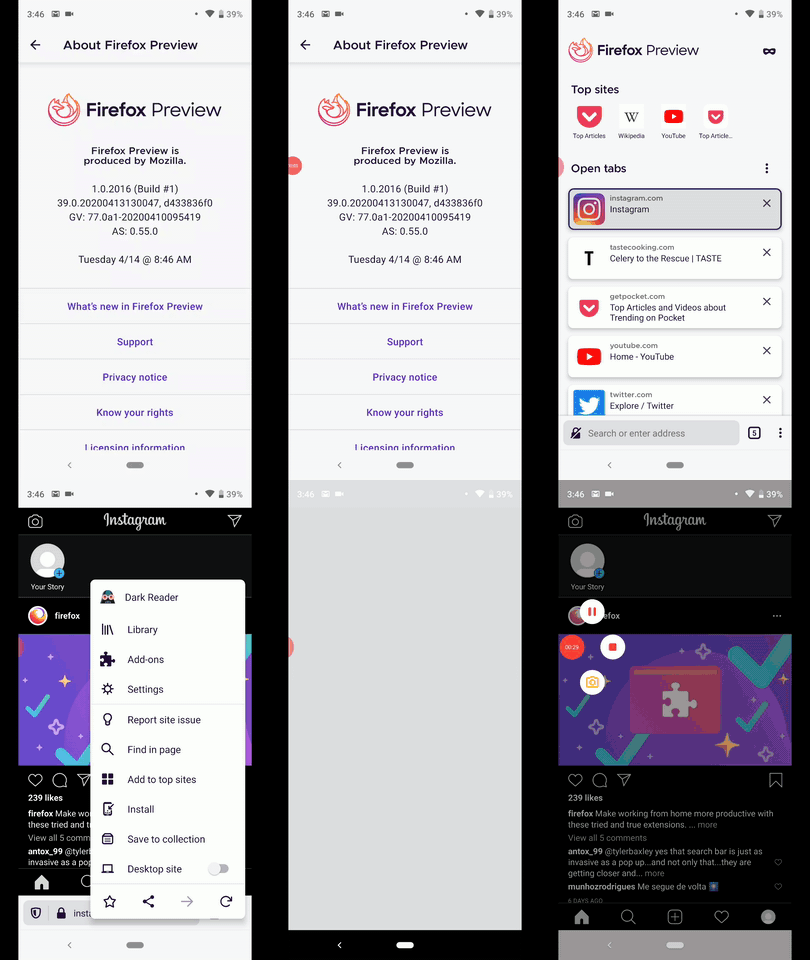
- Open app and go to instagram.com.
- Tap on Menu/Install.
- Add to homescreen.
- View the icon of the pwa from devices homescreen.
Expected behavior
The PWA icon displays the instagram's favicon.
Actual behavior
The PWA icon does not display the instagram's favicon. The pwa icon for instagram is white.
Device information
- Android device: Google Pixel 3 XL (Android 9)
- Fenix version: Nightly debug build 39.0.20200413130047, d433836f0 GV: 77.0a1-20200410095419
Note:
- The issue seems to be device specific as I could only reproduce with Google Pixel 3 XL (Android 9)
- With Samsung Galaxy S9 (Android 8) and Sony Xperia Z5 (Android 7) I did not reproduce.
- It does not happen with twitter.com set as PWA nor with daleharvey.github.io/testapp.
GIF:
 Diana-Rus
All 10 comments
Reproducible also with trivago.com on Samsung Galaxy Note 10 (Android 10).
 sflorean
on 24 Apr 2020
sflorean
on 24 Apr 2020
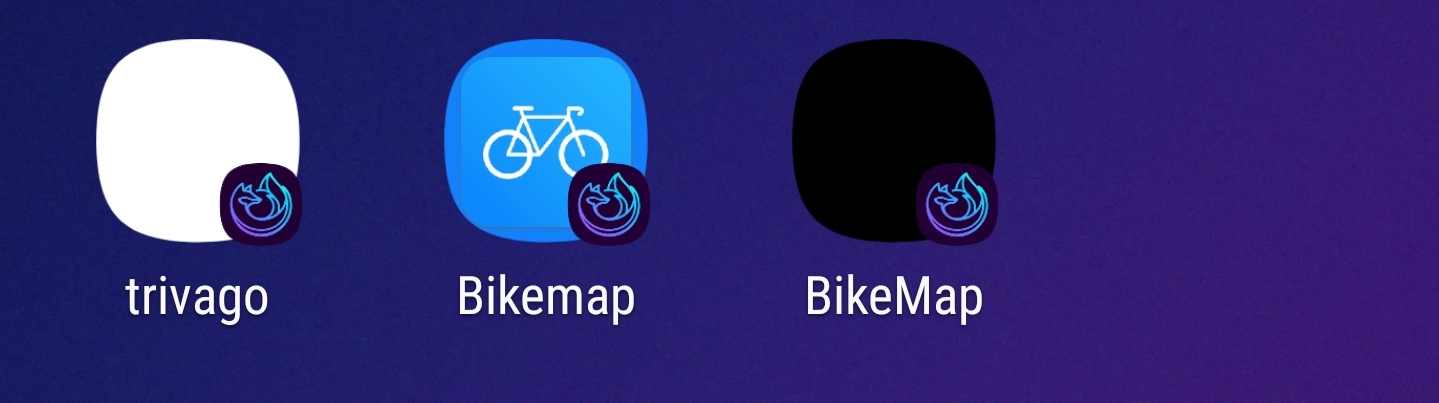
In my device Firefox Preview picks up favicon for some sites, ie. mastodon and https://app.fevermap.net works ok. But if I try with https://bikemap.finomena.fi/ I end up with black icon instead of favicon. My default theme at Android is dark, tried to change it bright but still got black icon for that site. Didn't restart phone between trying those, but did try to change browser theme also.
Anyway seems like it's getting white icon for some users, black for others, while working fine with some pwa.
My device is Nokia 7 Plus with Android 10.
Edit:
Could some of you who are getting plain white icon, confirm that are you getting white icon also for that bikemap pwa ( https://bikemap.finomena.fi/ ) or will there be icon? Just thinking that could there be also one part of problem that it offers black background for dark theme even when icon is also black. If so there should be icon visible if background is white.
Also would it be good idea to let use select background color so it will match to other app icons?
 huuhaa
on 9 May 2020
huuhaa
on 9 May 2020
Hi, i tried with Samsung Galaxy S9 (Android 8) yes it displays a black icon the pwa for:https://bikemap.finomena.fi/ , in my case with Samsung Galaxy S9 (Android 8) on Nightly 5/22 but my android does not support dark themes.
Screenshot
Could some of you who are getting plain white icon, confirm that are you getting white icon also for that bikemap pwa ( https://bikemap.finomena.fi/ ) or will there be icon? Just thinking that could there be also one part of problem that it offers black background for dark theme even when icon is also black. If so there should be icon visible if background is white.
Diana-Rus
on 22 May 2020
Hi, issue is reproducible on Beta 5.2.0-beta.1 with Samsung Galaxy S9 (Android 8) with the mentioned links and also with https://www.resetera.com/forums/etcetera-forum.9/
Diana-Rus
on 10 Jun 2020
reproducible on 5.2.0 : resetera only, all other websites mentioned in above comnents are ok.
 leela52452
on 19 Jun 2020
leela52452
on 19 Jun 2020
Reproducing the issue (as a white favicon) on latest Nightly 8/26 with Google Pixel 3XL (Android 9) and Samsung Galaxy S9 (Android 8) with the pwa for:
- makemytrip.com
- flipboard.com
Diana-Rus
on 26 Aug 2020
flipboard.com also has no website name (just a generic "Website" title) on my devices, on Nightly 9/14 and Beta 8.1.1.
 sv-ohorvath
on 14 Sep 2020
sv-ohorvath
on 14 Sep 2020
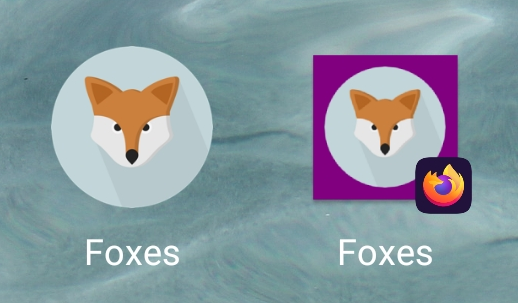
Hey, I noticed that the background-color of the icon on the homescreen seems to match the background_color defined in the webmanifest.
When installing the demo application for "A2HS" from https://developer.mozilla.org/en-US/docs/Web/Progressive_web_apps/Add_to_home_screen the icons aren't using a transparent background:
In the screenshot the icon on the left is from Chrome and the icon on the right from Firefox:
Is this related to this issue?
 Trekky12
on 20 Sep 2020
Trekky12
on 20 Sep 2020
@Trekky12 I have the same problem of the weird background too.
I also noticed that SVG icons in manifest.json do not work while it does on Chrome. They result in white circle icons on home screens after installation. I don't know if it's the same issue as this. Should I create a new one?
 raviqqe
on 20 Sep 2020
raviqqe
on 20 Sep 2020
So apparently the background-color on the icon is the expected behaviour for adaptive launcher icons :confused:
Despite that the background-color is not parsed correct when there is an image with a transparent background and in the manifest the defined background-color is white.
The background-color attribute (#FFFFFF) from the webmanifest parses to -1. In this case the background-color is apparently retrieved from the main color of the image, which is not that good for images which only have one color:
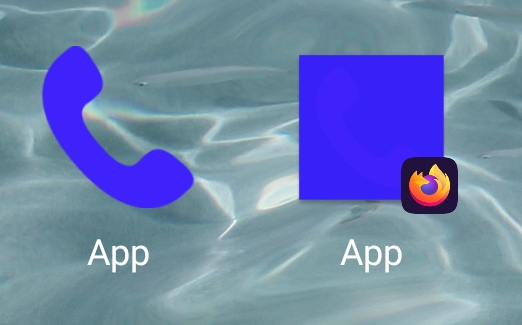
You can see the problem at https://fenix-test-f02a9.web.app/
Trekky12
on 18 Dec 2020
Related issues
 ekager
·
3Comments
ekager
·
3Comments
 robsmith11
·
3Comments
robsmith11
·
3Comments
 clitetailor
·
3Comments
clitetailor
·
3Comments
 bbinto
·
3Comments
bbinto
·
3Comments
 csadilek
·
3Comments
csadilek
·
3Comments