Fenix: [Bug] Set as default browser should just be a toggle
Currently the "set as default browser" preference sends you to a fragment where the only option is to toggle it on. We should raise this toggle outside of this preference if it's the only one inside.

 sblatz
All 7 comments
Also what about completely hiding it if Firefox is already default?
 hakkikaancaliskan
on 7 Apr 2020
hakkikaancaliskan
on 7 Apr 2020
Yes, the toggle can be placed at the preference "Set as Default Browser itself" itself.
 nitin10s
on 7 Apr 2020
nitin10s
on 7 Apr 2020
@AmyYLee Can you please let me know if this was part of the settings redesign? We can also just pull it out to the main menu which is how it used to work? :)
sblatz
on 7 Apr 2020
@sblatz Quoting @AmyYLee on https://github.com/mozilla-mobile/fenix/issues/5905#issuecomment-585427769, we’ve made a decision to put “Open links in apps” inside this “Set as default browser” section:
The "Open links in apps" should be located here (see screenshot). This is part of issue #3177 and the full UX spec can be found in comment 0.
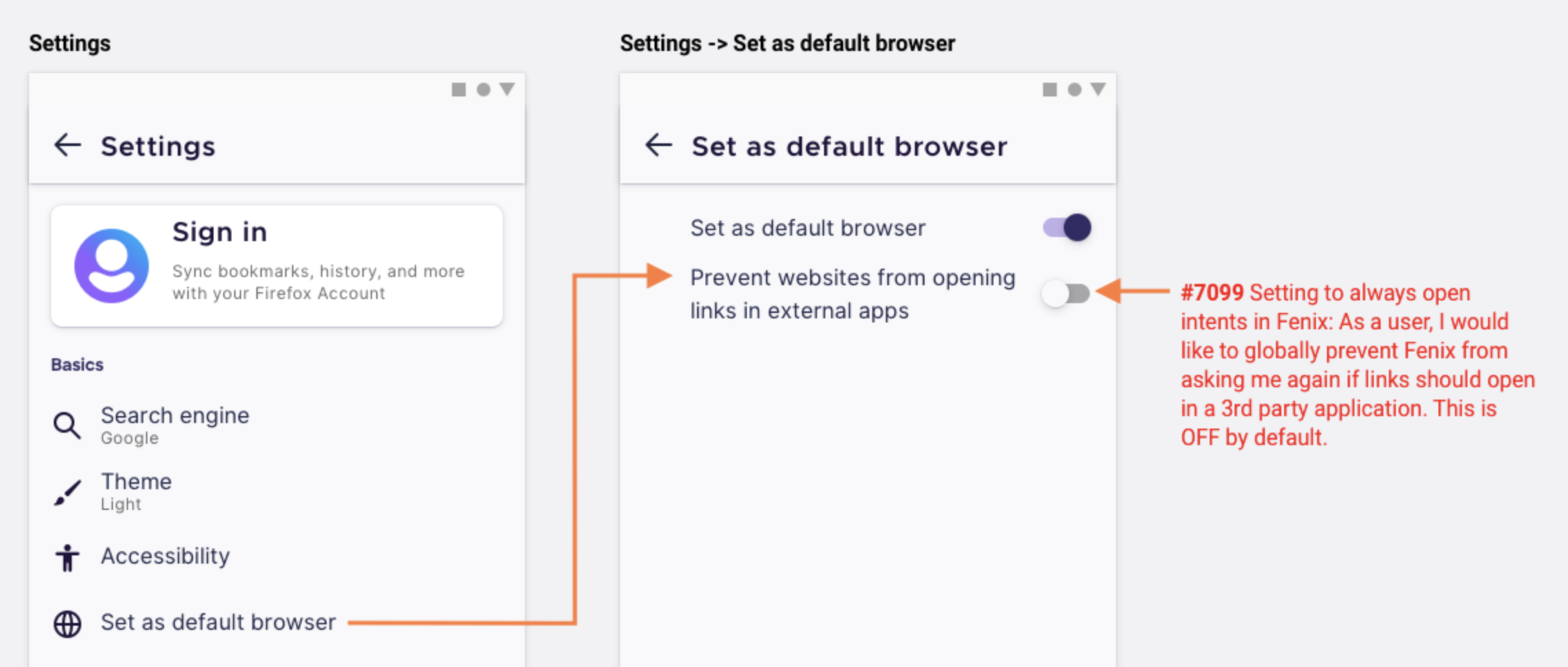
This means that this section will contain two items, so it can’t be pulled out into the main Settings page.
 brampitoyo
on 8 Apr 2020
brampitoyo
on 8 Apr 2020
That sounds like a negative implementation of the top level Open links in apps how would those two prefs interact?
 kbrosnan
on 8 Apr 2020
kbrosnan
on 8 Apr 2020
@kbrosnan I think so. @AmyYLee, can you help confirm?
brampitoyo
on 8 Apr 2020
@kbrosnan I think so. @AmyYLee, can you help confirm?
Hi,
@kbrosnan Yes it is. "Present websites from opening links in external apps" will be ON by default. These 2 items are separate and whether or not FF is set as default should not affect how we handle links.
Looping in @betsymi to review strings. These were looked at by Michelle a while back FYI.
Betsy, basically the change is from "Open links in apps" (which can be found in settings top level) to "Prevent websites from opening links in external apps" that will live in "Set as default browser" section and this will be ON by default.
 AmyYLee
on 13 Apr 2020
AmyYLee
on 13 Apr 2020
Related issues
 csadilek
·
3Comments
csadilek
·
3Comments
 topotropic
·
3Comments
topotropic
·
3Comments
 clitetailor
·
3Comments
clitetailor
·
3Comments
 vesta0
·
3Comments
vesta0
·
3Comments
 abodea
·
3Comments
abodea
·
3Comments
Most helpful comment
Also what about completely hiding it if Firefox is already default?