Fenix: [Bug]Failed download after resuming it
Steps to reproduce
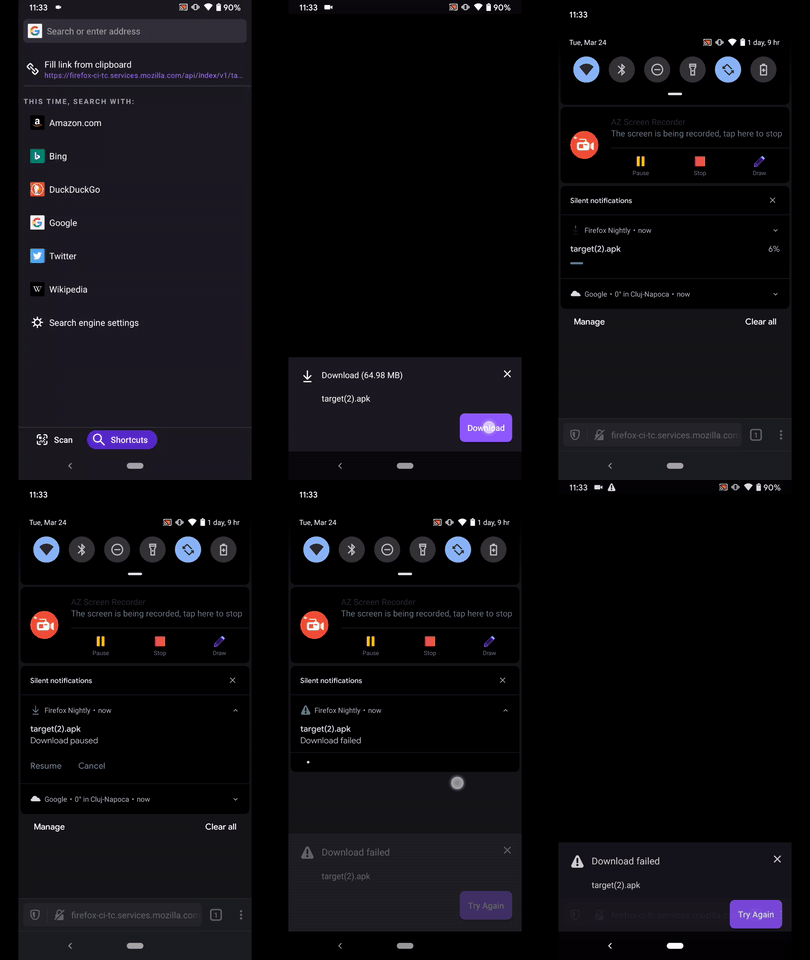
- Navigate to https://firefox-ci-tc.services.mozilla.com/api/index/v1/task/project.mobile.fenix.v2.nightly.latest/artifacts/public/build/armeabi-v7a/geckoNightly/target.apk and confirm the download.
- Pause the download
- Resume the download
Expected behavior
The download should be properly resumed.
Actual behavior
The download fails after resume.
Device information
Android device:
• Google Pixel 3a (Android 10)
• OnePlus A3 (Android 6.0.1)Fenix version:
• Nightly Build #20840606 from 3/24
• Fenix Beta 4.2.0-beta.1 from 3/24
Notes
► Video
 AndiAJ
All 25 comments
Related to #8930 ?
 liuche
on 31 Mar 2020
liuche
on 31 Mar 2020
Related to #8930 ?
I think it could be a different issue I added to the backlog of the download board
 Amejia481
on 27 May 2020
Amejia481
on 27 May 2020
I was able to reproduce this issue on the latest Nightly build from 10/9 (AC: 63.0.20201008190100, GV: 83.0a1-20201008094950) with HTC 10 (Android 8). I tried downloading a .zip file from https://www.thinkbroadband.com/download, paused and resumed the download in the notification, and the download failed.

 softvision-miralobontiu
on 9 Oct 2020
softvision-miralobontiu
on 9 Oct 2020
Reproducible on Firefox Beta 83.0.0-beta.1 using a OnePlus A3 (Android 6.0.1) after resuming downloads on:
• https://file-examples.com/
• https://www.thinkbroadband.com/download
AndiAJ
on 22 Oct 2020
This will be fixed when https://github.com/mozilla-mobile/android-components/pull/8906 lands. There are some caveats that we have to keep in mind.
Resuming a download is not always possible as not all the web servers support that functionality, we are showing the pause/resume buttons on all downloads giving the false expectation that all downloads can be resumed, this is a bug and will be addressed on https://github.com/mozilla-mobile/android-components/issues/8903.
Not all intents of resuming a download will be successful, downloads that are behind authentication, normally will FAIL, we have some API limitation that doesn't allow to cover this use case.
Amejia481
on 5 Nov 2020
Hi @Amejia481 , still reproducible onNightly Build 201110 using the following devices:
• Google Pixel 3a (Android 11)
• Huawei Mate 20 Lite (Android 10)
• OnePlus A3 (Android 6.0.1)
❌ Pause/Resume still fails on the following websites:
• https://file-examples.com/
• https://firefox-ci-tc.services.mozilla.com/tasks/index/mobile.v2.fenix.nightly.latest/arm64-v8a
• https://www.thinkbroadband.com/download
AndiAJ
on 10 Nov 2020
Thanks @AndiAJ, I'm taking a look!
Amejia481
on 10 Nov 2020
@AndiAJ which ac version does is the build using?
Amejia481
on 10 Nov 2020
The fix is available on AC 66.0.20201109143146
Amejia481
on 10 Nov 2020
Verified as fixed on Nightly 11/11 - AC 66.0.20201109143146 with Pixel 3 (Android 11), and Samsung Note10 (Android 10).
 sflorean
on 11 Nov 2020
sflorean
on 11 Nov 2020
Still reproducible on both the latest Nightly 201112 and RC 83.1.0-rc.1 using the following devices:
• Google Pixel 3a (Android 11)
• OnePlus A3 (Android 6.0.1)
It happens if you pause/resume a couple of times the download on these websites:
• Google Pixel 3a (Android 11)
https://file-examples.com/index.php/sample-video-files/sample-ogg-files-download 13.3mb OGG file
https://www.thinkbroadband.com/download - 20mb zip file
• OnePlus A3 (Android 6.0.1)
https://file-examples.com/index.php/text-files-and-archives-download/ - 10mb zip file
https://www.thinkbroadband.com/download - 5mb zip file
► Video

► Video

AndiAJ
on 13 Nov 2020
Still reproducible on both the latest
Nightly 201112andRC 83.1.0-rc.1using the following devices:
• Google Pixel 3a (Android 11)
• OnePlus A3 (Android 6.0.1)It happens if you pause/resume a couple of times the download on these websites:
• Google Pixel 3a (Android 11)
https://file-examples.com/index.php/sample-video-files/sample-ogg-files-download 13.3mb OGG file
https://www.thinkbroadband.com/download - 20mb zip file• OnePlus A3 (Android 6.0.1)
https://file-examples.com/index.php/text-files-and-archives-download/ - 10mb zip file
https://www.thinkbroadband.com/download - 5mb zip file
Thanks @AndiAJ , I will take a look :)
Amejia481
on 13 Nov 2020
Reproducible on RC 83.1.0 using a OnePlus A3 (Android 6.0.1)
► Video

► Video

► Video

AndiAJ
on 19 Nov 2020
Thanks for the report, I'm having a hard time trying to replicate if there is anything that your remember that triggers the failed download please let me know :)
Amejia481
on 20 Nov 2020
@Amejia481 managed to repro it on the latest Nightly 201120 using a OnePlus A3 (Android 6.0.1)
Started the download for the 5 mb zip file from https://www.thinkbroadband.com/download
And after the first pause/resume it failed.
11-20 18:19:22.870 1788-1788/? D/StatusBar: Clicked on button 0 for 0|org.mozilla.fenix|643909394|null|10489
11-20 18:19:23.280 1275-1275/? V/NotificationService: pkg=org.mozilla.fenix canInterrupt=false intercept=true
11-20 18:19:23.860 1788-1788/? D/StatusBar: Clicked on button 0 for 0|org.mozilla.fenix|643909394|null|10489
11-20 18:19:24.815 1275-1275/? V/NotificationService: pkg=org.mozilla.fenix canInterrupt=false intercept=true
11-20 18:19:25.334 1788-1788/? D/StatusBar: Clicked on button 0 for 0|org.mozilla.fenix|643909394|null|10489
11-20 18:19:25.357 4780-4800/? E/AbstractFetchDownloadSe: Unable to complete download for 2dff304e-c57c-4ec1-a25c-afeb74447baf marked as FAILED
    java.io.IOException: Stream is closed
        at org.mozilla.geckoview.GeckoInputStream.ensureNotClosed(GeckoInputStream.java:2)
        at org.mozilla.geckoview.GeckoInputStream.read(GeckoInputStream.java:7)
        at org.mozilla.geckoview.GeckoInputStream.read(GeckoInputStream.java:6)
        at mozilla.components.feature.downloads.AbstractFetchDownloadService.copyInChunks$feature_downloads_release(AbstractFetchDownloadService.kt:8)
        at mozilla.components.feature.downloads.AbstractFetchDownloadService$performDownload$1$1.invoke(AbstractFetchDownloadService.kt:3)
        at mozilla.components.feature.downloads.AbstractFetchDownloadService$performDownload$1.invoke(AbstractFetchDownloadService.kt:56)
        at mozilla.components.concept.fetch.Response$Body.useStream(Response.kt:1)
        at mozilla.components.feature.downloads.AbstractFetchDownloadService.performDownload$feature_downloads_release(AbstractFetchDownloadService.kt:17)
        at mozilla.components.feature.downloads.AbstractFetchDownloadService.startDownloadJob$feature_downloads_release(AbstractFetchDownloadService.kt:2)
        at mozilla.components.feature.downloads.AbstractFetchDownloadService$broadcastReceiver$2$1$onReceive$3.invokeSuspend(AbstractFetchDownloadService.kt:2)
        at kotlin.coroutines.jvm.internal.BaseContinuationImpl.resumeWith(ContinuationImpl.kt:3)
        at kotlinx.coroutines.DispatchedTask.run(DispatchedTask.kt:15)
        at kotlinx.coroutines.scheduling.CoroutineScheduler.runSafely(CoroutineScheduler.kt:1)
        at kotlinx.coroutines.scheduling.CoroutineScheduler$Worker.run(CoroutineScheduler.kt:11)
11-20 18:19:26.607 1275-1275/? I/DeviceIdleController: updateChargingLocked: charging=true
11-20 18:19:26.607 1275-1275/? I/DeviceIdleController: becomeActiveLocked, reason = charging
11-20 18:19:27.069 1275-1318/? D/NotificationService: stripForegroundServiceFlag: Could not find notification with pkg=org.mozilla.fenix / id=643909394 / userId=0
11-20 18:19:27.088 1275-1275/? V/NotificationService: pkg=org.mozilla.fenix canInterrupt=false intercept=true
Thanks ❤️ !
Amejia481
on 20 Nov 2020
The fix should be available after https://github.com/mozilla-mobile/fenix/pull/16800 lands it will contain a updated version of ac 68.0.20201201190117
Amejia481
on 2 Dec 2020
I think ac 68.0.20201201190117 should be in nightly by now, we could retest
Amejia481
on 3 Dec 2020
Hi @Amejia481 , I've just re-checked this matter on the latest Nightly 201204 05:00 (Build #2015779369) AC:69.0.20201203202830, 99e23fce4 GV: 85.0a1-20201203094726 AS: 67.0.0 using a OnePlus A3 (Android 6.0.1) and it's still failing after resume.
► Video

AndiAJ
on 4 Dec 2020
Hi @Amejia481 , I've just re-checked this matter on the latest
Nightly 201204 05:00 (Build #2015779369) AC:69.0.20201203202830, 99e23fce4 GV: 85.0a1-20201203094726 AS: 67.0.0using a OnePlus A3 (Android 6.0.1) and it's still failing after resume.► Video
Thanks for the report, could you try to re-capture the logs, the previous one doesn't have downloads entries. I'm looking for this key AbstractFetchDownloadSeit gets logged every time we update the download notification, thanks in advance!
Amejia481
on 4 Dec 2020
Hi @Amejia481 , downloaded a couple of files and not sure why, but the key isn't displayed.
Used these devices:
• Google Pixel 3a (Android 11)
• OnePlus 6T (Android 9)
• OnePlus A3 (Android 6.0.1)
AndiAJ
on 4 Dec 2020
@AndiAJ is this always reproducible reliably, after doing the same steps over and over ?
Amejia481
on 7 Dec 2020
When the failed download is shown, what happens after you click the "RETRY AGAIN" button? Does the download resume or it starts from the scratch?
Amejia481
on 7 Dec 2020
Hi @Amejia481 , I've just re-checked this matter on 84.0.0-beta.4 using a OnePlus A3 (Android 6.0.1)
@AndiAJ is this always reproducible reliably, after doing the same steps over and over ?
Not always, sometimes it happens on the first attempt sometimes only after a couple of tries.
As previously mentioned it seems to be happening after you resume when the file is almost downloaded
For instance, it failed after resuming the download when the progress was at 94%
When the failed download is shown, what happens after you click the "RETRY AGAIN" button? Does the download resume or it starts from the scratch?
It failed again right away.
It looks like it wants to download an indexed the file.
E.g.
| Action | File Name|
| ------------- | ------------- |
| First fail | 5MB.zip |
| Press "Try again" | 5MB (1).zip |
| Press "Try again" | 5MB (1) (1).zip |
| Press "Try again" | 5MB (1) (1) (1).zip |
AndiAJ
on 8 Dec 2020
I will give it another try later in the week, I think we could decrease the priority to S3, due to this is not something that is always happening and affecting users constantly. Please feel free to change the priority back if needed.
Amejia481
on 8 Dec 2020
Related issues
 phileastv
·
3Comments
phileastv
·
3Comments
 thelazyoxymoron
·
3Comments
thelazyoxymoron
·
3Comments
 abodea
·
3Comments
softvision-miralobontiu
·
3Comments
abodea
·
3Comments
softvision-miralobontiu
·
3Comments
 csadilek
·
3Comments
csadilek
·
3Comments