Fenix: [Bug] Private custom tab opened when signing in to sync records history
Steps to reproduce
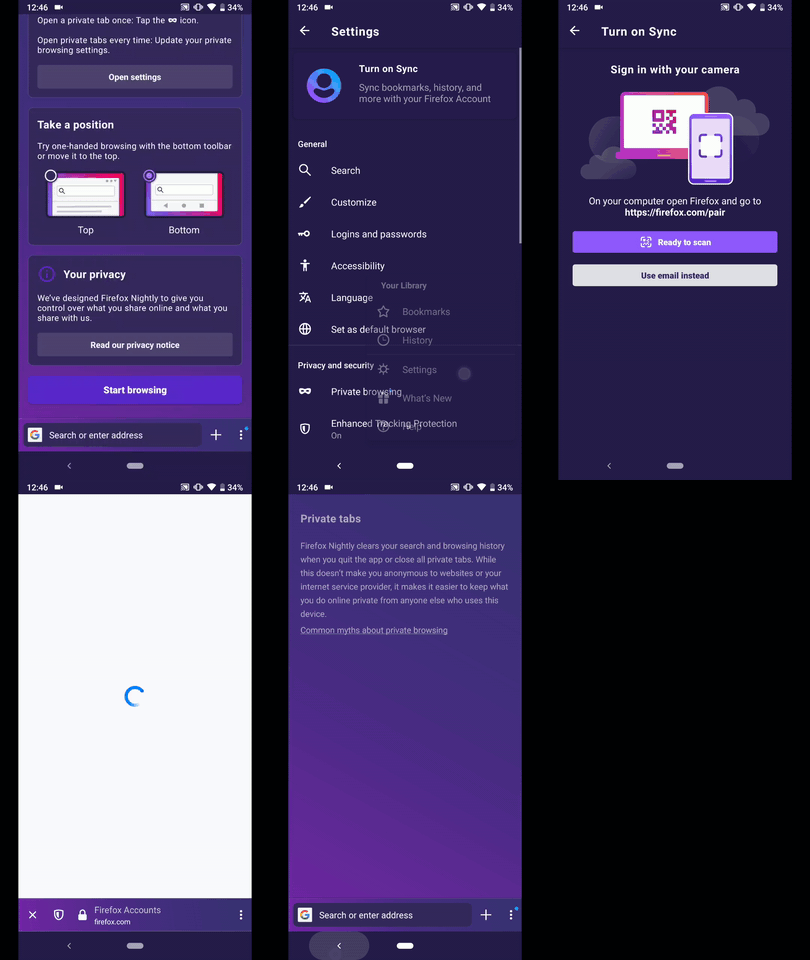
- Make sure sync is not turned on and you are in private browsing mode. Go to Main Menu > Settings > Turn on Sync.
- Click on the Use email instead button. This will launch a private custom tab prompting the user to sign in.
Expected behavior
The private custom tab does not record any history, like normal private custom tabs opened from other applications.
Actual behavior
This private custom tab records the browsing history.
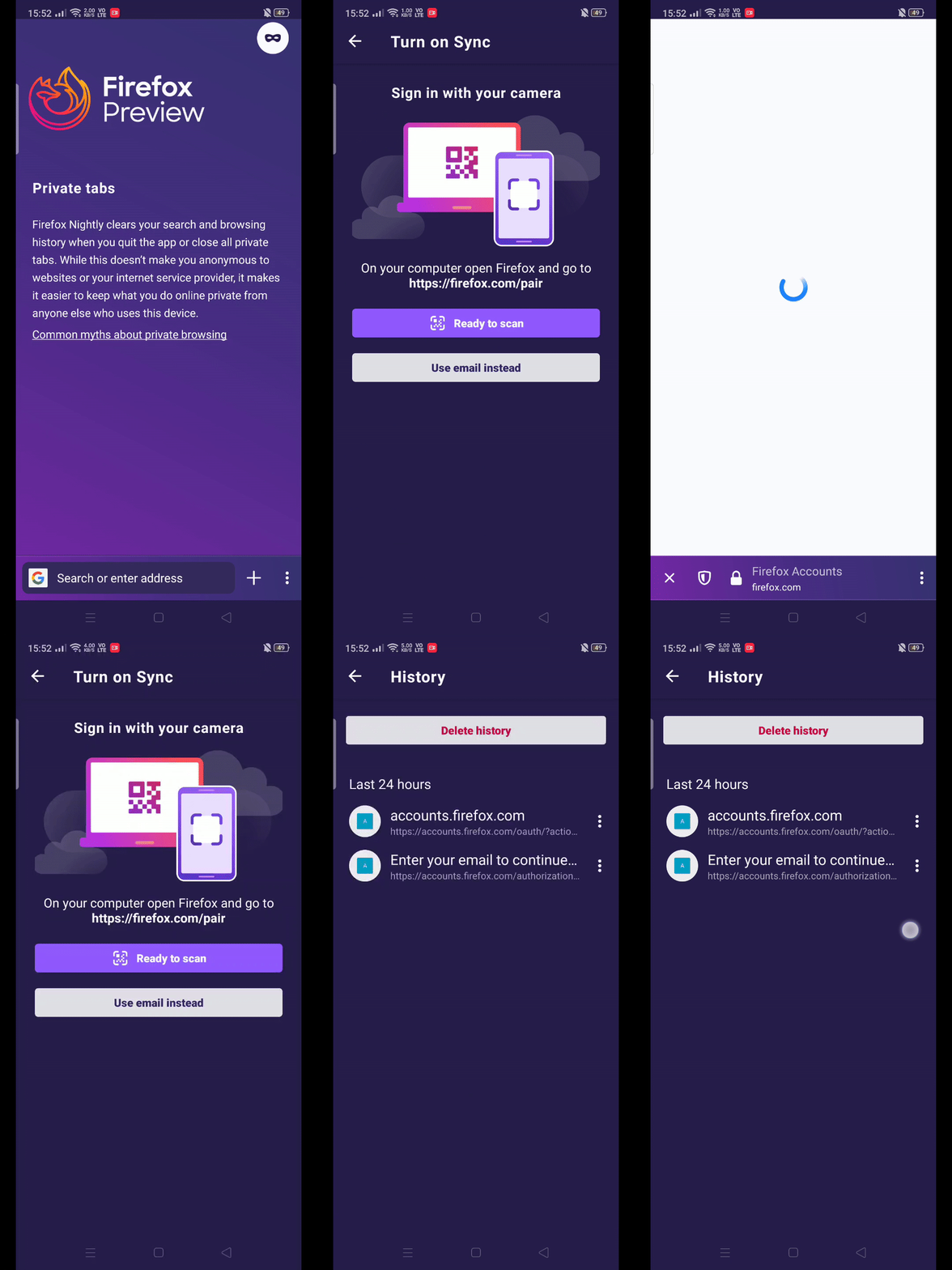
One behavior I noticed is that this is a "special" private tab - it does not follow the "Open links in private tab" option, rather, it follows the browsing mode settings was opened in. For example, even if "Open links in private tab" is enabled, opening settings when in normal browsing mode and then clicking on the Use email instead button will open a normal custom tab (not private).
Device information
- Android device: Oppo Reno 2, Android 9
- Fenix version: Nightly 200225 06:00 (Build #20560607)
 SL-Lee
All 8 comments
I believe this should also be fixed by #8740
 ekager
on 26 Feb 2020
ekager
on 26 Feb 2020
Hi, still reproducible on the latest Nightly Build #20570604 from 02/26 using the following devices:
• Google Pixel 3a (Android 9)
• Huawei Mate 20 Lite (Android 8.1.0)
• Samsung Galaxy S7 (Android 7)
• OnePlus A3 (Android 6.0.1)
• LG Nexus 4 (Android 5.1.1)
► Video
 AndiAJ
on 26 Feb 2020
AndiAJ
on 26 Feb 2020
Note: History is recorded in any private custom tab, in Gmail for example.
 sv-ohorvath
on 20 May 2020
sv-ohorvath
on 20 May 2020
I don't think that's true. If a private custom tab records history, that is likely caused by #9037 (a stylistic issue), where the "Open links in a private tab" setting is off and Fenix was left in private browsing mode, leading users to believe that they are using a private custom tab when they are actually not.
Quote from #9037:
Custom tabs appear as private custom tabs, but pressing "Open in Firefox Nightly" opens it in a normal tab (which means it DOES record history -- hence may be related to #8716).
This issue focuses more on why clicking on why the "use email instead" button always opens a normal tab (and may appear as a private custom tab if you just so happen to be in private browsing mode when clicking the button [an effect of #9037]), and not respecting the "Open links in a private tab" setting.
In fact, if you click on the triple-dot menu and select "Open in Firefox Nightly" in the custom tab (after clicking on the "use email instead" button), you will see that it opens a normal tab, be it whether you are in a normal or private custom tab, or whether the "Open links in a private tab" setting is enabled or not.
SL-Lee
on 20 May 2020
@SL-Lee thanks for the clarification.
sv-ohorvath
on 20 May 2020
Note: Though #9037 does not reproduce anymore on Nightly 200929 17:11 (Build #2015766795), this issue is still reproducible on the same version. So this issue might not be caused by #9037 (as I had thought before).
SL-Lee
on 30 Sep 2020
I was able to reproduce this issue on Beta 82.0.0-beta.4 with Samsung Galaxy Tab S6 (Android 10).
 softvision-miralobontiu
on 7 Oct 2020
softvision-miralobontiu
on 7 Oct 2020
The issue is reproducible on the latest RC 81.1.5 with Samsung Galaxy Tab S6 (Android 10).
I've signed in with a valid FxA account while accessing Settings - Turn on sync in private mode, and all the browsing was visible in History.
softvision-miralobontiu
on 14 Oct 2020
Related issues
 abodea
·
3Comments
abodea
·
3Comments
 andreicristianpetcu
·
3Comments
andreicristianpetcu
·
3Comments
 topotropic
·
3Comments
topotropic
·
3Comments
 robsmith11
·
3Comments
robsmith11
·
3Comments
 lindongbin
·
3Comments
lindongbin
·
3Comments