Fenix: [Bug] ETP dropdown has bad TalkBack semantics
- The switch and label should be grouped together so you hear "Enhanced Tracking Protection, Switch ON". Now those are two separate items, so you get an unlabeled switch (ie. "Switch, ON").
- The "Blocked" heading should be marked as a heading.
- Activating the blocked items goes to another screen but TalkBack does not set the cursor inside it.
- The back button in the "blocked items" info sheet is unlabeled.
- The "Blocked" heading in the info sheet also needs a heading role.
- Each of the blocked trackers should be distinct and not be read all at once.
 eeejay
All 8 comments
@eeejay
Each of the blocked trackers should be distinct and not be read all at once.
Do you mean it should be as a list view where the user has to navigate through the list's elements? I'm asking because there are sites were we have over a dozen or so blocked trackers.
 codrut-topliceanu
on 23 Mar 2020
codrut-topliceanu
on 23 Mar 2020
@eeejay @codrut-topliceanu Is this related to https://github.com/mozilla-mobile/fenix/issues/7720 ?
PR here for the issue referenced above https://github.com/mozilla-mobile/fenix/pull/9327
 asavill
on 24 Mar 2020
asavill
on 24 Mar 2020
@asavill Partly yes. That PR solves the first part of this issue:
"The switch and label should be grouped together so you hear "Enhanced Tracking Protection, Switch ON". Now those are two separate items, so you get an unlabeled switch (ie. "Switch, ON")."
I will make sure my code doesn't overwrite anything from that PR.
codrut-topliceanu
on 26 Mar 2020
@codrut-topliceanu That's great. Thank you. Let me know If I can help :).
I also noticed this issue/PR https://github.com/mozilla-mobile/fenix/issues/8288 which seems to fix:
The back button in the "blocked items" info sheet is unlabeled.
Apologies for the comment spam!
Edit: It talks about the "tracking content" info sheet specifically. Not sure if it applies to the other blocked items.
asavill
on 26 Mar 2020
@asavill You're right again! I just did a rebase and the back button does have content description. I will take it into account when committing. Thank you.
codrut-topliceanu
on 26 Mar 2020
@eeejay
Each of the blocked trackers should be distinct and not be read all at once.
Do you mean it should be as a list view where the user has to navigate through the list's elements? I'm asking because there are sites were we have over a dozen or so blocked trackers.
I looked at this again. And I think it's fine as-is. The newlines allow TalkBack to pause and not read the whole thing like a giant blob. Also, reading with line granularity allows the user to read each one distinctly.
Thanks for looking into this!
eeejay
on 3 Apr 2020
This is an accessibility P2. The feature is available and works but is difficult to use. This kind of bug prevents Fenix from being a delightful experience for users with disabilities.
 asadotzler
on 5 Apr 2020
asadotzler
on 5 Apr 2020
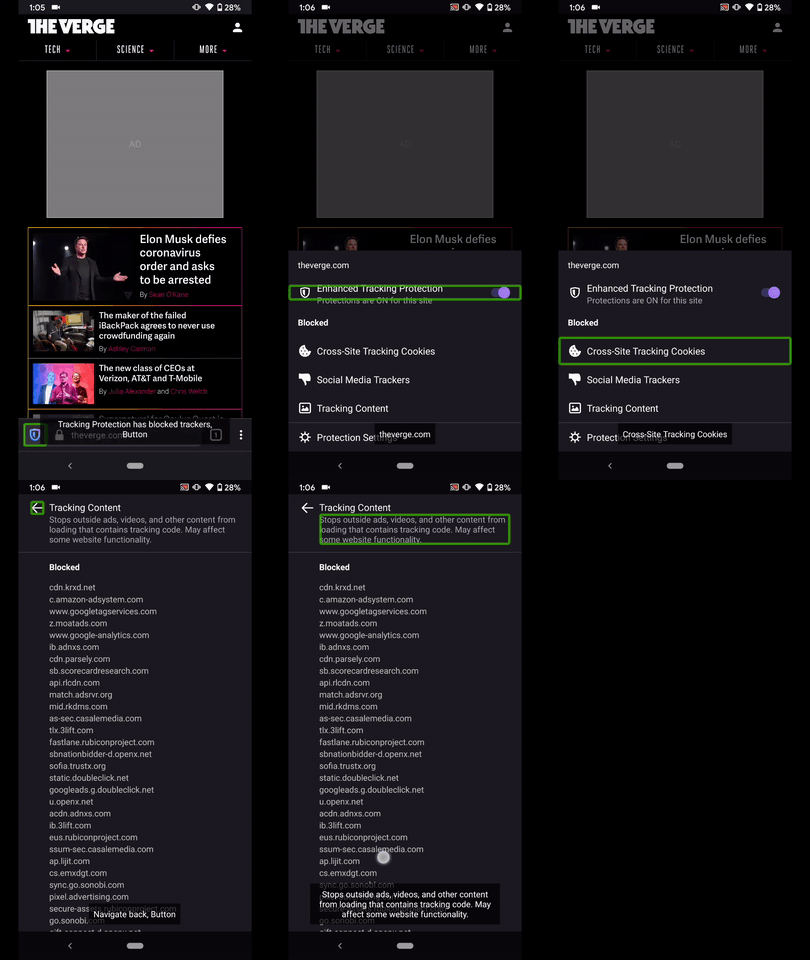
Hi, verified as fixed on the latest Nightly Build 200512 from 5/12 using the following devices:
• Google Pixel 3 XL (Android 10)
• Google Pixel 3a (Android 10)
• Huawei Mate 20 Lite (Android 9)
• OnePlus A3 (Android 6.0.1)
✔️ The switch and label are grouped together.
✔️ The "Blocked" heading is marked as a heading.

✔️ Activating the blocked items goes to another screen, the cursor will be set on the back button.
✔️ The back button in the "blocked items" is label as "Navigate back button"
✔️ The "Blocked" heading in the info sheet also has a heading role.
✔️ Each of the blocked trackers are read from one list, but now TalkBack to pauses between the new lines
► Video
 AndiAJ
on 12 May 2020
AndiAJ
on 12 May 2020
Related issues
 clitetailor
·
3Comments
clitetailor
·
3Comments
 Chris01277
·
3Comments
Chris01277
·
3Comments
 softvision-miralobontiu
·
3Comments
softvision-miralobontiu
·
3Comments
 lindongbin
·
3Comments
lindongbin
·
3Comments
 ekager
·
3Comments
ekager
·
3Comments