Fenix: [Bug] Red buttons on Android 5 devices
Steps to reproduce
- Install the latest Nightly/Beta 4.0 build.
- Go to Settings menu & sub-menus.
- Observe the buttons: back buttons, radio buttons/ unselected checkboxes.
Expected behavior
Black buttons/ according to the selected theme.
Actual behavior
Red buttons, scroll bar, checkboxes, in both light & dark theme in the Settings menu.
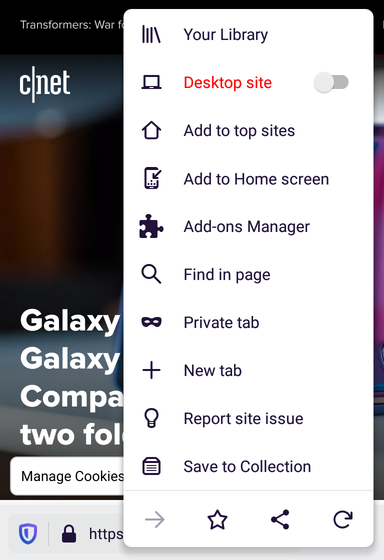
LE: the Request desktop site from the main menu is also in red.
Device information
- Android device: Nexus 4 (Android 5.1.1), Xiaomi Mi Pad 2 (Android 5.1)
- Fenix version: Nightly 2/19, Beta 4.0
 sv-ohorvath
All 6 comments
Hi @ekager , still reproducible on the latest Nightly Build #20550606 from 02/24using the • LG Nexus 4 (Android 5.1.1)
►Screenshot

 AndiAJ
on 24 Feb 2020
AndiAJ
on 24 Feb 2020
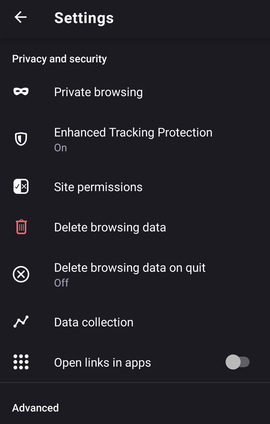
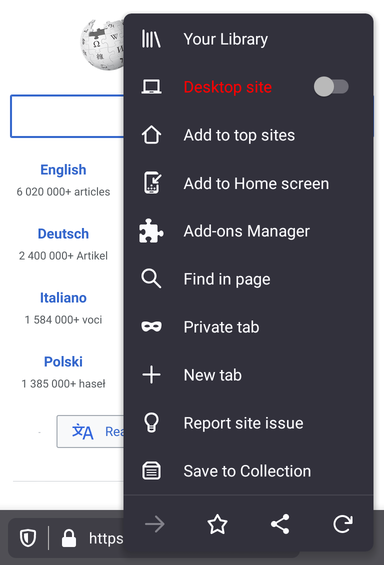
Hi, unfortunately it's still reproducible on the latest Nightly Build #20560606 from 02/25 using the following devices:
• OnePlus A3 (Android 6.0.1)
• LG Nexus 4 (Android 5.1.1)
On the LG Nexus the "Desktop site " is always red while using the "Dark" theme.
On the OnePlus the "Delete browsing data" turns to red after changing a couple of times Fenix's theme.
► Screenshot OnePlus A3
► Screenshot LG Nexus 4
AndiAJ
on 25 Feb 2020
Add the download confirmation dialog to this as well.
sv-ohorvath
on 27 Feb 2020
Alright, let's try again 😅
Couldn't reproduce the "Delete Browsing Data" trash icon one but I _think_ I got the others (at least on my emulator)
 ekager
on 28 Feb 2020
ekager
on 28 Feb 2020
This is not fixed entirely yet: the "+" icon from Settings-Add-ons is red, both in light theme, and dark theme.
The rest of the buttons/items are displayed correctly.
Verified on the latest Nightly build from 2/28, and on Beta V4.0.0-beta.2, with Xiaomi Mi4i (Android 5.0.2), and Xiaomi MiPad 2 (Android 5.1).

 softvision-miralobontiu
on 28 Feb 2020
softvision-miralobontiu
on 28 Feb 2020
Okay let's close this ticket now for #8641 since I think the remaining issues overlap :)
ekager
on 2 Mar 2020
Related issues
ekager
·
3Comments
 Chris01277
·
3Comments
Chris01277
·
3Comments
 csadilek
·
3Comments
softvision-miralobontiu
·
3Comments
csadilek
·
3Comments
softvision-miralobontiu
·
3Comments
 topotropic
·
3Comments
topotropic
·
3Comments