Fenix: [Bug] "Prevent websites from opening links in external apps" is not in the "Set as default browser" section in the settings menu
Steps to reproduce
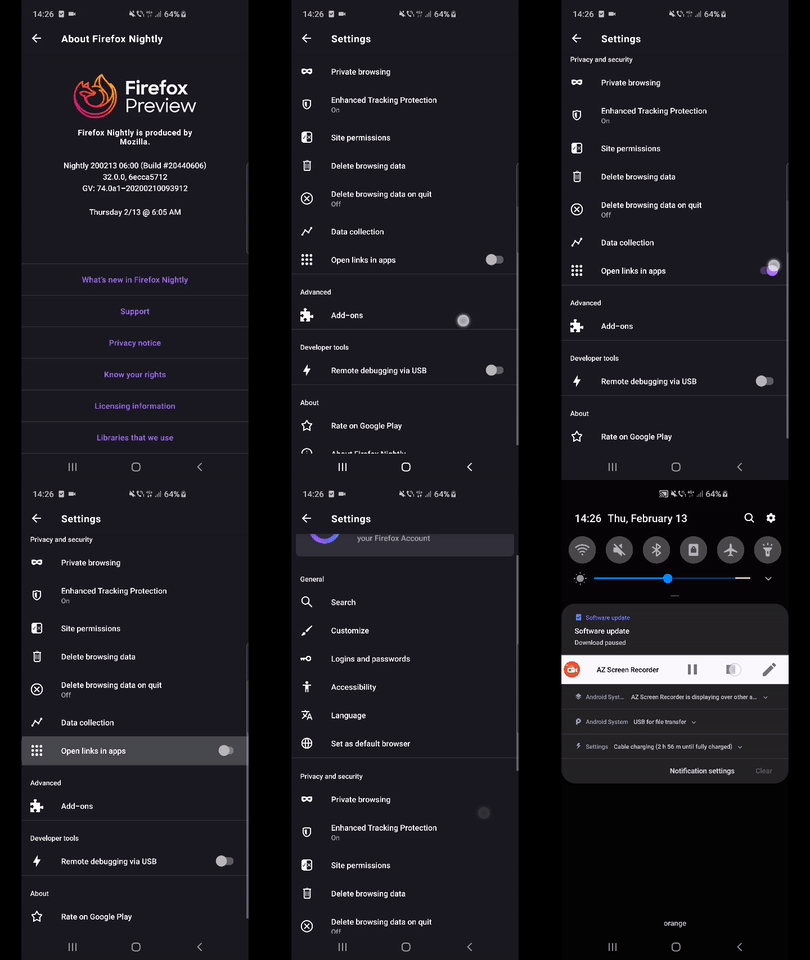
- Launch Fenix and reach settings menu.
- Scroll down and observe the
Open links in apps.
Expected behavior
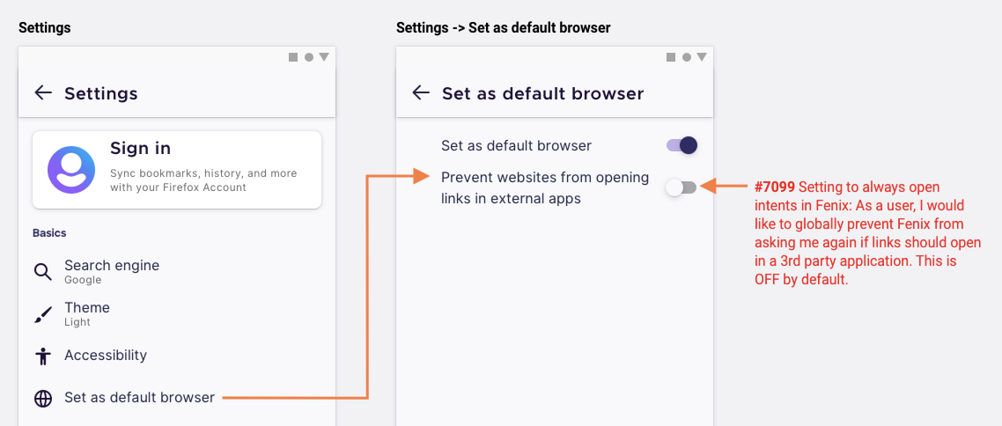
The Prevent websites from opening links in external apps should be in the Set as default browser section in the settings menu.
Actual behavior
Prevent websites from opening links in external apps" should be in the "Set as default browser" section in the settings menu.
Device information
- Android device: All.
- Fenix version: Nightly 2/13.
 abodea
All 9 comments
I wouldn't expect it to be in the Set as default browser section. A browser doesn't have to be the default for a link to open in another app, right?
 Poopooracoocoo
on 31 Mar 2020
Poopooracoocoo
on 31 Mar 2020
Hi, @Poopooracoocoo this was a follow up for the Review settings organization and it was a requirement from UX Team.
abodea
on 31 Mar 2020
@abodea i wonder why they went with that
Poopooracoocoo
on 2 Apr 2020
“Open links in app” was originally specced out to be under “Set as default browser” because we didn’t have an “Advanced” section.
Now that we have the right section to put it (as well as to contain other things), @AmyYLee and I thought that we should put “Open links in app” under it.
So a slightly revised Settings organisation look like this. Note two things:
- “Set as default browser” is a menu item on the root-level with a toggle. Same position as before: underneath “Language”
- Similarly, “Open links in apps” is also a menu item on the root-level with a toggle. It has a different position now: in the “Advanced” section, underneath “Add-ons”
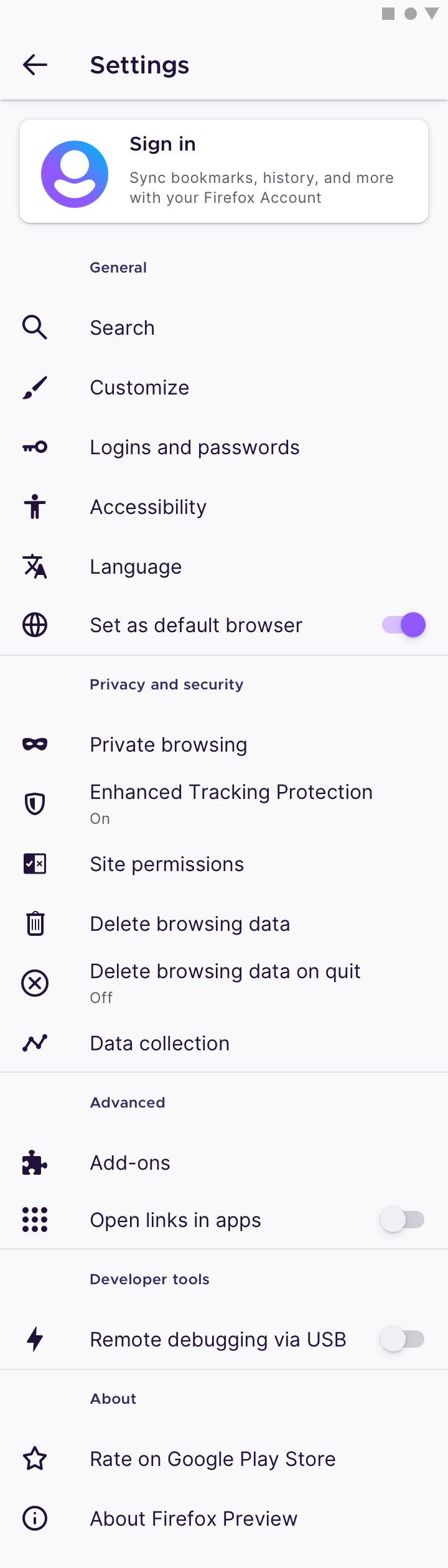
We hope that this helps bring it up to the forefront!
 brampitoyo
on 7 May 2020
brampitoyo
on 7 May 2020
@brampitoyo should we open a new issue based on your last comment and close this one since the specifications are now different?
 ValentinTimisica
on 8 May 2020
ValentinTimisica
on 8 May 2020
Hi @ValentinTimisica – @AmyYLee and I thought that “Open links in apps” should have its own sub-page, because the explanation text is a bit long.
So the design I posted above isn’t totally final yet.
We’ll have the new Settings structure finalised within the next day or two. When that’s posted, we can file a new issue and close this one. Stay tuned!
brampitoyo
on 11 May 2020
@brampitoyo for follow-up
 AmyYLee
on 4 Jun 2020
AmyYLee
on 4 Jun 2020
@ValentinTimisica I just went into our Settings page, had a think, and rechecked everything.
Let’s go ahead with the change I proposed above, on https://github.com/mozilla-mobile/fenix/issues/8380#issuecomment-624967123
This will remove sub-pages on both “Set as default browser” and “Open links in apps”, and make our Settings a little cleaner.
brampitoyo
on 8 Jun 2020
Created #11365 based on @brampitoyo's comment. Closing this since the specifications are now different.
ValentinTimisica
on 9 Jun 2020
Related issues
abodea
·
3Comments
 csadilek
·
3Comments
csadilek
·
3Comments
 AndiAJ
·
3Comments
AndiAJ
·
3Comments
 robsmith11
·
3Comments
robsmith11
·
3Comments
 lindongbin
·
3Comments
lindongbin
·
3Comments
Most helpful comment
“Open links in app” was originally specced out to be under “Set as default browser” because we didn’t have an “Advanced” section.
Now that we have the right section to put it (as well as to contain other things), @AmyYLee and I thought that we should put “Open links in app” under it.
So a slightly revised Settings organisation look like this. Note two things:
We hope that this helps bring it up to the forefront!